Architecture Diagrams
The diagrams of these docs live in docs/diagrams/. Each one is a pair: a .drawio file that is the editable source, and an .svg file that the page embeds. A change to a diagram updates both files in the same commit.
Inventory
| Diagram | Shows | Embedded in |
|---|---|---|
brownfield-keystone-adoption-phases | The four adoption phases: implemented identity-only management, followed by sketches for infrastructure attach, Keystone takeover, and steady state | Brownfield Keystone Adoption phase model |
cobaltcore-overview | What CobaltCore does, as a layer stack from bare metal to the OpenStack clouds, and why it matters | Overview |
cobaltcore-management-cluster | The implemented management cluster, from one ControlPlane CR to the running OpenStack services, with optional target clusters | Implemented topology, Quick Start (ControlPlane), Core Components, ControlPlane Reconciler Architecture, ControlPlane CRD API Reference, Target Clusters, Architecture Overview |
cobaltcore-stack | The stack layer by layer, with the project behind each layer (IronCore, Garden Linux, Gardener, CobaltCore, OpenStack) | The multi-cluster target picture |
cobaltcore-architecture | The five clusters (Operation and Monitoring, OpenStack Control Plane, Ceph Storage, OpenStack Compute, OpenStack Network) on Garden Linux, managed by Gardener, on bare metal managed by IronCore | The multi-cluster target picture, Hypervisor Cluster, Storage Cluster, Management Cluster |
cobaltcore-control-planes | One Operation and Monitoring cluster that creates and manages several OpenStack control planes | Several control planes |
cobaltcore-attached-clusters | One control plane with several storage, compute, and network clusters attached | Attached clusters, Connect a Compute Cluster |
quickstart-map | The five quick starts as a map: what each deploys and ends with, and the four ways they relate | Start here, Quick Start, Quick Start (Extended), Quick Start (ControlPlane), Quick Start (metal-stack), Quick Start (Orders), One devstack per guide |
quickstart-request-path | The six hops of a request from the workstation to an OpenStack API on the kind devstack, and the two port-forwards that leave hops out | Access Keystone from your local machine, Quick Start, Service exposure, Step 7 of the Quick Start (ControlPlane) |
secrets-flow | The read, write-back and dynamic paths between OpenBao, ESO, the operators and the services, with the cluster store and the tenant store | Secret flow, Architecture Overview, External Secrets Operator, Per-ControlPlane secret stores and OpenBao identities |
secrets-db-credentials | Static and dynamic database credentials side by side, with the refresh interval inside the two TTLs | setup-database-tenant.sh, Migrate Keystone DB to Dynamic Credentials, Migrate Glance DB to Dynamic Credentials, Migrate Placement DB to Dynamic Credentials, Migrate Barbican DB to Dynamic Credentials, Migrate Cinder DB to Dynamic Credentials, Migrate Nova DB to Dynamic Credentials, Quick Start (ControlPlane), Quick Start (Orders), Order Resources from a ControlPlane |
secrets-admin-credential-loop | The nine steps that bring the admin application credential from OpenBao to K-ORC and back | K-ORC admin credential chain, Admin Credential Chain, AdminCredentialSpec |
secrets-rotation-keys | Staged rotation of Fernet and credential keys: CronJob, staging Secret, operator, pods | Key Rotation RBAC Split, Background: Who Writes What, Rotate Fernet keys manually |
secrets-rotation-admin-password | Scheduled and manual rotation of the admin password through OpenBao to the bootstrap Job | Schedule Keystone Admin Password Rotation, Rotate the Keystone Admin Password, reconcilePasswordRotation |
secrets-rotation-orders | Generation N and N+1 of an ordered application credential or bus user over time, the grace period, the expiry, and the two kinds that rotate differently | Order an application credential, Step 7 of the Quick Start (Orders) |
secrets-issuer-chains | The self-signed issuer, the four CAs and their leaves as trust domains | Self-Signed ClusterIssuer, TLS Configuration, Enable Keystone Database TLS/mTLS |
secrets-rotation-key-projection | How a rotated Fernet or credential key reaches the running pods without a rollout: the CronJob, the operator, the kubelet, the pods | reconcileDeployment |
secrets-openbao-bootstrap-order | The order the five OpenBao bootstrap scripts run in, with what each does | Script Execution Order |
controlplane-gate-graph | The twenty-one conditions of a ControlPlane as a gate graph: the blocking prefix, the tail group, and an arrow wherever one condition gates another | Reconciliation Flow, Status Conditions, Quick Start (ControlPlane), Quick Start (metal-stack), Conditions of a ControlPlane |
controlplane-children-placement | The ControlPlane namespace, a dedicated service namespace and a target cluster, with the ownership model of each | ControlPlane placement, Owner-ref / GC model, Ownership and garbage collection, Background: what a namespace assignment moves |
controlplane-target-cluster | A workload CR on a target cluster: the registration Secret, the access chart, the labelled children, and the routes that cross the cluster boundary | Registering a target cluster, Deploy to a Target Cluster |
controlplane-keystoneservice-registration | The seven steps of a KeystoneService registration across two namespaces, from the consent to the consumer Secret | Child Naming and Placement, Namespace consent, Background: what lands where |
controlplane-order-flow | An order of one of the seven kinds, its children in the ControlPlane namespace, the backends and its delivered Secret, on the management cluster and on a target cluster | Quick Start (Orders), Background: what lands where |
controlplane-orders-target-path | The six hops from a pod on a kind target cluster to the devstack's Keystone, database and bus, with the parts that exist on kind only | The path from the target, On a target cluster |
controlplane-keystoneservice-flow | The reconciliation flow of the KeystoneService controller: the deletion branch, the finalizer, the gates with their reasons, and the three steps of a pass | Reconciliation Flow |
controlplane-keystoneuser-flow | The reconciliation flow of the KeystoneUser controller: the cluster and deletion branches, the admission gates, the finalizer, the credential gate, and the provision and delivery steps | Reconciliation Flow |
controlplane-mariadbdatabase-flow | The reconciliation flow of the MariaDBDatabase controller: the cluster and deletion branches, the admission gates, the finalizer, the dynamic-credentials gate, and the provision and delivery steps | Reconciliation Flow |
controlplane-rabbitmqvhost-flow | The reconciliation flow of the RabbitMQVhost controller: the cluster and deletion branches, the admission gates, the finalizer, the messaging gate, and the provision and delivery steps | Reconciliation Flow |
compute-node-anatomy | One hypervisor node: the four pods three resources put on it, their init containers, the host paths they share, and the three gates that order their start | Node contract of a NovaCompute, Node contract of a NeutronMetadataAgent, Node contract of an OVNChassis, Label a Node as a Compute or Network Node |
compute-cluster-wiring | A control-plane cluster and a compute cluster: the Secrets that cross with their writers, and the address every component on the compute cluster dials | What the ControlPlane delivers, Namespaces on a compute cluster, reconcileNova, The remote contract |
compute-ovn-control-plane | What one OVNCentral runs, and which client reads or writes which database | OVN Operator, Address computation, The two kinds, Drain a Chassis Node, Restore an OVN Database Snapshot, Repair OVN Drift with db-sync, Create a Provider Network |
compute-nova-control-plane | The five Nova Deployments with the schemas and the bus each holds a connection to | Processes, Two cells per CR, Migrate Nova DB to Dynamic Credentials |
compute-metadata-path | The six hops of a metadata request from an instance to the Nova metadata API, and the shared secret at both ends | The path of a request, NovaMetadataSpec, Quick Start (metal-stack) |
compute-node-phases | The five phases of a node in a NovaCompute pool, with the trigger and the actor of every change | Node phases, Drain a Compute Node |
compute-node-drain | The seven steps of a drain under the hypervisor operator across four lanes, with the point of no return | The drain, On a compute cluster, Quick Start (metal-stack) |
compute-metal-stack-lab | The metal-stack lab after both parts of its quick start: cluster-wide parts, the pods of every worker, the traffic between workers, and the port-forward | Quick Start (metal-stack), Open questions, Metal-stack lab |
compute-nova-pipeline | The sub-reconciler pipeline of the Nova operator: the lane, the parallel group of seven, the condition each step sets, the values handed on, and the exit to the status write | Pipeline |
compute-novacompute-pipeline | The sub-reconciler pipeline of the NovaCompute controller: the lane, no parallel group, the condition each step sets, the values handed on, and the exit to the status write | NovaCompute pipeline |
compute-neutronmetadataagent-pipeline | The sub-reconciler pipeline of the NeutronMetadataAgent controller: the lane, no parallel group, the condition each step sets, the values handed on, and the exit to the status write | NeutronMetadataAgent |
compute-ovncentral-pipeline | The sub-reconciler pipeline of the OVNCentral controller: the lane, the parallel group, the condition each step sets, the values handed on, and the exit to the status write | OVNCentral |
compute-ovnchassis-pipeline | The sub-reconciler pipeline of the OVNChassis controller: the lane, no parallel group, the condition each step sets, the values handed on, and the exit to the status write | OVNChassis |
compute-nova-events | The event flow of the Nova operator: which sub-reconciler emits which event, with the condition, the type and the reason | Event flow |
compute-ovn-events | The event flow of the OVN operator: which sub-reconciler emits which event, with the condition, the type and the reason | Event Flow |
service-reconciler-pipeline | The sub-reconciler pipeline of the Keystone operator: the lane, the two parallel groups, the condition each step sets, the values handed on, and the exit to the status write | Reconciliation Flow, Lifecycle and Reconciliation, Reconciler Integration Pattern |
service-glance-pipeline | The sub-reconciler pipeline of the Glance operator: the lane, the parallel group, the condition each step sets, the values handed on, and the exit to the status write | Pipeline |
service-barbican-pipeline | The sub-reconciler pipeline of the Barbican operator: the lane, the parallel group, the condition each step sets, the values handed on, and the exit to the status write | Pipeline |
service-placement-pipeline | The sub-reconciler pipeline of the Placement operator: the lane, the parallel group, the condition each step sets, the values handed on, and the exit to the status write | Pipeline |
service-horizon-pipeline | The sub-reconciler pipeline of the Horizon operator: the lane, the prune step and the parallel group, the condition each step sets, the values handed on, and the exit to the status write | Pipeline |
service-cinder-pipeline | The sub-reconciler pipeline of the Cinder operator: the lane, the parallel group, the condition each step sets, the values handed on, and the exit to the status write | Pipeline |
service-neutron-pipeline | The sub-reconciler pipeline of the Neutron operator: the lane, the parallel group, the condition each step sets, the values handed on, and the exit to the status write | Neutron |
service-barbican-events | The event flow of the Barbican operator: which sub-reconciler emits which event, with the condition, the type and the reason | Event Flow |
service-cinder-events | The event flow of the Cinder operator: which sub-reconciler emits which event, with the condition, the type and the reason | Event Flow |
service-glance-events | The event flow of the Glance operator: which sub-reconciler emits which event, with the condition, the type and the reason | Event Flow |
service-keystone-events | The event flow of the Keystone operator: which sub-reconciler emits which event, with the condition, the type and the reason | Event Flow |
service-neutron-events | The event flow of the Neutron operator: which sub-reconciler emits which event, with the condition, the type and the reason | Event Flow |
service-placement-events | The event flow of the Placement operator: which sub-reconciler emits which event, with the condition, the type and the reason | Event Flow |
service-upgrade-phases | The release upgrade as a state machine: the four phases with gate, failure states, the hold on a changed target and the abort, and the single pass of Barbican and Placement | Phase Transitions, Phases of a Cinder upgrade, Phases of a Glance upgrade, Phases of a Nova upgrade, Day 2 Operations |
service-satellite-handshake | The five steps in which a satellite resource and its service settle, and the read that must not exist | The handshake, KeystoneIdentityBackendStatus, Conditions of a GlanceBackend, Conditions of a CinderBackend, Conditions of a CinderBackupBackend, Conditions of a BarbicanSecretStore, Attach an LDAP Domain Backend to Keystone, Attach an OIDC Federation Backend to Keystone, Attach a SAML Federation Backend to Keystone, Attach S3 Multi-Store Backends to Glance, Attach an NFS Backend to Cinder, Configure NFS Volume Backups, Attach an External OpenBao to Barbican, Run Barbican on a Dedicated OpenBao |
service-owned-resources | What one Keystone resource creates, in four groups with the objects it only reads, and who mounts what | Owned Resources, Owned resources of the Keystone operator |
service-cinder-nfs-mounts | The four Cinder processes with the NFS export each mounts, the bus and the database they share, and nova-compute at the same export | Processes, Config directories and mounts, Attach an NFS Backend to Cinder, Configure NFS Volume Backups, Quick Start (metal-stack) |
service-glance-image-paths | Upload, web-download import and cached download as three paths through one glance-api pod, with the eviction threshold on its three volumes | How image bytes reach the store, What the conversion costs in staging, What the cache changes, Filter web-download Image Imports, StagingSpec |
service-barbican-secret-stores | The dedicated and the external mode of a Barbican secret store side by side, with the management OpenBao as a separate server in both | OpenBaoStoreSpec, Run Barbican on a Dedicated OpenBao, Attach an External OpenBao to Barbican |
service-federated-login | The eight hops of a federated login through Horizon, with the hops the browser sends drawn apart from the calls between servers | The hops of a login, Browser (WebSSO), Step 7 — Log in via WebSSO, WebSSOSpec |
service-keystone-parallel-merge | How parallel group 1 of the Keystone operator merges its conditions: the three deep copies, the goroutines, errgroup.Wait() and the sequential merge back into the original | DeepCopy Condition Merge Pattern |
service-keystone-deletion-branch | How the Keystone reconciler branches on the deletion timestamp: the two finalizer handlers on a terminating resource, AddFinalizer and the pipeline on a live one | Reconcile Branching on DeletionTimestamp |
service-keystone-config-pipeline | The eight stages reconcileConfig renders keystone.conf through, from the spec fields to the immutable ConfigMap | reconcileConfig |
service-keystone-schema-check-flow | The database step of the Keystone operator with the schema check: the MariaDB gate, the upgrade hand-off, the db_sync and schema-check Jobs with the condition each outcome sets, and the final status write | Data Flow |
service-keystone-upgrade-dispatch | How the two sub-reconcilers of the Keystone operator share a release upgrade: the active-upgrade and isUpgrade() branches of reconcileDatabase, the zero-value hand-off, and the RollingUpdate check of reconcileDeployment | Data Flow |
ci-stage-overview | The jobs of the CI workflow grouped into stages, with the order of the stages on a pull request and on a push | Job Dependency DAG |
ci-service-image-build | Which file of the repository feeds which step of a service image build on the Nix path: the pins hack/nix-lock.sh turns into the committed lock, the nix build that reads the lock, and the nova-compute image beside it | Image Hierarchy, build-service-images |
ci-image-publish | The image build workflow on a pull request and on a push: what every run checks, where a pull request stops, and what a push merges, attests and signs | PR vs Push Behavior, Service Images |
ci-build-images-jobs | The jobs of the build-images workflow in three families, with an arrow from every job a job needs | Jobs |
test-tempest-bed | The Tempest container on the runner, the port-forwards and host aliases that take it to the Services, and the seed Jobs inside the cluster | Data Flow (CI End-to-End), tempest |
test-chaos-bed | The six steps of a chaos suite between the runner, the chaos resource, Chaos Mesh and the victim pods, and why a partition rule sits on the server pods | Overview, e2e-chaos |
test-tempest-image-chain | From the Tempest version pins to the JUnit report: the lock, the image expression, the two workflows that consume it, the config directory, and the result | Architecture |
test-tempest-job-steps | The commands of one tempest job in CI, in six steps from the lock to the uploaded artifact | Data Flow (CI End-to-End) |
test-keystone-condition-progression | The order the Keystone reconciler sets its conditions in, as the basic-deployment suite asserts them | Sub-Condition Progression |
test-chaos-patterns | The six step patterns of the chaos suites, each a numbered chain | Test Patterns |
deploy-flux-dependencies | The HelmReleases of the production base in four layers by dependsOn, the three Flux Kustomizations with the one dependsOn between them, and the two dependencies on a Flux Kustomization that no manifest declares | Dependency Order, Layering, Dependency Chain |
deploy-infra-run | The eight steps of make deploy-infra with the waits between them, the two cluster modes and the step each opt-in changes | Deployment Sequence, Deployment, Step 3 of the Quick Start (Extended) |
deploy-overlay-inheritance | Which kustomize overlay under deploy/ takes which as its base, from production over kind to the lab, and who applies each | Kustomize Overlay Structure, Lab overlay |
deploy-keystone-operator-helmrelease | How the Flux helm-controller installs the keystone-operator HelmRelease, in seven steps from the dependsOn check to the first reconcile | Data Flow |
conventions-legend | The notation for frames, objects, arrows, sequences, state machines, markers, outside actors, nodes, browser hops and images | Notation legend |
Change a diagram
- Open the
.drawiofile in the draw.io desktop app, in diagrams.net, or in VS Code with the Draw.io Integration extension. The file is stored uncompressed, so a change shows up as a readable diff. - Edit the diagram. Most arrows are attached to their boxes and follow when a box moves.
- Export with File › Export as › SVG and overwrite the
.svgof the same name. Leave Transparent Background unchecked: on a transparent background the dark labels vanish in the dark theme of the docs. A Border Width of 40 keeps the margin the current files have. - Run
npm run docs:dev, open the page that embeds the diagram, and check it in the light and the dark theme. - Commit the
.drawioand the.svgtogether.
The figures that hack/docs-figures/ lists are generated: the pipeline, event-flow, order-flow and chain figures of the reference pages. A change to one of them is a change to its entry in the script that draws it (pipelines.py, events.py with the trees under events/, gate_trees.py or rest_figs.py), followed by a run of that script, which rewrites both files of every pair it owns. A hand edit to a generated pair is lost on the next run.
A new diagram follows the same pattern. Put the pair into docs/diagrams/ under a name from File names. On a page directly under docs/ the path is ./diagrams/<name>.svg. A page further down puts one ../ per directory level in front of diagrams/<name>.svg, so a page two levels down spells it ../../diagrams/<name>.svg. Give the image an alt text that states what the diagram shows, and add a row to the inventory that lists every page that embeds it. Every embed of a figure carries the same alt text, so a change to what a figure shows updates the alt text on every page its row lists. When a file, a row and an embed disagree, or two embeds of a figure carry different alt texts, tests/unit/docs/diagrams_inventory_test.sh fails, and a missing file also fails npm run docs:build.
File names
A file is named <prefix><subject>, lower case, words joined by hyphens.
| Prefix | Figures |
|---|---|
cobaltcore- | The product architecture: the six figures of the start page and the Architecture page |
quickstart- | Entry pages: the quick-start map and the request path |
secrets- | Secret and credential paths between OpenBao, ESO, the operators and the services |
controlplane- | ControlPlane orchestration, placement, target clusters and the orders |
service- | Service operator patterns and paths specific to one service |
compute- | Compute nodes, the compute cluster, Nova, OVN and the metadata path |
deploy- | Installation: Flux dependencies, the deploy run, overlays |
ci- | CI and image builds |
test- | Test beds |
conventions- | Figures about the figures: the legend |
Visual conventions
The font is IBM Plex Sans from Google Fonts. A browser that does not have it installed falls back to Arial.
| Element | Stroke | Text | Fill |
|---|---|---|---|
| IronCore / bare-metal node | #C9620F | #A44E07 | #FBEFE3 (node: #FFF8F1) |
| Gardener | #5E43A8 | #4B3592 | #EEEAF7 |
| CobaltCore / Operation and Monitoring / c5c3-operator | #2F8A57 | #1E6B40 | #E6F1EA |
| OpenStack Control Plane / API / services | #2457C5 | #1D47A6 | #E7EDF9 |
| Ceph Storage | #0E7D89 | #0B5F69 | #E3F1F2 |
| OpenStack Compute | #C6343C | #A3262E | #F8E8E9 |
| OpenStack Network / OVN | #B38A00 | #6F5600 | #FAF3DA |
| Garden Linux | #7D8794 | #2B3440 | #E9ECEF |
| Platform and infrastructure components | #7D8794 | #2B3440 | #EEF0F3 |
| Secret material | #B0387F | #8A2B63 | #F7E8F0 |
| Background | none | none | #F6F5F1 |
The shapes and arrows carry a fixed meaning:
- Orange node frames: bare-metal servers that IronCore provisions and manages.
- Solid orange arrows: IronCore manages the nodes out of band. Where a Gardener arrow crosses one, the orange line has a small gap.
- A violet K8s chip and violet arrows mark a Kubernetes cluster that Gardener creates and manages through its IronCore provider extension.
- A grey K8s chip marks a Kubernetes cluster whose management the diagram leaves open.
- Blue arrows: OpenStack API and control-plane connections.
- Dashed boxes: optional parts, or further instances of the same kind (+ more).
- Green arrows: an operator creates or reconciles what the arrow points at.
- Line patterns: solid is declared in an object or enforced in code, dashed (
3 2) is optional or a further instance, and dotted (1 3) holds at run time and is declared nowhere.
The icons in cobaltcore-overview are plain line icons and can be replaced by another icon set.
Notation legend
The legend draws one sample of every element in the table below.
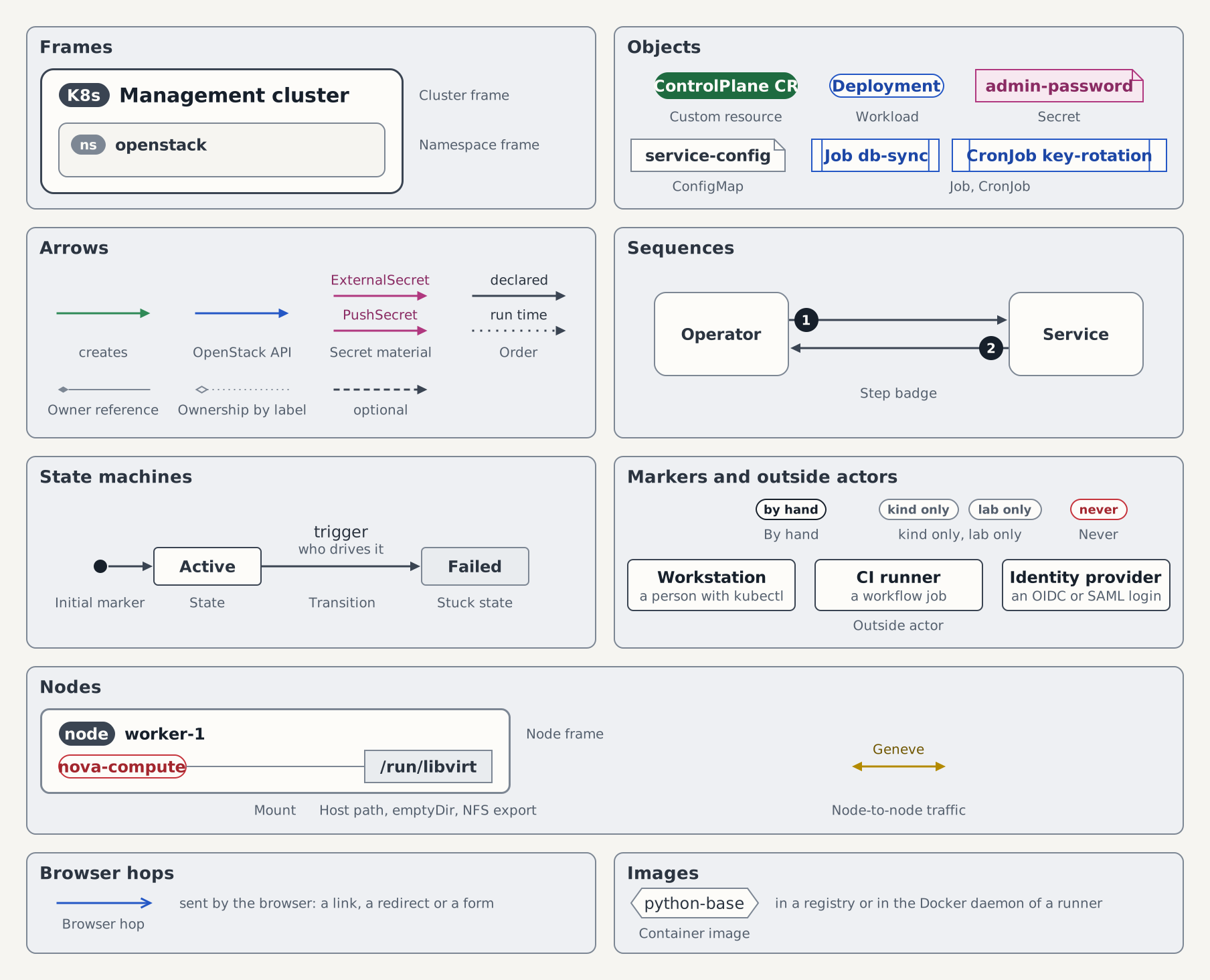
Every draw.io style also carries whiteSpace=wrap;html=1; and the font settings of the existing files. <stroke> and <text> are the palette colors of the role that owns the object.
| Element | Meaning | Looks like | draw.io style |
|---|---|---|---|
| Cluster frame | One Kubernetes cluster | Light frame, dark K8s chip and bold name at the top left | rounded=1;absoluteArcSize=1;arcSize=37;fillColor=#FDFCF9;strokeColor=#3A4452;strokeWidth=3; |
| Namespace frame | One namespace inside a cluster frame | Recessed frame, grey ns chip and bold name at the top left | rounded=1;absoluteArcSize=1;arcSize=24;fillColor=#F6F5F1;strokeColor=#7D8794;strokeWidth=2; and for the chip fillColor=#7D8794;strokeColor=none; |
| Custom resource | A CR a person or an operator applies, or another API object that is no workload, Secret, ConfigMap, Job or CronJob | Filled pill, bold light text | rounded=1;absoluteArcSize=1;arcSize=40;fillColor=<text>;strokeColor=none; |
| Workload | Deployment, StatefulSet, DaemonSet or pod, or the Service in front of one. In a test bed figure also a container that docker run starts on the runner | Outline pill | rounded=1;absoluteArcSize=1;arcSize=34;fillColor=#FDFCF9;strokeColor=<stroke>;strokeWidth=2; |
| Secret | A Kubernetes Secret | Sheet with a folded corner in the Secret colors | shape=note;size=16;fillColor=#F7E8F0;strokeColor=#B0387F;strokeWidth=2; |
| ConfigMap | A ConfigMap | Sheet with a folded corner, grey | shape=note;size=16;fillColor=#FDFCF9;strokeColor=#7D8794;strokeWidth=2; |
| Job, CronJob | A workload that runs to completion. The label starts with the kind | Box with a bar at each side | shape=process;size=0.08;fillColor=#FDFCF9;strokeColor=<stroke>;strokeWidth=2; |
| Creates | An operator creates or reconciles what the arrow points at | Green arrow | strokeColor=#2F8A57;strokeWidth=3;endArrow=block;endFill=1; |
| OpenStack API | An OpenStack API or control-plane connection | Blue arrow | strokeColor=#2457C5;strokeWidth=3;endArrow=block;endFill=1; |
| Secret material | A secret value travels in the arrow's direction. The label names the resource that moves it: ExternalSecret out of OpenBao, PushSecret into it | Magenta arrow, label in font size 20 | strokeColor=#B0387F;strokeWidth=3;endArrow=block;endFill=1; |
| Order | What must be ready first points at what waits for it. In the overlay figure the directory an overlay lists under resources points at that overlay | Dark arrow, solid when declared or enforced, dotted when it holds only at run time | strokeColor=#3A4452;strokeWidth=3;endArrow=block;endFill=1; plus dashed=1;dashPattern=1 3; |
| Owner reference | The owner garbage-collects the object | Grey line, filled diamond at the owner | strokeColor=#7D8794;strokeWidth=2;endArrow=none;startArrow=diamondThin;startFill=1;startSize=14; |
| Ownership by label | Owned through labels, because no owner reference can cross the namespace or cluster | Dotted grey line, open diamond at the owner | strokeColor=#7D8794;strokeWidth=2;endArrow=none;startArrow=diamondThin;startFill=0;startSize=14;dashed=1;dashPattern=1 3; |
| Optional | An optional part or a further instance of the same kind | Dashed arrow in the color of its kind | the style of its kind plus dashed=1;dashPattern=3 2; |
| Step badge | Step n of a sequence. One page lists the steps under the same numbers, and the other pages that embed the figure link to that list | Dark circle with a light number at the tail of the arrow, or at the top left of the box where the step is a box | ellipse;aspect=fixed;fillColor=#17202B;strokeColor=none;fontColor=#FDFCF9;fontStyle=1;fontSize=20; at 36 by 36 |
| State | A state of a state machine, a status condition in a gate graph, a quick start in the quick-start map, or a step of a pipeline | Box with slightly rounded corners, bold name | rounded=1;absoluteArcSize=1;arcSize=12;fillColor=#FDFCF9;strokeColor=#3A4452;strokeWidth=2; |
| Stuck state | A state the machine leaves only after someone intervenes | The same box, grey | rounded=1;absoluteArcSize=1;arcSize=12;fillColor=#E9ECEF;strokeColor=#7D8794;strokeWidth=2; |
| Initial marker | Where the machine, or a pass of a pipeline, starts | Small dark dot with an Order arrow into the first state | ellipse;aspect=fixed;fillColor=#17202B;strokeColor=none; at 20 by 20 |
| Transition | A change of state. First label line: the trigger. Second line, font size 20 in #55606E: who drives it. In the quick-start map the first line says how two quick starts relate and the second what changes for the reader | Order arrow with a two-line label | the Order style |
| By hand | A person does this step, no controller | Outlined dark chip by hand at the top right of the part | rounded=1;arcSize=50;fillColor=#FDFCF9;strokeColor=#17202B;strokeWidth=2;fontColor=#17202B;fontStyle=1;fontSize=18; |
| kind only, lab only | The part exists on that devstack only. The part itself is drawn solid, since dashed means optional | Outlined grey chip kind only or lab only | rounded=1;arcSize=50;fillColor=#FDFCF9;strokeColor=#7D8794;strokeWidth=2;fontColor=#55606E;fontStyle=1;fontSize=18; |
| Outside actor | A workstation, a CI runner or an identity provider. It sits on the canvas, outside every cluster frame | Box with a bold name and a second line, font size 20 in #55606E, that says what acts | rounded=1;absoluteArcSize=1;arcSize=16;fillColor=#FDFCF9;strokeColor=#3A4452;strokeWidth=2; |
| Node frame | One Kubernetes node. A pod on it is a group box named after its DaemonSet; inside, a container is a Workload pill and an init container a Job box whose label starts with init | Light frame with a grey outline, dark node chip and bold name at the top left | rounded=1;absoluteArcSize=1;arcSize=24;fillColor=#FDFCF9;strokeColor=#7D8794;strokeWidth=3; and for the chip fillColor=#3A4452;strokeColor=none; |
| Host path | A directory or socket in the node's file system that pods mount. An emptyDir and an NFS export are drawn the same way; the label then starts with emptyDir or NFS export. In a build figure a file or a directory of the repository is drawn the same way, with its path as the label | Grey box with square corners, the path as its label | rounded=0;fillColor=#E9ECEF;strokeColor=#7D8794;strokeWidth=2; |
| Mount | The pod at one end mounts the host path, the emptyDir, the NFS export or the ConfigMap at the other | Thin grey line without an arrowhead | strokeColor=#7D8794;strokeWidth=2;endArrow=none; |
| Node-to-node traffic | Traffic of instances, or of their memory and disks, between two nodes. The label names protocol and port | Line with an arrowhead at each end, in the colour of the role that owns the traffic | strokeColor=<stroke>;strokeWidth=3;endArrow=block;endFill=1;startArrow=block;startFill=1; |
| Browser hop | A request the browser sends because a link, a redirect or a form told it to. It starts at the browser, and its label says what the browser opens. A call one server makes to another keeps the OpenStack API arrow | Blue arrow with an open arrowhead | strokeColor=#2457C5;strokeWidth=3;endArrow=open;endSize=14; |
| Never | The arrow under the chip must not exist: a read or a dependency the code leaves out on purpose. A caption says what would break | An arrow of its kind in red, #C6343C, with an outlined red chip never on its middle | rounded=1;arcSize=50;fillColor=#FDFCF9;strokeColor=#C6343C;strokeWidth=2;fontColor=#A3262E;fontStyle=1;fontSize=18; for the chip |
| Container image | An image in a registry or in the Docker daemon of a runner. The label is the repository name without the registry; a caption gives the tag where it matters | Hexagon with a grey outline | shape=hexagon;perimeter=hexagonPerimeter2;fixedSize=1;size=16;fillColor=#FDFCF9;strokeColor=#7D8794;strokeWidth=2; |