How-to: Order Resources from a ControlPlane
A service owner whose namespace a ControlPlane assigns can order a Keystone user there with a KeystoneUser CR. The c5c3-operator creates the user, backs its password up to OpenBao, and writes the credentials into a Secret beside the order. Nothing in the owner's namespace can reach OpenBao: the owner receives a Secret and nothing else.
Beside the user the owner can order a project, a role for the user on it, a catalog entry and an application credential, each as a CR of its own. The user's Secret scopes a token to the project once the role is assigned. The operator rotates the user's password on a schedule. Of the further orders only the application credential delivers a Secret, and the operator rotates it on a schedule too. A MariaDBDatabase orders a database on the ControlPlane's MariaDB, whose user OpenBao replaces every day. Apart from Keystone, the owner can order a vhost of their own on the ControlPlane's message bus with a RabbitMQVhost; its Secret carries a broker user the operator rotates the same way.
The example orders a user for a fictional workflow service from a namespace of the same name.
Prerequisites
Devstack
This guide is written against the Quick Start (ControlPlane) devstack. Stand it up first:
KIND_HOST_PORT=8443 WITH_CONTROLPLANE=true make deploy-infraFollow that tutorial through to its final Verify step, so a ControlPlane CR named controlplane is Ready in the openstack namespace and its projected controlplane-keystone Keystone child is running. Every resource name in the examples below is one that devstack produces.
A database order also needs the OpenBao roles and policies the bootstrap writes for it. make deploy-infra runs the scripts, so the devstack has them. A deployment brought up before this operator version runs them once more before its first database order:
deploy/openbao/bootstrap/setup-auth.sh
deploy/openbao/bootstrap/setup-policies.sh
deploy/openbao/bootstrap/setup-database-tenant.sh <namespace> <controlplane>
Until then the order reports DatabaseReady=False/OpenBaoError naming the three scripts.
Background: what lands where
| Description | Namespace | Why |
|---|---|---|
| The namespace assignment | openstack | It is consent the ControlPlane gives, so it lives on the ControlPlane CR |
| The K-ORC User, its password Secrets, the source Secret and the PushSecret | openstack | K-ORC reads the admin credential there, and the PushSecret pushes the password to OpenBao through that namespace's own secret store |
The order and the delivered Secret workflow-credentials | workflow | The credentials are delivered where the service that reads them runs |
| The K-ORC Project, Role import, RoleAssignment, Service, Region import and Endpoints of the further orders | openstack | K-ORC reads the admin credential there |
The KeystoneProject, KeystoneRoleAssignment and KeystoneCatalogEntry orders | workflow | They live beside the user they belong to |
The K-ORC ApplicationCredentials, their secrets, the user's mint-cloud document, the source Secret and the PushSecret of the application credential | openstack | K-ORC creates and deletes the credentials there, authenticated as the user |
The KeystoneApplicationCredential order and its Secret workflow-appcred-credentials | workflow | The credential is delivered where the service that reads it runs |
| The ESO generator and ExternalSecret and the Database CR of the database order | openstack | OpenBao issues the credential through that namespace's identity, and the mariadb-operator creates the schema beside the MariaDB |
The MariaDBDatabase order and its Secret workflow-db-credentials | workflow | The credential is delivered where the service that reads it runs |
The topology operator's Vhost, User and Permission CRs, the password Secrets, the source Secret and the PushSecret of a vhost order | openstack | The RabbitMQ Messaging Topology Operator creates them on the broker that runs there, and the PushSecret pushes the credentials through that namespace's own store |
The RabbitMQVhost order and its Secret workflow-bus-credentials | workflow | The credentials are delivered where the service that reads them runs |
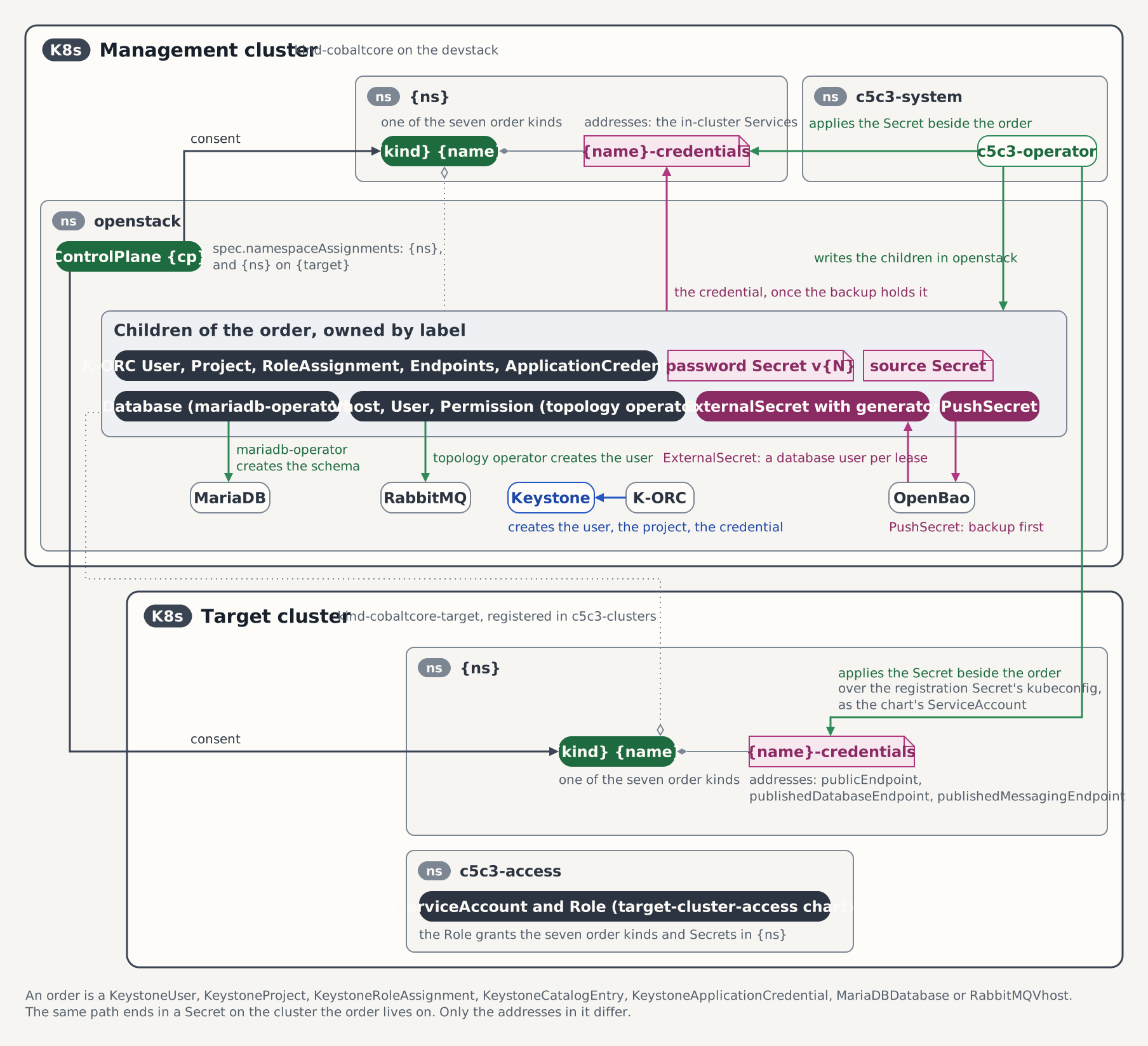
The objects in openstack cannot carry an owner reference to an order in another namespace, so they carry the labels c5c3.io/keystoneuser-name, c5c3.io/keystoneuser-namespace and c5c3.io/keystoneuser-cluster instead.
The figure draws the table: the children in openstack, the order and its Secret in workflow, and the same order on a target cluster.
Steps
1. Create the service's namespace
kubectl create namespace workflow2. Assign the namespace on the ControlPlane
The assignment is the only consent an order reads. The list is atomic, and a merge patch replaces every entry in it, so change it with a JSON patch. On a ControlPlane that assigns no namespace yet, create the list:
kubectl patch controlplane controlplane -n openstack --type json \
  -p '[{"op":"add","path":"/spec/namespaceAssignments","value":[{"namespace":"workflow"}]}]'
On a ControlPlane that already assigns namespaces, append an entry instead:
kubectl patch controlplane controlplane -n openstack --type json \
  -p '[{"op":"add","path":"/spec/namespaceAssignments/-","value":{"namespace":"workflow"}}]'
The entry lists no roles: the ordered user has no project and no role, so the entry's allowedRoles plays no part.
3. Order the user
kubectl apply -f - <<'EOF'
apiVersion: c5c3.io/v1alpha1
kind: KeystoneUser
metadata:
  name: workflow
  namespace: workflow
spec:
  controlPlaneRef:
    name: controlplane
    namespace: openstack
EOF
The user name defaults to metadata.name and the password generation to 1. controlPlaneRef.namespace is set because the order lives in another namespace than the ControlPlane.
4. Wait for the order to converge
K-ORC creates the user in Keystone, and ESO pushes the password to OpenBao before anything is delivered:
kubectl wait --for=condition=Ready keystoneuser/workflow -n workflow --timeout=15m
kubectl get keystoneuser workflow -n workflow \
  -o jsonpath='{range .status.conditions[*]}{.type}={.status} ({.reason}){"\n"}{end}'
UserReady=True (UserProvisioned)
DeliveryReady=True (Delivered)
Ready=True (AllReady)If it does not converge, the reason names the step that holds it. The table under Conditions lists every reason; NamespaceNotAssigned means Step 2 did not take effect.
5. Read the credentials
kubectl get keystoneuser workflow -n workflow \
  -o jsonpath='{.status.secretName}{" "}{.status.secretKeys}{"\n"}'
kubectl get secret workflow-credentials -n workflow \
-o jsonpath='{.data.clouds\.yaml}' | base64 -dclouds:
"admin":
auth:
auth_url: "http://controlplane-keystone.openstack.svc:5000/v3"
username: "workflow"
password: "<generated>"
user_domain_name: "Default"
region_name: "RegionOne"
endpoint_type: internal
identity_api_version: 3The document carries no project, so a token issued with it is unscoped. The cloud entry is named after the ControlPlane's korc.adminCredential.cloudCredentialsRef.cloudName; the credentials inside it belong to the ordered user. A password key sits beside clouds.yaml for a service that builds its own configuration.
The namespace holds no secret store, no client certificate and no ESO object:
kubectl get secretstore,certificate,pushsecret,externalsecret -n workflowVerification
Authenticate with the Secret from inside the namespace it was delivered to:
kubectl apply -f - <<'EOF'
apiVersion: batch/v1
kind: Job
metadata:
  name: workflow-verify
  namespace: workflow
spec:
  backoffLimit: 1
  template:
    spec:
      restartPolicy: Never
      containers:
        - name: osc
          image: ghcr.io/c5c3/tempest:2026.1
          env:
            - name: OS_CLIENT_CONFIG_FILE
              value: /etc/openstack/clouds.yaml
          command: ["/bin/sh", "-c"]
          args:
            - openstack --os-cloud admin token issue
          volumeMounts:
            - name: clouds
              mountPath: /etc/openstack
              readOnly: true
      volumes:
        - name: clouds
          secret:
            secretName: workflow-credentials
EOF

kubectl wait --for=condition=complete job/workflow-verify -n workflow --timeout=5m
kubectl logs -n workflow job/workflow-verify
kubectl delete job workflow-verify -n workflow
The log shows a token table without a project. A failing token issue means the password in the Secret is not the one Keystone holds.
From the host, with the OS_* variables from the Quick Start's token-issue step still exported, the user is visible from the admin's side:
openstack --insecure user show workflowRotate the password
The operator rotates the password every 720 hours, the default of spec.rotation.interval. The order reports its generation and when the next rotation is due:
kubectl get keystoneuser workflow -n workflow \
  -o jsonpath='{.status.passwordGeneration}{" "}{.status.nextPasswordRotation}{"\n"}'
A Keystone user holds one password, so there is no grace period: the old password stops authenticating the moment Keystone applies the new one. A service reads the Secret again, or reconnects when it changes. Anything that runs unattended belongs on an application credential, which rotates with an overlap. For a consumer that cannot pick up a new password, set spec.rotation.interval to 0s, which turns the schedule off.
To rotate at once, raise the password generation above the one the status reports. It may only increase:
next=$(( $(kubectl get keystoneuser workflow -n workflow -o jsonpath='{.status.passwordGeneration}') + 1 ))
kubectl patch keystoneuser workflow -n workflow --type merge \
  -p "{\"spec\":{\"passwordGeneration\":${next}}}"
kubectl get keystoneuser workflow -n workflow -o jsonpath='{.status.passwordGeneration}{"\n"}'
The operator generates a new password and K-ORC applies it in Keystone. While it does, the Secret keeps the old password, which still authenticates. Once status.passwordGeneration reads the raised generation, the Secret holding the previous one is gone from openstack. The new password goes to OpenBao first; once ESO has pushed it, the Secret carries it and the order is Ready again. The schedule starts the same steps once status.nextPasswordRotation has passed.
Order a project
The user has no project yet. Order one from the same namespace:
kubectl apply -f - <<'EOF'
apiVersion: c5c3.io/v1alpha1
kind: KeystoneProject
metadata:
  name: workflow-project
  namespace: workflow
spec:
  controlPlaneRef:
    name: controlplane
    namespace: openstack
EOF
kubectl wait --for=condition=Ready keystoneproject/workflow-project -n workflow --timeout=10m
kubectl get keystoneproject workflow-project -n workflow \
  -o jsonpath='{.status.projectName}{" "}{.status.domainName}{" "}{.status.projectID}{"\n"}'
The project name defaults to metadata.name, and the project lives in the ControlPlane's admin domain, Default on the devstack. A project of that name the order did not create, the admin project, or a built-in service project such as service-glance is refused with ProjectCollision.
Assign a role
A role assignment names the user and the project by their order names, and one role:
kubectl apply -f - <<'EOF'
apiVersion: c5c3.io/v1alpha1
kind: KeystoneRoleAssignment
metadata:
  name: workflow-member
  namespace: workflow
spec:
  controlPlaneRef:
    name: controlplane
    namespace: openstack
  userRef:
    name: workflow
  projectRef:
    name: workflow-project
  role: member
EOF
kubectl get keystoneroleassignment workflow-member -n workflow \
  -o jsonpath='{range .status.conditions[*]}{.type}={.status} ({.reason}){"\n"}{end}'
The entry of Step 2 lists no roles, so the order is refused, and the message names the list and the role:
AssignmentReady=False (RoleNotAllowed)
Ready=False (NotAllReady)
Allow the role on the workflow entry. The test operation guards the index as in Withdrawing the assignment:
i=$(kubectl get controlplane controlplane -n openstack -o json \
  | jq '[.spec.namespaceAssignments[] | .namespace == "workflow" and .targetClusterRef == null] | index(true)')
kubectl patch controlplane controlplane -n openstack --type json -p "[
  {\"op\":\"test\",\"path\":\"/spec/namespaceAssignments/${i}/namespace\",\"value\":\"workflow\"},
  {\"op\":\"add\",\"path\":\"/spec/namespaceAssignments/${i}/allowedRoles\",\"value\":[\"member\"]}]"
kubectl wait --for=condition=Ready keystoneroleassignment/workflow-member -n workflow --timeout=10m
kubectl get keystoneroleassignment workflow-member -n workflow \
  -o jsonpath='{.status.roleID}{" "}{.status.userID}{" "}{.status.projectID}{"\n"}'
The delivered clouds.yaml stays unscoped. A service scopes its token to the project with two environment variables beside it. Rerun the Verification Job with them:
          env:
            - name: OS_CLIENT_CONFIG_FILE
              value: /etc/openstack/clouds.yaml
            - name: OS_PROJECT_NAME
              value: workflow-project
            - name: OS_PROJECT_DOMAIN_NAME
              value: Default
The token table now names the project. Taking the role off the list later freezes the order and revokes nothing: the assignment stays in Keystone until the order is deleted.
Order an application credential
An application credential lets the service authenticate without the user's password, and the operator replaces it on a schedule without an outage. The operator creates it as the user, with a token scoped to the project, and that token needs the role of the previous section. Order it for the user on the project:
kubectl apply -f - <<'EOF'
apiVersion: c5c3.io/v1alpha1
kind: KeystoneApplicationCredential
metadata:
  name: workflow-appcred
  namespace: workflow
spec:
  controlPlaneRef:
    name: controlplane
    namespace: openstack
  userRef:
    name: workflow
  projectRef:
    name: workflow-project
EOF
kubectl wait --for=condition=Ready keystoneapplicationcredential/workflow-appcred -n workflow --timeout=15m
kubectl get keystoneapplicationcredential workflow-appcred -n workflow \
  -o jsonpath='{.status.credentialGeneration}{" "}{.status.credentialID}{" "}{.status.nextRotation}{"\n"}'
Without the role the order reports CredentialReady=False/NoRoleOnProject and creates nothing. Once it is Ready, the Secret workflow-appcred-credentials carries clouds.yaml, application_credential_id and application_credential_secret:
kubectl get secret workflow-appcred-credentials -n workflow \
-o jsonpath='{.data.clouds\.yaml}' | base64 -dclouds:
"admin":
auth:
auth_url: "http://controlplane-keystone.openstack.svc:5000/v3"
application_credential_id: "<id>"
application_credential_secret: "<generated>"
auth_type: v3applicationcredential
region_name: "RegionOne"
endpoint_type: internal
identity_api_version: 3A token issued with this document is scoped to workflow-project and carries the user's roles there, with no further variables. Rerun the Verification Job with the Secret it mounts replaced:
      volumes:
        - name: clouds
          secret:
            secretName: workflow-appcred-credentials
The token table names the project.
The schedule rotates the credential every 720 hours, in three steps the figure numbers:
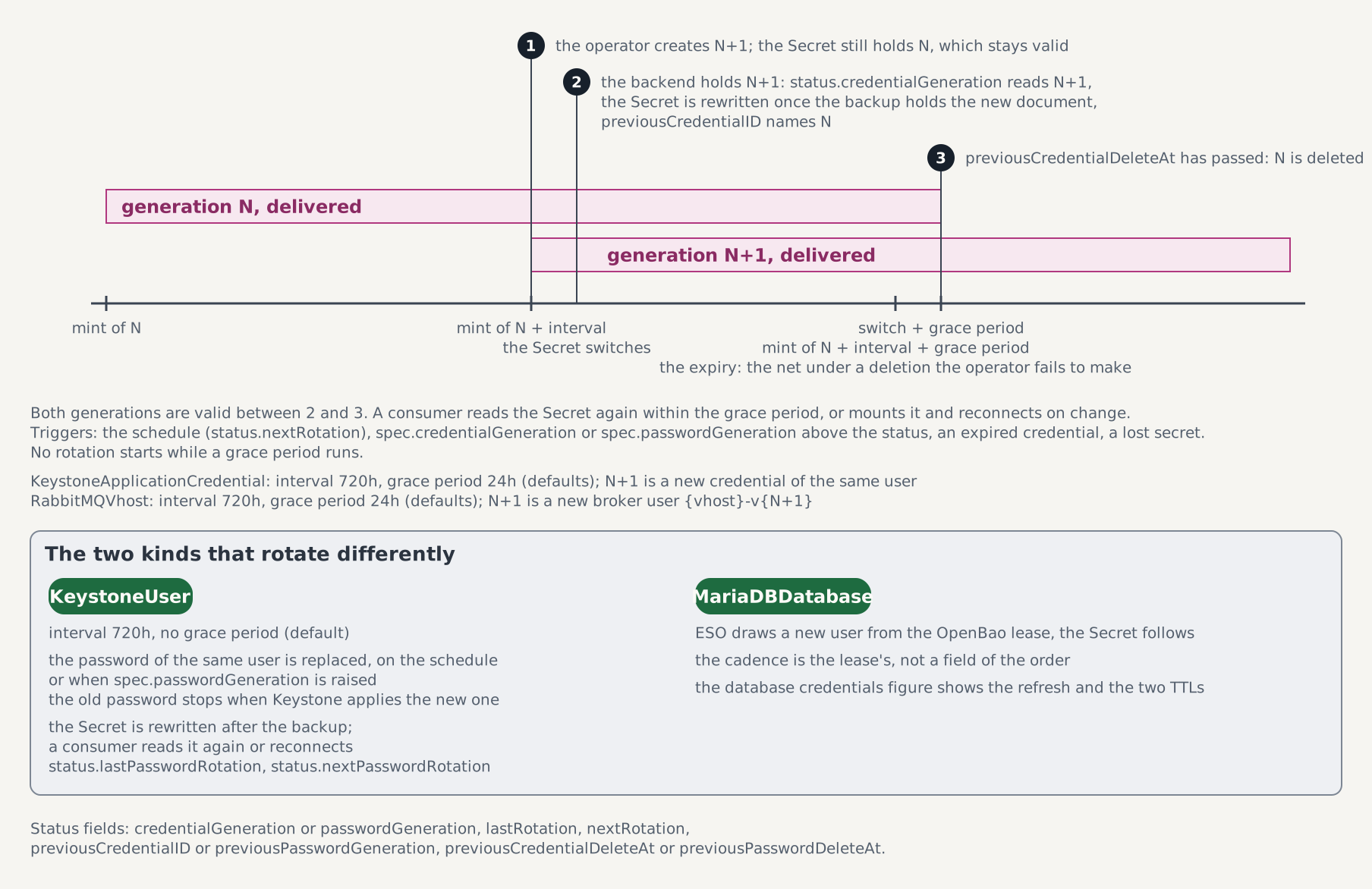
- The operator creates generation N+1 in Keystone. The delivered Secret keeps generation N, which stays valid.
- Once Keystone holds N+1, the order switches:
status.credentialGenerationreads N+1,status.previousCredentialIDnames N, and the Secret is rewritten as soon as the backup holds the new document. - When
status.previousCredentialDeleteAthas passed, generation N is deleted.
The grace period between steps 2 and 3 is 24 hours, so the Secret never names an invalid credential. During it the status names the superseded credential:
kubectl get keystoneapplicationcredential workflow-appcred -n workflow \
  -o jsonpath='{.status.previousCredentialID}{" "}{.status.previousCredentialDeleteAt}{"\n"}'
A service reads the Secret again within that grace period. Every credential expires in Keystone at its creation time plus the interval plus the grace period, so one the operator fails to delete stops working on its own. spec.rotation.interval and spec.rotation.gracePeriod change the schedule; the grace period stays shorter than the interval.
Rotate at once by raising spec.credentialGeneration above the generation the status reports:
gen=$(kubectl get keystoneapplicationcredential workflow-appcred -n workflow \
  -o jsonpath='{.status.credentialGeneration}')
kubectl patch keystoneapplicationcredential workflow-appcred -n workflow --type merge \
  -p "{\"spec\":{\"credentialGeneration\":$((gen + 1))}}"
An interval of 0s turns the schedule off, and status.nextRotation disappears:
kubectl patch keystoneapplicationcredential workflow-appcred -n workflow --type merge \
  -p '{"spec":{"rotation":{"interval":"0s"}}}'
The live credential keeps its expiry and is rotated once it expires. Raise the generation once more to replace it right away with a credential that does not expire.
Order a message-bus vhost
A service that talks over the ControlPlane's message bus gets a vhost of its own, with a user that reaches that vhost and nothing else. The devstack ControlPlane declares the managed bus openstack-rabbitmq (messaging: {}), which is the only kind of bus that serves the order. Order a vhost from the assigned namespace:
kubectl apply -f - <<'EOF'
apiVersion: c5c3.io/v1alpha1
kind: RabbitMQVhost
metadata:
  name: workflow-bus
  namespace: workflow
spec:
  controlPlaneRef:
    name: controlplane
    namespace: openstack
EOF
kubectl wait --for=condition=Ready rabbitmqvhost/workflow-bus -n workflow --timeout=10m
kubectl get rabbitmqvhost workflow-bus -n workflow \
  -o jsonpath='{.status.vhost}{" "}{.status.username}{" "}{.status.passwordGeneration}{"\n"}'
The vhost is named after the order with a hash, workflow-bus-<8 hex>, and the user after the vhost and the generation, workflow-bus-<8 hex>-v1. The Secret workflow-bus-credentials carries transport_url, host, port, username, password and vhost. Point oslo.messaging at the URL:
kubectl get secret workflow-bus-credentials -n workflow \
-o jsonpath='{.data.transport_url}' | base64 -drabbit://workflow-bus-<8 hex>-v1:<generated>@openstack-rabbitmq.openstack.svc:5672/workflow-bus-<8 hex>The broker accepts the user and lists the vhost as its only permission. Check both from the broker pod:
vhost=$(kubectl get rabbitmqvhost workflow-bus -n workflow -o jsonpath='{.status.vhost}')
user=$(kubectl get secret workflow-bus-credentials -n workflow -o jsonpath='{.data.username}' | base64 -d)
password=$(kubectl get secret workflow-bus-credentials -n workflow -o jsonpath='{.data.password}' | base64 -d)
kubectl exec -n openstack openstack-rabbitmq-server-0 -c rabbitmq -- \
  rabbitmqctl authenticate_user "$user" "$password"
kubectl exec -n openstack openstack-rabbitmq-server-0 -c rabbitmq -- \
  rabbitmqctl list_user_permissions "$user"
The first command reports Success, and the second lists $vhost with .* for configure, write and read.
The user rotates on the schedule the application credential follows: every 720 hours the operator creates the successor user <vhost>-v2, switches the Secret once the broker holds it, and deletes the superseded user 24 hours later. The three steps are the ones of the figure above, with a broker user in place of a credential. The superseded user keeps working through those 24 hours, so a service reads the Secret again within them. spec.rotation.interval and spec.rotation.gracePeriod change the schedule, interval: 0s turns it off, and raising spec.passwordGeneration above status.passwordGeneration rotates at once.
Deleting the order deletes the user and its backup either way. The vhost and the queues and messages in it stay under the default spec.deletionPolicy: Retain, and an order re-created with the same name finds them again. Set Delete before deleting the order to remove them as well:
kubectl patch rabbitmqvhost workflow-bus -n workflow --type merge \
  -p '{"spec":{"deletionPolicy":"Delete"}}'
kubectl delete rabbitmqvhost workflow-bus -n workflow
A retained vhost is removed by hand with rabbitmqctl delete_vhost in the broker pod. See the RabbitMQVhost CRD.
Register a catalog entry
A catalog row is visible to every cloud user, so the entry has to admit catalog entries on top of the assignment. Order the entry first:
kubectl apply -f - <<'EOF'
apiVersion: c5c3.io/v1alpha1
kind: KeystoneCatalogEntry
metadata:
  name: workflow-dns
  namespace: workflow
spec:
  controlPlaneRef:
    name: controlplane
    namespace: openstack
  serviceType: dns
  serviceName: designate
  endpoints:
    - interface: public
      url: https://dns.example.test/v2
EOF
kubectl get keystonecatalogentry workflow-dns -n workflow \
  -o jsonpath='{range .status.conditions[*]}{.type}={.status} ({.reason}){"\n"}{end}'
CatalogReady=False (CatalogNotAllowed)
Ready=False (NotAllReady)Set allowCatalogEntries on the workflow entry, with the index i from the role step:
kubectl patch controlplane controlplane -n openstack --type json -p "[
  {\"op\":\"test\",\"path\":\"/spec/namespaceAssignments/${i}/namespace\",\"value\":\"workflow\"},
  {\"op\":\"add\",\"path\":\"/spec/namespaceAssignments/${i}/allowCatalogEntries\",\"value\":true}]"
kubectl wait --for=condition=Ready keystonecatalogentry/workflow-dns -n workflow --timeout=10m
openstack --insecure catalog show dns
The catalog lists the public URL in RegionOne. Every service type but identity may be registered; a row of the same type and name that the order did not create is refused with ServiceCollision. The endpoints may change later, and an interface the spec no longer declares is removed. The type and the name are frozen.
Order a database
A MariaDBDatabase orders a schema on the ControlPlane's shared MariaDB, the one its Keystone uses, and a user that reaches that schema and nothing else. It needs only the namespace assignment of Step 2:
kubectl apply -f - <<'EOF'
apiVersion: c5c3.io/v1alpha1
kind: MariaDBDatabase
metadata:
  name: workflow-db
  namespace: workflow
spec:
  controlPlaneRef:
    name: controlplane
    namespace: openstack
EOF
kubectl wait --for=condition=Ready mariadbdatabase/workflow-db -n workflow --timeout=10m
kubectl get mariadbdatabase workflow-db -n workflow \
  -o jsonpath='{.status.databaseName}{" "}{.status.roleName}{" "}{.status.secretKeys}{"\n"}'
The schema is workflow_db, the order's name with its dash as an underscore; set spec.databaseName to name it yourself. The operator writes an OpenBao role for the order, the mariadb-operator creates the schema, and ESO reads the first credential from the role. The Secret workflow-db-credentials then carries host, port, database, username and password, and ca.crt when the ControlPlane's database runs TLS:
kubectl get secret workflow-db-credentials -n workflow \
  -o go-template='{{range $k, $v := .data}}{{if ne $k "password"}}{{$k}}={{$v | base64decode}}{{"\n"}}{{end}}{{end}}'
database=workflow_db
host=openstack-db.openstack.svc
port=3306
username=v-<generated by OpenBao>The user holds ALL PRIVILEGES on workflow_db and nothing else. A Job in workflow proves it: it logs in with the Secret's keys, writes a row and reads it back, and fails if the login reaches the ControlPlane's keystone schema. Apply the suite's Job from a checkout of the repository:
sed -e 's|@TENANT_NS@|workflow|g' tests/e2e/c5c3/keystone-user/13-mariadb-verify-job.yaml \
  | kubectl apply -f -
kubectl wait --for=condition=complete job/workflow-db-verify -n workflow --timeout=5m
kubectl logs -n workflow job/workflow-db-verify
kubectl delete job workflow-db-verify -n workflow
The Job
apiVersion: batch/v1
kind: Job
metadata:
  name: workflow-db-verify
  namespace: "@TENANT_NS@"
spec:
  backoffLimit: 1
  template:
    spec:
      restartPolicy: Never
      containers:
      - name: mysql
        image: ghcr.io/c5c3/keystone:2026.1
        imagePullPolicy: IfNotPresent
        env:
        - name: DB_HOST
          valueFrom: {secretKeyRef: {name: workflow-db-credentials, key: host}}
        - name: DB_PORT
          valueFrom: {secretKeyRef: {name: workflow-db-credentials, key: port}}
        - name: DB_NAME
          valueFrom: {secretKeyRef: {name: workflow-db-credentials, key: database}}
        - name: DB_USER
          valueFrom: {secretKeyRef: {name: workflow-db-credentials, key: username}}
        - name: DB_PASSWORD
          valueFrom: {secretKeyRef: {name: workflow-db-credentials, key: password}}
        command: ["python3", "-c"]
        args:
        - |
          import os
          import pymysql

          ca = "/etc/db-credentials/ca.crt"
          conn = pymysql.connect(
              host=os.environ["DB_HOST"],
              port=int(os.environ["DB_PORT"]),
              user=os.environ["DB_USER"],
              password=os.environ["DB_PASSWORD"],
              database=os.environ["DB_NAME"],
              ssl={"ca": ca} if os.path.exists(ca) else None,
              connect_timeout=10,
          )
          with conn.cursor() as cur:
              cur.execute("CREATE TABLE IF NOT EXISTS probe (id INT)")
              cur.execute("INSERT INTO probe (id) VALUES (1)")
              conn.commit()
              cur.execute("SELECT COUNT(*) FROM probe WHERE id = 1")
              print("rows:", cur.fetchone()[0])
              cur.execute("SHOW DATABASES")
              schemas = {row[0] for row in cur.fetchall()}
              if "keystone" in schemas:
                  raise SystemExit("the login sees the ControlPlane's keystone schema")
              try:
                  cur.execute("USE keystone")
              except pymysql.err.OperationalError:
                  pass
              else:
                  raise SystemExit("the login can use the ControlPlane's keystone schema")
          conn.close()
          print("OK: the delivered database credential reaches its schema and no other")
        volumeMounts:
        - name: credentials
          mountPath: /etc/db-credentials
          readOnly: true
      volumes:
      - name: credentials
        secret:
          secretName: workflow-db-credentials
The credential rotates on its own. ESO reads a new user from OpenBao every 24 hours and the operator rewrites the Secret with it; OpenBao drops each user 48 hours after it issued it. A service therefore reads the Secret again at least once a day, for example by mounting it as a volume and reconnecting when it changes. status.credentialsRefreshedAt reports the last refresh.
The right half of the figure is this chain; the left half is the static mode the ControlPlane's own services may still use.
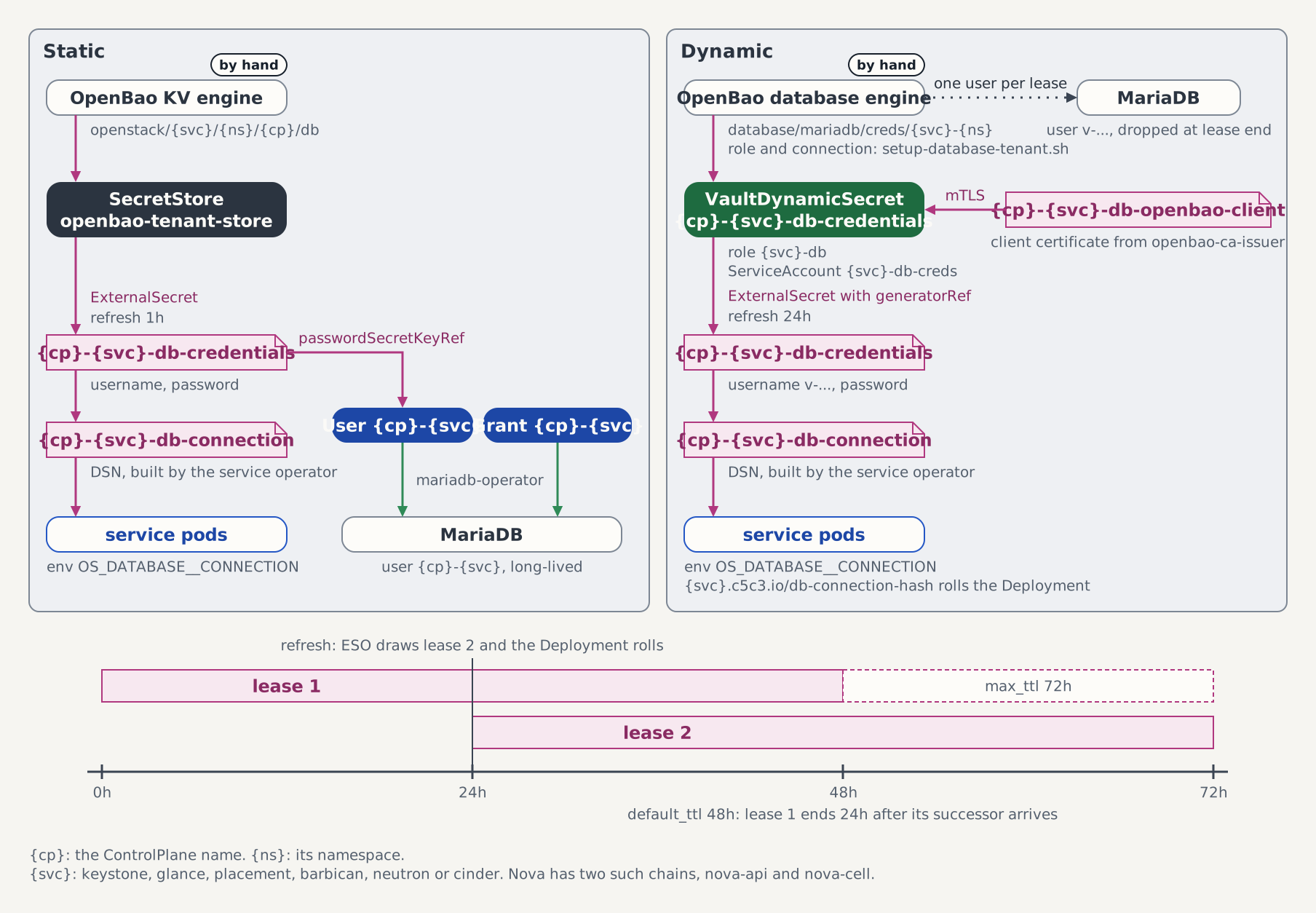
The order refuses a ControlPlane whose shared database the OpenBao engine does not issue for (External mode, a brownfield or dedicated Keystone database, or credentialsMode: Static) with DynamicCredentialsUnavailable, and a schema that already exists on the MariaDB with DatabaseCollision; the table under Conditions lists every other reason the order reports.
spec.deletionPolicy decides what deleting the order does to the data. Under Retain, the default, the schema and its data stay; under Delete the mariadb-operator drops them. The user, its leases and the OpenBao role go under both, so the last credential stops working the moment the order is deleted:
kubectl patch mariadbdatabase workflow-db -n workflow --type merge \
  -p '{"spec":{"deletionPolicy":"Delete"}}'
kubectl delete mariadbdatabase workflow-db -n workflow
Edit or delete the Secret
The operator owns the two keys it writes. Overwrite the password, then delete the Secret, and watch it come back each time:
kubectl patch secret workflow-credentials -n workflow --type merge \
  -p '{"data":{"password":"Zm9v"}}'
kubectl get secret workflow-credentials -n workflow \
  -o jsonpath='{.data.password}' | base64 -d; echo
kubectl delete secret workflow-credentials -n workflow
kubectl get secret workflow-credentials -n workflow
Within seconds the password is the generated one again, and the deleted Secret is back with an owner reference to the order. A key you add yourself is left in place, because the operator owns only password and clouds.yaml.
Withdrawing the assignment freezes the order
An assignment is consent, not a revocation tool
Removing the entry stops the operator from acting on the order. It revokes nothing: the Keystone user keeps authenticating and the Secret stays until the order is deleted.
Look up the index of the workflow entry; the test operation rejects the patch if another entry sits at that index by the time it applies:
i=$(kubectl get controlplane controlplane -n openstack -o json \
  | jq '[.spec.namespaceAssignments[] | .namespace == "workflow" and .targetClusterRef == null] | index(true)')
kubectl patch controlplane controlplane -n openstack --type json -p "[
  {\"op\":\"test\",\"path\":\"/spec/namespaceAssignments/${i}/namespace\",\"value\":\"workflow\"},
  {\"op\":\"remove\",\"path\":\"/spec/namespaceAssignments/${i}\"}]"
Within a minute both conditions report the gate, and the message names the field that assigns the namespace again:
UserReady=False (NamespaceNotAssigned)
DeliveryReady=False (NamespaceNotAssigned)
Ready=False (NotAllReady)
The Secret and the Keystone user are still in place, and the operator no longer repairs the Secret:
kubectl get secret workflow-credentials -n workflow
kubectl get users.openstack.k-orc.cloud -n openstack \
  -l c5c3.io/keystoneuser-name=workflow,c5c3.io/keystoneuser-namespace=workflow
Assign the namespace again with the Step 2 patch, and the order recovers:
kubectl wait --for=condition=Ready keystoneuser/workflow -n workflow --timeout=10mRevoking the user
Deleting the order is what revokes. Delete the application credential first, then the role assignment. A user, a project or an assignment that a credential order uses holds its deletion and reports ReferencedByApplicationCredentials, and a user or a project that an assignment names reports ReferencedByRoleAssignments, until the order that uses it is gone.
kubectl delete keystoneapplicationcredential workflow-appcred -n workflow
kubectl delete keystoneroleassignment workflow-member -n workflow
kubectl delete keystonecatalogentry workflow-dns -n workflow
kubectl delete keystoneproject workflow-project -n workflow
kubectl delete keystoneuser workflow -n workflow
K-ORC deletes the application credentials, unassigns the role, removes the catalog rows and deletes the project before each order goes, and ESO removes the credential's backup from OpenBao.
The last command blocks while K-ORC deletes the user from Keystone and ESO removes the password from OpenBao. Afterwards the Secret is gone from workflow and nothing labelled for the order is left in openstack:
kubectl get secret workflow-credentials -n workflow
kubectl get users.openstack.k-orc.cloud,secrets,pushsecrets -n openstack \
  -l c5c3.io/keystoneuser-name=workflow,c5c3.io/keystoneuser-namespace=workflow
The first command reports NotFound and the second reports no resources. See Deletion Semantics.
On a target cluster
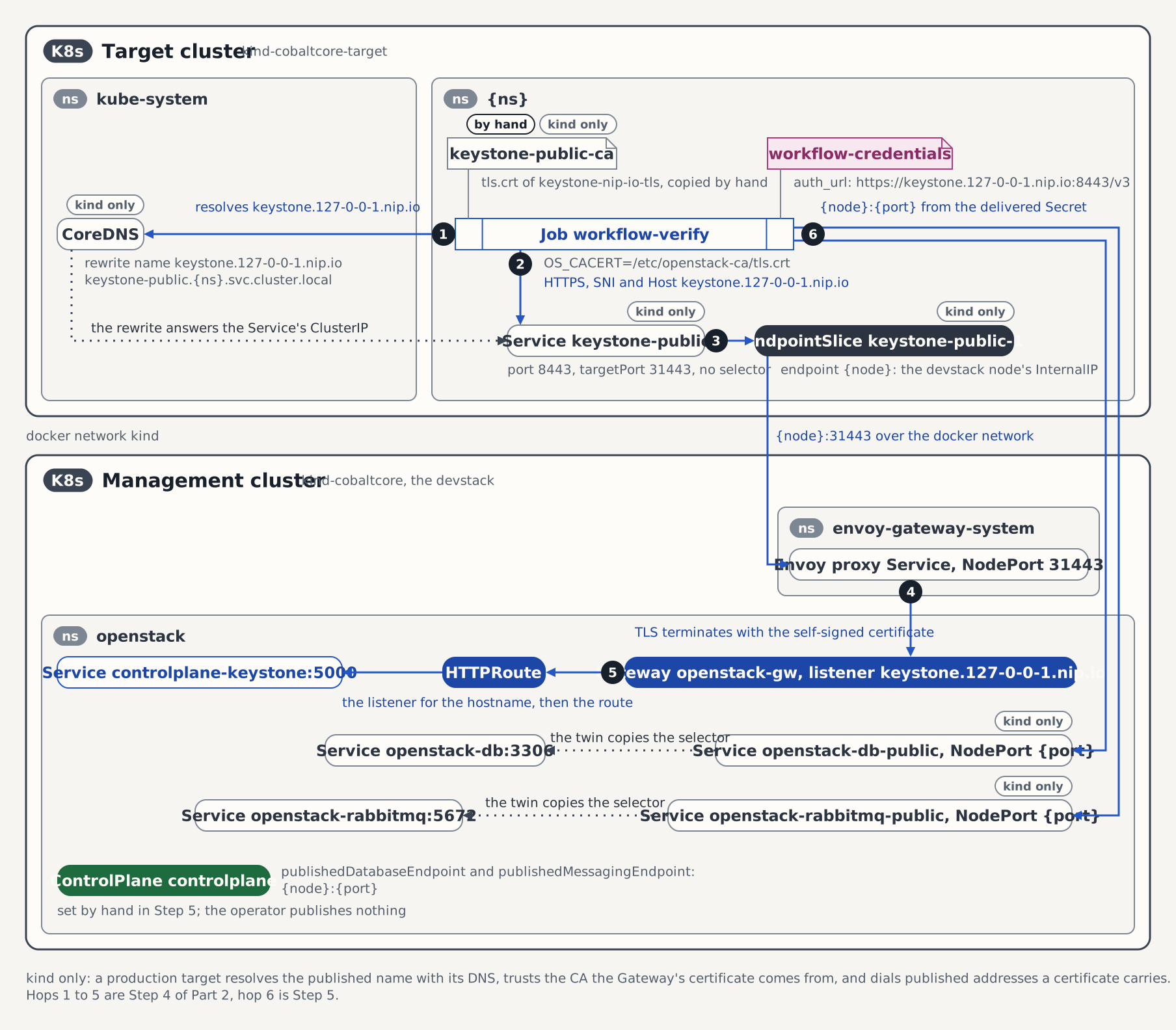
An owner whose namespace lives on a registered target cluster orders the same way, on that cluster. The ControlPlane's entry names the cluster in targetClusterRef, the target-cluster-access chart's assignedNamespaces and the registration Secret's assignedNamespaces key name the namespace, and the ControlPlane publishes the addresses of Keystone, the database and the bus that a pod on that cluster can reach; without them the orders report KeystoneNotPublished, DatabaseNotPublished or MessagingNotPublished. Part 2 of the Quick Start (Orders) runs all of it on two kind clusters. See Assigned namespaces.
On kind the published addresses need a path a real target cluster has by itself. The path from the target names the six hops.
Standalone Keystone, without a ControlPlane
There is no ordering path for a standalone Keystone. spec.controlPlaneRef is required, and the order relies on what only a ControlPlane has: the admin credential K-ORC authenticates with, the namespace assignments, and the secret store the password is backed up through. On such an installation, create users through the identity API directly.
See also
- KeystoneUser CRD: Consent: the assignment, the freeze, and orders on a target cluster.
- KeystoneUser CRD: Delivered Secret contract: the Secret's keys, the auth URL per cluster, and the repair.
- KeystoneUser CRD: Conditions: every reason the two conditions report.
- KeystoneUser Reconciler Architecture: the gates, the steps and the teardown order.
- KeystoneProject CRD, KeystoneRoleAssignment CRD and KeystoneCatalogEntry CRD: the further orders, their consent and their conditions.
- KeystoneApplicationCredential CRD: the rotation schedule, the Secret contract and the holds the credential order puts on the user, the project and the assignment.
- Keystone Orders Reconciler Architecture: the scaffold the order kinds share, and the holds.
- MariaDBDatabase CRD and MariaDBDatabase Reconciler Architecture: the database order, its rotation cadence, its deletion policies and the OpenBao role behind it.
- RabbitMQVhost CRD and RabbitMQVhost Reconciler Architecture: the vhost order, its rotation, its deletion policy and its Secret contract.
- ControlPlane CRD: NamespaceAssignmentSpec: the assignment field and its validation.
- Register a Service the ControlPlane Does Not Manage: a KeystoneService with a catalog entry and roles.
- ControlPlane E2E Test Suites: the suites behind this guide.
- Quick Start (ControlPlane): the devstack this guide builds on.
- Quick Start (Orders): the seven order kinds, one step each, on the devstack and on a target cluster.
Tested by
The flow above mirrors the following end-to-end suite:
chainsaw test --test-dir tests/e2e/c5c3/keystone-userIt orders a user from an assigned namespace and authenticates with the Secret from a Job there, repairs an edited and a deleted Secret, and rotates the password by hand to generation 2 and on a one-minute schedule to generation 3. It then orders a project, a role assignment and a catalog entry, sees the role and the entry refused, admits both, scopes a token to the project and reads the entry out of the catalog. It orders an application credential, sees it refused before the role is assigned, authenticates with it, and observes a scheduled rotation on a three-minute interval, authenticates with the superseded credential inside its two-minute grace period and sees it fail after it, and rotates by hand. It orders a database, writes and reads a row from a Job with its Secret, repairs the Secret, and forces an ESO refresh that delivers a new user. It refuses an order from an unassigned namespace, freezes every order by withdrawing the assignment, restores it, and deletes the orders: the database first, whose last credential stops working and whose schema stays under Retain and goes after a re-order with Delete, then the assignment to see it hold on the credential order, and the user to see it hold on the assignment. Against a full ControlPlane stack, run the suite with E2E_REQUIRE_CONTROLPLANE_STACK=true make e2e-controlplane.
The suite brings up a Keystone-only ControlPlane of its own in chainsaw's ephemeral namespace, so its fixtures are isolation-named where the walkthrough is devstack-named: the plane is cp instead of controlplane, and the @TENANT_NS@ and @CP_NS@ tokens are substituted per run so that parallel suites never collide.
The ControlPlane fixture the suite applies
apiVersion: c5c3.io/v1alpha1
kind: ControlPlane
metadata:
  name: cp
spec:
  openStackRelease: "2026.1"
  region: RegionOne
  infrastructure:
    database:
      clusterRef:
        name: openstack-db
      database: keystone
      secretRef:
        name: keystone-db
    cache:
      clusterRef:
        name: openstack-memcached
      backend: dogpile.cache.pymemcache
  services:
    keystone: {}
  sizing:
    profile: Minimal
  korc:
    adminCredential:
      cloudCredentialsRef:
        cloudName: admin
        secretName: k-orc-clouds-yaml
      passwordSecretRef:
        name: keystone-admin
        key: password
      applicationCredential:
        restricted: true
        rotation:
          mode: PasswordDriven
  namespaceAssignments:
  - namespace: "@TENANT_NS@"
The order the suite applies from the assigned namespace
apiVersion: c5c3.io/v1alpha1
kind: KeystoneUser
metadata:
  name: workflow
  namespace: "@TENANT_NS@"
spec:
  controlPlaneRef:
    name: cp
    namespace: "@CP_NS@"
The project the suite orders
apiVersion: c5c3.io/v1alpha1
kind: KeystoneProject
metadata:
  name: workflow-project
  namespace: "@TENANT_NS@"
spec:
  controlPlaneRef:
    name: cp
    namespace: "@CP_NS@"
The role assignment the suite orders
apiVersion: c5c3.io/v1alpha1
kind: KeystoneRoleAssignment
metadata:
  name: workflow-member
  namespace: "@TENANT_NS@"
spec:
  controlPlaneRef:
    name: cp
    namespace: "@CP_NS@"
  userRef:
    name: workflow
  projectRef:
    name: workflow-project
  role: member
The catalog entry the suite orders
apiVersion: c5c3.io/v1alpha1
kind: KeystoneCatalogEntry
metadata:
  name: workflow-dns
  namespace: "@TENANT_NS@"
spec:
  controlPlaneRef:
    name: cp
    namespace: "@CP_NS@"
  serviceType: dns
  serviceName: designate
  endpoints:
  - interface: public
    url: https://dns.example.test/v2
  - interface: internal
    url: http://designate-api.@TENANT_NS@.svc:9001/v2
The application credential the suite orders
apiVersion: c5c3.io/v1alpha1
kind: KeystoneApplicationCredential
metadata:
  name: workflow-appcred
  namespace: "@TENANT_NS@"
spec:
  controlPlaneRef:
    name: cp
    namespace: "@CP_NS@"
  userRef:
    name: workflow
  projectRef:
    name: workflow-project
  rotation:
    interval: 3m
    gracePeriod: 2m
The Job the suite authenticates with the application credential from
apiVersion: batch/v1
kind: Job
metadata:
  name: workflow-appcred-verify
  namespace: "@TENANT_NS@"
spec:
  backoffLimit: 1
  template:
    spec:
      restartPolicy: Never
      containers:
      - name: osc
        image: ghcr.io/c5c3/tempest:2026.1
        imagePullPolicy: IfNotPresent
        env:
        - name: OS_CLIENT_CONFIG_FILE
          value: /etc/openstack/clouds.yaml
        command: ["/bin/sh", "-c"]
        args:
        - |
          set -e
          echo "== openstack --os-cloud admin token issue =="
          openstack --os-cloud admin token issue -c expires -c project_id
          echo "OK: the delivered application credential authenticates"
        volumeMounts:
        - name: clouds
          mountPath: /etc/openstack
          readOnly: true
      volumes:
      - name: clouds
        secret:
          secretName: workflow-appcred-credentials
The database the suite orders
apiVersion: c5c3.io/v1alpha1
kind: MariaDBDatabase
metadata:
  name: workflow-db
  namespace: "@TENANT_NS@"
spec:
  controlPlaneRef:
    name: cp
    namespace: "@CP_NS@"
  deletionPolicy: "@DELETION_POLICY@"
The vhost order mirrors a second suite, the one with a live managed bus:
chainsaw test --test-dir tests/e2e/c5c3/messagingIt orders a vhost from an assigned namespace, checks the six keys and the OpenBao backup, and proves with rabbitmqctl in the broker pod that the user authenticates and holds .* on its vhost alone. It repairs an edited and a deleted Secret, observes a rotation on a three-minute interval with both users valid during the one-minute grace period and the superseded one refused afterwards, and rotates by hand with the schedule off. It deletes one order under Retain, whose vhost stays on the broker, and one under Delete, whose vhost goes, and freezes an order by withdrawing the assignment. The suite runs on the e2e-operator (c5c3) job; its plane is cp and its order workflow.
The vhost order the messaging suite applies
apiVersion: c5c3.io/v1alpha1
kind: RabbitMQVhost
metadata:
  name: workflow
  namespace: "@TENANT_NS@"
spec:
  controlPlaneRef:
    name: cp
    namespace: "@CP_NS@"
  rotation:
    interval: 3m
    gracePeriod: 1m