Quick Start (ControlPlane): C5C3 + K-ORC on Kind
This guide creates the ControlPlane devstack, a local kind environment that takes a single c5c3 ControlPlane CR from git clone to an authenticated Keystone API call. Compared with the Quick Start, the c5c3-operator now provisions the MariaDB, Memcached, RabbitmqCluster, Keystone, Horizon, Glance, Placement, Barbican, Neutron, and Nova children against a referenced OVNCentral, mints the admin application credential through K-ORC, mirrors it to OpenBao, and registers the identity catalog.
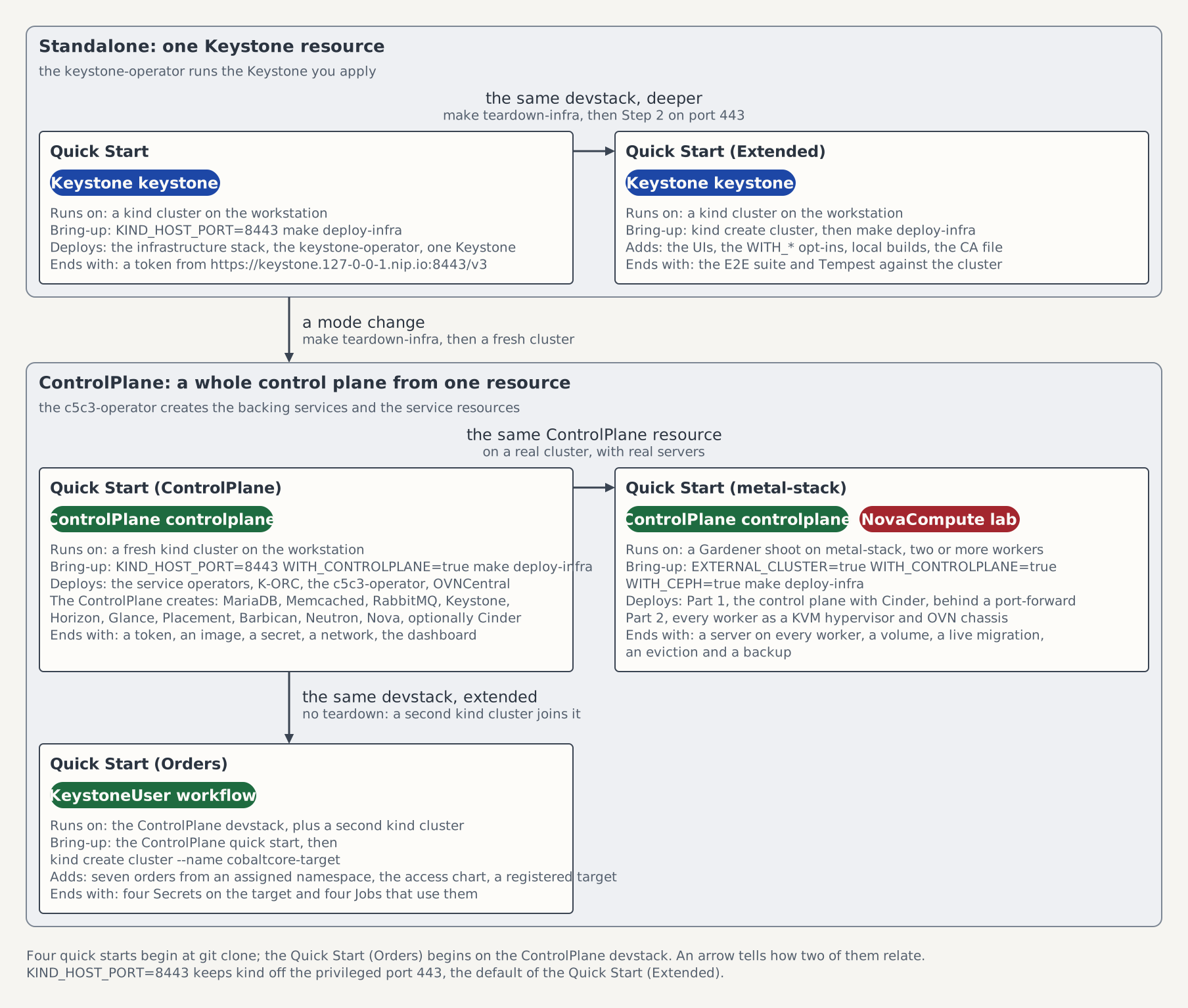
On the map of the five quick starts this page is the box Quick Start (ControlPlane). It needs a fresh cluster: where a cluster already runs the standalone Keystone of the other two kind pages, run make teardown-infra first, because WITH_CONTROLPLANE=true changes the mode of the stack and the ControlPlane provisions its own MariaDB and Memcached.
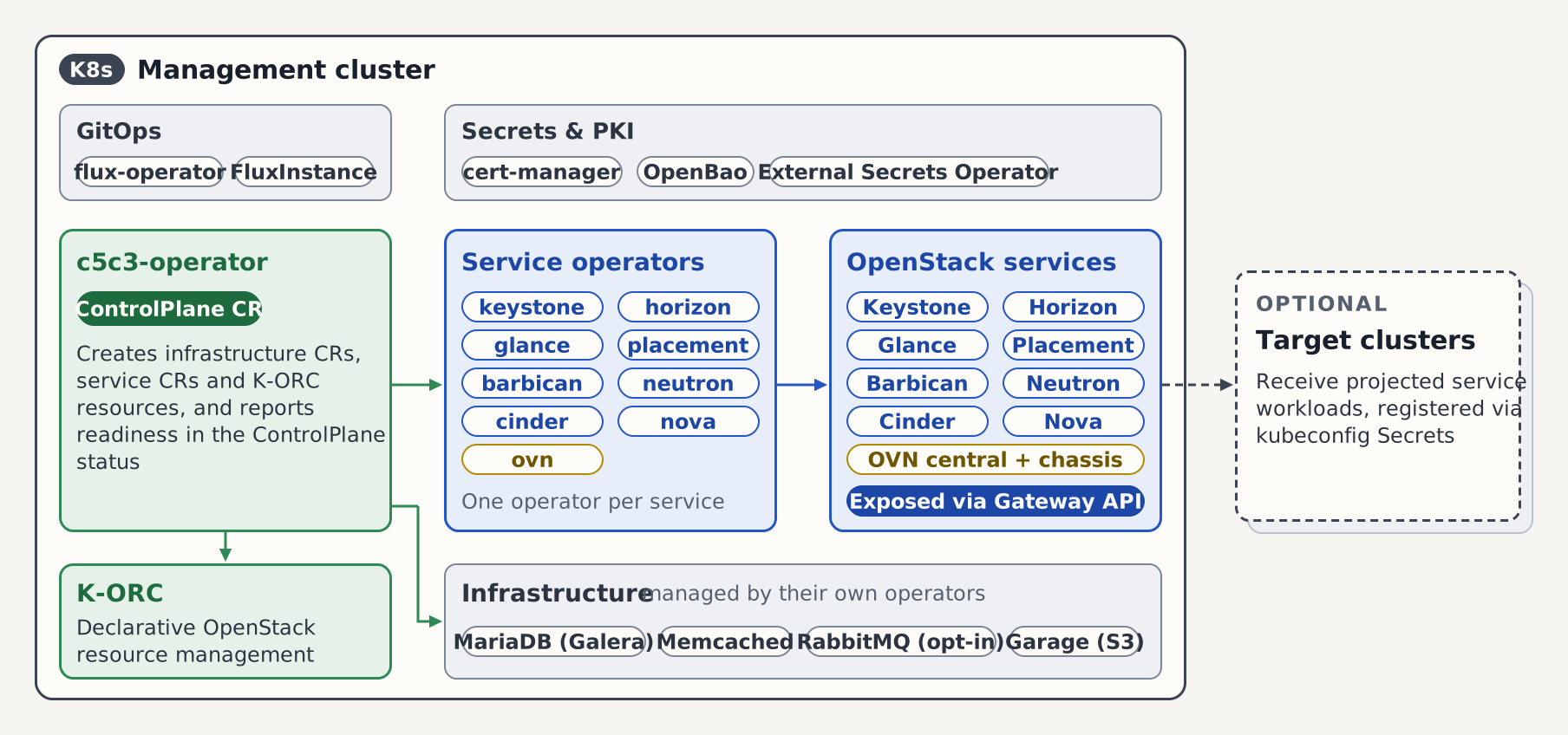
The figure shows the cluster this page builds, from the one ControlPlane CR to the running services. Target clusters, the dashed box, are not part of this page. Architecture describes the whole picture.
Prerequisites
Same toolchain as the Quick Start, plus:
makeonPATHforinstall-test-deps,deploy-infra, andteardown-infra- The OpenStack CLI (
python-openstackclient) onPATHfor the auth check in Step 7, plus two plugins for the other checks in that step:osc-placementfor the placement call andpython-barbicanclientfor theopenstack secretsubcommands. - A host with 4 CPU cores, 16 GB of memory for the container runtime, and 10 GB of free disk. On the
Minimalsizing profile the full stack requests at most 4 CPU and 16 GiB; the node budget gate of the e2e-controlplane CI job enforces that budget on the CI stack. The optional compute leg of Step 7 (the fake compute, the OVN chassis, and the metadata agent) runs beside that budget yqv4.40.1 or newer onPATHfor theKIND_HOST_PORT=8443override path in Step 2 Docker Desktop and Podman are both valid kind providers. When using Podman, ensure its machine is already running and select it explicitly before running Step 2:
export KIND_EXPERIMENTAL_PROVIDER=podman- The bundled kind
ControlPlaneCR namesspec.sizing.profile: Minimal, so the fresh-create chain fits a single-node kind cluster: a single-instance, non-Galera MariaDB on a512Mivolume, a single Memcached pod, and one pod per service component. - The
Standardprofile gives3of each and a100Givolume: the production baseline, which OOM-kills a laptop-sized kind. - On a bigger box, set
CONTROLPLANE_DB_REPLICAS=3and/orCONTROLPLANE_CACHE_REPLICAS=Nfor Step 2 to pin those fields over the profile.2is rejected for the database: Galera needs a quorum. - To mirror the production volume, set
CONTROLPLANE_DB_STORAGE=100Gifor Step 2. Any Kubernetes quantity inMi/Gi/Tiis accepted. database.replicasanddatabase.storageSizeare immutable after the CR is created, so change them on a fresh environment (make teardown-infrafirst).
make install-test-deps
export PATH="${HOME}/.local/bin:${PATH}"
Step 1 — Clone
git clone https://github.com/c5c3/cobaltcore.git
cd cobaltcore
Step 2 — Cluster + ControlPlane stack
KIND_HOST_PORT=8443 WITH_CONTROLPLANE=true make deploy-infraWITH_CONTROLPLANE=true brings up the shared infrastructure and then the ControlPlane operator stack (keystone-operator, horizon-operator, glance-operator, placement-operator, barbican-operator, ovn-operator, neutron-operator, cinder-operator, nova-operator, K-ORC, c5c3-operator) from the published charts. It does not create the ControlPlane CR itself; you create and apply that in Step 4. The command returns once the operator releases are Ready and the cluster admits the manifests of Steps 3 and 4. The RabbitMQ Cluster Operator that serves the managed bus arrives through a Flux Kustomization of its own, on every cluster this script provisions, with or without WITH_CONTROLPLANE=true. In this mode the ControlPlane provisions its own MariaDB/Memcached (managed mode), so deploy-infra does not create the shared ones. KIND_HOST_PORT=8443 maps the Gateway to a non-privileged host port for macOS; on Linux with rootful Docker drop the override and use port 443. Expect 5 to 10 minutes.
If a download or image pull fails, run make teardown-infra and repeat Step 2.
Fresh operator images after a merge
The operator images are published under the mutable :latest tag, so deploy-infra pins them to the digest current at deploy time (per-operator image-digest ConfigMaps consumed by the HelmReleases via valuesFrom). After a feature merges to main, run make refresh-operator-digests against the running cluster: it re-resolves the digests, updates the ConfigMaps, and requests a Flux reconcile so the operators roll to the freshly built images. You do not need to redeploy. The helper prefers docker buildx, but falls back to curl if Docker is unavailable.
Block storage is an opt-in. If you want the Cinder block of Step 4, run Step 2 with the NFS overlay instead:
KIND_HOST_PORT=8443 WITH_CONTROLPLANE=true WITH_NFS=true make deploy-infraThat adds the NFS server to openstack and csi-driver-nfs to kube-system. On a Linux host it also loads, through sudo, the nfs and nfsv4 kernel modules that csi-driver-nfs mounts the shares with. On macOS the script skips the module step: those modules belong to the Linux VM kernel Docker Desktop runs. The NFS storage stack reference describes the overlay.
Step 3 — Deploy the OVN control plane
The network service in the CR below programs an OVN control plane that the ControlPlane references. Setting up the service first:
# controlplane-ovn.yaml
apiVersion: ovn.openstack.c5c3.io/v1alpha1
kind: OVNCentral
metadata:
  name: controlplane-ovn
  namespace: openstack
spec:
  tls:
    issuerRef:
      # The cluster-scoped CA issuer the kind overlay ships. OVN authenticates
      # every connection, so both databases and the client identity the Neutron
      # pods mount are issued from this one CA.
      name: openstack-ovn-ca-issuer
  # Single-member Raft clusters and a single northd. Omit these and each
  # database comes up as a 3-member cluster, which a single-node kind cannot
  # carry beside the rest of the control plane.
  northbound:
    replicas: 1
  southbound:
    replicas: 1
  northd:
    deployment:
replicas: 1kubectl apply -f controlplane-ovn.yaml
kubectl wait ovncentral/controlplane-ovn -n openstack \
--for=condition=Ready --timeout=10mThe ControlPlane references this central the way it references the infrastructure clusters in spec.infrastructure: it reads the two database addresses and the client Secret the central publishes, and it projects, updates and deletes nothing on it. The CR stays yours: kubectl delete controlplane leaves the central running, and only the Teardown at the end of this page takes it down with the cluster.
Step 4 — Create the ControlPlane CR
Then apply a ControlPlane CR. You only supply openStackRelease and the services.keystone block; the defaulting webhook fills the infrastructure and admin-credential references with their well-known names:
openstack-dbandopenstack-memcachedfor the managed infrastructurekeystone-dbandkeystone-admin/passwordas placeholders that the operator replaces with per-ControlPlane Secrets in managed modek-orc-clouds-yamlwith theadmincloud entry
The c5c3-operator seeds the K-ORC bootstrap clouds.yaml per CR and derives the in-cluster Keystone auth URL from the CR name. To use a different name, pass CONTROLPLANE_NAME=foo to Step 2; it renames the bundled CR and seeds the matching admin password. The defaulting only fills the names and references; the operator still consumes the pre-seeded Secret content and materialises the bootstrap clouds.yaml itself.
# controlplane.yaml
apiVersion: c5c3.io/v1alpha1
kind: ControlPlane
metadata:
  name: controlplane
  namespace: openstack
spec:
  openStackRelease: "2026.1"
  infrastructure:
    # The shared message bus. The webhook fills clusterRef.name with
    # openstack-rabbitmq, the RabbitmqCluster this ControlPlane then owns.
    messaging: {}
  services:
    keystone:
      # Drop publicEndpoint on the default port 443 — the operator then derives
      # https://keystone.127-0-0-1.nip.io/v3 from the gateway hostname.
      publicEndpoint: https://keystone.127-0-0-1.nip.io:8443/v3
      gateway:
        parentRef:
          name: openstack-gw
        hostname: keystone.127-0-0-1.nip.io
        path: /
    horizon:
      # Exposed through the same shared Envoy Gateway as Keystone, via the
      # second HTTPS listener the kind overlay adds for horizon.127-0-0-1.nip.io.
      gateway:
        parentRef:
          name: openstack-gw
        hostname: horizon.127-0-0-1.nip.io
    glance:
      # Drop publicEndpoint on the default port 443 — the operator then derives
      # https://glance.127-0-0-1.nip.io from the gateway hostname.
      publicEndpoint: https://glance.127-0-0-1.nip.io:8443
      # Exposed through the same shared Envoy Gateway, via the third HTTPS
      # listener the kind overlay adds for glance.127-0-0-1.nip.io.
      gateway:
        parentRef:
          name: openstack-gw
        hostname: glance.127-0-0-1.nip.io
      # One curated S3 image store on the in-cluster Garage object store; the
      # Step 2 stack ships the Garage cluster and the glance-images bucket.
      backends:
        - name: default
          type: S3
          isDefault: true
          s3:
            endpoint: http://garage.shared-services.svc.cluster.local:3900
            bucket: glance-images
            region: garage
            credentialsSecretRef:
              name: garage-s3-credentials
    placement:
      # Drop publicEndpoint on the default port 443 — the operator then derives
      # https://placement.127-0-0-1.nip.io from the gateway hostname.
      publicEndpoint: https://placement.127-0-0-1.nip.io:8443
      # Exposed through the same shared Envoy Gateway, via the sixth HTTPS
      # listener the kind overlay adds for placement.127-0-0-1.nip.io.
      gateway:
        parentRef:
          name: openstack-gw
        hostname: placement.127-0-0-1.nip.io
    barbican:
      # An OpenBao instance this ControlPlane provisions and owns; its name, its
      # KV mount, and its AppRole are derived by convention, so the block is empty.
      secretStore:
        dedicated: {}
      # Drop publicEndpoint on the default port 443; the operator then derives
      # https://barbican.127-0-0-1.nip.io from the gateway hostname.
      publicEndpoint: https://barbican.127-0-0-1.nip.io:8443
      # Exposed through the same shared Envoy Gateway, via the seventh HTTPS
      # listener the kind overlay adds for barbican.127-0-0-1.nip.io.
      gateway:
        parentRef:
          name: openstack-gw
        hostname: barbican.127-0-0-1.nip.io
    neutron:
      # Drop publicEndpoint on the default port 443 and the operator derives
      # https://neutron.127-0-0-1.nip.io from the gateway hostname.
      publicEndpoint: https://neutron.127-0-0-1.nip.io:8443
      # Exposed through the same shared Envoy Gateway, via the eighth HTTPS
      # listener the kind overlay adds for neutron.127-0-0-1.nip.io.
      gateway:
        parentRef:
          name: openstack-gw
        hostname: neutron.127-0-0-1.nip.io
      # The standalone OVNCentral applied above. Its namespace defaults to this
      # ControlPlane's own, so naming the CR is the whole reference.
      ovn:
        centralRef:
          name: controlplane-ovn
    nova:
      # Drop publicEndpoint on the default port 443 and the operator derives
      # https://nova.127-0-0-1.nip.io from the gateway hostname. Both compute
      # catalog rows append /v2.1 to it.
      publicEndpoint: https://nova.127-0-0-1.nip.io:8443
      # Exposed through the same shared Envoy Gateway, via the tenth HTTPS
      # listener the kind overlay adds for nova.127-0-0-1.nip.io. The metadata
      # API, the scheduler, the conductor and the console proxy run one replica
      # each and stay in-cluster.
      gateway:
        parentRef:
          name: openstack-gw
        hostname: nova.127-0-0-1.nip.io
  # One small node: a single-instance MariaDB on 512Mi, one Memcached pod, one
  # broker pod, and one pod per service component. Omit spec.sizing and every
  # component takes the Standard profile: three per API, a 3-node Galera
  # MariaDB on 100Gi, three Memcached pods and three broker pods.
  sizing:
profile: Minimalkubectl apply -f controlplane.yamlThe horizon block makes the reconciler project the OpenStack Dashboard once its Keystone child is Ready. Everything else is derived: the image tag from spec.openStackRelease, the Memcached wiring from spec.infrastructure.cache, and the Keystone endpoint from the Keystone child's naming convention. The Django SECRET_KEY defaults to the kind-only horizon-secret-key Secret (seeded per the default ControlPlane identity); a second ControlPlane must set services.horizon.secretKeyRef to its own Secret. A HorizonReady condition joins the chain (after KeystoneReady) and status.services gains a second entry.
The glance block makes the reconciler project the OpenStack Image service and one GlanceBackend child per backends entry, here a single S3 store on the in-cluster Garage object store. Garage runs in shared-services; the Step 2 stack also syncs a garage-s3-credentials Secret into openstack, which is where the Glance child resolves credentialsSecretRef. The gateway block exposes the image API through the same shared Envoy Gateway as Keystone and Horizon, on the third HTTPS listener the kind overlay adds for glance.127-0-0-1.nip.io. publicEndpoint makes the public image catalog row advertise the reachable host URL with its :8443 host port, instead of the default-443 form the operator would otherwise derive from the gateway hostname. The operator projects a KeystoneService registration controlplane-glance carrying the image catalog entry and the glance service account (user glance, project service-glance, role service), so Glance can validate the Keystone tokens it receives. Its database and cache derive from spec.infrastructure the same way Keystone's do. On the managed shared database its DB credential is engine-issued and auto-rotated like Keystone's, as short-lived leases from the OpenBao database engine, and the Step 5 onboarding provisions the engine tenant for all database services (keystone, glance, placement, barbican, neutron, nova's two schemas, and cinder when the block-storage block is present). A GlanceReady condition joins the chain, gated on KeystoneReady plus that registration having provisioned the account, and status.services gains a third entry.
The placement block projects a Placement child, controlplane-placement: the API deployment, its own logical schema on the shared MariaDB, and a Keystone service user. Its own KeystoneService registration controlplane-placement carries the placement catalog entry and the placement account (user placement, role service) with a project of its own, service-placement; each registration creates its project, so two naming one project would collide. Database and cache derive from spec.infrastructure the same way Glance's do, and on the managed shared database the DB credential is engine-issued too, from the tenant Step 5 onboards. The gateway block puts the API on the sixth HTTPS listener the kind overlay adds, placement.127-0-0-1.nip.io, and publicEndpoint carries the :8443 host port into the public placement catalog row. A PlacementReady condition joins the chain next to GlanceReady, gated the same way, and status.services gains a fourth entry.
The barbican block adds the Key Manager service. secretStore.dedicated asks for an OpenBao instance this ControlPlane owns, so the operator projects three CRs: the Barbican child controlplane-barbican, the instance controlplane-barbican-bao, and the store controlplane-barbican-store that attaches the two. A KeystoneService registration controlplane-barbican carries the key-manager catalog entry and the barbican account (user barbican, role service) with a project of its own, service-barbican. Its database credential is engine-issued from the tenant Step 5 onboards, like Glance's and Placement's. The gateway block puts the key-manager API on the seventh HTTPS listener, barbican.127-0-0-1.nip.io, and publicEndpoint carries the :8443 host port into the public key-manager catalog row. A BarbicanReady condition joins the chain beside GlanceReady and PlacementReady, gated the same way, and status.services gains a fifth entry. The projected instance is proving-grade: one replica, no PodDisruptionBudget, sealed by a static key in a plain Secret beside its volume. Run Barbican on a Dedicated OpenBao covers the same service step by step, including the external-server alternative.
The neutron block adds the network service, and the infrastructure.messaging block beside it is what makes that service admissible: the Neutron CRD requires a message bus, so the webhook rejects services.neutron without one. The reconciler provisions the openstack-rabbitmq cluster, resolves its transport URL, and delivers the URL beside the child as a controlplane-neutron-messaging Secret, which the projected Neutron child controlplane-neutron references brownfield. A KeystoneService registration controlplane-neutron carries the network catalog entry and the neutron account (user neutron, role service) in its own project, service-neutron. Its database credential is engine-issued from the tenant Step 5 onboards, like Glance's, Placement's, and Barbican's. ovn.centralRef points at the controlplane-ovn central of Step 3; the plane reads that central's database addresses and client Secret and mirrors its readiness into an OVNReady condition, which NeutronReady gates on alongside KeystoneReady, the bus delivery, and the registration. The gateway block puts the API on the eighth HTTPS listener, neutron.127-0-0-1.nip.io, and publicEndpoint carries the :8443 host port into the public network catalog row. status.services gains a sixth entry.
The nova block adds the compute service. The reconciler projects the Nova child controlplane-nova, which runs five Deployments: the API controlplane-nova, the metadata API controlplane-nova-metadata, the scheduler controlplane-nova-scheduler, the conductor controlplane-nova-conductor, and the console proxy controlplane-nova-novncproxy. Two KeystoneService registrations come with it. controlplane-nova carries the compute catalog entry and the nova account in a project of its own, service-nova, with the roles service and admin: nova calls the block-storage API through its service user where it holds no user token, and Cinder refuses a caller holding service alone on a user's volume. controlplane-neutron-nova carries no catalog entry, only the neutron-nova account the network service posts its port-status notifications to Nova as. It sits in Neutron's project service-neutron and holds service and admin too, because Nova looks up the instance behind a notified port with the caller's own context.
Nova keeps its state in two schemas, nova_api and nova (with nova_cell0 beside it), and each takes an engine-issued credential of its own from the tenant Step 5 onboards: controlplane-nova-api-db-credentials and controlplane-nova-db-credentials. The bus reaches the child as controlplane-nova-messaging, like Neutron's. The ControlPlane generates the shared secret the metadata API verifies proxied instance requests with into controlplane-nova-metadata-secret, and the child publishes the compute contract controlplane-nova-compute-config, the Secret a nova-compute joins this control plane with. The gateway block puts the API on the tenth HTTPS listener, nova.127-0-0-1.nip.io, and publicEndpoint carries the :8443 host port into the public compute catalog row. A NovaReady condition joins the chain, gated on KeystoneReady, PlacementReady, and the registration, and status.services gains a seventh entry. The webhook admits services.nova only beside services.placement, services.neutron, services.glance, and spec.infrastructure.messaging: Nova claims every instance's resources in Placement, binds its ports in Neutron, reads its image from Glance, and reaches its conductor and scheduler over the bus.
Optional: block storage (needs WITH_NFS=true in Step 2)
The cinder block adds the block-storage service on the two NFS exports the Step 2 overlay pre-creates. Drop the fragment into spec.services of either CR shape on this page, beside the neutron block, and apply it again. The Minimal profile already runs one Cinder API pod.
# block-storage.yaml
# Goes under `spec.services`, beside the `neutron` block above.
cinder:
  # Drop publicEndpoint on the default port 443 and the operator derives
  # https://cinder.127-0-0-1.nip.io from the gateway hostname.
  publicEndpoint: https://cinder.127-0-0-1.nip.io:8443
  # Exposed through the same shared Envoy Gateway, via the ninth HTTPS
  # listener the kind overlay adds for cinder.127-0-0-1.nip.io.
  gateway:
    parentRef:
      name: openstack-gw
    hostname: cinder.127-0-0-1.nip.io
  # One volume backend per entry. The paths are NFSv4 share strings below the
  # server's /exports pseudo-root, so /volumes, never /exports/volumes.
  backends:
    - name: nfs1
      type: NFS
      nfs:
        server: nfs-server.openstack.svc.cluster.local
        path: /volumes
  # The driver the backup service writes through, on the second export.
  backupBackend:
    name: nfsbk
    type: NFS
    nfs:
      server: nfs-server.openstack.svc.cluster.local
      path: /backups
The block projects a Cinder child controlplane-cinder with one cinder-volume Deployment per backend and one cinder-backup Deployment, plus the CinderBackend nfs1 and the CinderBackupBackend nfsbk. Both satellites carry the bare entry name from the CR. status.services gains an eighth entry. The message bus is required here as well and spec.infrastructure.messaging above already declares it: a volume create travels from the API through the scheduler to the volume service over that bus.
Without WITH_NFS=true in Step 2 the volume pod stays ContainerCreating with a FailedMount event that names nfs.csi.k8s.io as not registered, and CinderReady stays False/WaitingForCinder.
Manual work remains after the apply: a hand-applied ControlPlane needs the one-time OpenBao onboarding in Step 5 before the chain can progress past its database credentials.
Equivalent fully-expanded form (what the webhook defaults to)
# controlplane.yaml
apiVersion: c5c3.io/v1alpha1
kind: ControlPlane
metadata:
  name: controlplane
  namespace: openstack
spec:
  openStackRelease: "2026.1"
  region: RegionOne
  infrastructure:
    database:
      clusterRef:
        name: openstack-db        # MariaDB the operator provisions (managed mode)
      database: keystone
      secretRef:
        name: keystone-db         # placeholder default — the operator replaces it
                                  # with {name}-keystone-db-credentials (managed mode)
      replicas: 1                 # stored from the Minimal profile (Standard: 3, Galera)
      storageSize: 512Mi          # stored from the Minimal profile (Standard: 100Gi)
    cache:                        # replicas follows the profile on every pass
      clusterRef:
        name: openstack-memcached
      backend: dogpile.cache.pymemcache
    messaging:                    # replicas follows the profile on every pass
      clusterRef:
        name: openstack-rabbitmq  # RabbitmqCluster the operator provisions (managed mode)
  services:
    keystone:
      publicEndpoint: https://keystone.127-0-0-1.nip.io:8443/v3
      gateway:
        parentRef:
          name: openstack-gw
        hostname: keystone.127-0-0-1.nip.io
        path: /
    horizon:
      gateway:
        parentRef:
          name: openstack-gw          # same Gateway as Keystone; second listener
        hostname: horizon.127-0-0-1.nip.io
      secretKeyRef:
        name: horizon-secret-key       # default-identity kind shim Secret
        key: secret-key
    glance:
      publicEndpoint: https://glance.127-0-0-1.nip.io:8443
      gateway:
        parentRef:
          name: openstack-gw          # same Gateway; third listener
        hostname: glance.127-0-0-1.nip.io
      backends:
        - name: default
          type: S3
          isDefault: true
          s3:
            endpoint: http://garage.shared-services.svc.cluster.local:3900
            bucket: glance-images
            region: garage
            credentialsSecretRef:
              name: garage-s3-credentials
    placement:
      publicEndpoint: https://placement.127-0-0-1.nip.io:8443
      gateway:
        parentRef:
          name: openstack-gw          # same Gateway; sixth listener
        hostname: placement.127-0-0-1.nip.io
    barbican:
      secretStore:
        dedicated: {}                 # OpenBao instance projected beside the child
      publicEndpoint: https://barbican.127-0-0-1.nip.io:8443
      gateway:
        parentRef:
          name: openstack-gw          # same Gateway; seventh listener
        hostname: barbican.127-0-0-1.nip.io
    neutron:
      publicEndpoint: https://neutron.127-0-0-1.nip.io:8443
      gateway:
        parentRef:
          name: openstack-gw          # same Gateway; eighth listener
        hostname: neutron.127-0-0-1.nip.io
      ovn:
        centralRef:
          name: controlplane-ovn
          namespace: openstack        # the ControlPlane's own namespace
    nova:
      publicEndpoint: https://nova.127-0-0-1.nip.io:8443
      gateway:
        parentRef:
          name: openstack-gw          # same Gateway; tenth listener
        hostname: nova.127-0-0-1.nip.io
  sizing:
    profile: Minimal
  korc:
    adminCredential:
      cloudCredentialsRef:
        cloudName: admin             # entry in the operator-materialised k-orc-clouds-yaml Secret
        secretName: k-orc-clouds-yaml
      passwordSecretRef:
        name: keystone-admin         # spec-level/brownfield default — in managed mode the
                                     # operator projects {name}-keystone-admin-credentials
                                     # and points the Keystone child at it instead
        key: password
      applicationCredential:
        rotation:
          mode: PasswordDriven
Step 5 — Onboard the OpenBao database-engine tenant
In managed mode the ControlPlane defaults to engine-issued (Dynamic) Keystone DB credentials: ESO draws short-lived MySQL users from the OpenBao database engine at database/mariadb/creds/keystone-<namespace>. The c5c3-operator only reads from that path. The engine connection and the per-tenant role are provisioned out-of-band, once per ControlPlane, by deploy/openbao/bootstrap/setup-database-tenant.sh.
The right half of the figure is the path this step completes: the script writes the role that the "by hand" chip marks.
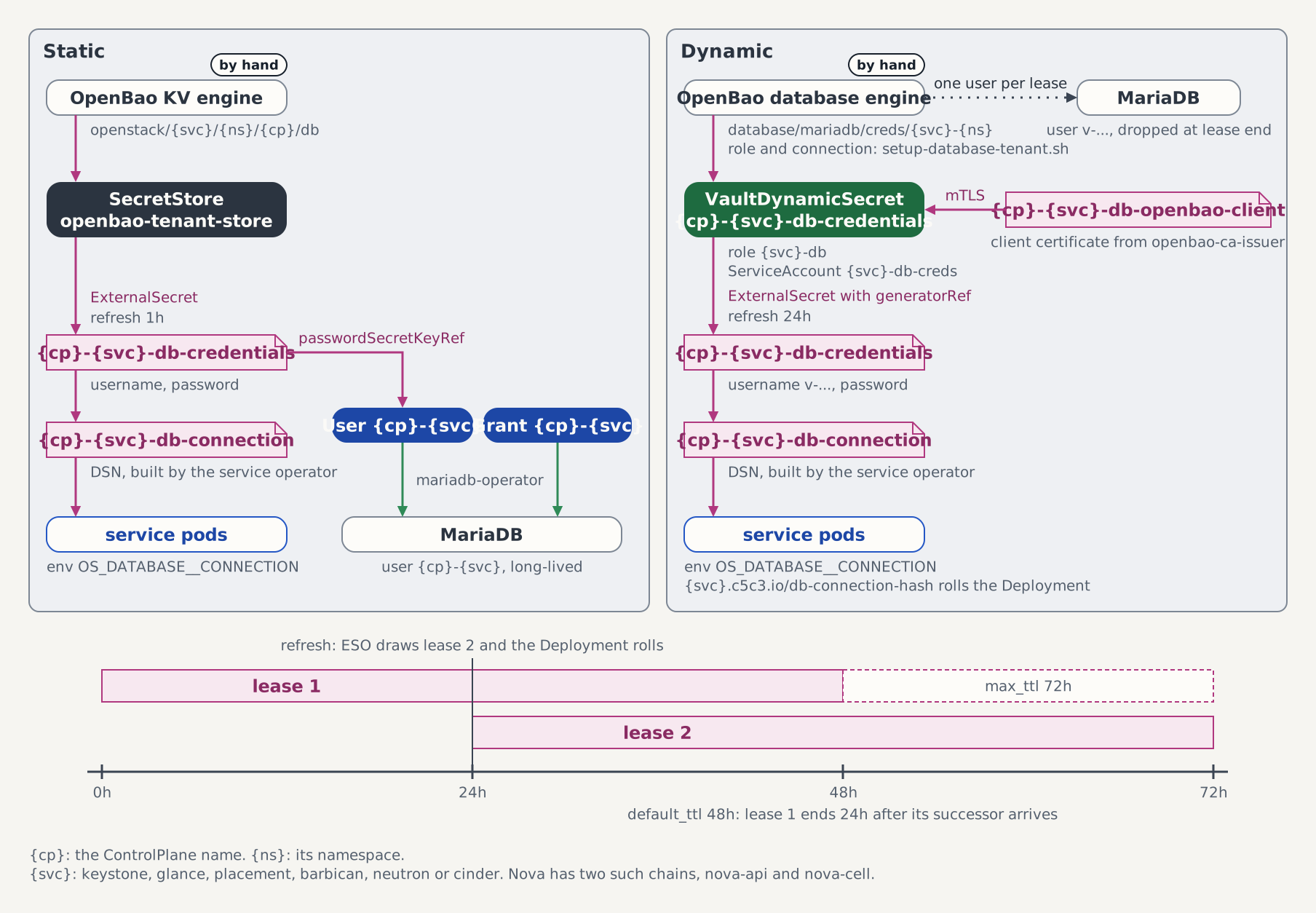
Here <namespace> is the Keystone service namespace: the ControlPlane's own namespace (openstack) in this quick start, and only different when spec.services.keystone.namespace places the Keystone service in a namespace of its own. The onboarding script resolves it from the live ControlPlane spec, so the two arguments below always name the ControlPlane, wherever its Keystone lands.
Run it after the kubectl apply from Step 4, as soon as the projected MariaDB is Ready (the script configures the engine's database connection, so it needs a reachable database):
kubectl wait mariadb/openstack-db -n openstack --for=condition=Ready --timeout=10m

export BAO_TOKEN=$(kubectl get secret openbao-init-keys -n shared-services \
  -o jsonpath='{.data.init-output}' | base64 -d | jq -r '.root_token')
deploy/openbao/bootstrap/setup-database-tenant.sh openstack controlplane
unset BAO_TOKEN
The two arguments are the ControlPlane namespace and name (openstack controlplane here; adjust the second one if you renamed the CR via CONTROLPLANE_NAME in Step 2). BAO_TOKEN is read from the openbao-init-keys Secret where deploy-infra stores the root token, which is kind-only plumbing; against a production OpenBao use a token with write access to database/mariadb/*. The script is idempotent: re-running it refreshes the connection and role in place.
Beside Keystone's role the script provisions one role per database service the CR declares, and two for Nova, whose state spans two schemas: nova-api-<namespace> issues users on nova_api, and nova-cell-<namespace> issues users on nova and nova_cell0.
Skip this step only when:
- Step 2 ran with
WITH_CONTROLPLANE_CR=true, in which case deploy-infra onboards the bundled ControlPlane automatically, or - the ControlPlane opts out of Dynamic credentials with
spec.infrastructure.database.credentialsMode: Static(see Migrate Keystone DB to Dynamic Credentials).
If you skip it
The reconcile chain stalls before any Keystone or Horizon child is created: the ControlPlane reports DBCredentialsReady=False (reason WaitingForDBCredentialSecret), the controlplane-keystone-db-credentials ExternalSecret sits in SecretSyncedError, and the external-secrets controller logs unknown role: keystone-<namespace>. Nothing is lost: run the onboarding script and ESO syncs the credential on its next retry.
A per-tenant OpenBao identity is the default
This ControlPlane reaches OpenBao through a store of its own. The c5c3-operator provisions the SecretStore openbao-tenant-store in the openstack namespace and routes the ControlPlane and its children through it, so OpenBao itself isolates it from other tenants. There is nothing to run. spec.secretStoreRef is the override for a store you manage yourself. See the multi-tenant deployment guide.
Step 6 — Watch the chain reconcile
The aggregate Ready flips to True once all 21 sub-conditions are met. They do not form one line. The first seven are a blocking prefix, and each waits for the one before it. The others belong to steps that all run on every pass, so several of them can be False at once, and each waits only for what the figure draws an arrow from.
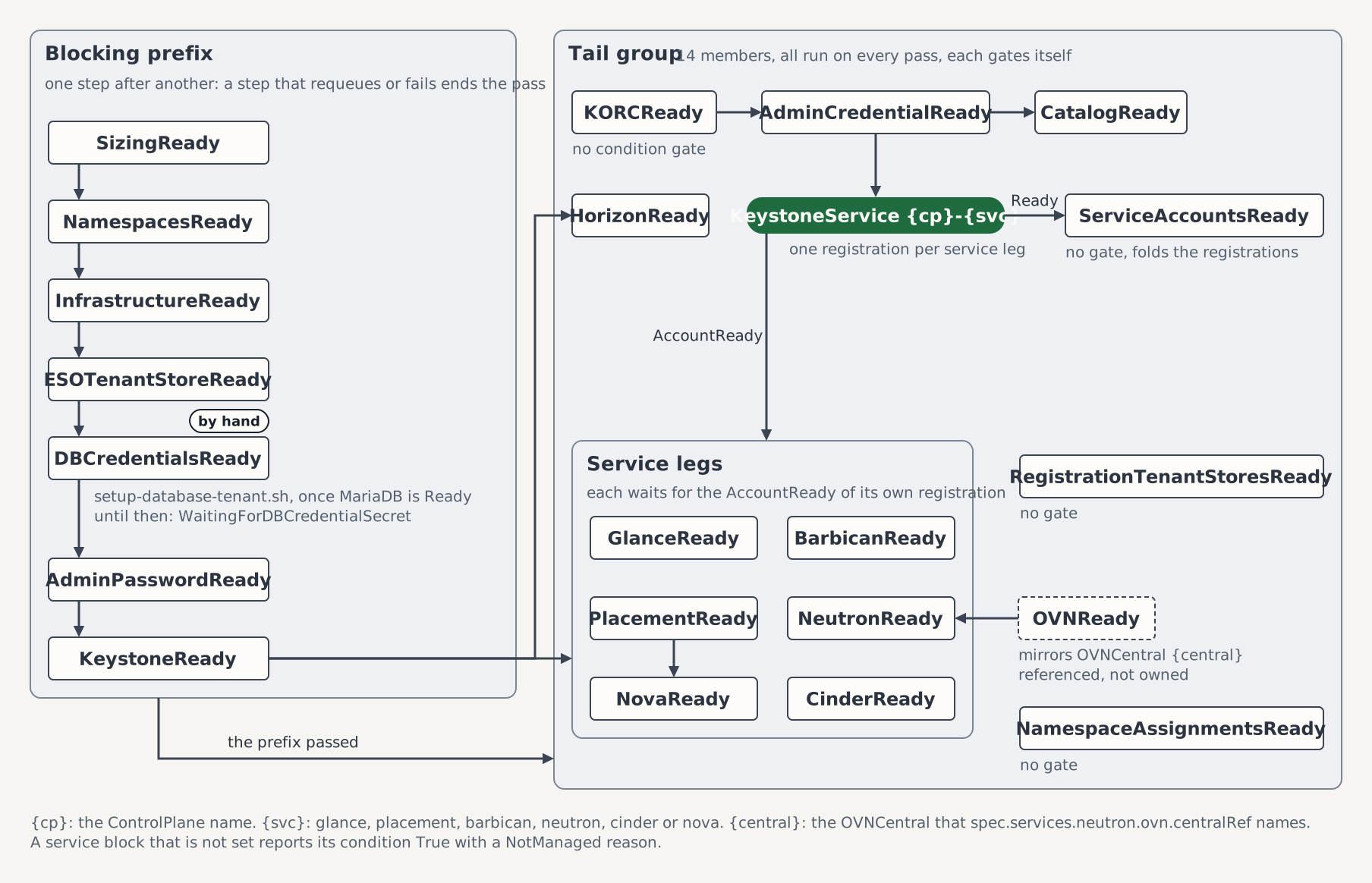
The conditions in call order, with what each waits for on this devstack:
| Condition | Waits for |
|---|---|
SizingReady | Nothing |
NamespacesReady | SizingReady. Reads True/NoDedicatedNamespaces here: no service has a namespace of its own |
InfrastructureReady | NamespacesReady, then the backing services of spec.infrastructure |
ESOTenantStoreReady | InfrastructureReady, then the secret store openbao-tenant-store |
DBCredentialsReady | ESOTenantStoreReady, then the onboarding of Step 5 |
AdminPasswordReady | DBCredentialsReady, then the admin password from OpenBao |
KeystoneReady | AdminPasswordReady, then the Keystone child controlplane-keystone |
HorizonReady | KeystoneReady |
KORCReady | The prefix. It has no gate of its own |
AdminCredentialReady | KORCReady |
CatalogReady | AdminCredentialReady |
GlanceReady | KeystoneReady and its own KeystoneService registration |
PlacementReady | KeystoneReady and its own registration |
BarbicanReady | KeystoneReady and its own registration |
OVNReady | Nothing in this chain. It mirrors controlplane-ovn from Step 3 |
NeutronReady | KeystoneReady, OVNReady, its registration and the message bus in its namespace |
CinderReady | KeystoneReady, its registration and the message bus. Reads True/CinderNotManaged without the block-storage block |
NovaReady | KeystoneReady, PlacementReady, its registration and the message bus |
ServiceAccountsReady | The registrations of glance, placement, barbican, neutron, neutron-nova, cinder when present, and nova |
RegistrationTenantStoresReady | Nothing. Reads True/NoRegistrationNamespaces here: no other namespace registers a service against this ControlPlane |
NamespaceAssignmentsReady | Nothing. Reads True/NoNamespaceAssignments here: no namespace is assigned to a service owner |
Each of the six services registers through a KeystoneService, and a registration waits for AdminCredentialReady, so the six service conditions turn True only after it.
kubectl get controlplane controlplane -n openstack \
  -o jsonpath='{range .status.conditions[*]}{.type}={.status} ({.reason}){"\n"}{end}'
Wait for the aggregate condition:
kubectl wait controlplane/controlplane -n openstack \
  --for=condition=Ready --timeout=15m
Step 7 — Verify
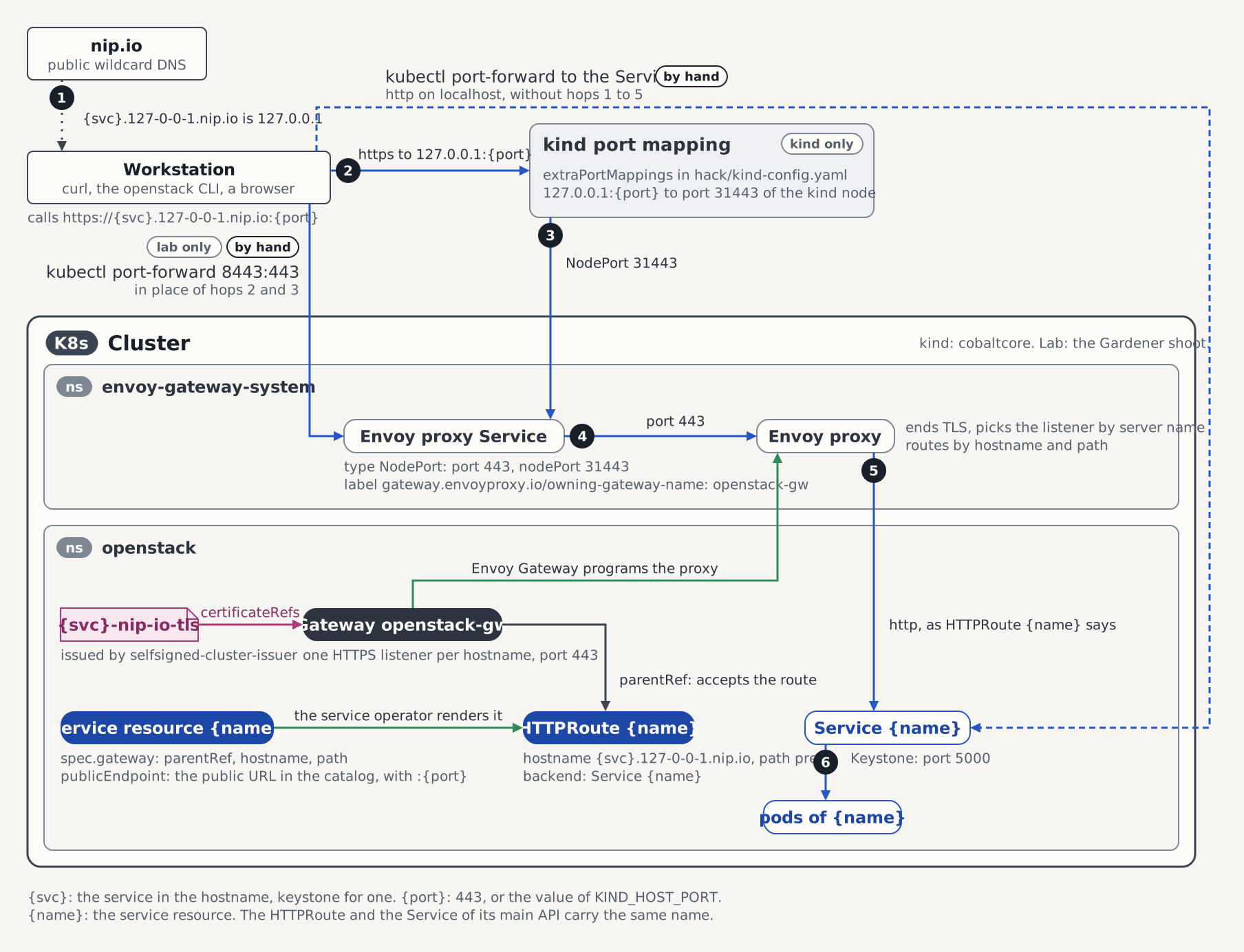
The ControlPlane exposes the projected Keystone through the shared Envoy Gateway at https://keystone.127-0-0-1.nip.io:8443/v3, the same path as the per-service Quick Start, and no port-forward is needed.
The figure follows that path. Every service block with a gateway has a listener and a route of its own, and the publicEndpoint lines of the CR in Step 4 put the host port into the catalog. The request path, hop by hop names each hop and where a first run stops.
curl -k https://keystone.127-0-0-1.nip.io:8443/v3If your host cannot resolve *.nip.io
On some local setups that filter or block this specific DNS pattern, the following command fails:
curl -k https://keystone.127-0-0-1.nip.io:8443/v3The command returns the following error:
curl: (6) Could not resolve host: keystone.127-0-0-1.nip.ionip.io resolves hostnames like keystone.127-0-0-1.nip.io to the loopback address 127.0.0.1 by design. Some routers ship DNS rebind protection, a security feature that silently drops any DNS response resolving a public hostname to a private or loopback address, which is this pattern. When your machine's resolver does this, nip.io never resolves. Confirm the cause by comparing your router against a public resolver:
dig +short keystone.127-0-0-1.nip.io @<your-router-ip>   # empty: blocked
dig +short keystone.127-0-0-1.nip.io @1.1.1.1            # 127.0.0.1: as expected
The most reliable fix is host-local: add loopback entries to /etc/hosts:
sudo sh -c 'cat >> /etc/hosts <<EOF
127.0.0.1 keystone.127-0-0-1.nip.io
127.0.0.1 horizon.127-0-0-1.nip.io
127.0.0.1 glance.127-0-0-1.nip.io
127.0.0.1 placement.127-0-0-1.nip.io
127.0.0.1 barbican.127-0-0-1.nip.io
127.0.0.1 neutron.127-0-0-1.nip.io
127.0.0.1 cinder.127-0-0-1.nip.io
127.0.0.1 nova.127-0-0-1.nip.io
EOF'
For a one-off curl check without touching /etc/hosts, use --resolve to override DNS for a single host/port pair. curl still sends the original hostname in the request and TLS handshake, but connects directly to 127.0.0.1:
curl -k --resolve keystone.127-0-0-1.nip.io:8443:127.0.0.1 \
  https://keystone.127-0-0-1.nip.io:8443/v3
If you'd rather fix it at the network level, most routers let you exempt specific domains from rebind protection, or you can add a public resolver (e.g. 1.1.1.1) ahead of the router in your machine's network settings.
Then issue a token with the admin password:
export OS_AUTH_URL=https://keystone.127-0-0-1.nip.io:8443/v3
export OS_USERNAME=admin
export OS_PASSWORD=$(kubectl get secret controlplane-keystone-admin-credentials -n openstack -o jsonpath='{.data.password}' | base64 -d)
export OS_PROJECT_NAME=admin
export OS_USER_DOMAIN_NAME=Default
export OS_PROJECT_DOMAIN_NAME=Default
openstack --insecure token issue
The admin password is read from the operator-owned per-ControlPlane Secret
controlplane-keystone-admin-credentials(named{ControlPlane name}-keystone-admin-credentials). In managed mode the c5c3-operator always projects this Secret, so the command holds for any identity. If you setCONTROLPLANE_NAME=fooin Step 2, readfoo-keystone-admin-credentialsinstead.
With the default
KIND_HOST_PORT=443usehttps://keystone.127-0-0-1.nip.io/v3and drop all sevenpublicEndpointlines (keystone, glance, placement, barbican, neutron, nova, and cinder) from the CR in Step 4.
Upload a first image
With the OS_* variables from the token-issue step still exported, confirm the Image service reached the catalog:
openstack --insecure catalog listAn image row proves Glance registered its endpoints. The public image catalog row now carries the gateway URL (https://glance.127-0-0-1.nip.io:8443, the publicEndpoint from Step 4), and the openstack CLI resolves the public interface by default, so the upload runs directly from the host through the shared Gateway, with no in-cluster pod involved. --insecure accepts the listener's self-signed certificate, as with the Keystone calls above.
Create a throwaway 1 KiB image, upload it through the gateway, wait for it to reach active, and delete it again:
dd if=/dev/urandom of=/tmp/first.img bs=1024 count=1
openstack --insecure image create --disk-format raw --container-format bare \
  --file /tmp/first.img first-image
for _ in $(seq 30); do
  [ "$(openstack --insecure image show first-image -f value -c status)" = active ] && break
  sleep 2
done
test "$(openstack --insecure image show first-image -f value -c status)" = active \
  && echo "OK: image uploaded through the gateway and reached active"
openstack --insecure image delete first-image
The poll loop matters because image create returns as soon as Glance accepts the upload, while the store write completes asynchronously: a cold S3 connection or a contended Garage backend can leave the image in saving for a few seconds.
A run aborted before the final delete leaves first-image behind; delete it (openstack --insecure image delete first-image) before retrying, or the next image create fails on a name collision.
OS_REGION_NAME is optional
Every catalog row the ControlPlane registers sits in its spec.region (RegionOne here), beside the identity rows Keystone's bootstrap inserted, so the openstack commands on this page work with OS_REGION_NAME=RegionOne exported and without it.
List placement resource classes
With the same OS_* variables still exported, confirm the Placement service reached the catalog:
openstack --insecure catalog listA placement row proves the ControlPlane registered both endpoints: the in-cluster one at http://controlplane-placement.openstack.svc:8778 and the public one at https://placement.127-0-0-1.nip.io:8443, the publicEndpoint from Step 4. Then ask the API for its resource classes:
openstack --insecure resource class listThe call is read-only and Placement answers it only for an authenticated request, so a listing of the standard classes (VCPU, MEMORY_MB and DISK_GB among them) covers the catalog row, the gateway listener, and the service user's token validation in one command. It needs the osc-placement plugin from the prerequisites; without it the openstack CLI rejects resource class list as an unknown command.
Store and retrieve a first secret
With the same OS_* variables still exported, confirm the Key Manager service reached the catalog:
openstack --insecure catalog listA key-manager row proves the ControlPlane registered both endpoints: the in-cluster one at http://controlplane-barbican.openstack.svc:9311 and the public one at https://barbican.127-0-0-1.nip.io:8443, the publicEndpoint from Step 4. Store a secret through that public endpoint, read the payload back, and delete it again:
PAYLOAD='cobaltcore-quick-start-payload'
HREF=$(openstack --insecure secret store --name first-secret \
  --payload "$PAYLOAD" -f value -c 'Secret href')
test "$(openstack --insecure secret get -p "$HREF" -f value -c Payload)" = "$PAYLOAD" \
  && echo "OK: payload came back unchanged from the key manager"
openstack --insecure secret delete "$HREF"
A payload that survives the round-trip covers the whole key-manager chain in two calls: the catalog row resolves the endpoint, Barbican validates the admin token against Keystone, and the payload travels through castellan's vault plugin into the dedicated controlplane-barbican-bao instance and out again. The openstack secret subcommands come from the python-barbicanclient plugin in the prerequisites; without it the CLI rejects secret store as an unknown command.
Do not substitute real key material into --payload
The literal above is a throwaway, and this snippet is written for the ControlPlane devstack. A value passed to --payload sits in the process argument vector, where any local user reads it out of ps or /proc/<pid>/cmdline for the life of the call, and typing it directly rather than through a variable also leaves it in your shell history. Feed real material in from a file or from standard input instead. --insecure belongs to this ControlPlane devstack for the same reason, and it reaches further than the payload: the flag disables certificate verification for the whole invocation, including the Keystone call that sends OS_PASSWORD. Anything that answers on the way collects the admin credential. Drop it anywhere the gateway presents a certificate you trust.
Create a first network
With the same OS_* variables still exported, confirm the network service reached the catalog:
openstack --insecure catalog listA network row proves the ControlPlane registered both endpoints: the in-cluster one at http://controlplane-neutron.openstack.svc:9696 and the public one at https://neutron.127-0-0-1.nip.io:8443, the publicEndpoint from Step 4. Create a network, put a subnet on it, and read the network's status back:
openstack --insecure network create demo-net
openstack --insecure subnet create --network demo-net --subnet-range 192.0.2.0/24 demo-subnet
openstack --insecure network show demo-net -c status -f value
The last command prints ACTIVE. That one word covers the whole network chain: the catalog row resolved the endpoint, the gateway listener routed the request to the Neutron API, Neutron validated the admin token against Keystone, and the ML2/OVN mechanism driver wrote the logical switch into the Northbound database of controlplane-ovn. The subnet range is the RFC 5737 documentation block, so it collides with nothing on your host. These are core python-openstackclient commands, so no plugin is needed here.
Remove the two objects again, the subnet first:
openstack --insecure subnet delete demo-subnet
openstack --insecure network delete demo-net
Create a first volume
This check belongs to the optional block-storage block of Step 4; skip it if you left that block out. With the same OS_* variables still exported, confirm the block-storage service reached the catalog:
openstack --insecure catalog listA block-storage row proves the ControlPlane registered both endpoints: the in-cluster one at http://controlplane-cinder.openstack.svc:8776/v3 and the public one at https://cinder.127-0-0-1.nip.io:8443/v3, the publicEndpoint from Step 4 with the /v3 the registration appends. Create a 1 GiB volume and read its status back:
openstack --insecure volume create --size 1 demo-vol
openstack --insecure volume show demo-vol -c status -f value
The last command prints available. That one word covers the whole block-storage chain: the catalog row resolved the endpoint, the gateway listener routed the request to the Cinder API, the API cast the request to the scheduler over the message bus, the scheduler picked the nfs1 backend, and the volume service wrote a volume-<id> file into the export. That file sits at the md5 mount point /var/lib/cinder/mnt/<md5>, owned 42424:42424 with mode 660. These are core python-openstackclient commands, so no plugin is needed here.
Clean the volume up when you are done:
openstack --insecure volume delete demo-volConfigure NFS backups starts from the demo-vol this check leaves behind, so keep the volume if that guide is your next stop.
Boot a first server
With the same OS_* variables still exported, confirm the compute service reached the catalog:
openstack --insecure catalog listA compute row proves the ControlPlane registered both endpoints: the in-cluster one at http://controlplane-nova.openstack.svc:8774/v2.1 and the public one at https://nova.127-0-0-1.nip.io:8443/v2.1, the publicEndpoint from Step 4 with the /v2.1 the registration appends. Then list the compute services the control plane runs:
openstack --insecure compute service listnova-scheduler and nova-conductor each report up. Each registers under the name of its pod, controlplane-nova-scheduler-… and controlplane-nova-conductor-…, because the control plane sets no [DEFAULT] host; a down row under an older pod name is a pod that has been replaced since. No nova-compute row appears. The ControlPlane runs no compute node, so the plane accepts a server but has no host to place it on.
Optional: boot a server on a fake compute
The kind overlay deploy/kind/fake-compute/ adds a nova-compute on nova's fake virt driver. It is built from the compute contract controlplane-nova-compute-config the way a compute cluster would build one, and the servers it hosts run nothing. make deploy-infra never applies it. Apply it now that NovaReady is True, and wait for the rollout:
kubectl apply -k deploy/kind/fake-compute
kubectl rollout status deploy/controlplane-fake-compute -n openstack --timeout=5m
The compute registers under the name of the kind node, cobaltcore-control-plane. Wait until its service row reads up, which takes about a minute:
for _ in $(seq 24); do
  [ "$(openstack --insecure compute service list --service nova-compute \
    --host cobaltcore-control-plane -f value -c State)" = up ] && break
  sleep 5
done
openstack --insecure compute service list --service nova-compute
The scheduler places a server only on a host that is mapped into the cell, and its discovery periodic maps a new host within 300 seconds. Map it now by running the discovery in the conductor pod, or wait out those 300 seconds:
kubectl exec -n openstack deploy/controlplane-nova-conductor -c conductor -- \
  nova-manage --config-dir /etc/nova/nova.conf.d cell_v2 discover_hosts --verbose
openstack --insecure hypervisor list now shows cobaltcore-control-plane. Create a flavor the fake driver can satisfy and a 1 MiB image it never reads, then boot a server without a network:
openstack --insecure flavor create --vcpus 1 --ram 128 --disk 1 m1.nano
truncate -s 1M /tmp/boot-image.raw
openstack --insecure image create --disk-format raw --container-format bare \
  --file /tmp/boot-image.raw boot-image
for _ in $(seq 30); do
  [ "$(openstack --insecure image show boot-image -f value -c status)" = active ] && break
  sleep 2
done
openstack --insecure server create --image boot-image --flavor m1.nano \
  --nic none --wait demo-server
openstack --insecure server show demo-server -c status -f value
The last command prints ACTIVE. That one word covers the compute chain: the API validated the admin token against Keystone, the conductor asked the scheduler for a host over the message bus, the scheduler claimed the flavor's resources in Placement, and the fake compute took the instance.
--nic none is what lets the boot finish here. This devstack runs no OVNChassis, so a port on a network could never bind, and a server with one would fail on the binding.
A server in ERROR whose fault reads No valid host was found was booted before the host was mapped:
openstack --insecure server show demo-server -c fault -f valueRun the discovery above, delete the server (openstack --insecure server delete --wait demo-server), and boot it again.
Clean up in reverse order, the server first:
openstack --insecure server delete --wait demo-server
openstack --insecure image delete boot-image
openstack --insecure flavor delete m1.nano
The fake compute itself keeps running. Run a Fake Compute for Testing explains its settings, resizes a server on it, and removes it again. Expose the Console Proxy starts from the demo-server this check boots, so keep the server if that guide is your next stop.
Servers that run on KVM, with a network, a console and live migration, are the subject of the Quick Start (metal-stack).
Open the Horizon dashboard
The dashboard is exposed through the same shared Envoy Gateway as Keystone, on its own horizon.127-0-0-1.nip.io listener:
open https://horizon.127-0-0-1.nip.io:8443/Your browser will warn that the certificate is not trusted. That is expected for a kind cluster, where the listener terminates with a self-signed certificate. Log in with admin / the password from the controlplane-keystone-admin-credentials Secret above (domain Default).
After login the dashboard redirects to /project/. Open the Identity panel to see the users and projects the ControlPlane provisioned:
open https://horizon.127-0-0-1.nip.io:8443/identity/With the default
KIND_HOST_PORT=443drop the:8443and openhttps://horizon.127-0-0-1.nip.io/.
Teardown
make teardown-infraRelated references
- ControlPlane CRD API Reference — every
spec.*field, the webhooks, and the status conditions. - ControlPlane Reconciler — the sub-reconciler ordering and gating semantics.
- Glance Operator — the projected Image service, its
GlanceBackendstores, and the reconciler chain. - Placement Operator — the projected Placement service, its CRD surface, and the reconciler chain.
- Barbican Operator — the projected Key Manager service, its
BarbicanSecretStoreattachment, and the reconciler chain. - Neutron Operator — the projected network service, its ML2/OVN posture, and the reconciler chain.
- Cinder Operator — the projected block-storage service, its
CinderBackendandCinderBackupBackendsatellites, and the reconciler chain. - Nova Operator — the projected compute service, its cells, the compute contract, and the reconciler chain.
- OVN Operator — the referenced
OVNCentral, theOVNChassisnode layer, and the reconciler chain. - Quick Start — the compact per-service Keystone path.