How-to: Repair OVN Drift with db-sync
Neutron holds the networks, subnets and ports it was asked for; the OVN Northbound database holds the logical model the ML2/OVN mechanism driver wrote for them. A restore, a manual edit or a partial outage can leave the two disagreeing. neutron-ovn-db-sync-util walks both and reports the difference, or rewrites the Northbound side to match.
spec.ovnDBSync on a Neutron is what schedules that utility as a CronJob. This guide turns it on in its reporting mode, runs it once by hand, reads the report, and switches to repair for a single run.
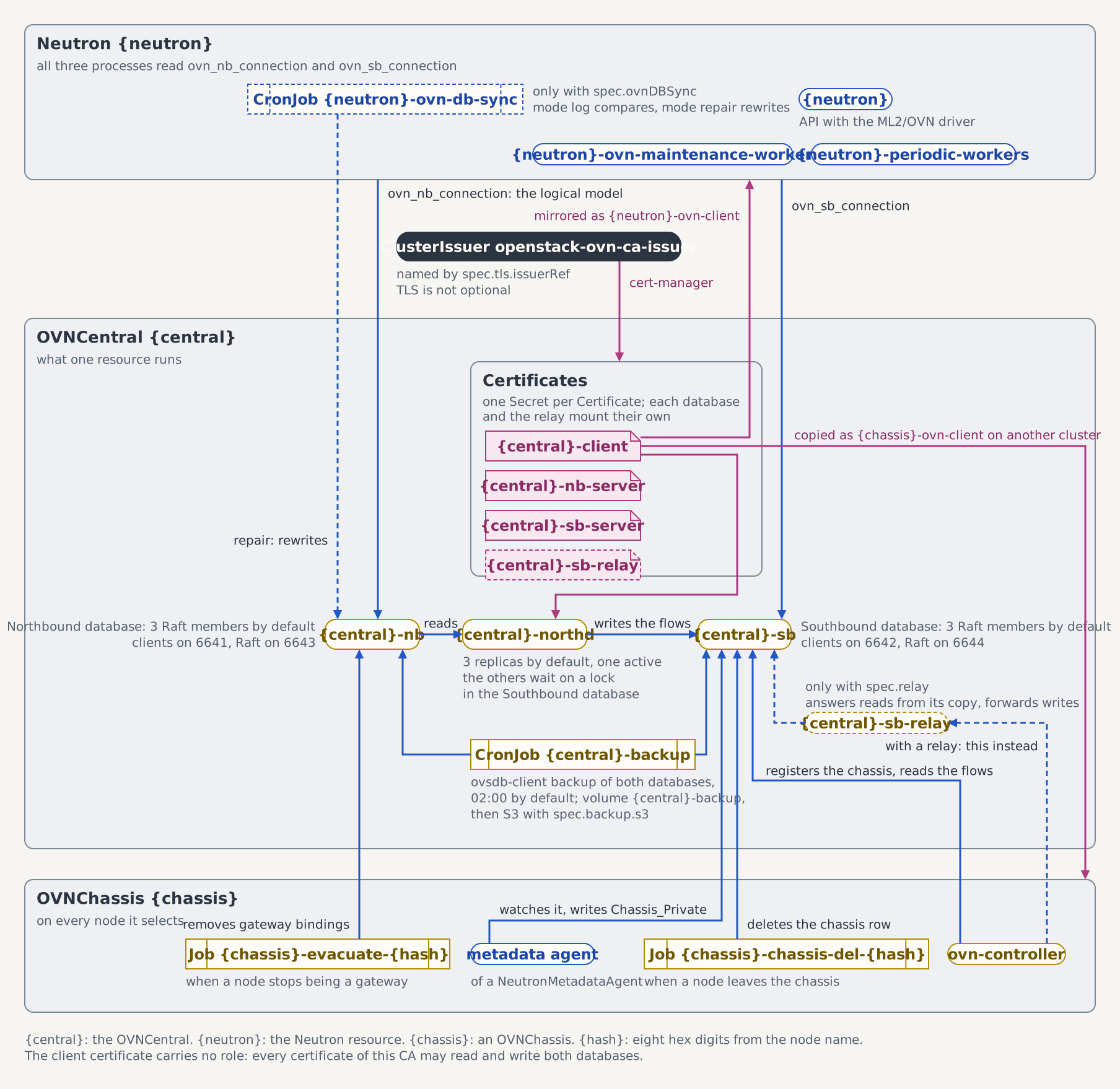
The figure shows the Northbound database with everything that writes to it: the ML2/OVN driver in the API, the maintenance worker, and the CronJob this guide schedules.
Prerequisites
Devstack
This guide is written against the Quick Start (ControlPlane) devstack. Stand it up first:
KIND_HOST_PORT=8443 WITH_CONTROLPLANE=true make deploy-infraFollow that tutorial through to the Create a first network check in its Step 7, so the projected Neutron controlplane-neutron is Ready in the openstack namespace and its logical model holds something worth comparing.
- The
OVNCentralcontrolplane-ovnreachable from the Neutron pods. The sync utility reads the same two config files the API pods do, so a Northbound address they cannot dial is one it cannot dial either.
Steps
1. Turn the comparison on
spec.ovnDBSync is yours to set and yours to revert
The c5c3-operator projects controlplane-neutron through a server-side apply of the fields it sets, and spec.ovnDBSync is not among them: the ControlPlane CRD carries no field for the schedule, and the projection leaves the child's own value alone (see ServiceNeutronSpec). The patch below therefore survives every reconcile, and nothing takes it back for you.
kubectl patch neutron controlplane-neutron -n openstack --type merge \
  -p '{"spec":{"ovnDBSync":{"syncMode":"log","suspend":true}}}'
Undo it with the matching removal when you are done:
kubectl patch neutron controlplane-neutron -n openstack --type json \
  -p '[{"op":"remove","path":"/spec/ovnDBSync"}]'
syncMode: log reports and changes nothing. suspend: true keeps the schedule from firing while you drive the runs yourself, so the only comparison against the Northbound database is the one you ask for. An unset schedule resolves to the hourly default at reconcile time, and a suspended CronJob never reaches it.
The operator projects the CronJob under the CR's name plus the sync suffix:
kubectl get cronjob controlplane-neutron-ovn-db-sync -n openstack2. Run it once by hand
Creating a Job from the CronJob runs the pod template the schedule would have run:
kubectl create job controlplane-neutron-ovn-db-sync-manual \
  --from=cronjob/controlplane-neutron-ovn-db-sync -n openstack
kubectl wait --for=condition=complete -n openstack \
  job/controlplane-neutron-ovn-db-sync-manual --timeout=10m
A Job created this way carries the sync labels but no controller reference back to the CronJob, and the operator reports on the runs the CronJob controls, so this one leaves OVNDBSyncReady reporting the suspended schedule it reported before.
3. Read the report
The verdict is in the log, not in the exit status:
kubectl logs job/controlplane-neutron-ovn-db-sync-manual -n openstackIn log mode the utility exits 0 whether or not the two databases agree, so a completed Job says nothing about drift on its own. Look for the lines that name an object and the side it is missing from:
Network found in OVN NB DB but not in Neutron, network_id=<uuid>A run that finds nothing prints no such line.
4. Repair, for a run you intend
repair mode deletes every Northbound object the Neutron database cannot account for and creates the ones Neutron has that OVN lacks. Nothing replays those deletions for you, so take a Northbound snapshot before the run. The report you read in Step 3 came from an earlier run, and the database keeps moving between the two:
kubectl create job controlplane-ovn-backup-prerepair \
  --from=cronjob/controlplane-ovn-backup -n openstack
kubectl wait --for=condition=complete -n openstack \
  job/controlplane-ovn-backup-prerepair --timeout=5m
Restore an OVN Database Snapshot is the way back if the run deletes more than the report led you to expect.
Switch to repair only once you have read a report you agree with. The mode is baked into the CronJob's pod template, and the patch reaches that template only on the operator's next reconcile, so wait for the projection before you create a Job from it. kubectl create job --from=cronjob/... copies whatever template is on the CronJob at that instant:
kubectl patch neutron controlplane-neutron -n openstack --type merge \
  -p '{"spec":{"ovnDBSync":{"syncMode":"repair"}}}'

kubectl wait --for=jsonpath='{.spec.jobTemplate.spec.template.spec.containers[0].command[-1]}'=repair \
  cronjob/controlplane-neutron-ovn-db-sync -n openstack --timeout=2m
Then repeat Step 2 under a fresh Job name, read its log the same way, and put syncMode back to log — waiting on the same projection with log as the value, because a schedule that resumes before it lands still fires the repair template. Leaving the CR in repair lets the hourly schedule rewrite the logical model unattended, which is the wrong posture for anything but the window you are working in.
5. Read the condition
OVNDBSyncReady reports Job outcomes, never drift:
| Reason | What it says |
|---|---|
OVNDBSyncNotRequired | spec.ovnDBSync is unset, so no CronJob exists |
OVNDBSyncScheduled | The CronJob is projected and firing on its schedule |
OVNDBSyncSuspended | The schedule is paused; the message names the mode it resumes in |
OVNDBSyncJobFailed | The newest run the CronJob controls failed |
kubectl get neutron controlplane-neutron -n openstack \
  -o jsonpath='{.status.conditions[?(@.type=="OVNDBSyncReady")].reason}'
On a failure the condition message and the Warning event both name one line to look for in the pod log:
Could not retrieve schema from <address>It means the Northbound at that address was unreachable. The two databases were never compared, so nothing about their agreement follows from that run.
When to run it
The obvious moment is after a Northbound restore. The replay brings back the model as of the snapshot, while Neutron's own database kept moving, so the two disagree wherever anything changed since. Take the report first: Restore an OVN Database Snapshot ends by pointing here for that pass.
The other moments are the same shape: after someone has edited the Northbound database directly, and after an outage that interrupted the mechanism driver mid-write.
See also
- ovnDBSync: the field, the two modes, and the CronJob's concurrency and deadline settings.
- reconcileOVNDBSync: how the operator picks the run it reports on.
- Controller events: the
OVNDBSyncJobFailedevent and the field selector to watch it with.
Tested by
The flow above mirrors the following end-to-end suite, which brings a Neutron up with a suspended repair schedule, puts a logical switch in the Northbound database that Neutron knows nothing about, runs the CronJob's pod template once, and reads the switch back:
chainsaw test --test-dir tests/e2e/neutron/ovn-db-sync-repairThe suite proves the deletion direction of repair mode, on a leg that carries no Keystone: it drives the Northbound database directly, so the openstack side of a drift stays outside what it asserts.
The Neutron the suite applies
The suite shares the openstack namespace with every other neutron suite, so its CR is isolation-named (neutron-dbsync on the schema neutron_dbsync) where the walkthrough above uses the controlplane-neutron name the devstack produces. Its spec.ovnDBSync is the block Step 1 patches in, already switched to the mode Step 4 reaches.
apiVersion: neutron.openstack.c5c3.io/v1alpha1
kind: Neutron
metadata:
  name: neutron-dbsync
  namespace: openstack
spec:
  openStackRelease: "2026.1"
  deployment:
    replicas: 1
  workers:
    deployment:
      replicas: 1
  image:
    repository: ghcr.io/c5c3/neutron
    tag: "2026.1"
  database:
    clusterRef:
      name: openstack-db
    database: neutron_dbsync
    secretRef:
      name: neutron-db
  cache:
    clusterRef:
      name: openstack-memcached
  messaging:
    secretRef:
      name: neutron-dbsync-messaging
  ovn:
    centralRef:
      name: neutron-dbsync-ovn
  keystoneEndpoint: http://keystone.openstack.svc.cluster.local:5000/v3
  serviceUser:
    username: admin
    projectName: admin
    userDomainName: Default
    projectDomainName: Default
    secretRef:
      name: keystone-admin
      key: password
  ovnDBSync:
    syncMode: repair
    suspend: true