Quick Start (metal-stack): ControlPlane and KVM hypervisors on a metal-stack cluster
This guide builds the metal-stack devstack of the guide conventions on a Gardener shoot with two or more workers. Part 1 deploys the infrastructure stack, a Ceph for Cinder and the full ControlPlane, reached through a port-forward. Part 2 turns every worker into a KVM hypervisor of that ControlPlane and boots a server on each. One server gets a Cinder volume on Ceph and keeps it through a live migration and the eviction of its node. The volume is backed up after the detach and restored into a new volume, and the key of the Ceph user is rotated under the running servers. With the optional lab NFS stack, Part 3 adds an NFS volume backend beside Ceph. The teardown leaves the cluster as bare as it was. The ControlPlane CR is the one of the Quick Start (ControlPlane) with its block-storage block on Ceph and three lab settings; read Steps 3 and 4 there for its anatomy.
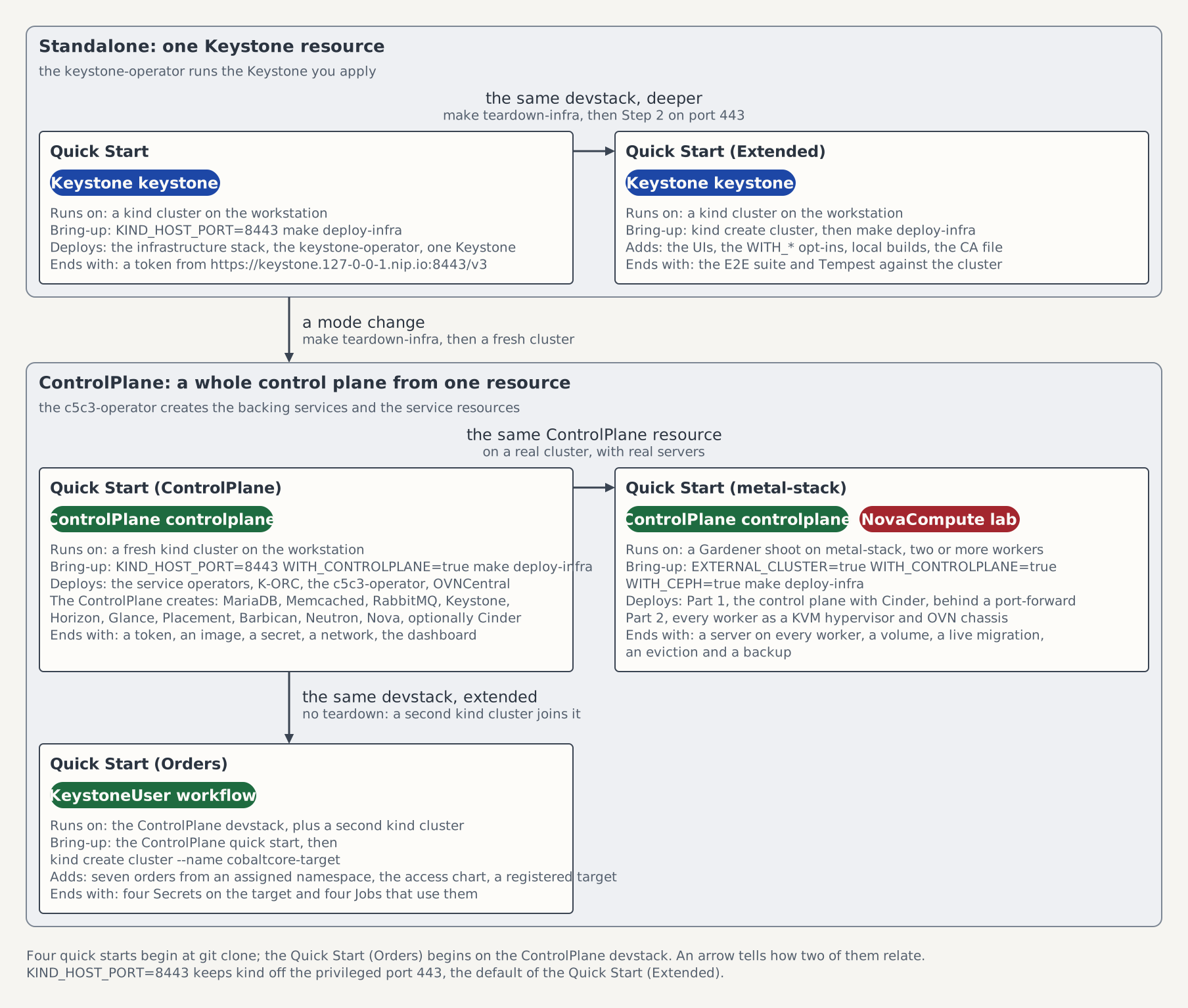
On the map of the five quick starts this page is the box Quick Start (metal-stack): the ControlPlane of the Quick Start (ControlPlane) on a cluster you bring, with servers on KVM.
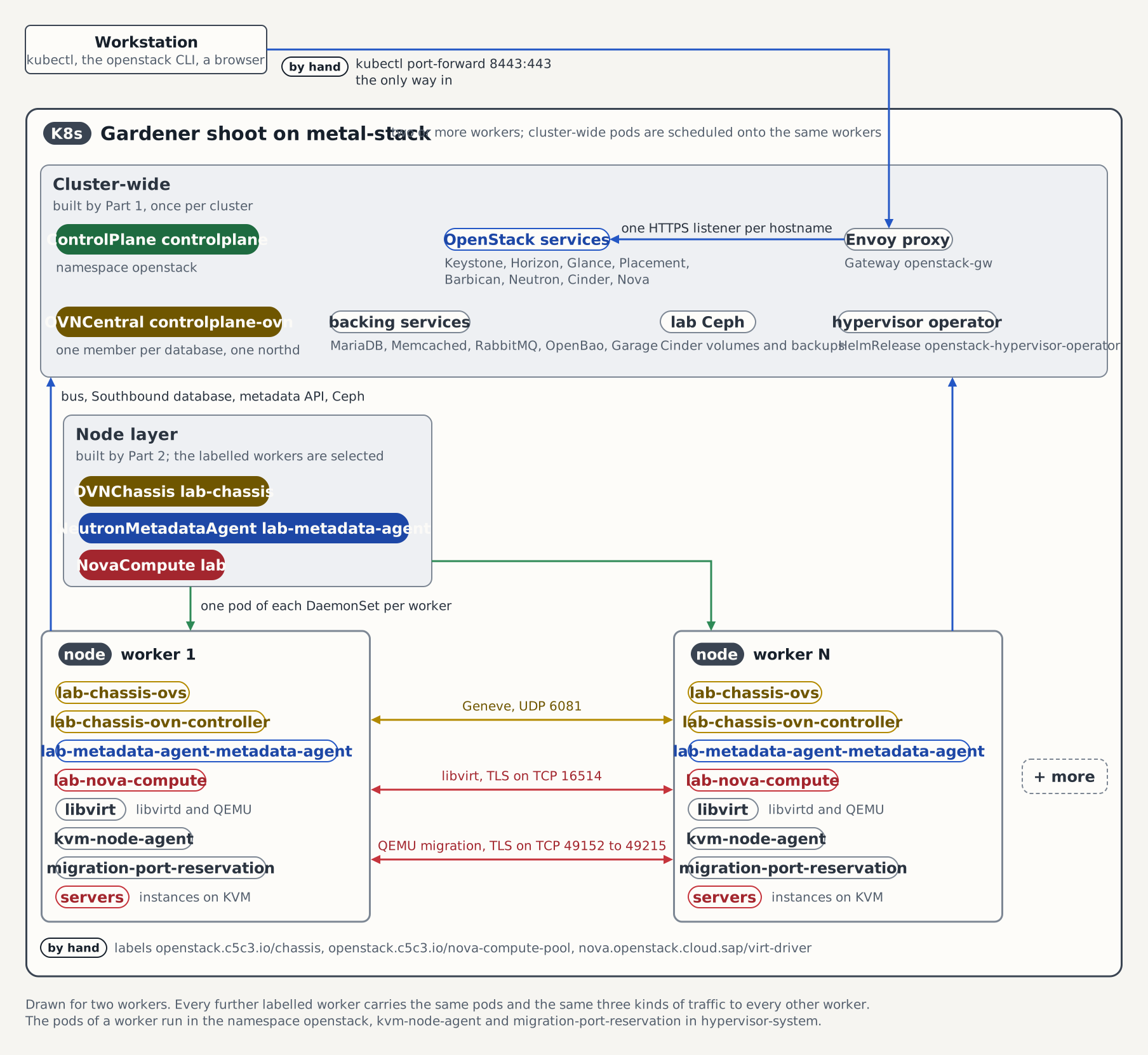
The figure shows the lab after both parts: what runs once per cluster, what runs on every worker, the port-forward as the only way in, and the traffic between the workers.
Prerequisites
The lab assumes a cluster of this shape:
| The lab assumes | Where it shows |
|---|---|
A Gardener shoot on metal-stack with two or more Ready workers that carry the same topology.kubernetes.io/zone label | kubectl get nodes -L topology.kubernetes.io/zone |
/dev/kvm on every worker and the same CPU model; deploy/lab/metal-stack/hypervisor/compute.yaml names Skylake-Server-IBRS, the host-model of a c1-medium-x86 (Xeon D-2141I), and other hardware changes cpuModels there | probe, == kvm device and == cpu |
The module files vhost_net, openvswitch and geneve for the running kernel | probe, == module files for <kernel> |
Only with the optional WITH_NFS=true of Part 3: the module files nfs and nfsv4 for the running kernel | probe, == module files for <kernel> |
Only with the optional WITH_CHAOS_MESH=true: the module files ip_set, ip_set_hash_ip, ip_set_hash_net, xt_set, sch_netem and sch_tbf for the running kernel | probe, == module files for <kernel> |
No /var/lib/rook on any node, which a Ceph deployed there before leaves behind | probe, == rook |
| cgroup v2 | probe, == cgroup |
/var/lib on a volume with room for the instance disks (192 GiB on the surveyed node) | probe, == disks |
No libvirtd, qemu-system-x86_64 or ovs-vswitchd on the host | probe, == host os / binaries |
A pod-network MTU of 1460 or more, the value of global_physnet_mtu | probe, == nics, the cali* lines |
A default StorageClass, which every volume of the stack binds to, and no DaemonSet kube-system/node-local-dns | Step 1 of EXTERNAL_CLUSTER=true make deploy-infra exits 1 otherwise |
Room in that class for three 100Gi raw block volumes and one 10Gi volume of the Ceph, from a provisioner that serves volumeMode: Block | the Ceph wait of the deploy in Step 3, which exits 1 otherwise |
Only with the optional WITH_NFS=true of Part 3: room in that class for a 100Gi volume, the claim nfs-server-exports of the NFS server | the nfs-server rollout wait of the deploy, which exits 1 otherwise |
Egress on TCP 443 to ghcr.io, the Helm repositories and the cirros download | the shoot's firewall |
| TCP 16514 and 49152 to 49215 open between the workers | hack/lab-node-ports.sh |
The shoot's kubeconfig is saved as kubeconfig in the root of the clone; .gitignore keeps that file out of git. The workstation needs kubectl, jq, yq v4.40.1 or newer, make, and the OpenStack CLI (python-openstackclient) with the osc-placement plugin. Neither Docker nor kind is needed: the deploy creates no cluster and loads no image.
Part 1: The control plane
Step 1: Clone and select the cluster
git clone https://github.com/c5c3/cobaltcore.git
cd cobaltcore
Save the shoot's kubeconfig as kubeconfig in this directory, then point kubectl at it:
export KUBECONFIG="$PWD/kubeconfig"
kubectl get nodes
Every worker reports Ready. Every command on this page runs from this directory with KUBECONFIG set this way.
Step 2: Probe the nodes
The node probe is a read-only Job that prints the node facts the lab depends on under thirteen fixed headers. The loop pins it to each node in turn, under a === <node> line, and deletes it before and after every run: a Job's pod template is immutable, so a Job left over from an interrupted run would make the apply fail and print another node's facts:
for node in $(kubectl get nodes -o jsonpath='{.items[*].metadata.name}'); do
  echo "=== ${node}"
  kubectl delete job -n default node-probe --ignore-not-found
  yq ".spec.template.spec.nodeName = \"${node}\"" deploy/lab/metal-stack/probe/node-probe.yaml | kubectl apply -f - || continue
  kubectl wait --for=condition=complete job/node-probe -n default --timeout=5m
  kubectl logs -n default job/node-probe
  kubectl delete job -n default node-probe
done
Compare each node's output with the Prerequisites table and with the expected output in the header of deploy/lab/metal-stack/probe/node-probe.yaml, which a lab-ready node printed on 2026-10-04. The probe completes whatever it finds, so a missing piece shows up as absent, none or NOT FOUND in the output and not as a failed Job.
Step 3: Deploy the stack
EXTERNAL_CLUSTER=true WITH_CONTROLPLANE=true WITH_CEPH=true make deploy-infraThe script deploys onto the cluster the current kubeconfig context points at and never switches the context. It refuses the opt-ins this cluster does not take, checks the cluster before it applies anything, and installs the shared infrastructure and the ControlPlane operator stack. It returns once the ten operator releases are Ready and the cluster admits the manifests of Step 4. When it completes, it prints the port-forward command on its Access: line. make deploy-infra describes every step and variable.
WITH_CEPH=true deploys the Lab Ceph that holds Cinder's volumes and backups: the Rook operator and a Ceph with three OSDs per worker on raw block volumes of the default class, the RBD pools volumes and backups, and the users cinder and cinder-backup, whose keys reach the Secrets ceph-client-cinder and ceph-client-cinder-backup in openstack through OpenBao. The deploy waits until the Ceph reports HEALTH_OK, which can take several minutes, and its completion block names the status command, kubectl -n rook-ceph exec deploy/rook-ceph-tools -- ceph status. Without the flag the script exits 1 before it applies anything, because the ControlPlane of Step 4 puts Cinder's volume backend and backup target on that Ceph.
WITH_NFS=true is optional, and only Part 3 needs it. Added to the deploy command, it deploys the Lab NFS stack: an NFS server with the two shares /volumes and /backups, the csi-driver-nfs mounter, and pods that load the NFS kernel modules on the nodes.
WITH_CHAOS_MESH=true is optional, and this page does not need it. Added to the deploy command, it deploys Chaos Mesh for fault injection, limited to the namespaces the lab declares, with pods that load its kernel modules on the nodes; see Lab Chaos Mesh.
WITH_DIZZY=true is optional too, and this page does not need it either. Added to the deploy command, it deploys the metrics stack of a dizzy load or chaos soak: VictoriaMetrics, which keeps the metrics on a volume, and Grafana with dizzy's dashboards. A soak reaches them through the port-forward of Step 6 and a second one to VictoriaMetrics; see Lab dizzy stack. Once Part 2 has run, make dizzy-soak-start starts a six-hour soak inside the cluster that needs no port-forward and ends with a report and a verdict; see In-cluster soak.
WITH_PROMETHEUS=true is optional as well. Added to the deploy command, it deploys Prometheus and Grafana. Prometheus keeps its metrics on a volume and scrapes the service operators, and the hypervisor operator once Part 2 has applied it. Grafana carries a dashboard for the Keystone operator and one for the hypervisor operator. Prometheus is reached with kubectl -n monitoring port-forward svc/kube-prometheus-stack-prometheus 9090:9090 and Grafana with kubectl -n monitoring port-forward svc/kube-prometheus-stack-grafana 3000:80, where it signs in admin with the password prom-operator; see Lab Prometheus stack.
The shoot brings a VerticalPodAutoscaler and a metrics-server of its own, so the script refuses WITH_VPA=true and WITH_METRICS_SERVER=true and installs neither. A workload opts into the platform's VPA with its verticalAutoscaling block, and an API into an HPA with its autoscaling block, both under spec.sizing of the ControlPlane; see Lab autoscaling.
Step 4: Apply the OVN central and the ControlPlane
The ControlPlane's Ceph entries name the shoot's pod and service networks. Read them first:
kubectl -n kube-system get configmap shoot-info -o jsonpath='{.data.podNetwork} {.data.serviceNetwork}'; echoThe read prints 10.240.0.0/13 10.248.0.0/18 on forge and newforge, the two networks controlplane-lab.yaml names; on another shoot, write its own two there first. Then apply the directory:
kubectl apply -k deploy/lab/metal-stack/controlplane
kubectl wait ovncentral/controlplane-ovn -n openstack --for=condition=Ready --timeout=10m
The directory holds the OVNCentral controlplane-ovn and the ControlPlane controlplane of the Quick Start (ControlPlane). The ControlPlane carries that page's block-storage block with the Ceph of Step 3 in place of its NFS shares: the RBD volume backend ceph1 on the pool volumes and the RBD backup target cephbk on the pool backups, each with the key Secret of its Ceph user. It adds three settings for the lab:
sizing.profile: Minimalgives every component one replica and the database a 512Mi volume, which a worker carries beside its servers.global_physnet_mtu: "1460"matches the pod network's MTU, so Neutron gives every tenant network an MTU of 1402 after the IPv4 and Geneve headers.hypervisorOperator: {}provisions the Keystone account of the hypervisor operator and the Secretcontrolplane-nova-hypervisor-operator-authit logs in with in Part 2.
Lab ControlPlane gives the reason behind each setting and the source of every value of the Ceph entries.
The two manifests
# SPDX-FileCopyrightText: Copyright 2026 SAP SE or an SAP affiliate company
#
# SPDX-License-Identifier: Apache-2.0

# The OVN central of the ControlPlane Quick Start (docs/quick-start-controlplane.md,
# Step 3, the `# controlplane-ovn.yaml` block), data unchanged. The ControlPlane
# in controlplane-lab.yaml references it by name and does not own it.
# tests/unit/deploy/metal_stack_controlplane_test.sh fails when this file and
# the page's block drift apart.
#
# No storage class is named, so the two 1Gi database volumes bind to the
# cluster's default class.
apiVersion: ovn.openstack.c5c3.io/v1alpha1
kind: OVNCentral
metadata:
  name: controlplane-ovn
  namespace: openstack
spec:
  tls:
    issuerRef:
      # The cluster-scoped CA issuer of deploy/flux-system/infrastructure/
      # ovn-ca-issuer.yaml, which the lab's infrastructure overlay inherits. OVN
      # authenticates every connection, so both databases and the client
      # identity the Neutron pods mount are issued from this one CA.
      name: openstack-ovn-ca-issuer
  # Single-member Raft clusters and a single northd, the quick start's sizing.
  # Omit these and each database comes up as a 3-member cluster.
  northbound:
    replicas: 1
  southbound:
    replicas: 1
  northd:
    deployment:
replicas: 1# SPDX-FileCopyrightText: Copyright 2026 SAP SE or an SAP affiliate company
#
# SPDX-License-Identifier: Apache-2.0
# The ControlPlane of the ControlPlane Quick Start (docs/quick-start-controlplane.md,
# Step 4): the data of the first `# controlplane.yaml` block, plus the
# spec.services.cinder of the page's optional `# block-storage.yaml` fragment
# with the lab's Ceph backends in place of its NFS ones, plus two keys the lab
# adds: spec.services.neutron.extraConfig and
# spec.services.nova.hypervisorOperator. The comments above those two keys,
# above the Cinder backends and above spec.sizing give the reasons.
# tests/unit/deploy/metal_stack_controlplane_test.sh fails when this file,
# minus cinder and the two keys, and the first block drift apart, and when
# cinder without its backends and the fragment without its own do.
#
# The file is not named controlplane.yaml: .gitignore ignores that basename in
# every directory.
#
# Every endpoint below is a *.127-0-0-1.nip.io hostname on the openstack-gw
# Gateway, reached from a workstation through
# `kubectl -n envoy-gateway-system port-forward <envoy service> 8443:443`,
# hence the :8443 on every publicEndpoint.
apiVersion: c5c3.io/v1alpha1
kind: ControlPlane
metadata:
name: controlplane
namespace: openstack
spec:
openStackRelease: "2026.1"
infrastructure:
# The shared message bus. The webhook fills clusterRef.name with
# openstack-rabbitmq, the RabbitmqCluster this ControlPlane then owns.
messaging: {}
services:
keystone:
# The port-forward's local port. Without it the operator derives
# https://keystone.127-0-0-1.nip.io/v3 (port 443) from the gateway
# hostname.
publicEndpoint: https://keystone.127-0-0-1.nip.io:8443/v3
gateway:
parentRef:
name: openstack-gw
hostname: keystone.127-0-0-1.nip.io
path: /
horizon:
# The openstack-gw listener for horizon.127-0-0-1.nip.io.
gateway:
parentRef:
name: openstack-gw
hostname: horizon.127-0-0-1.nip.io
glance:
publicEndpoint: https://glance.127-0-0-1.nip.io:8443
gateway:
parentRef:
name: openstack-gw
hostname: glance.127-0-0-1.nip.io
# One S3 image store on the in-cluster Garage object store; the lab's
# infrastructure overlay ships the Garage cluster and the glance-images
# bucket.
backends:
- name: default
type: S3
isDefault: true
s3:
endpoint: http://garage.shared-services.svc.cluster.local:3900
bucket: glance-images
region: garage
credentialsSecretRef:
name: garage-s3-credentials
placement:
publicEndpoint: https://placement.127-0-0-1.nip.io:8443
gateway:
parentRef:
name: openstack-gw
hostname: placement.127-0-0-1.nip.io
barbican:
# An OpenBao instance this ControlPlane provisions and owns; its name, its
# KV mount, and its AppRole are derived by convention, so the block is empty.
secretStore:
dedicated: {}
publicEndpoint: https://barbican.127-0-0-1.nip.io:8443
gateway:
parentRef:
name: openstack-gw
hostname: barbican.127-0-0-1.nip.io
neutron:
publicEndpoint: https://neutron.127-0-0-1.nip.io:8443
gateway:
parentRef:
name: openstack-gw
hostname: neutron.127-0-0-1.nip.io
# The standalone OVNCentral of ovncentral.yaml. Its namespace defaults to
# this ControlPlane's own, so naming the CR is the whole reference.
ovn:
centralRef:
name: controlplane-ovn
# Lab setting. Tenant networks are Geneve, and Neutron 27.0.3 computes
# their MTU as global_physnet_mtu minus 20 (the IPv4 header, get_mtu in
# neutron/plugins/ml2/drivers/type_tunnel.py) minus [ml2_type_geneve]
# max_header_size, which the Neutron operator owns at 38
# (operators/neutron/internal/controller/reconcile_config.go). Every
# tenant network therefore gets MTU 1402.
# 1460 is the MTU of the pod network (the cali* lines of
# deploy/lab/metal-stack/probe/node-probe.yaml). The chassis tunnels over
# the node network (its encapsulation address is the pod's status.hostIP),
# whose uplinks lan0 and lan1 carry 9000. 1460 is a bound that holds
# without a path-MTU measurement between the two racks, and nothing has
# measured it yet. The value is a string: extraConfig is
# map[string]map[string]string.
extraConfig:
DEFAULT:
global_physnet_mtu: "1460"
cinder:
publicEndpoint: https://cinder.127-0-0-1.nip.io:8443
# The openstack-gw listener for cinder.127-0-0-1.nip.io, which the lab's
# infrastructure overlay takes over from the kind overlay.
gateway:
parentRef:
name: openstack-gw
hostname: cinder.127-0-0-1.nip.io
# The lab Ceph of deploy/lab/metal-stack/ceph/, which WITH_CEPH=true
# deploys: the RBD volume backend ceph1 on the pool volumes and the RBD
# backup target cephbk on the pool backups. Where the values come from:
# - pool volumes and backups: the CephBlockPools of
# ../ceph/cluster/pools.yaml
# - user cinder and cinder-backup: the CephClients of
# ../ceph/cluster/clients.yaml
# - keySecretRef ceph-client-cinder and ceph-client-cinder-backup: the
# targets of the ExternalSecrets of ../ceph/cluster/keys-pull.yaml,
# each with the one key userKey
# - monitors: the Service Rook gives the first monitor in the
# CephCluster's namespace rook-ceph; ../ceph/cluster/cluster.yaml runs
# one (mon.count 1), so it is rook-ceph-mon-a.
# - secretUUID: the libvirt secret that ceph-secret.sh of
# ../hypervisor/libvirt-configmap.yaml defines on every hypervisor.
# The backup entry carries none, because no hypervisor attaches a
# backup.
# - networks: the podNetwork and serviceNetwork of forge and newforge,
# read from the ConfigMap kube-system/shoot-info on 2026-10-04 and
# 2026-10-11. Another shoot writes its own two from there.
# clusterName stays unset: the satellite CRDs default it to ceph, and
# the ControlPlane field has no default on purpose.
#
# The networks open nothing on the lab: the projected Cinder runs
# without a NetworkPolicy. With one, they would open the Ceph ports to
# every pod and Service address of the shoot, which is where Rook's
# daemons answer.
#
# ../controlplane-nfs adds the NFS volume backend nfs1 beside ceph1, for
# a lab deployed with WITH_NFS=true as well.
backends:
- name: ceph1
type: RBD
rbd:
pool: volumes
user: cinder
monitors:
- rook-ceph-mon-a.rook-ceph.svc.cluster.local
networks:
- 10.240.0.0/13
- 10.248.0.0/18
keySecretRef:
name: ceph-client-cinder
secretUUID: 090e4a3c-6c20-4e74-82dc-1a70382babe8
backupBackend:
name: cephbk
type: RBD
rbd:
pool: backups
user: cinder-backup
monitors:
- rook-ceph-mon-a.rook-ceph.svc.cluster.local
networks:
- 10.240.0.0/13
- 10.248.0.0/18
keySecretRef:
name: ceph-client-cinder-backup
nova:
# Both compute catalog rows append /v2.1 to this endpoint.
publicEndpoint: https://nova.127-0-0-1.nip.io:8443
# The metadata API, the scheduler, the conductor and the console proxy
# run one replica each and stay in-cluster.
gateway:
parentRef:
name: openstack-gw
hostname: nova.127-0-0-1.nip.io
# Lab setting. Provisions the Keystone user hypervisor-operator (project
# service-hypervisor-operator, role admin) and writes the Secret
# controlplane-nova-hypervisor-operator-auth into openstack
# (ServiceNovaHypervisorOperatorSpec in
# docs/reference/c5c3/controlplane-crd.md), which #1142 feeds into the
# hypervisor operator's chart.
hypervisorOperator: {}
# Lab setting, identical to the quick start. Minimal is one replica per
# component and a 512Mi database volume
# (operators/c5c3/api/v1alpha1/sizing_profiles.go); each worker offers 16
# CPUs and 128 GiB. The Lightbits CSI driver rounds a request up to its
# 1 GiB granularity (getReqCapacity in pkg/driver/controller.go of
# LightBitsLabs/los-csi), so the 512Mi claim binds as a 1 GiB volume. A lab
# that needs a value between Minimal and Standard declares a cluster-scoped
# SizingProfile with spec.base: Minimal and selects it with
# spec.sizing.profileRef.name, which excludes spec.sizing.profile.
sizing:
profile: MinimalStep 5: Onboard the database-engine tenant
The c5c3-operator creates the MariaDB openstack-db from the ControlPlane. Once it is Ready, onboard the OpenBao database-engine tenant that issues the services' database credentials:
kubectl wait --for=create mariadb/openstack-db -n openstack --timeout=10m
kubectl wait mariadb/openstack-db -n openstack --for=condition=Ready --timeout=10m
export BAO_TOKEN=$(kubectl get secret openbao-init-keys -n shared-services \
  -o jsonpath='{.data.init-output}' | base64 -d | jq -r '.root_token')
deploy/openbao/bootstrap/setup-database-tenant.sh openstack controlplane
unset BAO_TOKEN
The first wait gives the c5c3-operator time to create the MariaDB: without it the Ready wait fails at once with Error from server (NotFound) while the MariaDB is missing. Step 5 of the Quick Start (ControlPlane) explains what the script sets up.
Step 6: Wait for the chain and open the port-forward
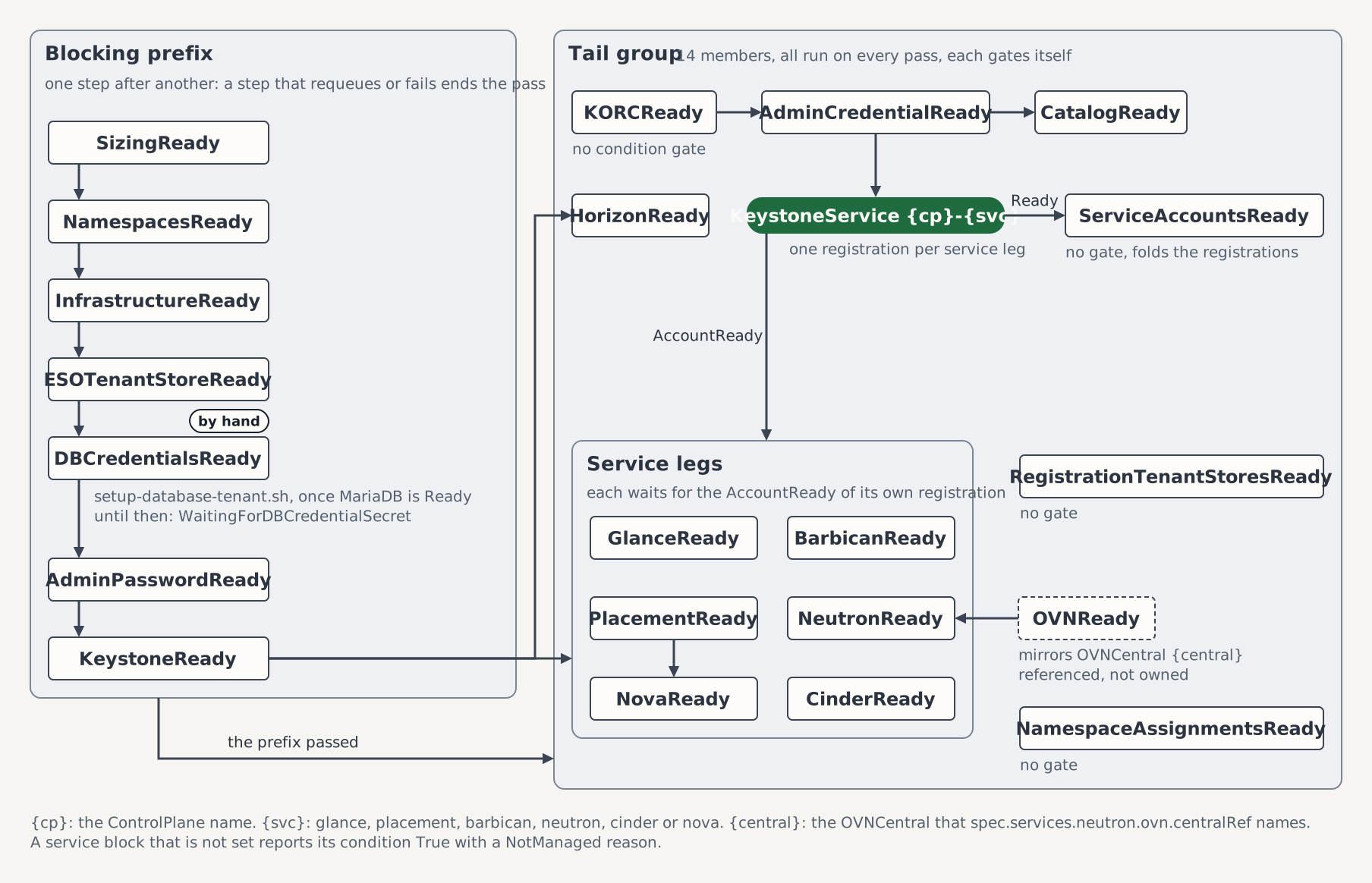
kubectl wait controlplane/controlplane -n openstack --for=condition=Ready --timeout=30mThe wait covers the twenty-one conditions of the figure. Step 6 of the Quick Start (ControlPlane) lists what each one waits for.
No image is preloaded on the lab, so the wait allows 30 minutes, twice the 15 of the Quick Start (ControlPlane). Then open the port-forward to the Gateway in a second terminal, from the root of the clone, and keep it running for the rest of the page:
export KUBECONFIG="$PWD/kubeconfig"
kubectl -n envoy-gateway-system port-forward \
  "$(kubectl -n envoy-gateway-system get svc -l gateway.envoyproxy.io/owning-gateway-name=openstack-gw -o name)" 8443:443
It is the command of the Access: line of Step 3. When it ends, for example after the Envoy pod restarted, start it again.
Step 7: Verify
The Gateway serves one self-signed certificate per hostname, each in a Secret <service>-nip-io-tls in openstack whose ca.crt is the certificate itself. Each names its hostname as its subject, which lets one CA file hold all of them. Collect them into that file for the OpenStack CLI:
kubectl get secret -n openstack --field-selector type=kubernetes.io/tls -o json |
  jq -r '.items[] | select(.metadata.name | endswith("-nip-io-tls")) | .data["ca.crt"] | @base64d' > gateway-ca.pem
grep -c 'BEGIN CERTIFICATE' gateway-ca.pem
The count is the number of Gateway hostnames, twelve on the lab. .gitignore keeps *.pem out of git. Then log in as the admin through the port-forward:
export OS_CACERT="$PWD/gateway-ca.pem"
export OS_AUTH_URL=https://keystone.127-0-0-1.nip.io:8443/v3
export OS_USERNAME=admin
export OS_PASSWORD=$(kubectl get secret controlplane-keystone-admin-credentials -n openstack -o jsonpath='{.data.password}' | base64 -d)
export OS_PROJECT_NAME=admin
export OS_USER_DOMAIN_NAME=Default
export OS_PROJECT_DOMAIN_NAME=Default
openstack token issue
The command prints a token table. OS_CACERT makes the CLI verify every endpoint against the Gateway's certificates, so no command on this page takes --insecure, and the admin password goes only to a listener that holds one of their keys. A certificate verify failed error means the file predates a reissued certificate; write it again. On a host that cannot resolve *.nip.io, the tip in Step 7 of the Quick Start (ControlPlane) gives the /etc/hosts entries. Then list the catalog, the compute services and the hypervisors:
openstack catalog list
timeout 300 bash -c 'until openstack volume backend pool list -f value | grep -q "@ceph1#"; do sleep 5; done'
openstack volume service list
openstack compute service list
openstack hypervisor list
The catalog holds a row per service of the ControlPlane, among them block-storage for Cinder. The pool wait catches a volume service that started but could not reach Ceph: its row in the service list reads up while its pool never reports. The volume service list shows cinder-scheduler, cinder-volume on the host controlplane-cinder@ceph1 and cinder-backup, each up. When the wait runs out, kubectl describe cinderbackend ceph1 -n openstack names the failing condition, and the Troubleshooting table of Attach an RBD Backend to Cinder lists the causes. The compute service list has no nova-compute row, and the hypervisor list is empty: no node runs a hypervisor yet. The image, placement, secret and volume checks of the Quick Start (ControlPlane) run with these variables, with or without the --insecure they carry there: Upload a first image, List placement resource classes, Store and retrieve a first secret with the python-barbicanclient plugin, and Create a first volume.
Part 2: The hypervisors
Part 2 turns every worker into a KVM hypervisor and boots a server on each. It attaches a Cinder volume on Ceph to one of them, live-migrates that server and evicts its node with the volume attached. Then it detaches the volume, backs it up, restores the backup into a new volume, and rotates the key of the Ceph user cinder under the running servers. It needs three things, whatever brought them up: a Ready ControlPlane controlplane in openstack with spec.services.nova.hypervisorOperator and spec.services.cinder on the Lab Ceph, a running port-forward to the Gateway on local port 8443, and the OS_* variables of an admin login exported, OS_CACERT with the Gateway's certificates among them. Run it from the root of the clone with KUBECONFIG pointing at the cluster. The commands read the names of all nodes into the array nodes, and their availability zone. A command that needs one node takes it by slice, ${nodes[@]:0:1} for the first and ${nodes[@]:1:1} for the second. bash and zsh count a slice from 0, while zsh counts an array index from 1:
nodes=($(kubectl get nodes -o jsonpath='{.items[*].metadata.name}'))
zone=$(kubectl get node "${nodes[@]:0:1}" -o jsonpath='{.metadata.labels.topology\.kubernetes\.io/zone}')
Step 1: Check the node network and label the nodes
Live migration needs libvirt's TLS port 16514 and QEMU's migration ports 49152 to 49215 open between the workers. The node port check prints one line per ordered pair of nodes and exits 0 when all 65 ports are open in both directions:
kubectl apply -k deploy/lab/metal-stack/migration-ports
kubectl rollout status daemonset/migration-port-reservation -n hypervisor-system --timeout=5m
hack/lab-node-ports.sh
The migration ports lie in Linux's ephemeral port range, where an outgoing connection on a node can get one of them as its local port. The first two commands reserve them on every node, so the kernel hands out none of them from then on. A connection that took one before keeps it: the listener tries such a port again every second for 10 seconds, and a port still taken then is reported as listener bind failed and fails the check, because nothing could listen on it. The reservation's log names the process that holds the port, and Migration port reservation says how to free it.
Then label and annotate the nodes:
kubectl label node --all openstack.c5c3.io/chassis=true \
  openstack.c5c3.io/nova-compute-pool=lab \
  nova.openstack.cloud.sap/virt-driver=kvm \
  cobaltcore.cloud.sap/node-hypervisor-lifecycle=skip-tests
kubectl annotate node --all nova.openstack.cloud.sap/aggregates=
The labels select the nodes for the OVN chassis, the NovaCompute pool, the libvirt DaemonSet and the hypervisor operator. The empty nova.openstack.cloud.sap/aggregates annotation keeps each node in its zone's aggregate after onboarding, which the servers of Step 5 need. The label and annotation tables of Lab hypervisors give the reason behind each.
Step 2: Apply the fixtures
The fixtures are the OpenStack objects the hypervisor operator looks up, among them the flavor 1 and the image cirros-kvm the servers boot. K-ORC creates them:
kubectl apply -k deploy/lab/metal-stack/hypervisor-fixtures
kubectl kustomize deploy/lab/metal-stack/hypervisor-fixtures |
  kubectl wait -f - --for=condition=Available --timeout=15m
Step 3: Apply the hypervisors
The kustomization adds libvirt in a DaemonSet, the OVN chassis, the metadata agent, the NovaCompute pool lab, and the upstream openstack-hypervisor-operator and kvm-node-agent:
kubectl apply -k deploy/lab/metal-stack/hypervisor
kubectl wait helmrelease/openstack-hypervisor-operator -n openstack --for=condition=Ready --timeout=10m
kubectl wait crd/hypervisors.kvm.cloud.sap --for=condition=Established --timeout=2m
for node in "${nodes[@]}"; do
  kubectl wait --for=create "hypervisor/${node}" --timeout=10m
done
kubectl wait certificate --all -n hypervisor-system --for=condition=Ready --timeout=10m
kubectl wait pod -l app.kubernetes.io/name=libvirt -n openstack --for=condition=Ready --timeout=15m
The hypervisor operator creates a Hypervisor per node with spec.highAvailability: false, because the release starts it with --default-high-availability=false: onboarding would otherwise wait for an HA service the lab does not run. The two waits in front of the loop give the operator's chart time to install: without them the wait in the loop fails at once with the server doesn't have a resource type while the Hypervisor CRD is missing. A libvirt pod turns Ready once kvm-node-agent has written its node's TLS files.
The libvirt pods also carry the container ceph-secret. It defines the libvirt secret 090e4a3c-6c20-4e74-82dc-1a70382babe8 from the key in openstack/ceph-client-cinder and sets its value again after every rotation (Lab hypervisors). QEMU authenticates to Ceph with that secret when a server attaches a volume of ceph1. Each node logs one set the value line:
kubectl logs -n openstack -l app.kubernetes.io/name=libvirt -c ceph-secretA server with an attached RBD volume keeps the key its QEMU started with until it is migrated or restarted, which Step 11 relies on.
Step 4: Wait for onboarding
kubectl wait hypervisor --all --timeout=20m \
  --for=jsonpath='{.status.conditions[?(@.type=="Onboarding")].reason}'=Succeeded
kubectl wait ovnchassis/lab-chassis neutronmetadataagent/lab-metadata-agent novacompute/lab \
  -n openstack --for=condition=Ready --timeout=20m
kubectl get hypervisor -o custom-columns='NAME:.metadata.name,LIBVIRTD:.status.conditions[?(@.type=="libvirtd.service")].status,LIBVIRT:.status.conditions[?(@.type=="LibVirtConnection")].status,TLS:.status.conditions[?(@.type=="TLSCertificateInstalled")].status'
openstack hypervisor list
openstack aggregate list
openstack aggregate show "${zone}" -c hosts -f value
novacompute/lab turns Ready only once Nova has mapped every host into the cell, so the servers of Step 5 can be scheduled at once.
Each Hypervisor shows True in the LIBVIRTD, LIBVIRT and TLS columns. The hypervisor list prints one row per node, and the aggregate list holds the aggregate named after the nodes' zone, the availability zone the servers of the next step name. That aggregate lists every node as a host.
Step 5: Boot a server on each node
Create a network without a router and boot one server on each node. The loop counts the nodes from 0, as a slice does, and boots lab-<n> on the node ${nodes[@]:<n>:1} names: lab-0 on the first node, lab-1 on the second. Steps 6 to 11 use these two:
openstack network create lab-net
openstack subnet create lab-subnet --network lab-net --subnet-range 192.168.77.0/24
openstack network show lab-net -c mtu -f value
i=0
for node in "${nodes[@]}"; do
  openstack server create "lab-${i}" --image cirros-kvm --flavor 1 \
    --network lab-net --availability-zone "${zone}:${node}" --wait
  i=$((i + 1))
done
for pod in $(kubectl get pod -n openstack -l app.kubernetes.io/name=libvirt -o name); do
  kubectl exec -n openstack "${pod}" -c libvirtd -- virsh list
done
The network's MTU prints 1402. Every server reaches ACTIVE, each on the node its availability zone names, and each libvirt pod lists one running domain.
Step 6: Check metadata and the tunnel from the console
A server on a network without a router is reached through its console. Print lab-1's address, then open the console of lab-0 in the libvirt pod of its node:
openstack server show lab-1 -c addresses -f value
host=$(openstack server show lab-0 -c OS-EXT-SRV-ATTR:host -f value)
domain=$(openstack server show lab-0 -c OS-EXT-SRV-ATTR:instance_name -f value)
libvirt_pod=$(kubectl get pod -n openstack -l app.kubernetes.io/name=libvirt \
  --field-selector "spec.nodeName=${host}" -o name)
kubectl exec -it -n openstack "${libvirt_pod}" -c libvirtd -- virsh console "${domain}"
Press Enter for the login prompt and log in as cirros with the password gocubsgo. In a browser, the noVNC console of Expose the Console Proxy reaches the same server. On the console, with <lab-1> replaced by the address the first command printed:
curl http://169.254.169.254/latest/meta-data/instance-id
ping -c 3 <lab-1>
ping -c 3 -s 1374 -M do <lab-1>
ping -c 1 -s 1375 -M do <lab-1>
The metadata call prints an instance ID, which proves the metadata agent on lab-0's node answers. The plain ping and the 1374-byte ping pass through the Geneve tunnel between the first two nodes: 1374 bytes of payload and 28 bytes of ICMP and IPv4 headers fill the network's MTU of 1402. The 1375-byte ping fails, because the packet does not fit and -M do forbids fragmenting it. Leave the console with Ctrl+].
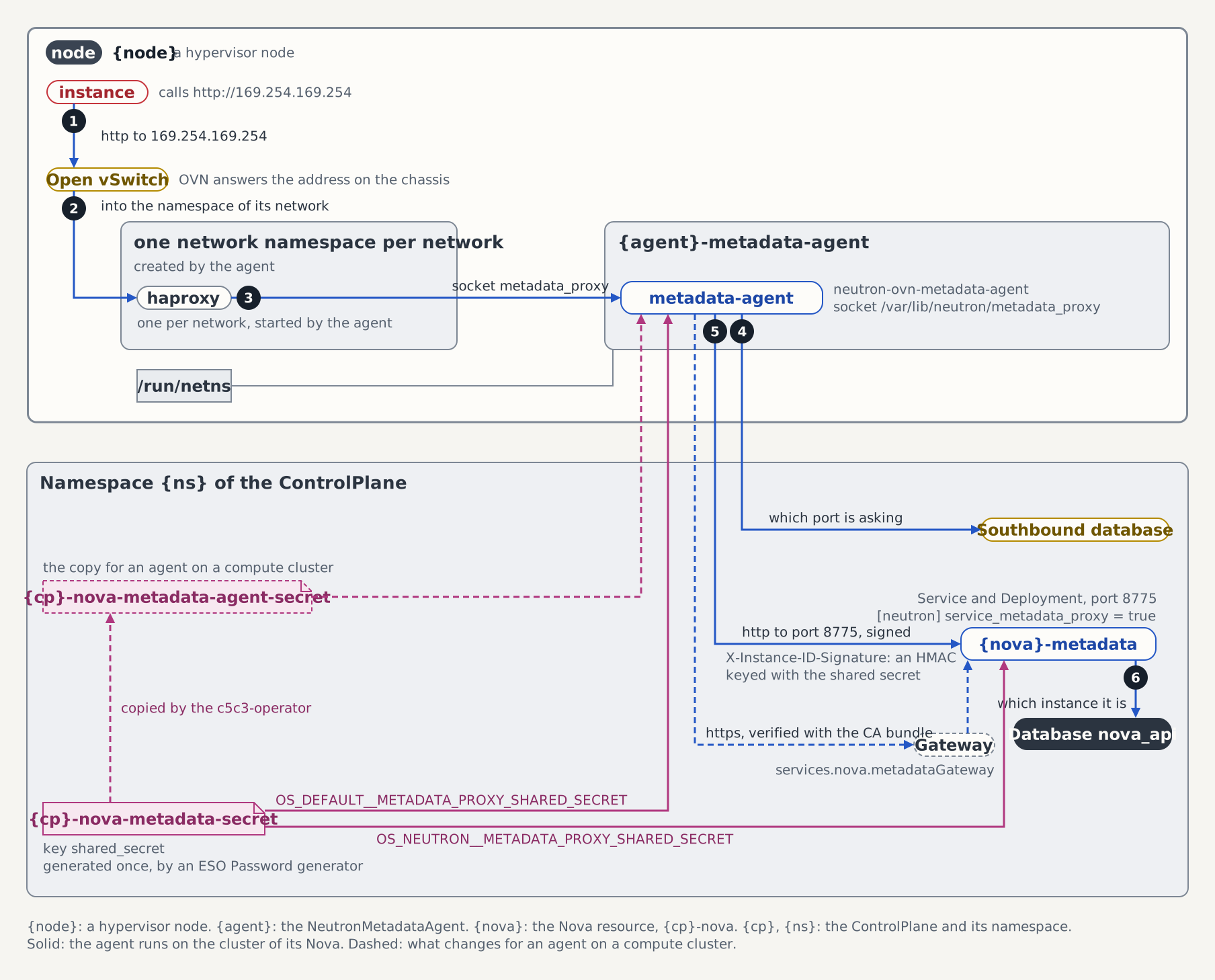
The figure follows the metadata call of this step. The lab's agent runs on the cluster of its Nova, so the call takes the solid path, to the Service controlplane-nova-metadata over plain HTTP. The path of a request lists the hops.
Step 7: Attach a volume
Create a 1 GiB volume, which the scheduler places on the backend ceph1, and attach it to lab-0. Both volume commands return before the volume reaches the status the next command needs, so a bounded wait for that status follows each; a wait that runs out exits 124. lab-0 is still on the node of Step 6, so the step uses libvirt_pod and domain from there:
openstack volume create --size 1 lab-vol
timeout 120 bash -c 'until [ "$(openstack volume show lab-vol -c status -f value)" = available ]; do sleep 2; done'
volume=$(openstack volume show lab-vol -c id -f value)
kubectl -n rook-ceph exec deploy/rook-ceph-tools -- rbd info "volumes/volume-${volume}"
openstack server add volume lab-0 lab-vol
timeout 120 bash -c 'until [ "$(openstack volume show lab-vol -c status -f value)" = in-use ]; do sleep 2; done'
kubectl exec -n openstack "${libvirt_pod}" -c libvirtd -- virsh dumpxml "${domain}" |
  grep -E "protocol='rbd'|<host name=|secret type='ceph'"
rbd info shows the image volume-<id> of 1 GiB in the pool volumes. The dumpxml prints three lines of the volume's disk: the source protocol='rbd' name='volumes/volume-<id>', the monitor <host name='<mon address>' port='3300'/>, and <secret type='ceph' uuid='090e4a3c-6c20-4e74-82dc-1a70382babe8'/>, the libvirt secret of Step 3. Cinder reads the monitor's address from ceph mon dump, and the port is the msgr2 port the cluster requires. No mount is involved: QEMU on the host opens the image through librbd, as the Ceph user cinder.
Open the console of lab-0 as in Step 6:
kubectl exec -it -n openstack "${libvirt_pod}" -c libvirtd -- virsh console "${domain}"On the console, find the volume, write a marker to it and read the marker back:
grep vdb /proc/partitions
echo lab-volume-marker | sudo dd of=/dev/vdb
sync
echo 3 | sudo tee /proc/sys/vm/drop_caches
sudo head -c 17 /dev/vdb
/proc/partitions lists vdb with 1048576 blocks: flavor 1 has one 1 GiB root disk and neither an ephemeral nor a swap disk, so the volume is the second virtio disk. The last command prints lab-volume-marker: head -c 17 reads the 17 bytes of the marker and stops before the newline echo appended. The page cache was dropped before it, so the guest read the marker back from the volume. Leave the console with Ctrl+].
Step 8: Live-migrate a server
openstack server migrate --live-migration --wait lab-0
openstack server show lab-0 -c OS-EXT-SRV-ATTR:host -f value
openstack server migration list --server lab-0
lab-0 now runs on another node, which the second command prints, and the migration list shows the migration completed. libvirt carried it over TLS between the nodes, with the CPU model that cpuModels names in deploy/lab/metal-stack/hypervisor/compute.yaml, which every node provides.
The volume moved with the server. Read its disk on the destination node, with domain from Step 6, and open the console there:
host=$(openstack server show lab-0 -c OS-EXT-SRV-ATTR:host -f value)
libvirt_pod=$(kubectl get pod -n openstack -l app.kubernetes.io/name=libvirt \
  --field-selector "spec.nodeName=${host}" -o name)
kubectl exec -n openstack "${libvirt_pod}" -c libvirtd -- virsh dumpxml "${domain}" |
  grep -E "protocol='rbd'|secret type='ceph'"
kubectl exec -it -n openstack "${libvirt_pod}" -c libvirtd -- virsh console "${domain}"
The libvirt pod of the destination node prints the same source and secret: QEMU there opened the image with the libvirt secret of its own node. On the console:
echo 3 | sudo tee /proc/sys/vm/drop_caches
sudo head -c 17 /dev/vdb
The guest prints lab-volume-marker again, read through the destination's connection to Ceph. Leave the console with Ctrl+].
Step 9: Evict a node
The step evicts the node that holds lab-0, which host names since Step 8. Manual maintenance makes the hypervisor operator create an Eviction that live-migrates every server off the node, lab-0 with its volume.
The figure shows a whole drain. This step runs its steps 1 to 3 and then clears maintenance again, so the pool label stays on and the node stays Active.
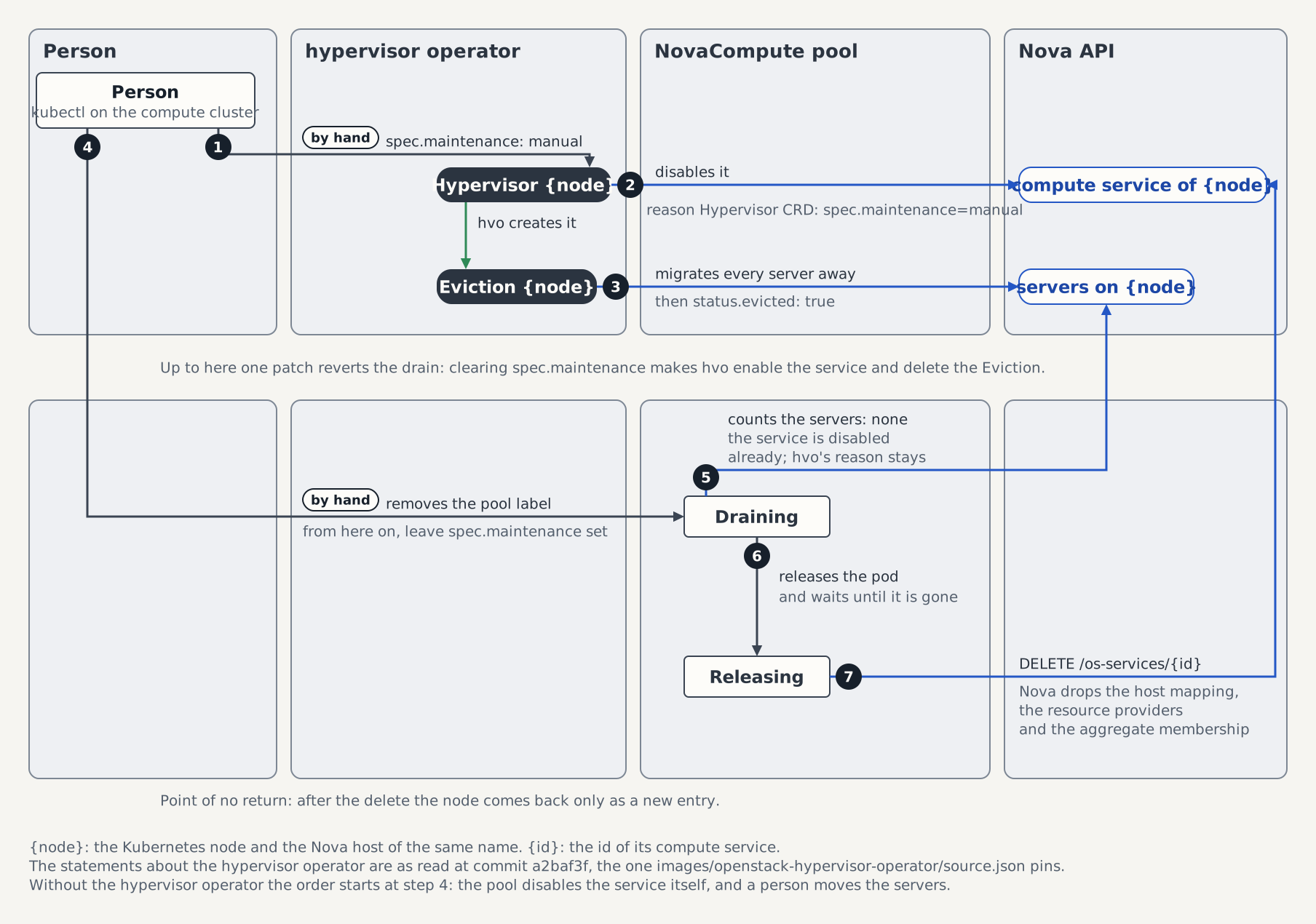
kubectl patch hypervisor "${host}" --type merge \
  -p '{"spec":{"maintenance":"manual","maintenanceReason":"lab eviction check"}}'
kubectl wait --for=create "eviction/${host}" --timeout=5m
kubectl wait "eviction/${host}" --timeout=20m \
  --for=jsonpath='{.status.conditions[?(@.type=="Evicting")].reason}'=Succeeded
openstack server list --all-projects --host "${host}"
kubectl patch hypervisor "${host}" --type merge \
  -p '{"spec":{"maintenance":"","maintenanceReason":""}}'
openstack compute service list --service nova-compute
openstack volume show lab-vol -c status -f value
The operator disables the node's compute service in Nova before it creates the Eviction, so the first wait gives the object time to appear; the second wait alone exits 1 with Error from server (NotFound) while it is missing. The server list of the evicted node is empty. The second patch clears maintenance, which deletes the Eviction; sent before the wait succeeded, it would leave the servers not yet moved on the node. After it, the node's compute service is enabled and up again. The volume moved with lab-0 and is still in-use.
Step 10: Detach the volume, back it up and restore it
Detach the volume from lab-0 and read the marker from its image, with volume from Step 7. Then back the volume up, restore the backup into a new volume, and attach that one to lab-0:
openstack server remove volume lab-0 lab-vol
timeout 120 bash -c 'until [ "$(openstack volume show lab-vol -c status -f value)" = available ]; do sleep 2; done'
kubectl -n rook-ceph exec deploy/rook-ceph-tools -- sh -c "rbd export volumes/volume-${volume} - 2>/dev/null | head -c 17"; echo
openstack volume backup create --name lab-bk lab-vol
timeout 600 bash -c 'until [ "$(openstack volume backup show lab-bk -c status -f value)" = available ]; do sleep 2; done'
kubectl -n rook-ceph exec deploy/rook-ceph-tools -- rbd ls backups
openstack volume create --size 1 lab-restored
timeout 120 bash -c 'until [ "$(openstack volume show lab-restored -c status -f value)" = available ]; do sleep 2; done'
openstack volume backup restore --force lab-bk lab-restored
timeout 600 bash -c 'until [ "$(openstack volume show lab-restored -c status -f value)" = available ]; do sleep 2; done'
restored=$(openstack volume show lab-restored -c id -f value)
kubectl -n rook-ceph exec deploy/rook-ceph-tools -- sh -c "rbd export volumes/volume-${restored} - 2>/dev/null | head -c 17"; echo
openstack server add volume lab-0 lab-restored
timeout 120 bash -c 'until [ "$(openstack volume show lab-restored -c status -f value)" = in-use ]; do sleep 2; done'
The first read prints lab-volume-marker: the guest's write reached the image in the pool volumes, and the image kept it through the attach, the migration and the eviction. The backup reaches available. The Ceph driver writes the backup of an RBD volume as the difference between two snapshots rather than a full copy, into a base image that rbd ls backups lists as volume-<volume id>.backup.<backup id>. The backup follows the detach: a backup of an attached volume needs --force.
lab-restored is a new volume, so the marker read back from it can only come from the backup. The restore needs --force because lab-restored exists, and the OpenStack CLI refuses an existing volume without it. The API sets restoring-backup before it returns, so the wait for available sees the restore end. The toolbox prints lab-volume-marker from the restored image. The last two commands attach lab-restored to lab-0, whose QEMU opens it with the current key of cinder. Step 11 rotates that key under the running guest.
Step 11: Rotate the cinder key
Raise the keyGeneration of the Ceph user cinder, then wait until the volume and backup Deployments and every node's libvirt secret carry the new key:
volume_generation=$(kubectl -n openstack get deploy controlplane-cinder-volume-ceph1 -o jsonpath='{.metadata.generation}')
backup_generation=$(kubectl -n openstack get deploy controlplane-cinder-backup -o jsonpath='{.metadata.generation}')
export volume_generation backup_generation
key_generation=$(kubectl -n rook-ceph get cephclient cinder -o jsonpath='{.spec.security.cephx.keyGeneration}')
old_key=$(kubectl -n openstack get secret ceph-client-cinder -o jsonpath='{.data.userKey}')
if [ -n "${volume_generation}" ] && [ -n "${backup_generation}" ] && [ -n "${key_generation}" ] && [ -n "${old_key}" ] &&
  kubectl -n rook-ceph patch cephclient cinder --type merge \
    -p "{\"spec\":{\"security\":{\"cephx\":{\"keyGeneration\":$((key_generation + 1))}}}}" &&
  timeout 600 bash -c 'until g=$(kubectl -n openstack get deploy controlplane-cinder-volume-ceph1 -o jsonpath="{.metadata.generation}") && [ -n "${g}" ] && [ "${g}" != "${volume_generation}" ]; do sleep 5; done' &&
  timeout 300 bash -c 'until g=$(kubectl -n openstack get deploy controlplane-cinder-backup -o jsonpath="{.metadata.generation}") && [ -n "${g}" ] && [ "${g}" != "${backup_generation}" ]; do sleep 5; done' &&
  kubectl -n openstack rollout status deploy/controlplane-cinder-volume-ceph1 --timeout=300s &&
  kubectl -n openstack rollout status deploy/controlplane-cinder-backup --timeout=300s &&
  key=$(kubectl -n openstack get secret ceph-client-cinder -o jsonpath='{.data.userKey}') &&
  [ -n "${key}" ] && [ "${key}" != "${old_key}" ]; then
  printf '%s' "${key}" | base64 -d | sha256sum
  kubectl -n rook-ceph exec deploy/rook-ceph-tools -- ceph auth get-key client.cinder | sha256sum
  digest=$(printf '%s' "${key}" | base64 -d | tr -d '[:space:]' | sha256sum | cut -c1-12)
  listed=
  for pod in $(kubectl get pod -n openstack -l app.kubernetes.io/name=libvirt -o name); do
    listed=yes
    timeout 300 bash -c "until kubectl logs -n openstack ${pod} -c ceph-secret | grep -qF '(sha256 ${digest})'; do sleep 10; done" ||
      echo "${pod} did not log the new digest within 300 s: repeat the loop before the migration"
  done
  [ -n "${listed}" ] || echo 'no libvirt pod was listed: repeat the loop before the migration'
  kubectl logs -n openstack -l app.kubernetes.io/name=libvirt -c ceph-secret --tail=1
else
  echo 'a read, the patch, a wait or the key check failed: repeat the block'
fi
The patch raises the generation it reads by one, so it rotates the key also on a lab where a guide raised it before. Rook writes the new key, and Ceph accepts only the new key from then on. The PushSecret and the ExternalSecret carry it to openstack within their one-minute intervals. The cinder-operator renders it into the keyrings of ceph1 and of the backup pod, which carries the keyring of every RBD volume backend, and both Deployments roll. The two full digests, of the Secret in openstack and of the key Ceph holds, are equal.
The loop waits until the ceph-secret container of every node has logged set the value … (sha256 <digest>) with the new digest, which the last command prints for each pod. The container's 10-second pass and the kubelet's sync of about a minute bound that wait. A pod that has not logged it within 300 s prints its name and did not log the new digest within 300 s: repeat the loop before the migration, and an empty pod list prints no libvirt pod was listed: repeat the loop before the migration. The loop is the lines from listed= to the last command, which reuse digest and so repeat without a second rotation. The two generations are exported because each wait runs in its own bash -c, under bash or zsh. A wait ends only on a generation it read that differs from the exported one, because an empty read differs from every generation.
The digests and the loop run only when the four reads returned a value, the patch, both waits and both rollouts passed, and the Secret in openstack holds a key other than the one read before the patch. Otherwise the block prints a read, the patch, a wait or the key check failed: repeat the block. The loop alone cannot tell a missed rotation from a completed one: every node logged the digest of the old key at its start, and the two full digests are equal for the old key too.
A guest that holds an RBD volume through a rotation keeps the session its QEMU opened with the old key until the server is live-migrated or restarted. Move lab-0 onto the new key with a migration and open its console on the destination:
openstack server migrate --live-migration --wait lab-0
host=$(openstack server show lab-0 -c OS-EXT-SRV-ATTR:host -f value)
libvirt_pod=$(kubectl get pod -n openstack -l app.kubernetes.io/name=libvirt \
  --field-selector "spec.nodeName=${host}" -o name)
kubectl exec -it -n openstack "${libvirt_pod}" -c libvirtd -- virsh console "${domain}"
On the console:
echo 3 | sudo tee /proc/sys/vm/drop_caches
sudo head -c 17 /dev/vdb
The guest prints lab-volume-marker from lab-restored, read by the destination's QEMU with the new key. Leave the console with Ctrl+]. Then attach lab-vol to lab-1, which held no volume, and open its console:
openstack server add volume lab-1 lab-vol
timeout 120 bash -c 'until [ "$(openstack volume show lab-vol -c status -f value)" = in-use ]; do sleep 2; done'
openstack volume service list --service cinder-volume
host=$(openstack server show lab-1 -c OS-EXT-SRV-ATTR:host -f value)
domain=$(openstack server show lab-1 -c OS-EXT-SRV-ATTR:instance_name -f value)
libvirt_pod=$(kubectl get pod -n openstack -l app.kubernetes.io/name=libvirt \
  --field-selector "spec.nodeName=${host}" -o name)
kubectl exec -it -n openstack "${libvirt_pod}" -c libvirtd -- virsh console "${domain}"
On the console:
grep vdb /proc/partitions
sudo head -c 17 /dev/vdb
/proc/partitions lists vdb with 1048576 blocks, and the last command prints lab-volume-marker. The attach of lab-vol asked the volume service of ceph1 for the connection, so that service runs on the new key. QEMU on lab-1's node opened a new connection to Ceph, so the libvirt secret of that node carries the new key. The service list shows the cinder-volume row of ceph1 up. Leave the console with Ctrl+].
Part 3: Cinder on NFS
Part 3 adds the NFS volume backend nfs1 on the Lab NFS stack beside ceph1. It attaches an NFS volume, live-migrates its server, and backs the volume up to Ceph. Part 3 needs a lab deployed with WITH_NFS=true added to the command of Part 1, Step 3, EXTERNAL_CLUSTER=true WITH_CONTROLPLANE=true WITH_CEPH=true WITH_NFS=true make deploy-infra, and Part 2 through Step 11, which leaves lab-restored attached to lab-0, lab-vol attached to lab-1, and both servers ACTIVE. The port-forward of Part 1, Step 6 keeps running, and the OS_* variables of Part 1, Step 7 and KUBECONFIG stay exported. Part 2 moved lab-0 and left domain on lab-1, so Part 3 sets host, domain and libvirt_pod itself.
Step 1: Put an NFS backend beside Ceph
Check the NFS stack and apply the variant behind that check:
kubectl -n openstack rollout status deployment/nfs-server --timeout=60s &&
  kubectl get csidriver nfs.csi.k8s.io &&
  kubectl apply -k deploy/lab/metal-stack/controlplane-nfs
The rollout status reports the Deployment nfs-server rolled out, and the read lists the CSIDriver nfs.csi.k8s.io. On a lab deployed without WITH_NFS=true the first command fails with NotFound, and the apply does not run: the volume service of nfs1 would wait for a share nothing serves, and so would the backup pod, which mounts the export of every NFS volume backend to read the volumes it backs up. The variant adds nfs1 after ceph1 to spec.services.cinder.backends and keeps the backup target cephbk.
Then wait for the NFS entry, for the backup Deployment to mount its share, and for the volume service of nfs1:
kubectl wait --for=create cinderbackend/nfs1 -n openstack --timeout=5m
kubectl wait cinderbackend/nfs1 -n openstack --for=condition=Ready --timeout=10m
kubectl wait controlplane/controlplane -n openstack --for=condition=Ready --timeout=15m
kubectl wait deploy/controlplane-cinder-backup -n openstack --timeout=5m \
  --for=jsonpath='{.spec.template.spec.volumes[?(@.name=="share-nfs1")].csi.driver}'=nfs.csi.k8s.io
kubectl -n openstack rollout status deploy/controlplane-cinder-backup --timeout=300s
timeout 300 bash -c 'until openstack volume backend pool list -f value | grep -q "@nfs1#"; do sleep 5; done'
openstack volume service list
The backup Deployment gains the inline volume share-nfs1 of the CSI driver nfs.csi.k8s.io and rolls. The service list shows cinder-volume on controlplane-cinder@ceph1 and on controlplane-cinder@nfs1, and cinder-backup, each up. When a wait runs out, kubectl describe cinderbackend nfs1 -n openstack names the failing condition. Lab ControlPlane describes the way back to ceph1 alone.
The NFS variant
# SPDX-FileCopyrightText: Copyright 2026 SAP SE or an SAP affiliate company
#
# SPDX-License-Identifier: Apache-2.0

# The NFS variant of the lab's ControlPlane: the OVNCentral and the
# ControlPlane of ../controlplane, with Cinder's NFS volume backend nfs1 on the
# share /volumes of the lab NFS server beside ceph1. Part 3, Step 1 of the
# quick start applies it over the ControlPlane that Part 1, Step 4 applied with
# `kubectl apply -k`:
#
#   kubectl apply -k deploy/lab/metal-stack/controlplane-nfs
#
# hack/deploy-infra.sh neither applies nor reads this directory.
#
# It needs a lab deployed with WITH_NFS=true as well. Without the Deployment
# nfs-server in openstack and the CSIDriver nfs.csi.k8s.io, the volume service
# of nfs1 never starts, and neither does the backup pod, which mounts the
# export of every NFS volume backend to read the volumes it backs up. The
# ControlPlane then does not turn Ready again.
#
# The backups stay on cephbk: the Ceph backup driver reads an NFS volume
# through the export the backup pod mounts and writes it to the pool backups
# as a full copy.
#
# The share path is an NFSv4 share string below the server's /exports
# pseudo-root, so /volumes, never /exports/volumes. nfs1 is the volume backend
# of the `# block-storage.yaml` fragment of docs/quick-start-controlplane.md,
# which runs the same NFS server on kind.
#
# The way back is `kubectl apply -k deploy/lab/metal-stack/controlplane`: it
# replaces the backends list with ceph1 alone. The c5c3-operator then prunes
# nfs1, and the webhook warns that every volume left on it can no longer be
# managed, so delete those volumes first, then the volume type nfs of Part 3,
# Step 2, whose volume_backend_name names nfs1. The backups cephbk wrote of
# them stay in Ceph.
#
# The patch is a JSON patch: a strategic-merge patch on a custom resource is a
# JSON merge patch, which replaces the whole backends list and would have to
# copy ceph1.
#
# Every resource is local to this directory or a base, so the render passes
# kustomize's default `LoadRestrictionsRootOnly` check, and `kubectl apply -k`
# works without `--load-restrictor`.
---
apiVersion: kustomize.config.k8s.io/v1beta1
kind: Kustomization

resources:
  - ../controlplane

patches:
  - target:
      group: c5c3.io
      version: v1alpha1
      kind: ControlPlane
      name: controlplane
    patch: |-
      - op: add
        path: /spec/services/cinder/backends/-
        value:
          name: nfs1
          type: NFS
          nfs:
            server: nfs-server.openstack.svc.cluster.local
            path: /volumes
Step 2: Attach an NFS volume
Create the volume type nfs for the backend, a 1 GiB volume of that type, and attach it to lab-0. Without a type, the scheduler places a volume on either backend from now on. As in Part 2, a bounded wait for the status the next command needs follows each volume command:
openstack volume type create --property volume_backend_name=nfs1 nfs
openstack volume create --type nfs --size 1 lab-nfs
timeout 120 bash -c 'until [ "$(openstack volume show lab-nfs -c status -f value)" = available ]; do sleep 2; done'
openstack server add volume lab-0 lab-nfs
timeout 120 bash -c 'until [ "$(openstack volume show lab-nfs -c status -f value)" = in-use ]; do sleep 2; done'
nfs_volume=$(openstack volume show lab-nfs -c id -f value)
host=$(openstack server show lab-0 -c OS-EXT-SRV-ATTR:host -f value)
domain=$(openstack server show lab-0 -c OS-EXT-SRV-ATTR:instance_name -f value)
libvirt_pod=$(kubectl get pod -n openstack -l app.kubernetes.io/name=libvirt \
  --field-selector "spec.nodeName=${host}" -o name)
kubectl exec -n openstack "${libvirt_pod}" -c libvirtd -- \
  sh -c "grep ' /var/lib/nova/mnt/' /proc/mounts; stat -c '%u:%g %a %n' /var/lib/nova/mnt/*/volume-${nfs_volume}"
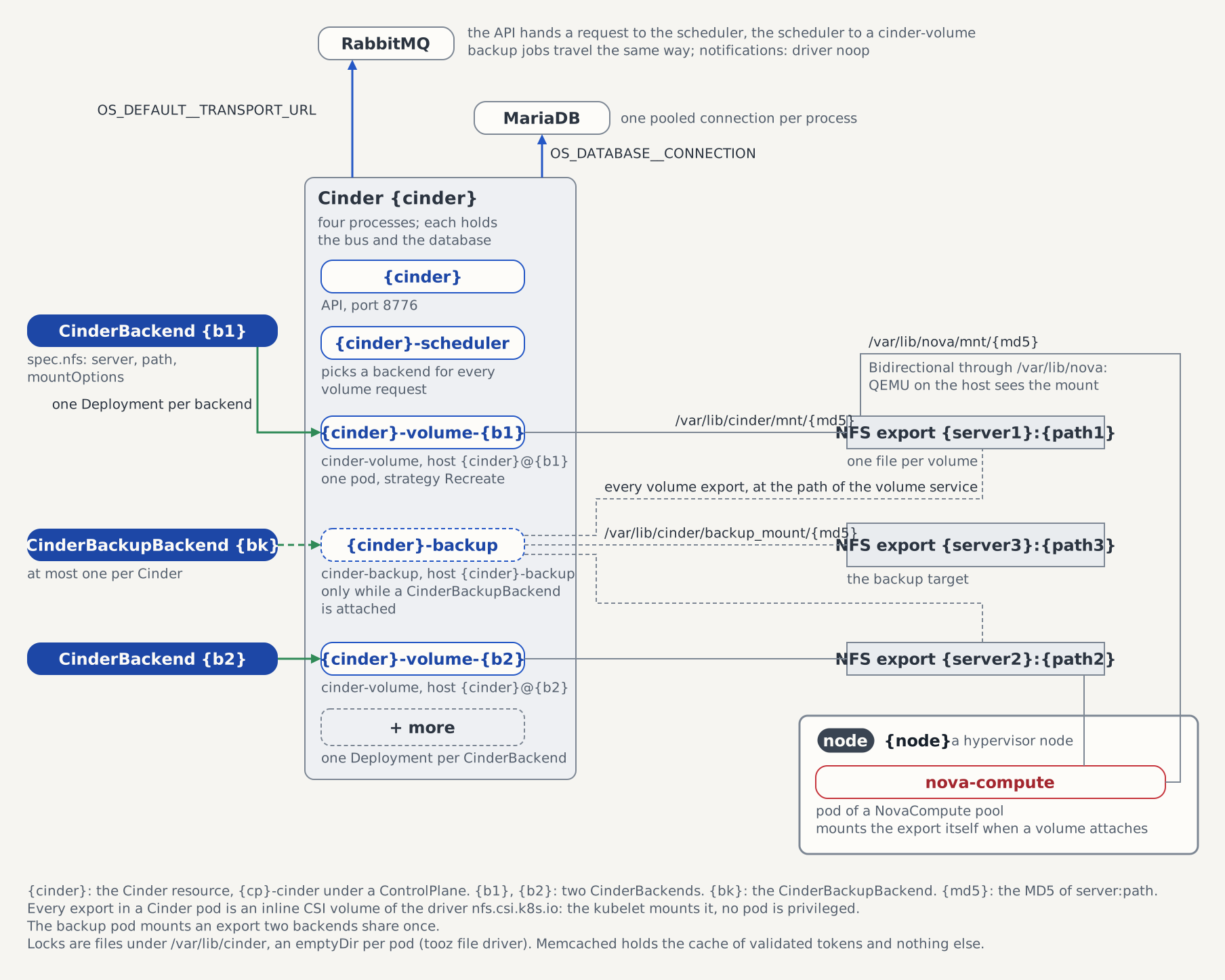
The last command runs in the libvirt pod of lab-0's node and prints two lines: the nfs4 mount of nfs-server.openstack.svc.cluster.local:/volumes below /var/lib/nova/mnt/<md5>, and 42424:42424 660 /var/lib/nova/mnt/<md5>/volume-<id>. nova-compute mounted the share in its own pod, and the Bidirectional mount propagation of both pods carried the mount through the host into the libvirt pod. The file keeps Cinder's owner and mode, so libvirt changed no owner on the attach (see dynamic_ownership in Lab hypervisors).
The figure shows the mounts behind this step. The volume service controlplane-cinder-volume-nfs1 and nova-compute on the node of lab-0 mount the same export, each below its own state directory.
Open the console of lab-0:
kubectl exec -it -n openstack "${libvirt_pod}" -c libvirtd -- virsh console "${domain}"On the console, find the volume, write a marker to it and read the marker back:
grep vd /proc/partitions
echo nfs-volume-marker | sudo dd of=/dev/vdc
sync
echo 3 | sudo tee /proc/sys/vm/drop_caches
sudo head -c 17 /dev/vdc
/proc/partitions lists vdb, which is lab-restored of Part 2, Step 10, and vdc, each with 1048576 blocks: the NFS volume is the third virtio disk. The last command prints nfs-volume-marker, which has the 17 bytes of Part 2's marker. Leave the console with Ctrl+].
Step 3: Live-migrate the server with the NFS volume
openstack server migrate --live-migration --wait lab-0
host=$(openstack server show lab-0 -c OS-EXT-SRV-ATTR:host -f value)
libvirt_pod=$(kubectl get pod -n openstack -l app.kubernetes.io/name=libvirt \
  --field-selector "spec.nodeName=${host}" -o name)
kubectl exec -n openstack "${libvirt_pod}" -c libvirtd -- \
  sh -c "grep ' /var/lib/nova/mnt/' /proc/mounts; stat -c '%u:%g %a %n' /var/lib/nova/mnt/*/volume-${nfs_volume}"
kubectl exec -it -n openstack "${libvirt_pod}" -c libvirtd -- virsh console "${domain}"
The libvirt pod of the destination node prints the mount and 42424:42424 660 for the volume file: nova-compute on the destination mounted the share for the migration, and libvirt changed no owner there either. On the console:
echo 3 | sudo tee /proc/sys/vm/drop_caches
sudo head -c 17 /dev/vdc
The guest prints nfs-volume-marker again, read through the destination's mount. Leave the console with Ctrl+].
Step 4: Detach the NFS volume and back it up to Ceph
Detach the volume from lab-0, check that no node keeps the share mounted and that Cinder still reads the volume file, with nfs_volume from Step 2, then back the volume up:
openstack server remove volume lab-0 lab-nfs
timeout 120 bash -c 'until [ "$(openstack volume show lab-nfs -c status -f value)" = available ]; do sleep 2; done'
for pod in $(kubectl get pod -n openstack -l app.kubernetes.io/name=libvirt -o name); do
  kubectl exec -n openstack "${pod}" -c libvirtd -- sh -c "grep -c ' /var/lib/nova/mnt/' /proc/mounts || true"
done
kubectl exec -n openstack deployment/controlplane-cinder-volume-nfs1 -- \
  sh -c "stat -c '%u:%g %a' /var/lib/cinder/mnt/*/volume-${nfs_volume}; head -c 17 /var/lib/cinder/mnt/*/volume-${nfs_volume}"
openstack volume backup create --name lab-nfs-bk lab-nfs
timeout 600 bash -c 'until [ "$(openstack volume backup show lab-nfs-bk -c status -f value)" = available ]; do sleep 2; done'
kubectl -n rook-ceph exec deploy/rook-ceph-tools -- rbd ls backups
The loop prints 0 for each node: Nova unmounted the share with the node's last detach of an NFS volume, and the RBD volumes need no mount. The cinder-volume pod prints 42424:42424 660 and nfs-volume-marker: the guest's write reached the volume file, and Cinder still reads the file after the attach and the migration. The backup reaches available. The Ceph driver read the volume through the export the backup pod mounts and wrote it to the pool backups as a full copy, in pieces of backup_ceph_chunk_size, 128 MiB by default. rbd ls backups lists two images, the one of lab-bk and the one of lab-nfs-bk, each named volume-<volume id>.backup.<backup id>.
Teardown
EXTERNAL_CLUSTER=true make teardown-infraThe teardown deletes what the run created in OpenStack itself, before the stack goes and while Nova and Cinder still answer: the servers of every project, then the volume backups, the volume snapshots and the volumes. So lab-bk, lab-nfs-bk, lab-vol, lab-restored and lab-nfs go, whichever of them a run created and wherever it stopped: a run without Part 3 has no NFS backup or volume, one that stopped before Part 2, Step 10 has no backup and no lab-restored, and one that stopped between Part 2, Steps 7 and 10 left lab-vol attached to lab-0. Deleting a server detaches its volumes, and an attachment Cinder still records once the server is gone is removed before the volume. The RBD images go with Cinder's deletes, and the pools with the Ceph teardown at the end of the teardown's step 2. lab-net and lab-subnet go with Neutron's database. Nothing of the run has to be deleted by hand first.
The teardown removes the hypervisors first, node labels included, while the ControlPlane and the operators still run, and then the rest of the stack (see make teardown-infra). A NovaCompute pool keeps its finalizer while Nova counts a server on its nodes, which is why the servers go before it. A server the teardown could not delete, or one of a ControlPlane whose admin credential it cannot read, stops it with exit 1 and Delete the servers on the lab hypervisors first (openstack server list --all-projects). The Ceph goes at the end of the teardown's step 2: its CephCluster with its claims, whose volumes go too where the class reclaims with Delete, and its state under /var/lib/rook on every node, which Rook's cleanup Jobs empty before the teardown goes on. An NFS stack deployed with WITH_NFS=true goes just before the Ceph, and the claim nfs-server-exports with it. Where the default class has the reclaim policy Delete, the claim's volume goes too, with every volume file on it, and the NFS kernel modules stay loaded until a node reboots. The node state under /var/lib/nova, /var/lib/libvirt and /etc/pki stays on the nodes. A Chaos Mesh deployed with WITH_CHAOS_MESH=true goes before the hypervisors: its experiments are released while its controller still runs, and its kernel modules stay loaded until a node reboots as well. A dizzy soak started with make dizzy-soak-start ends before the hypervisors go, and its project, Keystone user and report claim go with it, so fetch its reports with make dizzy-soak-report first. A dizzy stack deployed with WITH_DIZZY=true goes in the teardown's step 3, and its claim with it. Where the default class has the reclaim policy Delete, the metrics on its volume go too. A Prometheus deployed with WITH_PROMETHEUS=true goes in the same step, and its claim with it, then the Service and the Endpoints kube-prometheus-stack-kubelet that its operator wrote in kube-system. Stop the port-forward of Part 1, and those to VictoriaMetrics, Prometheus and Grafana if you opened them, once the teardown has finished. Delete gateway-ca.pem, and _output/dizzy/clouds.yaml if a soak wrote it: it holds the admin password of the removed stack.
Caveats
Nothing on the lab is reachable from outside the cluster. MetalLB has no address pool, so no Service gets an external address, and the APIs answer only through the port-forward of the workstation that opened it. Tenant networks have no router, so a server is reached through its console.
A server lives on its worker's local disk, under /var/lib/nova. A worker that Gardener replaces, after a machine update or a failed health check, takes its servers with it unless Part 2, Step 9 moved them to another worker first. With one worker left, no node can receive them.
Every Cinder volume and backup of the lab lives on the Lab Ceph: one monitor, one manager and nine OSDs, three per worker, whose disks are Lightbits volumes of the default class, reached over NVMe/TCP. A write reaches two OSDs and, below them, the replicas the platform keeps of each Lightbits volume; on newforge the default class is premium, which keeps three, as the survey of #1338 found on 2026-10-09. A backup sits in the same Ceph as its source, in another pool: it restores a deleted or overwritten volume, and the loss of the Ceph takes both. No run has measured the latency of that stack. The one monitor is a single point of failure the lab accepts: a Ceph client opens its connection through a monitor, so while the monitor's pod is away no volume is created, attached, migrated or backed up on Ceph. A guest keeps the key its QEMU started with until the server is live-migrated or restarted.
After Part 3, the volumes of nfs1 live on one NFS server pod with one ReadWriteOnce volume of 100Gi, which bounds all of them together; their backups go to Ceph. Nova mounts the share hard with NFS 4.2, so while the server pod is away, a guest's requests to an attached volume wait. The server is NFS-Ganesha, which keeps its NFSv4 client records on the export claim, so once the pod is back the node can reclaim the lock QEMU holds on the volume file; the cinder-nfs-outage chaos suite checks that a lock outlives a restart of the server. The lab fault runs have not measured that on the lab yet. They ran on 2026-10-04 on the kernel's NFS server, which kept no records: a reschedule of the pod stalled the guest's disk for 107 seconds, and a scale-down to 0 for 300 seconds, which stood for a node replacement, for 414 seconds. Each time the node lost QEMU's lock, and from then on every request to the volume failed with an I/O error until the Nova server it was attached to was hard-rebooted with openstack server reboot --hard (#1245). A volume that fails that way after a restart of the server pod still needs that reboot. The guest's network kept working. Meanwhile Nova reported the server ACTIVE, Cinder the volume in-use and cinder-volume up, and every CR stayed Ready, so only the guest shows the failure. Lab NFS stack describes the posture of the export.
A killed libvirt, nova-compute or ovn-controller pod leaves the servers on its node running. In the same runs each was killed under a running server and replaced within 9 seconds. QEMU kept running, the guest lost no ping and no disk write, the console log kept growing, and after the libvirt kill the console answered through the new pod. Only the OVNChassis was not Ready for less than 30 seconds after the ovn-controller kill. Lab fault runs lists the timings.
Every pod that runs an image by tag pulls the tag when it starts. The operators set imagePullPolicy: Always on every container that runs a tag, and the hvo and kna releases set it on their managers, so a node does not keep starting a build it cached under a tag that main has pushed again since. A running pod keeps its build until it restarts. The libvirt DaemonSet stays on its digest with IfNotPresent. While ghcr.io cannot be reached, a pod that starts waits in ImagePullBackOff although the node holds the image.
The shoot's VPA updater runs with --min-replicas=1, so a component of the Minimal profile that opts into verticalAutoscaling loses its only pod in Recreate mode whenever the pod's request lies outside the recommendation, with or without minReplicas: 1. In the lab autoscaling run the evicted Placement API had no ready pod for 11 and 12 seconds. In InPlaceOrRecreate mode with minReplicas: 1 the updater resized the pod in place, without a restart. Without minReplicas the run's pod already lay inside the recommended range, so the run did not show what that mode does there.
With WITH_PROMETHEUS=true, Prometheus loads the hypervisor operator's alerts, and those that read kube_customresource_* series never have data: only a kube-state-metrics with the operator chart's custom-resource config exports them, and the lab runs none. The hvo rows of Lab hypervisors name the alerts with and without data. No lab run has judged the chart's scrape jobs apiserver, coredns and kubelet yet, so a target of one of them may show down.
Proven by
The page as of commit e6a34f1b, before Cinder was added, ran in page order on 2026-10-03, every bash block but the git clone, on shoot forge with two workers and Kubernetes v1.35.6, from a bare cluster to a bare cluster, and each block exited 0 on its first attempt. Of the Cinder additions, the run of 2026-10-04 below ran all but the volume checks of Part 2, Steps 8 and 9, and the run of 2026-10-05 below ran those as well. The node selection of Part 2 changed after the run: a command that needs one node takes it from nodes by slice, and Step 9 evicts the node host names. On 2026-10-04, on forge, the opening block of Part 2 read the same zone in bash and in zsh. Step 5 changed after that: it boots lab-<n> on every node, where the run booted lab-a and lab-b on two, and the Teardown deletes every lab-<n>. The run of 2026-10-05 below ran Step 9 with the changes, and the run of 2026-10-04 ran Step 5 and the server delete of the Teardown on three workers. The port-forward of Part 1, Step 6 ran in a second terminal until the teardown had finished and was then stopped. The console commands of Part 2, Step 6 were typed by a script. The teardown waited 93 seconds for the stack's objects in openstack to be finalized and then finished. Two things were done on the workers before the run. calico-node on shoot--df33f0b4c1--forge-group-0-666b6-qmhrg was restarted, because it held port 49152 from before the reservation of Part 2, Step 1. The Open vSwitch database an earlier lab stack had left on both workers was removed, because the metadata agents otherwise read its old chassis name and the servers get no metadata (#1205). No chainsaw suite runs against the lab, because CI has no metal-stack cluster. The findings of the lab runs so far, upstream and in this repository, are listed under Lab hypervisors.
On 2026-10-04 the page as of commit 647736c1 ran on shoot newforge, three Xeon D-2141I workers on Kubernetes v1.35.6, from a bare cluster to a bare cluster, in the session of the lab fault runs. Part 1 ran with WITH_CHAOS_MESH=true added to the command of Step 3. Part 2 ran Steps 1 to 7 and 10 and the Teardown, whose last line gave way to the teardown of the Chaos Mesh Proving run; Steps 8 and 9 did not run. Every block exited 0 on its first attempt, and none was repeated. Step 5 booted lab-0, lab-1 and lab-2, one on each worker, and the Teardown's server delete removed all three. The fault runs between Steps 7 and 10 hard-rebooted lab-0 twice, and Step 10 still read lab-volume-marker and backed the volume up. A script typed the console commands, and the port-forward ran in a second terminal without a restart. Nothing was done by hand on the workers.
On 2026-10-05 the page as of commit d34fde24 ran on shoot newforge, three workers on Kubernetes v1.35.6, from a bare cluster to a bare cluster, in one session with the lab measurement and the lab autoscaling run. Part 1 ran Steps 1 to 7, without the git clone and without the optional checks Step 7 links, and Part 2 ran Steps 1 to 10. Step 7 attached the volume to lab-0, Step 8 live-migrated lab-0 with it and read lab-volume-marker on the destination, Step 9 evicted that node with the volume still in-use, and Step 10 backed it up. Every block exited 0 on its first attempt. The measurement's blocks ran around Part 1, Step 4 and after Part 2, Step 10. The first five lines of the Teardown followed, then the autoscaling block, then the Teardown's last line, which exited 0 and left the platform's namespaces alone. A script typed the console commands through tmux send-keys, and the port-forward ran in a second terminal without a restart. Nothing was done by hand on the cluster or the workers.
Part 2, Steps 1 and 4 changed after the runs above: Step 1 annotates the nodes, and Step 4 shows the hosts of the zone's aggregate. The run that proves them is recorded on #1314.
Every run above ran Cinder on the NFS stack: Part 1, Step 3 deployed with WITH_NFS=true, and Cinder's volumes and backups lived on the backends nfs1 and nfsbk. Cinder has been on the lab Ceph since. Part 1, Step 3 deploys with WITH_CEPH=true in place of WITH_NFS=true, Part 2, Steps 7 to 11 attach, migrate, evict, back up, restore and rotate on ceph1 and cephbk, and Part 3 adds the NFS backend nfs1 beside them. None of that has run on the lab yet. Neither has the Teardown, which deletes the backups and the volumes behind a guard that each exists and waits for available before each volume delete.
No lab run has set WITH_PROMETHEUS=true yet; the Lab Prometheus run lists the steps that would prove it.
Related references
- Metal-stack lab: the lab's manifests and the reason behind each setting, from the node probe to the node port check.
- Lab Ceph: the Ceph of
WITH_CEPH=true, its pools, its users and the hand-off of their keys, on which the ControlPlane puts Cinder. - Lab NFS stack: the NFS server of
WITH_NFS=true, on which Part 3 putsnfs1. - Attach an RBD Backend to Cinder and Configure RBD Volume Backups: an RBD backend and an RBD backup target as user-owned resources beside the ControlPlane's own.
- E2E Deployment:
make deploy-infraandmake teardown-infra, with every variable. - NovaCompute CRD: the compute pool, its aggregates, live migration and the node drain.
- Quick Start (ControlPlane): the same ControlPlane on kind, with every block of the CR explained.