How-to: Register a Service the ControlPlane Does Not Manage
A KeystoneService CR can be used to register an unmanaged service against a ControlPlane's identity plane.
The example registers a fictional workflow service running in a namespace of the same name.
Prerequisites
Devstack
This guide is written against the Quick Start (ControlPlane) devstack. Stand it up first:
KIND_HOST_PORT=8443 WITH_CONTROLPLANE=true make deploy-infraFollow that tutorial through to its final Verify step, so a ControlPlane CR named controlplane is Ready in the openstack namespace and its projected controlplane-keystone Keystone child is running. Every resource name in the examples below is one that devstack produces.
Background: what lands where
This example spreads the registration across two namespaces:
| Description | Namespace | Why |
|---|---|---|
| The allowlist entry | openstack | It is consent the ControlPlane gives, so it lives on the ControlPlane CR |
| The K-ORC children: user, project, role import, role assignment, catalog service row, region import, endpoint rows | openstack | K-ORC reads the admin clouds.yaml from each child's own namespace, and that credential is created once, beside the ControlPlane |
| The tenant secret store and the consumer Secret | workflow | Credentials are delivered where the workload that reads them runs |
The children follow the credential into openstack. Copying the cloud-admin clouds.yaml into every registering namespace would hand each of them the whole cloud, which is the escalation the allowlist exists to prevent. The child resources are marked with the labels c5c3.io/keystoneservice-name and c5c3.io/keystoneservice-namespace, because an owner reference cannot cross a namespace.
The figure shows both namespaces, and the reconciler reference lists the numbered steps. {reg} and {reg-ns} are both workflow here, {cp} is controlplane and {ns} is openstack.
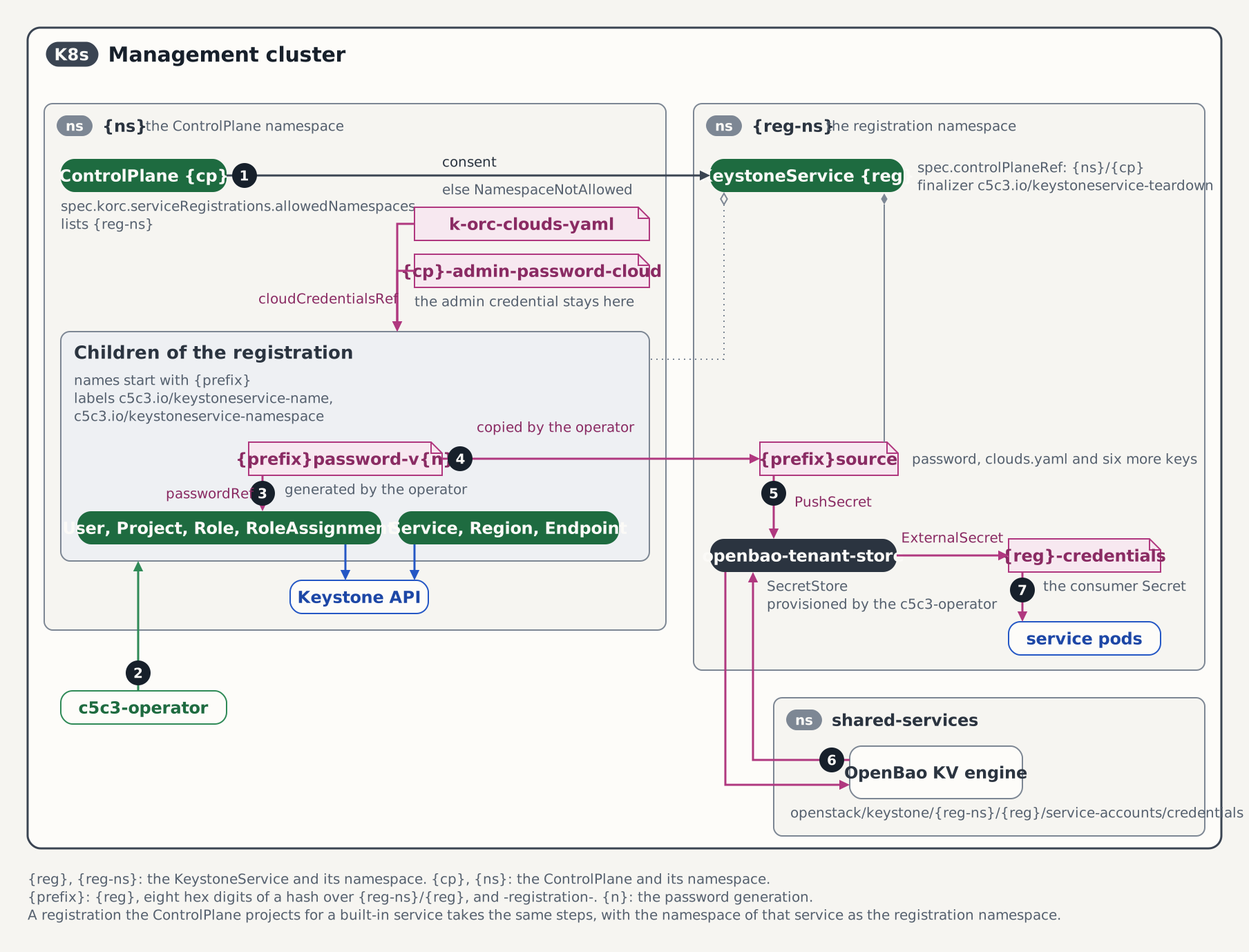
Steps
1. Create the service's namespace
kubectl create namespace workflow2. Grant consent on the ControlPlane
A KeystoneService can create a Keystone user with any role it asks for, so a registration from a namespace the ControlPlane has not consented to is refused. Admit workflow:
kubectl patch controlplane controlplane -n openstack --type merge \
  -p '{"spec":{"korc":{"serviceRegistrations":{"allowedNamespaces":["workflow"]}}}}'
A Merge patch replaces the whole list, so name every namespace you consent to in one patch. Admitting a second one later means repeating the first. Consent admits every role the registration asks for. To narrow that, see Limit the roles a registration may request.
Nothing happens in workflow yet. The ControlPlane provisions a secret store there only once a registration exists, so its RegistrationTenantStoresReady condition keeps reading True/NoRegistrationNamespaces until Step 3.
The ControlPlane's own namespace and its dedicated service namespaces need no entry here: they are already its own, and a registration in one of them is admitted without an allowlist entry. See Deploy Services into Dedicated Namespaces.
3. Register the service
kubectl apply -f - <<'EOF'
apiVersion: c5c3.io/v1alpha1
kind: KeystoneService
metadata:
  name: workflow
  namespace: workflow
spec:
  controlPlaneRef:
    name: controlplane
    namespace: openstack
  catalog:
    serviceType: workflow
    endpoints:
      - interface: public
        url: http://workflow-api.workflow.svc.cluster.local:8989/v2
      - interface: internal
        url: http://workflow-api.workflow.svc.cluster.local:8989/v2
  account:
    project:
      name: service-workflow
      create: true
    roles:
      - service
EOFcontrolPlaneRef.namespaceis required here. It defaults to the CR's own namespace, where currently no ControlPlane is deployed.- The endpoint URLs name a Service that does not have to exist. Registering a catalog row records an address; nothing connects to it.
catalog.serviceName,account.userNameandaccount.domainNameare unset, so they default toworkflow,workflow, and the ControlPlane's admin domainDefault.project.create: truecreates the project and deletes it with the registration. Withcreate: falsethe project is referenced instead, never created and never deleted.account.rolesmust name roles Keystone already has. Each one becomes a role import, and a role that is absent never resolves.serviceis the role the ControlPlane binds for its own registrations, so it exists on this devstack.
4. Wait for the registration to converge
kubectl wait --for=condition=Ready keystoneservice/workflow -n workflow --timeout=15mK-ORC creates a user, a project, a role assignment, a catalog service row and two endpoint rows in Keystone, and the password round-trips through OpenBao before the Secret appears.
kubectl get keystoneservice workflow -n workflow \
  -o jsonpath='{range .status.conditions[*]}{.type}={.status} ({.reason}){"\n"}{end}'
CatalogReady=True (CatalogRegistered)
AccountReady=True (AccountProvisioned)
Ready=True (AllReady)The ControlPlane reports the store it provisioned for the namespace:
kubectl get controlplane controlplane -n openstack \
  -o jsonpath='{.status.conditions[?(@.type=="RegistrationTenantStoresReady")].message}'
per-tenant SecretStore "openbao-tenant-store" is Ready in all 1 allowlisted registration namespace(s)That store arrives with the ServiceAccount and the certificate it authenticates to OpenBao with:
kubectl get secretstore,serviceaccount,certificate -n workflow \
  -l c5c3.io/controlplane-name=controlplane
The eight K-ORC children sit in the ControlPlane's namespace:
KORC_KINDS=users.openstack.k-orc.cloud,projects.openstack.k-orc.cloud,roles.openstack.k-orc.cloud,roleassignments.openstack.k-orc.cloud,services.openstack.k-orc.cloud,endpoints.openstack.k-orc.cloud,regions.openstack.k-orc.cloud

kubectl get "$KORC_KINDS" -n openstack \
  -l c5c3.io/keystoneservice-name=workflow,c5c3.io/keystoneservice-namespace=workflow
Their names all begin workflow-<8 hex>-registration-. The same query against -n workflow returns nothing, which is the placement the background table describes.
If it does not converge
Read the reason from the conditions one-liner above and match it here:
| Reason | What it means | What to do |
|---|---|---|
WaitingForAdminCredential | The ControlPlane has not minted its admin credential yet | Wait for the devstack's ControlPlane to go Ready. Nothing is wrong with the registration |
NamespaceNotAllowed | workflow is not on the allowlist, usually because Step 2 was skipped or a later patch replaced the list without it | Re-run Step 2, naming every namespace you want admitted |
RoleNotAllowed on AccountReady | The ControlPlane's spec.namespaceAssignments entry for workflow does not list a role the account requests | Add the role to the entry's allowedRoles, or drop it from spec.account.roles. See Limit the roles a registration may request |
ControlPlaneNotFound | spec.controlPlaneRef does not resolve, usually a missing namespace: openstack | Fix the reference. The registration recovers on its own |
SecretStoreNotReady | The tenant store in workflow is not ready, so the credentials cannot be delivered | Run kubectl get secretstore openbao-tenant-store certificate eso-tenant-client-tls -n workflow, then wait for cert-manager and External Secrets |
WaitingForServiceAccounts naming a role | A declared role does not exist in Keystone, so its import never resolves | Declare a role Keystone has, such as service |
ProbingForCollision | The collision probe has not finished | Transient. Wait |
ServiceCollision or ServiceAccountCollision | A catalog row of this type and name, or a user of this name, already exists | Take it over with catalog.adopt or account.adopt, or pick another name. See Collision and adoption |
5. Consume the delivered credentials
The account's credentials arrive in a Secret named after the CR, in the registration's own namespace:
kubectl get secret workflow-credentials -n workflow \
-o jsonpath='{.data.clouds\.yaml}' | base64 -dclouds:
"admin":
auth:
auth_url: "http://controlplane-keystone.openstack.svc:5000/v3"
username: "workflow"
password: "<generated>"
project_name: "service-workflow"
user_domain_name: "Default"
project_domain_name: "Default"
region_name: "RegionOne"
endpoint_type: internal
identity_api_version: 3- The cloud entry is named
admin. The name follows the ControlPlane'skorc.adminCredential.cloudCredentialsRef.cloudName, which is what every consumer on this control plane selects. The credentials inside it belong to the service account. This example assigns theservicerole on theservice-workflowproject. The cloud entry's name does not grant admin permissions, but a registration can request privileged roles such asadmin. The operator does not enforce a service-specific permission boundary. - The auth URL is cluster-internal, so the consumer runs in the cluster.
- A
passwordkey sits besideclouds.yamlin the same Secret, for a service that fills in its own[keystone_authtoken]configuration instead of reading aclouds.yaml.
A workload consumes it by mounting the Secret and pointing the OpenStack client at it:
env:
  - name: OS_CLIENT_CONFIG_FILE
    value: /etc/openstack/clouds.yaml
volumeMounts:
  - name: clouds
    mountPath: /etc/openstack
    readOnly: true
volumes:
  - name: clouds
    secret:
      secretName: workflow-credentials
External Secrets refreshes the Secret hourly, and immediately after a password rotation. See the consumer Secret contract.
Verification
A created Secret only proves External Secrets wrote something. Authenticate with it, from inside the namespace it was delivered to:
kubectl apply -f - <<'EOF'
apiVersion: batch/v1
kind: Job
metadata:
  name: workflow-verify
  namespace: workflow
spec:
  backoffLimit: 1
  template:
    spec:
      restartPolicy: Never
      containers:
        - name: osc
          image: ghcr.io/c5c3/tempest:2026.1
          env:
            - name: OS_CLIENT_CONFIG_FILE
              value: /etc/openstack/clouds.yaml
          command: ["/bin/sh", "-c"]
          args:
            - |
              set -e
              openstack --os-cloud admin token issue
              openstack --os-cloud admin catalog show workflow
          volumeMounts:
            - name: clouds
              mountPath: /etc/openstack
              readOnly: true
      volumes:
        - name: clouds
          secret:
            secretName: workflow-credentials
EOF

kubectl wait --for=condition=complete job/workflow-verify -n workflow --timeout=5m
kubectl logs -n workflow job/workflow-verify
The log shows a token table, then the catalog entry carrying both http://workflow-api.workflow.svc.cluster.local:8989/v2 URLs from Step 3.
token issuefailing means the password in the Secret is not the one Keystone holds. The account reports ready only once the delivered password matches the one applied to the user, so in practice this means the Secret was edited by hand.catalog show workflowfailing meansCatalogReadyis notTrue.- Neither command producing output means the image never pulled. Check
kubectl describe job workflow-verify -n workflow.
Remove the Job when you are done with it:
kubectl delete job workflow-verify -n workflowFrom the host, with the OS_* variables from the Quick Start's token-issue step still exported, the same registration is visible from the admin's side:
openstack --insecure catalog show workflow
openstack --insecure user show workflow
Limit the roles a registration may request
Consent alone lets a registration request any role, admin included. A management-cluster entry in the ControlPlane's spec.namespaceAssignments limits the roles for an admitted namespace.
The list is atomic: a merge patch replaces every entry in it, including the entries of other namespaces. Change it with JSON patches, which touch one entry. Append an entry that lists the roles workflow may request:
kubectl patch controlplane controlplane -n openstack --type json \
  -p '[{"op":"add","path":"/spec/namespaceAssignments/-","value":{"namespace":"workflow","allowedRoles":["member"]}}]'
The append fails on a ControlPlane that assigns no namespace yet, because the list does not exist. Create the list there instead:
kubectl patch controlplane controlplane -n openstack --type json \
  -p '[{"op":"add","path":"/spec/namespaceAssignments","value":[{"namespace":"workflow","allowedRoles":["member"]}]}]'
The registration from Step 3 requests service, which the entry does not list, so its account is refused while the catalog block keeps reconciling:
kubectl get keystoneservice workflow -n workflow \
  -o jsonpath='{range .status.conditions[*]}{.type}={.status} ({.reason}){"\n"}{end}'
CatalogReady=True (CatalogRegistered)
AccountReady=False (RoleNotAllowed)
Ready=False (NotAllReady)The AccountReady message names the list and the refused roles:
ControlPlane openstack/controlplane admits roles ["member"] from namespace "workflow" on the management cluster (spec.namespaceAssignments); ["service"] is not on that listThe refusal freezes the account. Nothing is revoked: the role assignment Keystone already holds, the Keystone user and the consumer Secret all stay, so the service keeps authenticating. To take a role away, drop it from spec.account.roles or delete the CR. A role matches only its own case-sensitive name, and Keystone's implied roles still apply: member grants reader as well.
The ControlPlane reports the entry, whether its namespace exists, and whether its cluster answers:
kubectl get controlplane controlplane -n openstack \
  -o jsonpath='{.status.namespaceAssignments}'
List the role and the account recovers. Look up the index of the workflow entry first; the test operation rejects the patch if another entry sits at that index by the time it applies:
i=$(kubectl get controlplane controlplane -n openstack -o json \
  | jq '[.spec.namespaceAssignments[] | .namespace == "workflow" and .targetClusterRef == null] | index(true)')
kubectl patch controlplane controlplane -n openstack --type json -p "[
  {\"op\":\"test\",\"path\":\"/spec/namespaceAssignments/${i}/namespace\",\"value\":\"workflow\"},
  {\"op\":\"replace\",\"path\":\"/spec/namespaceAssignments/${i}/allowedRoles\",\"value\":[\"service\",\"member\"]}]"
kubectl wait --for=condition=Ready keystoneservice/workflow -n workflow --timeout=10m
Removing the entry lifts the limit again, and the entries of other namespaces stay. The namespace stays admitted through allowedNamespaces:
i=$(kubectl get controlplane controlplane -n openstack -o json \
  | jq '[.spec.namespaceAssignments[] | .namespace == "workflow" and .targetClusterRef == null] | index(true)')
kubectl patch controlplane controlplane -n openstack --type json -p "[
  {\"op\":\"test\",\"path\":\"/spec/namespaceAssignments/${i}/namespace\",\"value\":\"workflow\"},
  {\"op\":\"remove\",\"path\":\"/spec/namespaceAssignments/${i}\"}]"
An entry never admits a namespace on its own: without an allowedNamespaces entry the registration reports NamespaceNotAllowed whatever allowedRoles lists. The ControlPlane's own namespace and its dedicated service namespaces are never limited. An entry whose targetClusterRef names a cluster that is not registered turns the ControlPlane's Ready False through NamespaceAssignmentsReady=False/TargetClusterUnavailable. See NamespaceAssignmentSpec.
Removing consent freezes the registration
The allowlist is an admission gate, not a revocation tool
Removing a namespace from allowedNamespaces stops the operator from reconciling the registrations in it. It revokes nothing already minted: the Keystone user keeps authenticating, the catalog row stays, and the consumer Secret stays in place until the KeystoneService itself is deleted. To revoke a registration, delete its CR.
Withdraw consent and watch what happens:
kubectl patch controlplane controlplane -n openstack --type merge \
  -p '{"spec":{"korc":{"serviceRegistrations":{"allowedNamespaces":[]}}}}'
An empty list and an absent block admit the same set, the namespaces the ControlPlane already owns. Within a minute the registration reports the gate:
kubectl get keystoneservice workflow -n workflow \
  -o jsonpath='{range .status.conditions[*]}{.type}={.status} ({.reason}){"\n"}{end}'
CatalogReady=False (NamespaceNotAllowed)
AccountReady=False (NamespaceNotAllowed)
Ready=False (NotAllReady)The message names the field that admits it again:
kubectl get keystoneservice workflow -n workflow \
  -o jsonpath='{.status.conditions[?(@.type=="CatalogReady")].message}'
ControlPlane openstack/controlplane does not admit service registrations from namespace "workflow"; nothing is projected. Add the namespace to its spec.korc.serviceRegistrations.allowedNamespaces to admit itNothing was reaped. The Secret, the Keystone user and the tenant store are all still in place:
kubectl get secret workflow-credentials -n workflow
kubectl get users.openstack.k-orc.cloud -n openstack \
  -l c5c3.io/keystoneservice-name=workflow,c5c3.io/keystoneservice-namespace=workflow
kubectl get secretstore openbao-tenant-store -n workflow
Re-applying the verification Job from the previous section still completes: the service authenticates as before. The ControlPlane meanwhile reports RegistrationTenantStoresReady=True with reason NoRegistrationNamespaces, because it counts admitted namespaces and there are none.
Re-admit the namespace with the Step 2 patch, and the registration recovers:
kubectl wait --for=condition=Ready keystoneservice/workflow -n workflow --timeout=10mRevoking a registration
Deleting the CR is what revokes:
kubectl delete keystoneservice workflow -n workflowThe command blocks while K-ORC takes the catalog rows and the Keystone user back out of the identity plane. What that destroys and what it leaves is tabulated under Deletion Semantics. In short: the user, the catalog rows and a create: true project go, while imported roles and a referenced project stay.
Afterwards the delivery is gone from the namespace, the children are gone from the ControlPlane's, and the store is collected once the namespace holds no registration at all:
kubectl get secret workflow-credentials -n workflow
kubectl get users.openstack.k-orc.cloud -n openstack \
  -l c5c3.io/keystoneservice-name=workflow,c5c3.io/keystoneservice-namespace=workflow
kubectl get secretstore openbao-tenant-store -n workflow
The first command reports NotFound and the other two report no resources. With the registration gone, dropping workflow from the allowlist and deleting the namespace is housekeeping.
Deleting the CR after the ControlPlane is already gone behaves differently: the teardown fails open. The Kubernetes objects still go, but K-ORC has no credentials left to reach Keystone with, so the rows there are not removed. See Deletion and Teardown.
Standalone Keystone, without a ControlPlane
There is no registration path for a standalone Keystone. spec.controlPlaneRef is required, and the two things it reaches for exist only on a ControlPlane: the admin credentials the K-ORC children authenticate with, and the tenant secret store the consumer Secret is delivered through. A Keystone CR you own carries neither. On such an installation, create service accounts and catalog entries through the identity API directly.
See also
- KeystoneService CRD: Namespace consent: the three layers that admit a registration.
- KeystoneService CRD: Consumer Secret contract: the Secret's keys and its refresh behaviour.
- KeystoneService CRD: Conditions: every reason the two block conditions report.
- KeystoneService CRD: Deletion Semantics: what a deletion destroys in Keystone.
- ControlPlane CRD: ServiceRegistrationsSpec: the allowlist field and its validation.
- ControlPlane CRD: NamespaceAssignmentSpec: the role allowlist, the freeze, and the unknown-cluster refusal.
- KeystoneService Reconciler: The shared gates: where the consent check sits in the control loop.
- KeystoneService Reconciler: Child Naming and Placement: why the children live beside the admin credential.
- Deploy Services into Dedicated Namespaces: registering from a namespace the ControlPlane owns, which needs no consent.
- Adopt an External Keystone: the same CR against a brownfield installation.
- ControlPlane E2E Test Suites: the suite behind this guide.
- Quick Start (ControlPlane): the devstack this guide builds on.
Tested by
The flow above mirrors the following end-to-end suite:
chainsaw test --test-dir tests/e2e/c5c3/keystone-service-foreign-namespaceIt drives four legs on a live cluster. An admitted namespace registers, and a Job there authenticates with the delivered Secret. A namespace the allowlist never carries holds at NamespaceNotAllowed with nothing projected anywhere. De-listing an admitted namespace freezes its registration without reaping the Secret, the Keystone user or the tenant store, and re-listing recovers it. A namespace assignment that does not list service refuses the account with RoleNotAllowed, listing it recovers, and removing the assignments lifts the limit. Against a full ControlPlane stack, run the suite with E2E_REQUIRE_CONTROLPLANE_STACK=true make e2e-controlplane.
The suite brings up a Keystone-only ControlPlane of its own in chainsaw's ephemeral namespace, so its fixtures are isolation-named where the walkthrough is devstack-named: the plane is cp instead of controlplane, and the @TENANT_NS@ and @CP_NS@ tokens are substituted per run so that parallel suites never collide.
The ControlPlane fixture the suite applies
apiVersion: c5c3.io/v1alpha1
kind: ControlPlane
metadata:
  name: cp
spec:
  openStackRelease: "2026.1"
  region: RegionOne
  infrastructure:
    database:
      clusterRef:
        name: openstack-db
      database: keystone
      secretRef:
        name: keystone-db
    cache:
      clusterRef:
        name: openstack-memcached
      backend: dogpile.cache.pymemcache
  services:
    keystone: {}
  sizing:
    profile: Minimal
  korc:
    adminCredential:
      cloudCredentialsRef:
        cloudName: admin
        secretName: k-orc-clouds-yaml
      passwordSecretRef:
        name: keystone-admin
        key: password
      applicationCredential:
        restricted: true
        rotation:
          mode: PasswordDriven
    serviceRegistrations:
      allowedNamespaces:
      - "@TENANT_NS@"
The registration the suite applies from the allowlisted namespace
apiVersion: c5c3.io/v1alpha1
kind: KeystoneService
metadata:
  name: workflow
  namespace: "@TENANT_NS@"
spec:
  controlPlaneRef:
    name: cp
    namespace: "@CP_NS@"
  catalog:
    serviceType: workflow
    endpoints:
    - interface: public
      url: "http://workflow-api.@TENANT_NS@.svc.cluster.local:8989/v2"
    - interface: internal
      url: "http://workflow-api.@TENANT_NS@.svc.cluster.local:8989/v2"
  account:
    project:
      name: service-workflow
      create: true
    roles:
    - service