How-to: Deploy Services into Dedicated Namespaces
By default, every service a ControlPlane projects lands in the ControlPlane's own namespace, so you cannot separate the services of one control plane with NetworkPolicies, RBAC, or quotas. This guide places Keystone in a namespace of its own, openstack-internal, which the operator creates and owns. Horizon stays in openstack, the ControlPlane's namespace. The backing services, the per-tenant secret store, and the credential material follow Keystone into its namespace, and Horizon still reaches Keystone across the namespace boundary without extra configuration.
Prerequisites
Devstack
This guide is written against the Quick Start (ControlPlane) devstack. Stand it up first:
KIND_HOST_PORT=8443 WITH_CONTROLPLANE=true make deploy-infraFollow that tutorial through Step 2 (cluster and operator stack) and stop before Step 3, so that no ControlPlane CR exists yet. If you already created the tutorial's ControlPlane, run make teardown-infra and bring the devstack up again; do not delete and re-create the CR in place. Every resource name in the examples below is one that devstack produces.
The namespace assignment is create-only: you cannot add it to an existing ControlPlane, and admission allows only one ControlPlane per namespace. Step 3 therefore applies its own ControlPlane CR in place of the tutorial's. Set every option on that CR. The c5c3-operator projects the controlplane-keystone child from it and reverts any change you make on the child directly.
Background: what a namespace assignment moves
A namespace block on spec.services.<svc> (e.g. spec.services.keystone) places that service and everything scoped to it in the named namespace:
- the projected service child (
controlplane-keystone) and its Deployment; - the backing services created from the shared
spec.infrastructureblock. Each namespace that hosts a service gets its own MariaDB / Memcached instances. In the example below,openstack-internalreceivesopenstack-dbandopenstack-memcachedfor Keystone, andopenstackkeeps anopenstack-memcachedfor the services that stay in the ControlPlane's namespace (here, Horizon); - the credential material: the
controlplane-keystone-admin-credentialsandcontrolplane-keystone-db-credentialsExternalSecrets and Secrets are created beside the Keystone child, and their OpenBao paths are keyed on the Keystone service namespace; - a per-namespace
openbao-tenant-storeSecretStore.
The children in openstack-internal carry the ControlPlane's ownership labels (c5c3.io/controlplane-name, c5c3.io/controlplane-namespace) in place of an owner reference. When you delete the ControlPlane, its c5c3.io/orc-teardown finalizer holds the ControlPlane CR until the c5c3-operator has deleted these labelled children. The Service Namespaces reference covers the full contract, including the Managed / External lifecycles and the tenant-key uniqueness rules.
In the figure, Keystone is the service in the middle namespace and Horizon the one on the left: {ns} is openstack and {ns-2} is openstack-internal here. The target cluster on the right is not part of this guide.
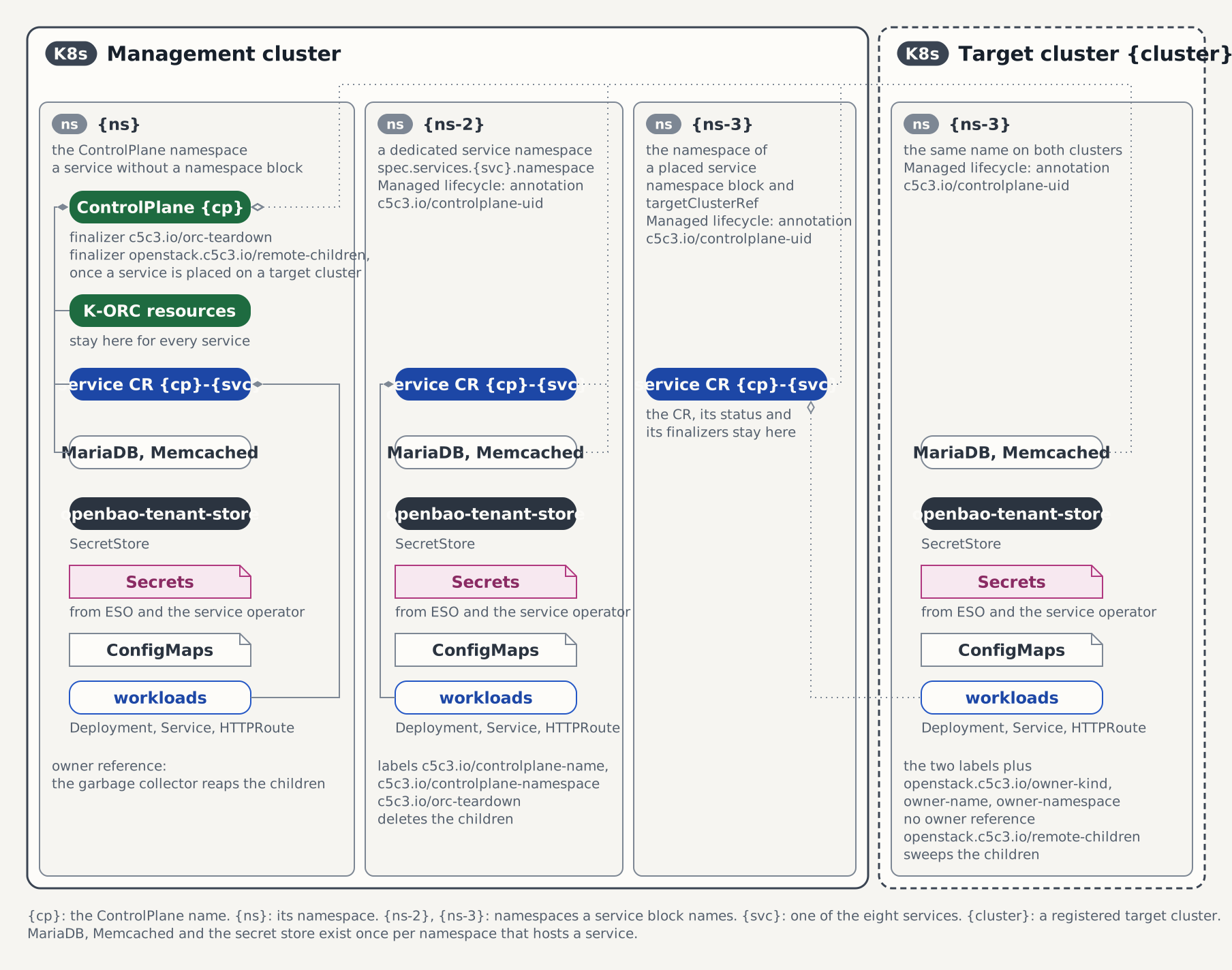
A service without a namespace block stays in the ControlPlane's namespace. In the example, the Horizon service spec block simply carries no namespace.
Steps
1. Allow the Keystone route onto the shared Gateway
The devstack's Envoy Gateway openstack-gw lives in openstack and ships with allowedRoutes.namespaces.from: Same on both listeners. With Keystone placed in openstack-internal, the HTTPRoute that the keystone-operator creates for Keystone will live there. The Gateway must explicitly admit routes from that namespace. Otherwise the route is never Accepted, the Keystone child stays at HTTPRouteReady=False, and the ControlPlane never reaches Ready. The HTTPRoute resource mapping shows the route the operator writes, and the Gateway API guide Cross-Namespace routing explains how a listener admits routes from other namespaces.
Open the Keystone listener (the first one, https) to the openstack-internal namespace. The https-horizon listener keeps from: Same because Horizon stays in openstack:
kubectl patch gateway openstack-gw -n openstack --type=json -p='[{
  "op": "replace",
  "path": "/spec/listeners/0/allowedRoutes/namespaces",
  "value": {
    "from": "Selector",
    "selector": {
      "matchLabels": {"kubernetes.io/metadata.name": "openstack-internal"}
    }
  }
}]'
Kubernetes sets the kubernetes.io/metadata.name label on every namespace, so the selector needs no labelling step and matches as soon as the operator creates the namespace. No ReferenceGrant is needed: the Gateway's allowedRoutes alone governs whether a route attaches, and the route's backend Service is in the route's own namespace.
Re-running
make deploy-infrare-applies the stock Gateway manifest and restoresfrom: Same. Re-apply this patch afterwards.
2. Seed the admin password on the new OpenBao path
The bootstrap admin password is read from bootstrap/<keystone-namespace>/controlplane-keystone/admin, so the path follows the Keystone service. The devstack bring-up seeded bootstrap/openstack/..., and the path this ControlPlane will read, bootstrap/openstack-internal/controlplane-keystone/admin, does not exist yet. The seeding script accepts the Keystone service namespace as an optional third segment. It is idempotent and skips paths that already exist:
export BAO_TOKEN=$(kubectl get secret openbao-init-keys -n shared-services \
  -o jsonpath='{.data.init-output}' | base64 -d | jq -r '.root_token')
KORC_CONTROLPLANES="openstack/controlplane/openstack-internal" \
  deploy/openbao/bootstrap/write-bootstrap-secrets.sh
unset BAO_TOKEN
Besides writing the password, the script marks the path with the managed-by=external-secrets metadata, so the keystone-operator's admin-password rotation PushSecret can later adopt and overwrite it. The Horizon SECRET_KEY path is keyed on the ControlPlane's namespace and was seeded by the bring-up, so Horizon needs nothing here.
3. Create the ControlPlane with the namespace assignment
The CR is the tutorial's Step 4 CR with two additions on the Keystone block:
- the
namespaceassignment; - an explicit
gateway.parentRef.namespace. When the field is empty, the operator assumes the Gateway lives in the Keystone child's own namespace, and no Gateway exists inopenstack-internal.
Horizon carries no namespace block, so it stays in openstack.
Two rules apply to the assignment:
- Create-only. The block's presence, its
name, and itslifecyclecannot change after creation, because moving a live service would strand its backing services and every OpenBao path keyed on the old namespace. Delete and re-create the ControlPlane to change the placement. - One ControlPlane per namespace. The service namespace is the tenant key that scopes the secret stack, so admission rejects an assignment naming a namespace another ControlPlane already occupies.
# controlplane.yaml
apiVersion: c5c3.io/v1alpha1
kind: ControlPlane
metadata:
  name: controlplane
  namespace: openstack
spec:
  openStackRelease: "2026.1"
  # Single-node backing services for kind, as in the Quick Start. Every
  # namespace that hosts a service materializes its instances from this one
  # shared block.
  infrastructure:
    database:
      replicas: 1
      storageSize: 512Mi
    cache:
      replicas: 1
  services:
    keystone:
      # Place the identity service — and its database, cache, secret store,
      # and credential material — in a namespace of its own. Managed: the
      # operator creates, labels, and (on deletion) removes the namespace.
      namespace:
        name: openstack-internal
        lifecycle: Managed
      publicEndpoint: https://keystone.127-0-0-1.nip.io:8443/v3
      gateway:
        parentRef:
          name: openstack-gw
          # The shared Gateway stays in the ControlPlane's namespace. Without
          # this line the Keystone child's own namespace would be assumed.
          namespace: openstack
        hostname: keystone.127-0-0-1.nip.io
        path: /
    horizon:
      # No namespace block: the dashboard stays in the ControlPlane's own
      # namespace (openstack), exactly as in the Quick Start.
      gateway:
        parentRef:
          name: openstack-gw
        hostname: horizon.127-0-0-1.nip.io
  sizing:
    keystone:
      api:
        replicas: 1
    horizon:
      api:
        replicas: 1
Do not pre-create openstack-internal. Under the Managed lifecycle the operator creates and labels the namespace itself, and it refuses to adopt an existing namespace that lacks its ownership labels (NamespacesReady=False, reason NamespaceNotOwned). A namespace you provision yourself uses the External lifecycle; see Using a pre-existing namespace.
kubectl apply -f controlplane.yaml4. Onboard the OpenBao database-engine tenant
This is the same one-time onboarding as the tutorial's Step 5, with one difference: the managed MariaDB now lives in openstack-internal, so you wait for it there. The script arguments are unchanged. They name the ControlPlane, and the script reads the Keystone service namespace from the live spec and creates the database-engine role keystone-openstack-internal:
kubectl wait mariadb/openstack-db -n openstack-internal --for=condition=Ready --timeout=10m

export BAO_TOKEN=$(kubectl get secret openbao-init-keys -n shared-services \
  -o jsonpath='{.data.init-output}' | base64 -d | jq -r '.root_token')
deploy/openbao/bootstrap/setup-database-tenant.sh openstack controlplane
unset BAO_TOKEN
If you skip this step, the chain stalls as in the Quick Start: the ControlPlane reports DBCredentialsReady=False, the controlplane-keystone-db-credentials ExternalSecret in openstack-internal reports SecretSyncedError, and the external-secrets controller logs unknown role: keystone-openstack-internal. Run the onboarding script, and ESO syncs the credential on its next retry.
Verification
NamespacesReady, the second condition of the chain, now reads True/NamespacesReady instead of True/NoDedicatedNamespaces; wait for the aggregate as usual:
kubectl get controlplane controlplane -n openstack \
  -o jsonpath='{range .status.conditions[*]}{.type}={.status} ({.reason}){"\n"}{end}'
kubectl wait controlplane/controlplane -n openstack --for=condition=Ready --timeout=15m
The namespace is operator-owned. openstack-internal exists and carries the ownership labels and the managed-by label:
kubectl get namespace openstack-internal --show-labelsNAME STATUS AGE LABELS
openstack-internal Active 5m app.kubernetes.io/managed-by=c5c3-operator,c5c3.io/controlplane-name=controlplane,c5c3.io/controlplane-namespace=openstack,kubernetes.io/metadata.name=openstack-internalEach service runs in its own namespace, next to its backing services. Keystone, its MariaDB, its Memcached, and its credential Secrets are in openstack-internal. Horizon and its own Memcached are in openstack:
kubectl get keystone,mariadb,memcached -n openstack-internal
kubectl get horizon,memcached -n openstack
The children in openstack-internal carry the ownership labels and no owner reference:
kubectl get mariadb openstack-db -n openstack-internal \
  -o jsonpath='{.metadata.labels.c5c3\.io/controlplane-name}{" / "}{.metadata.ownerReferences}{"\n"}'
The Keystone API answers through the shared Gateway, as on the single-namespace devstack. The route attaches across namespaces because of the Step 1 patch:
curl -k https://keystone.127-0-0-1.nip.io:8443/v3The admin credential follows the Keystone service, so read it from openstack-internal:
export OS_AUTH_URL=https://keystone.127-0-0-1.nip.io:8443/v3
export OS_USERNAME=admin
export OS_PASSWORD=$(kubectl get secret controlplane-keystone-admin-credentials \
  -n openstack-internal -o jsonpath='{.data.password}' | base64 -d)
export OS_PROJECT_NAME=admin
export OS_USER_DOMAIN_NAME=Default
export OS_PROJECT_DOMAIN_NAME=Default
openstack --insecure token issue
Horizon authenticates users against the Keystone in the other namespace. The horizon-operator sets Horizon's identity endpoint to the namespace-qualified Service DNS name http://controlplane-keystone.openstack-internal.svc:5000/v3, which resolves from any namespace. To check it, open https://horizon.127-0-0-1.nip.io:8443/ and log in with the user admin, the password read above, and the domain Default, as in the Quick Start.
Production environments may require NetworkPolicies
The operator creates no NetworkPolicies. With services in separate namespaces, you can write policies that separate them. The kind devstack's kindnet CNI enforces NetworkPolicy. This guide creates none, so nothing restricts the traffic between Keystone and Horizon. The proving OpenBao instance in openstack carries a deny-by-default policy of its own, though, and drops the packets of every client it does not name. For a default-deny production setup, the cross-namespace traffic matrix lists the flows to allow.
Registering a service in the dedicated namespace
The ControlPlane in this guide declares only Keystone and Horizon. If you run another OpenStack service or your own workload in openstack-internal without the ControlPlane, for example a Nova deployed directly with the nova-operator, that service needs its own Keystone user and possibly a catalog entry. A KeystoneService CR in the same namespace creates both and delivers the user's credentials as a Secret next to the workload.
The ControlPlane owns openstack-internal, so admission accepts a KeystoneService there without further configuration. The namespace needs no entry in spec.korc.serviceRegistrations.allowedNamespaces: that list admits namespaces the ControlPlane does not own. Since the operator already created openstack-internal, it is owned and already allowed.
The operator delivers the credentials through the openbao-tenant-store in the CR's own namespace, and Step 3 already created one in openstack-internal. The following CR creates the Keystone user nova in the project service-nova with the service role:
# keystoneservice-nova.yaml
apiVersion: c5c3.io/v1alpha1
kind: KeystoneService
metadata:
  name: nova
  namespace: openstack-internal
spec:
  controlPlaneRef:
    name: controlplane
    namespace: openstack
  account:
    project:
      name: service-nova
      create: true
    roles:
- servicekubectl apply -f keystoneservice-nova.yamlcontrolPlaneRef.namespace names the ControlPlane's namespace, openstack. When the registration is Ready, the credentials are in the Secret nova-credentials in openstack-internal. The CR reports its own conditions, so you can see why a registration waits, for example on the admin credential, without reading the ControlPlane's conditions:
kubectl get keystoneservice nova -n openstack-internal \
  -o jsonpath='{range .status.conditions[*]}{.type}={.status} ({.reason}){"\n"}{end}'
To register a service from a namespace the ControlPlane does not own, follow Register a Service the ControlPlane Does Not Manage. That flow needs consent: you list the namespace in spec.korc.serviceRegistrations.allowedNamespaces first, and the operator then creates a tenant store there.
Using a pre-existing namespace (External lifecycle)
When you provision the namespace's quotas, RBAC, and policies yourself, give the operator a namespace you own: create it first, and declare lifecycle: External:
      namespace:
        name: openstack-internal
        lifecycle: External
The operator then only verifies that the namespace exists and never labels or changes it. When you delete the ControlPlane, the operator deletes the resources it placed in the namespace by name, and the namespace itself is not deleted. The Gateway patch, the seed path, and the onboarding in this guide are the same for both lifecycles.
Note that an External namespace shared with unrelated third-party workloads also shares their OpenBao path scope, because the paths are keyed on the namespace. Use a dedicated namespace when isolation matters.
Deletion
Deleting the ControlPlane removes the whole split deployment. The operator deletes the children in openstack-internal, which it finds by their ownership labels, and then deletes the Managed namespace openstack-internal with everything left in it. The ControlPlane's c5c3.io/orc-teardown finalizer keeps the ControlPlane CR in place until this cleanup has finished.
Standalone Keystone, without a ControlPlane
The namespace assignment is a ControlPlane-level configuration. The ControlPlane manages the namespace lifecycle, places the backing services, distributes the secret stores, and keys the OpenBao paths on the namespace. A standalone Keystone has nothing that does this for it. The Keystone CR lives in whatever namespace you create it in, and everything it consumes (the MariaDB, the Memcached, the admin and DB Secrets, an ESO store) must be provisioned in that same namespace by hand, as the Quick Start does for openstack. There is no Managed/External distinction and no cross-namespace teardown. You own the namespace and its contents end to end.
See also
- ControlPlane CRD reference: Service Namespaces: the
ServiceNamespaceSpecfields, lifecycles, ownership labels, secret distribution, and uniqueness/immutability rules. - ControlPlane Reconciler: where
reconcileNamespacessits in the chain and the cross-namespace deletion ordering. - Multi-Tenant Deployment: the other tenancy axis, with namespace-scoped operator installs and several ControlPlanes side by side. The c5c3-operator chart does not support namespace-scoped RBAC: it refuses
rbac.namespaceScoped=true, because the operator needs cluster-scoped namespace and cross-namespace child access. - Quick Start (ControlPlane): the devstack this guide builds on.
Tested by
The flow above mirrors the following end-to-end suite:
chainsaw test --test-dir tests/e2e/c5c3/dedicated-namespacesThe suite asserts placement and lifecycle on a live cluster: both lifecycles, backing-service placement, ownership labels, per-namespace tenant stores, and the deletion sweep. It also covers the registration section above: admission accepts a KeystoneService in the Managed Keystone namespace without an allowlist entry. The suite never seeds OpenBao, so the registration stays at AccountReady=False/WaitingForAdminCredential and creates no consumer Secret and no K-ORC child until the ControlPlane's admin credential exists. The envtest scenario TestIntegration_DedicatedNamespaces (operators/c5c3/internal/controller/integration_test.go) runs on every PR and asserts the namespace-keyed credential paths and the projected Keystone child against the real CRD schema and webhook.
The suite's fixture below uses its own names to stay isolated from other suites: the CR is called cp, it places Keystone under the Managed and Horizon under the External lifecycle to cover both, and the @KEYSTONE_NS@ / @HORIZON_NS@ tokens are substituted per run from chainsaw's ephemeral namespace so parallel suites never collide. The walkthrough above keeps the names your devstack actually produces.
The ControlPlane fixture the suite applies
apiVersion: c5c3.io/v1alpha1
kind: ControlPlane
metadata:
  name: cp
spec:
  openStackRelease: "2026.1"
  infrastructure:
    database:
      clusterRef:
        name: openstack-db
      database: keystone
      secretRef:
        name: keystone-db
    cache:
      clusterRef:
        name: openstack-memcached
      backend: dogpile.cache.pymemcache
  services:
    keystone:
      namespace:
        name: "@KEYSTONE_NS@"
        lifecycle: Managed
    horizon:
      namespace:
        name: "@HORIZON_NS@"
        lifecycle: External
    glance:
      namespace:
        name: "@GLANCE_NS@"
        lifecycle: Managed
      backends:
        - name: default
          type: S3
          isDefault: true
          s3:
            endpoint: "http://garage.shared-services.svc.cluster.local:3900"
            bucket: glance-images
            region: garage
            credentialsSecretRef:
              name: garage-s3-credentials
    placement:
      namespace:
        name: "@PLACEMENT_NS@"
        lifecycle: Managed
  sizing:
    profile: Minimal
  korc:
    adminCredential:
      cloudCredentialsRef:
        cloudName: admin
      passwordSecretRef:
        name: keystone-admin
        key: password