Quick Start
This macOS quick start gets you from git clone to an authenticated Keystone API call on kind host port 8443. It needs no vmnetd helper and binds no privileged port. For the Keystone identity service reference, see Keystone Operator. For UI tours, fallbacks, the local-build path, the production HelmRelease, E2E and Tempest, see Quick Start (Extended).
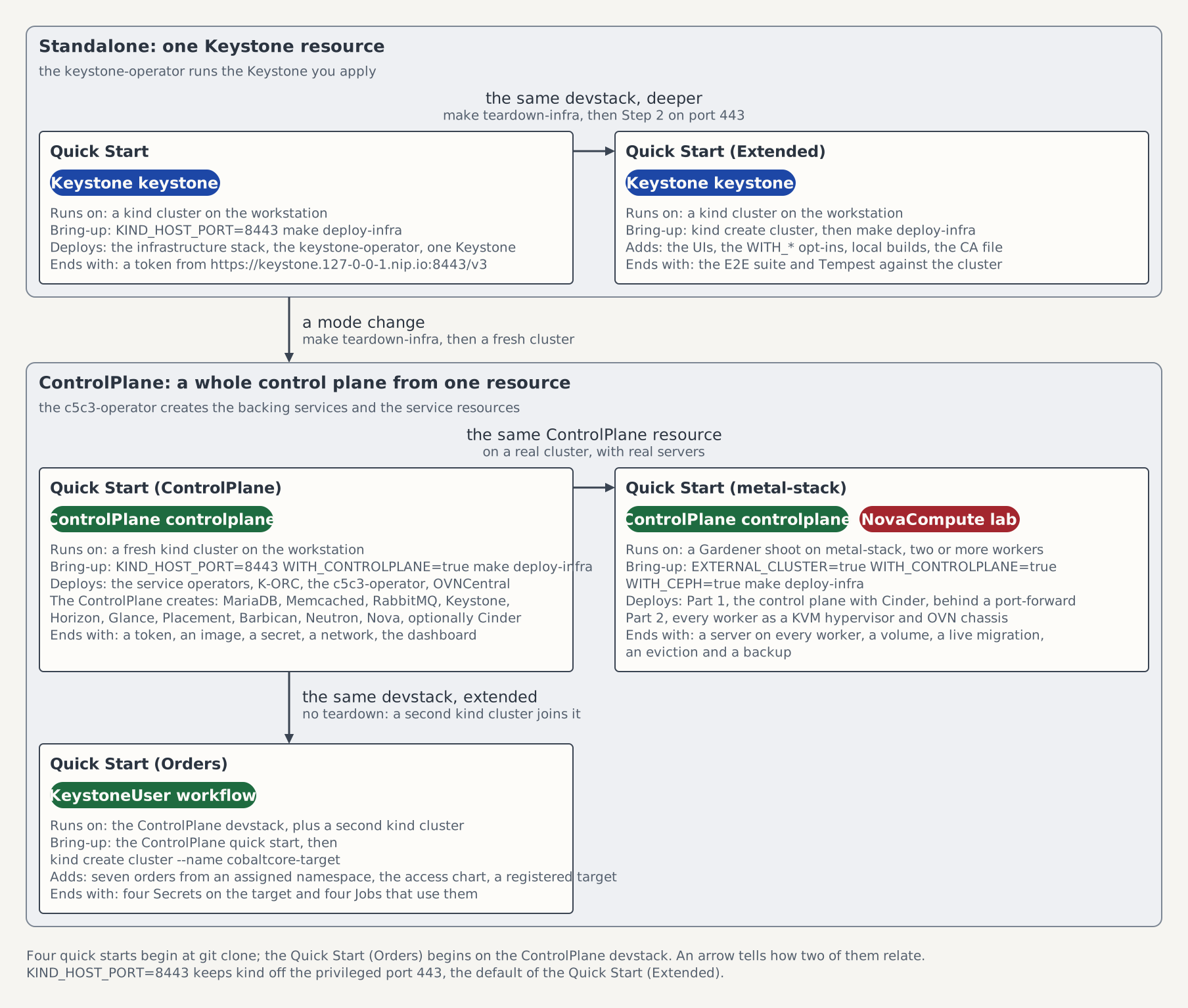
On the map of the five quick starts this page is the box Quick Start, the shortest path to one standalone Keystone.
Prerequisites
A running container runtime:
- Docker Desktop, or
- Podman with its machine already running.
makeonPATHforinstall-test-deps,deploy-infra, andteardown-infraOpenStack CLI (
python-openstackclient) onPATHfor the authenticated token check in Step 6Pinned
kind,kubectl,Helm,jqonPATH:bashmake install-test-deps export PATH="${HOME}/.local/bin:${PATH}"yqv4.40.1 or newer onPATH(only required becauseKIND_HOST_PORTis overridden)A stable internet connection for the initial image pulls and package downloads
Step 1 — Clone
git clone https://github.com/c5c3/cobaltcore.git
cd cobaltcore
Step 2 — Cluster + infrastructure stack
When using Podman, ensure its machine is already running and select Podman as kind's provider:
export KIND_EXPERIMENTAL_PROVIDER=podmanKIND_HOST_PORT=8443 make deploy-infraThe command creates the cobaltcore kind cluster with host:8443 → nodePort 31443, then installs Flux, cert-manager, the Gateway API CRDs, prometheus-operator-crds, OpenBao (initialised, unsealed and bootstrapped), MariaDB operator + openstack-db, External Secrets, Memcached operator + openstack-memcached, Envoy Gateway and the shared openstack-gw. Expect 5 to 10 minutes on first run.
The figure follows a request along that mapping, from the workstation to the pods of the Keystone that Step 5 creates. The request path, hop by hop names each hop and where a first run stops.
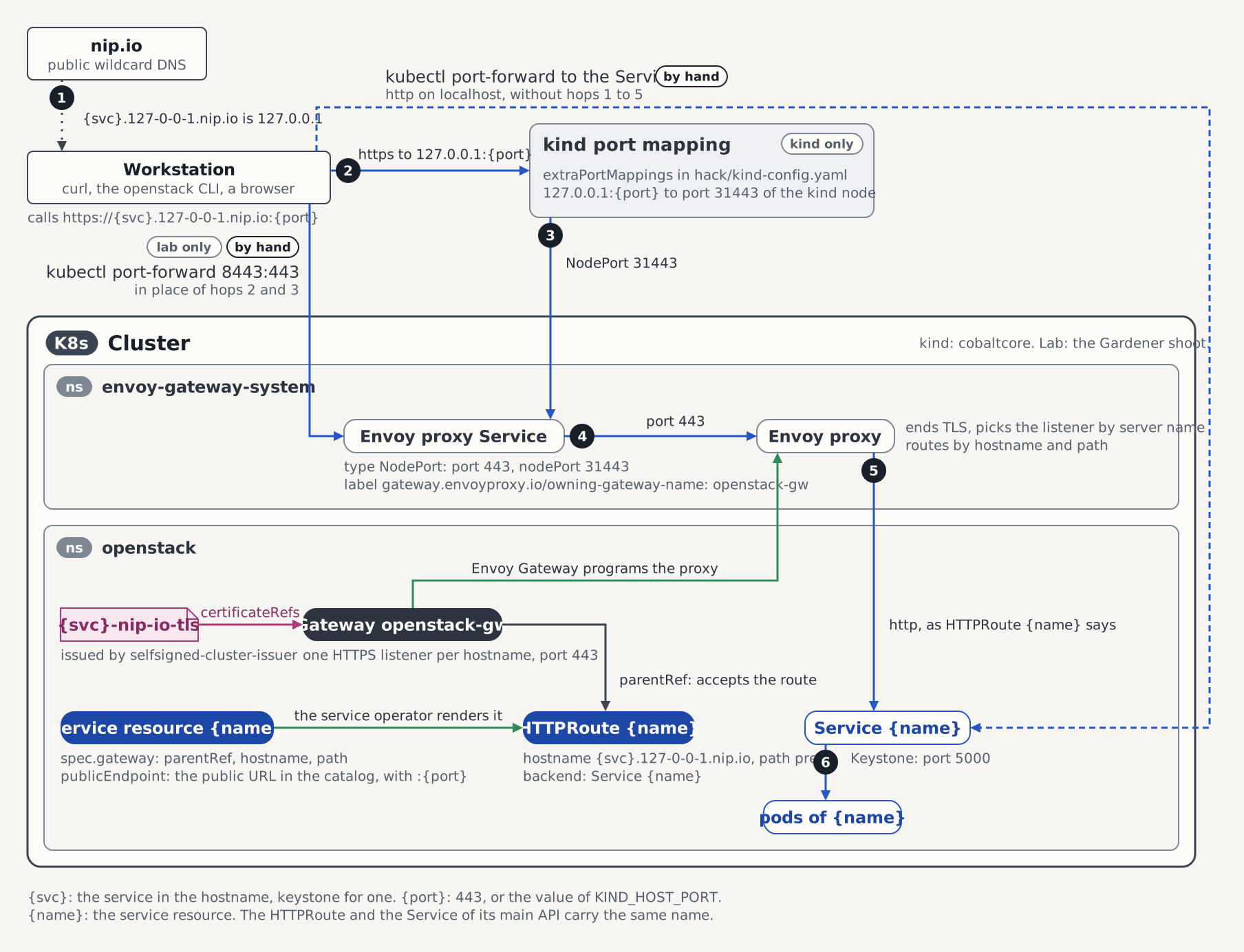
make deploy-infra is safe to re-run. A run with the same parameters detects the existing cluster and the steps that already completed, then converges without redoing them, so you can repeat an interrupted bootstrap. To enable an optional component later, re-run with its flag set; the opt-in tips are in the Extended Quick Start. Removing a flag does not uninstall that component. That is make teardown-infra's job.
If the first run fails because a download or image pull flakes out, run make teardown-infra and then repeat Step 2.
Step 3 — Keystone operator
kubectl apply -f deploy/flux-system/sources/c5c3-charts.yaml
kubectl apply -f deploy/flux-system/releases/keystone-operator.yaml
kubectl wait helmrelease/keystone-operator -n keystone-system \
  --for=condition=Ready --timeout=120s
Step 4 — Keystone service image
Note: the keystone-operator controller runs in
keystone-system; the Keystone workload it manages runs inopenstack(controller-vs-workload split).
The
2026.1image tag below matches the OpenStack release pinned in this repository underreleases/2026.1/; if you are following a different release branch, substitute the matching tag there.
RELEASE=2026.1
docker pull ghcr.io/c5c3/keystone:${RELEASE}
kind load docker-image ghcr.io/c5c3/keystone:${RELEASE} --name cobaltcore
With Podman, keep KIND_EXPERIMENTAL_PROVIDER=podman exported from the Prerequisites step, pull the image into Podman's image store, and load it into the same kind provider:
RELEASE=2026.1
podman pull ghcr.io/c5c3/keystone:${RELEASE}
kind load docker-image ghcr.io/c5c3/keystone:${RELEASE} --name cobaltcore
Step 5 — Keystone CR
# keystone.yaml
apiVersion: keystone.openstack.c5c3.io/v1alpha1
kind: Keystone
metadata:
  name: keystone
  namespace: openstack
spec:
  deployment:
    replicas: 3
  image:
    repository: ghcr.io/c5c3/keystone
    tag: "2026.1"
  database:
    clusterRef:
      name: openstack-db
    database: keystone
    secretRef:
      name: keystone-db
  cache:
    clusterRef:
      name: openstack-memcached
    backend: dogpile.cache.pymemcache
  fernet:
    rotationSchedule: "0 0 * * 0"
    maxActiveKeys: 3
  bootstrap:
    adminUser: admin
    adminPasswordSecretRef:
      name: keystone-admin
    region: RegionOne
    publicEndpoint: https://keystone.127-0-0-1.nip.io:8443/v3
  gateway:
    parentRef:
      name: openstack-gw
    hostname: keystone.127-0-0-1.nip.io
path: /kubectl apply -f keystone.yaml
kubectl wait keystone/keystone -n openstack \
--for=condition=Ready --timeout=5mStep 6 — Verify
curl -k https://keystone.127-0-0-1.nip.io:8443/v3Expected output:
{"version": {"id": "v3.14", "status": "stable", "updated": "2020-04-07T00:00:00Z", "links": [{"rel": "self", "href": "https://keystone.127-0-0-1.nip.io:8443/v3/"}], "media-types": [{"base": "application/json", "type": "application/vnd.openstack.identity-v3+json"}]}}Authenticated token request:
export OS_AUTH_URL=https://keystone.127-0-0-1.nip.io:8443/v3
export OS_USERNAME=admin
export OS_PASSWORD=$(kubectl get secret keystone-admin -n openstack -o jsonpath='{.data.password}' | base64 -d)
export OS_PROJECT_NAME=admin
export OS_USER_DOMAIN_NAME=Default
export OS_PROJECT_DOMAIN_NAME=Default
openstack --insecure token issue
Expected output:
+------------+-------------------------------------------------------------------------------------------------------+
| Field      | Value                                                                                                 |
+------------+-------------------------------------------------------------------------------------------------------+
| expires    | 2026-04-27T10:47:07+0000                                                                              |
| id         | gAAAAABp7zCb9zhkS7ULijkujyqTFwXQshf_SXm6TMe0APpwHCpTV10gGrEakgWX-                                     |
|            | OKcFgwDocxHvluFfr9MN2ByqSmuMEJT2vuXfTbOX7mn1zMIecvUTwLFQKgWsKpfQyRFNW71s4S4MVpd93o_EPLleg7aAZPT-      |
|            | fLjitIFzU7b6sCSUG-CEdg                                                                                |
| project_id | aed71e82de764a00aaab396e472e7929                                                                      |
| user_id    | 8ac0e4e97079469dacfd1c5732c6e06b                                                                      |
+------------+-------------------------------------------------------------------------------------------------------+
Optional — UIs
Headlamp (Kubernetes + Flux dashboard):
kubectl wait helmrelease/headlamp -n headlamp-system \
  --for=condition=Ready --timeout=300s
kubectl create token headlamp -n headlamp-system --duration=8h
kubectl port-forward svc/headlamp -n headlamp-system 8080:80
Open http://localhost:8080 and paste the token.
OpenBao (root token from openbao-init-keys):
kubectl get secret openbao-init-keys -n shared-services \
  -o jsonpath='{.data.init-output}' | base64 -d | jq -r '.root_token'
kubectl port-forward svc/openbao -n shared-services 8200:8200
The listener enforces mutual TLS, so the browser must present a client certificate before it reaches the UI. Build a PKCS#12 bundle from the openbao-client-tls Secret, import it into Firefox, and sign in with the token. Extended Quick Start — Step 4b has the commands, CA trust, and browser notes.
Grafana (kind-only, opt-in): for the keystone-operator metrics dashboard, run
WITH_PROMETHEUS=true make deploy-infraand follow Extended Quick Start — Step 4c. The compact path stays Grafana-free by default.
Teardown
make teardown-infra