Attach an LDAP Domain Backend to Keystone
This guide walks through attaching an LDAP/AD-backed identity domain to a running Keystone with the KeystoneIdentityBackend CRD: create the bind credentials Secret, apply one CR, watch the conditions converge, and verify an LDAP user can authenticate. The worked example uses the same docker-test-openldap fixture the e2e suite deploys (seeded dc=planetexpress,dc=com tree), so every value is copy-pasteable against a kind cluster.
For the full field reference, see the KeystoneIdentityBackend CRD API Reference.
Prerequisites
Devstack
This guide is written against the Quick Start devstack. Stand it up first:
KIND_HOST_PORT=8443 make deploy-infraFollow that tutorial through to its final Verify step, so a Keystone CR named keystone is Ready in the openstack namespace. Every resource name in the examples below is one that devstack produces.
- A Keystone CR that reaches
Ready=True; backends can be applied before the Keystone exists, but nothing is provisioned until its API is up. - An LDAP server reachable from the cluster, plus a bind DN allowed to search the user/group trees. On the kind devstack, Step 1 stands up the seeded fixture directory; on other clusters, substitute your own directory.
- Service users stay SQL-backed. The backend is read-only by default, so OpenStack service accounts (and the bootstrap admin) must remain in the SQL-backed
Defaultdomain — the CRD hard-rejects attaching a backend toDefaultfor this reason. Plan for humans in the LDAP domain and services inDefault.
Step 1 — Deploy the seeded OpenLDAP fixture (kind devstack)
On the kind devstack, stand up the same OpenLDAP directory the e2e suite uses. It is a plain namespace-pinned manifest, so kubectl apply runs it verbatim:
kubectl apply -f tests/e2e/keystone/ldap-domain-backend/00-openldap.yaml
kubectl -n openstack rollout status deploy/openldap
This ships, all in the openstack namespace:
- a seeded
dc=planetexpress,dc=comtree (users underou=peoplewithobjectClass: inetOrgPerson,uid/mailattributes, anduserPasswordequal to theuid); - a Service
openldapon port10389(ldap://openldap.openstack.svc.cluster.local:10389); - a bind-credentials Secret
openldap-bindholdingcn=admin,dc=planetexpress,dc=com/GoodNewsEveryone.
On a non-kind cluster, skip this step and point the CR (Step 3) at your own directory instead — every value below is one this fixture produces.
Step 2 — Create the bind credentials Secret
The projection reads two fixed data keys: username (the bind DN) and password:
kubectl create secret generic corp-ldap-bind -n openstack \
  --from-literal=username='cn=admin,dc=planetexpress,dc=com' \
  --from-literal=password='GoodNewsEveryone'
Rotating this Secret later re-renders the per-domain config automatically — the operator watches it.
On the kind devstack
Step 1's fixture already ships an openldap-bind Secret with these exact credentials (it is the one the e2e suite's own backend CR binds through), so you can skip this kubectl create and set bindCredentialsSecretRef.name: openldap-bind in Step 3 instead.
Step 3 — Apply the backend CR
apiVersion: keystone.openstack.c5c3.io/v1alpha1
kind: KeystoneIdentityBackend
metadata:
  name: corp-ldap
  namespace: openstack
spec:
  keystoneRef:
    name: keystone
  domain:
    name: planetexpress
    mode: Manage           # the operator creates the domain
    deletionPolicy: Retain # keep the domain when this CR is deleted
  type: LDAP
  ldap:
    url: ldap://openldap.openstack.svc.cluster.local:10389
    bindCredentialsSecretRef:
      name: corp-ldap-bind
    suffix: dc=planetexpress,dc=com
    readOnly: true         # the default, spelled out: keystone never writes to LDAP
    users:
      treeDN: ou=people,dc=planetexpress,dc=com
      objectClass: inetOrgPerson
      idAttribute: uid
      nameAttribute: uid
      mailAttribute: mail
Pick mode: Adopt instead when the domain already exists in Keystone — Adopt resolves it by name and never mutates it (adopted domains are also always retained on deletion).
For ldaps:// endpoints, add certificate verification:
    tls:
      caBundleSecretRef:
        name: corp-ldap-ca   # data key must be "ca.crt"
Step 4 — Watch the conditions converge
kubectl get keystoneidentitybackends -n openstack
NAME        READY   DOMAIN          KEYSTONE   AGE
corp-ldap   True    planetexpress   keystone   1m
kubectl describe keystoneidentitybackend corp-ldap -n openstack shows the progression: DomainReady=True (the domain exists in Keystone), then ConfigProjected=True (the rendered keystone.planetexpress.conf is mounted in the Keystone Deployment at /etc/keystone/domains/), then Ready=True. The Keystone CR itself reports the aggregate across all attached backends via its IdentityBackendsReady condition; a pending backend holds the Keystone's Ready at False so a half-attached domain never goes unnoticed.
The figure shows that order for every satellite kind. Its gate, CredentialsReady, is DomainReady on an identity backend. The handshake lists the five steps and what differs per kind.
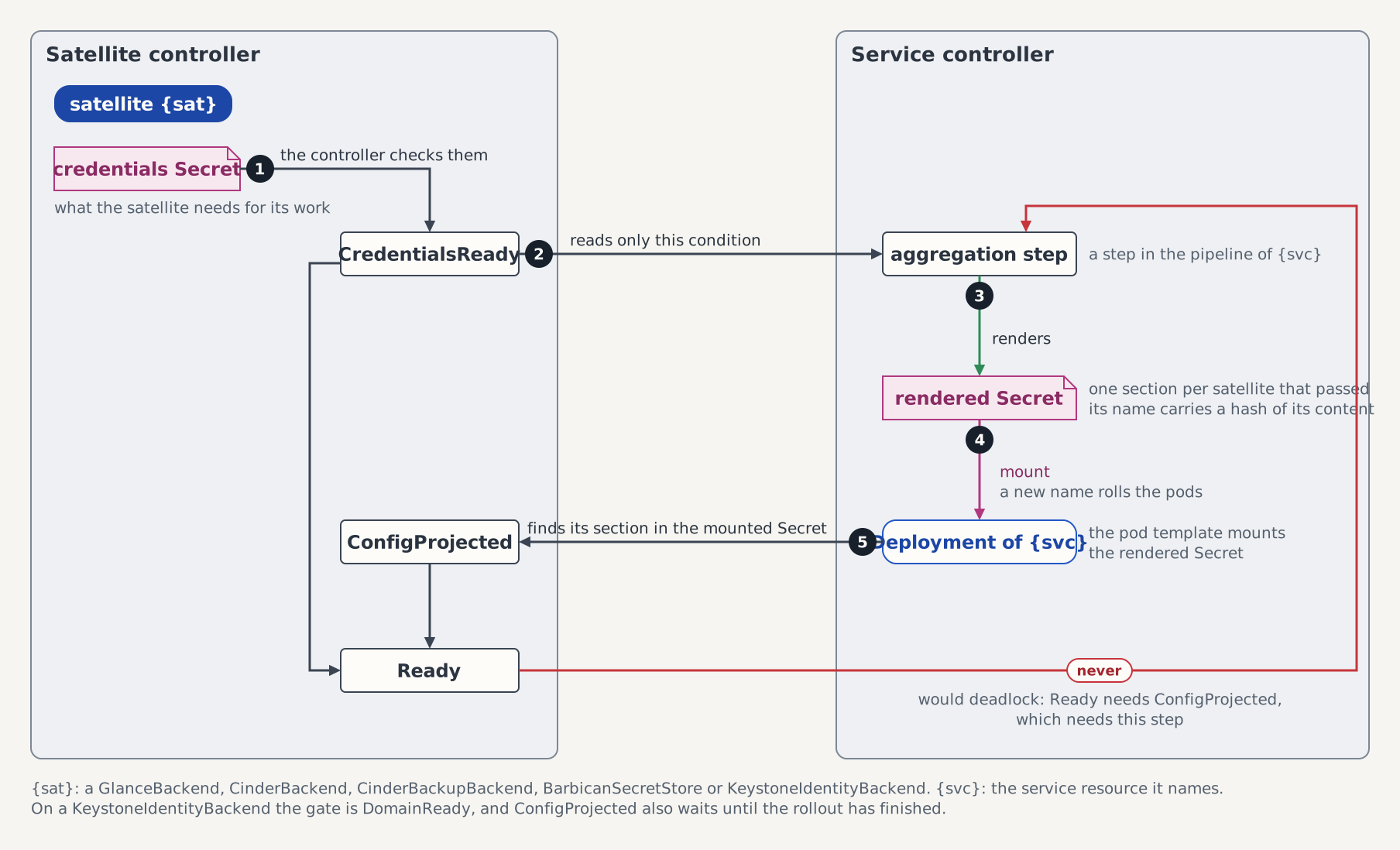
The domains Secret is content-hashed, so the attach rolls the Keystone Deployment once; subsequent reconciles are no-ops until the spec or the bind credentials change.
Step 5 — Verify an LDAP user can authenticate
# List the LDAP-backed users through the Keystone API (admin credentials):
openstack user list --domain planetexpress

# Issue a token as an LDAP user (docker-test-openldap seeds password == uid):
openstack --os-username professor --os-password professor \
  --os-user-domain-name planetexpress \
  --os-domain-name planetexpress token issue
Without the openstack CLI, the same flow works with two curl/urllib calls against POST /v3/auth/tokens — see step 4 of tests/e2e/keystone/ldap-domain-backend/chainsaw-test.yaml for a copy-pasteable in-cluster variant.
Deleting a backend
kubectl delete keystoneidentitybackend corp-ldap de-projects the config first (keystone never runs with config pointing at a dead domain) and then applies spec.domain.deletionPolicy:
| Mode / policy | Effect on the Keystone domain |
|---|---|
Manage + Retain (default) | Domain stays, including its users' assignments. |
Manage + Delete | Domain is disabled, then deleted. |
Adopt (any policy) | Domain always stays — the operator never destroys what it did not create. |
deletionPolicy is mutable, so you can decide at teardown time.
Troubleshooting
| Symptom | Likely cause |
|---|---|
DomainReady=False/WaitingForKeystoneAPI | The referenced Keystone is not serving yet — check its KeystoneAPIReady condition. |
DomainReady=False/DomainAlreadyExists | A same-named domain exists that this CR did not create. The operator never seizes foreign domains; use mode: Adopt to attach to it. |
DomainReady=False/DomainNotFound | mode: Adopt but no domain with that name exists — Adopt never creates. |
IdentityBackendsReady=False/WaitingForBackends with IdentityBackendSkipped Warning events | The bind Secret is missing or lacks the username/password keys; healthy sibling backends keep working. |
| LDAP users not listed | Check the tree/attribute mapping against your directory (user_tree_dn, user_objectclass, user_id_attribute) — unset fields fall back to keystone's defaults, which may not match your schema. |
GET /v3/users returns HTTP 400 'enabled' is a required property | The projected user_enabled_invert/user_enabled_default fallback was suppressed by a user_enabled_* key in extraOptions that does not match the directory — with no matching attribute, keystone omits enabled from the user model and its own response validation rejects the reply. Align the user_enabled_* options with the directory schema (or drop them to restore the fallback). |
| Admission rejects the CR | The message names the exact rule: Default-domain protection, domain-name uniqueness per Keystone, the extraOptions denylist, or the fixed Secret data-key contract. |
Tested by
Attaching the LDAP domain, watching the conditions converge, and authenticating an LDAP user against the seeded dc=planetexpress,dc=com directory are asserted end-to-end on the CI e2e kind cluster by this chainsaw suite:
chainsaw test --test-dir tests/e2e/keystone/ldap-domain-backendThe backend CR the suite applies
The suite isolates its Keystone instance from the parallel suite pool, so its backend CR name (planetexpress-ldap) and keystoneRef (keystone-ldap) differ from the corp-ldap / keystone names used in the walkthrough above.
apiVersion: keystone.openstack.c5c3.io/v1alpha1
kind: KeystoneIdentityBackend
metadata:
  name: planetexpress-ldap
  namespace: openstack
spec:
  keystoneRef:
    name: keystone-ldap
  domain:
    name: planetexpress
    mode: Manage
    deletionPolicy: Delete
    description: Planet Express corporate directory
  type: LDAP
  ldap:
    url: ldap://openldap.openstack.svc.cluster.local:10389
    bindCredentialsSecretRef:
      name: openldap-bind
    suffix: dc=planetexpress,dc=com
    readOnly: true
    users:
      treeDN: ou=people,dc=planetexpress,dc=com
      objectClass: inetOrgPerson
      idAttribute: uid
      nameAttribute: uid
      mailAttribute: mail