Quick Start (Orders): Keystone, MariaDB and RabbitMQ pieces from an assigned namespace
A service that the control plane does not manage orders its OpenStack footprint from a Kubernetes namespace. A ControlPlane assigns the namespace to the service's owner in spec.namespaceAssignments, and the owner orders seven kinds there: a KeystoneUser, a KeystoneProject, a KeystoneRoleAssignment, a KeystoneCatalogEntry, a KeystoneApplicationCredential, a MariaDBDatabase and a RabbitMQVhost. The c5c3-operator creates each piece against the ControlPlane's Keystone, MariaDB or message bus and writes the credentials as a Secret beside the order. In conversation this is called the seeder, after the seeding scripts other OpenStack distributions run to create users, projects, roles and endpoints up front; this page keeps the word order.
Part 1 orders the seven pieces on the ControlPlane devstack, where the owner's namespace sits on the management cluster beside the c5c3-operator and Keystone. Part 2 repeats them on a second kind cluster registered as a target cluster. The Secrets are written there, with addresses a pod on that cluster can reach.
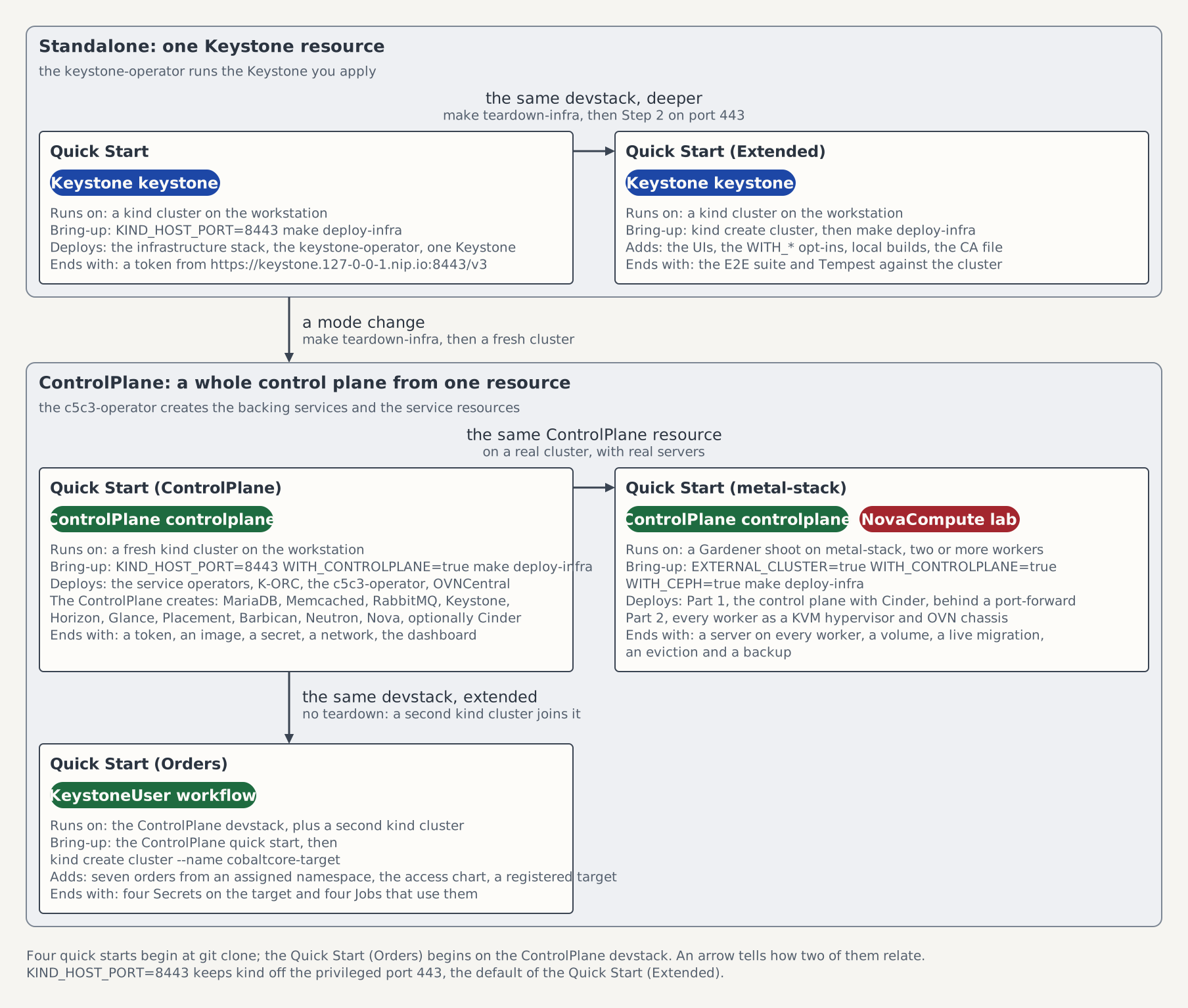
On the map of the five quick starts this page is the box Quick Start (Orders): the ControlPlane devstack, extended by a second kind cluster.
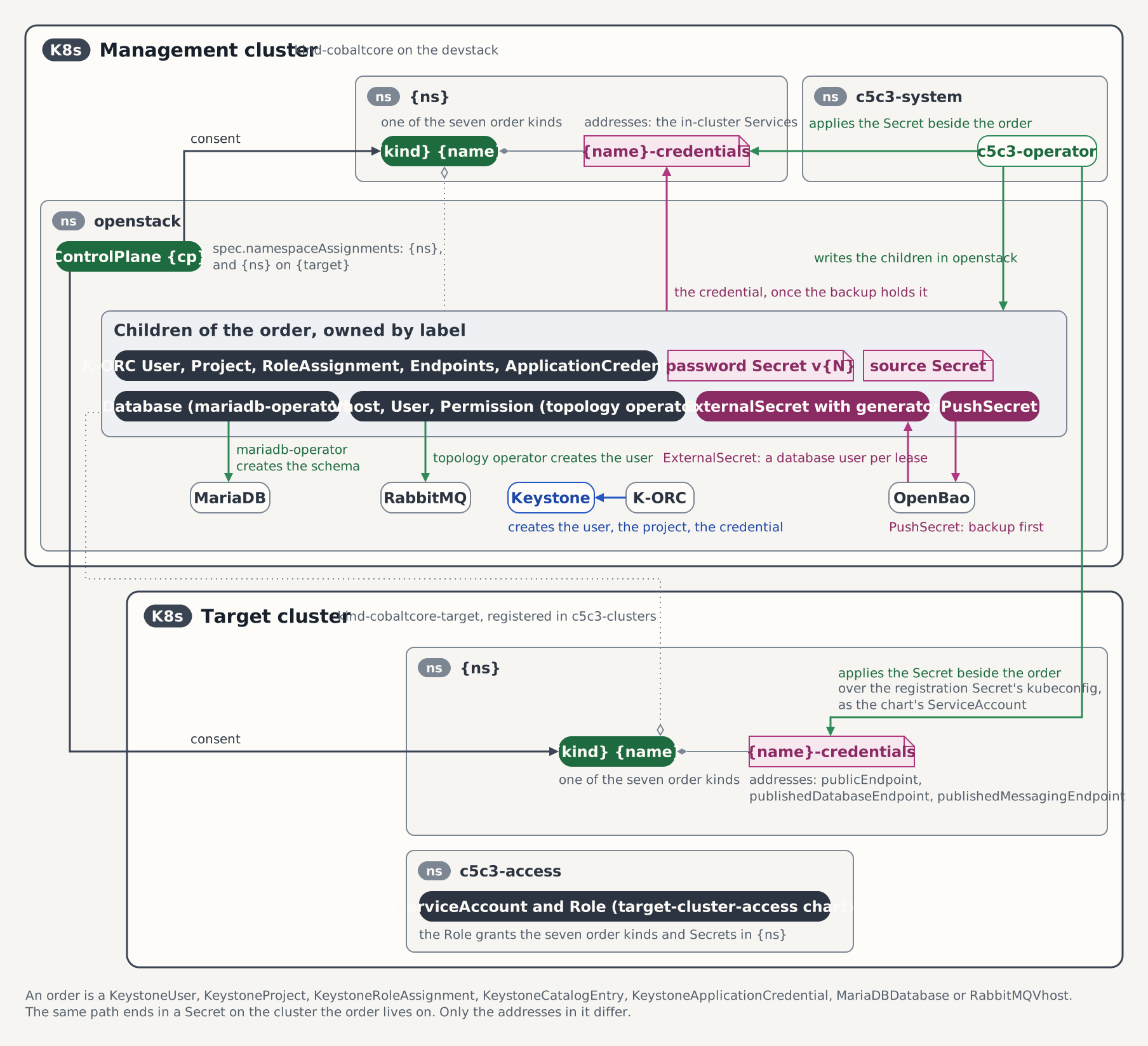
Every step of both parts follows the same path: the ControlPlane's entry admits the order, the c5c3-operator writes the order's children beside the ControlPlane and provisions against Keystone, MariaDB or the bus, and the credentials Secret lands beside the order. What lands where lists the children. On the target cluster only the addresses in that Secret change.
Prerequisites
Devstack
This quick start is written against the Quick Start (ControlPlane) devstack. Stand it up first:
KIND_HOST_PORT=8443 WITH_CONTROLPLANE=true make deploy-infraFollow that tutorial through to its final Verify step, Step 7, so a ControlPlane CR named controlplane is Ready in the openstack namespace. Every resource name below is one that devstack produces.
Run the commands from the root of the clone, with jq on PATH and, for Part 2, helm. The openstack calls run on the workstation and need the shell set up as below. A second kind cluster beside a full devstack fails at Preparing nodes while fs.inotify.max_user_instances is at its default of 128, so raise it before Part 2 with sudo sysctl fs.inotify.max_user_instances=512.
Point the shell at the devstack
The openstack calls below reach Keystone the way Step 7 of the ControlPlane quick start does: through the shared Envoy Gateway at keystone.127-0-0-1.nip.io:8443, with the admin password from the operator-owned Secret. Those settings live in the shell that ran that step. A new shell, a second terminal or a workstation that reaches a devstack stood up elsewhere starts without them, and every openstack call then fails with Missing value auth-url required for auth plugin password or with a refused connection. Set them again before Part 1.
The way to the Gateway depends on where the devstack runs. On the local kind devstack of the box above no port-forward is needed: hack/kind-config.yaml maps the host port 8443 to the Gateway's NodePort, and the hostname resolves to the loopback address. On any other cluster, the metal-stack lab among them, the Gateway has no host port. Open a port-forward of the local port 8443 to the Envoy proxy Service in a second terminal and keep it running for the rest of the page. It is the command of the Access: line make deploy-infra prints for such a cluster:
kubectl -n envoy-gateway-system port-forward \
  "$(kubectl -n envoy-gateway-system get svc -l gateway.envoyproxy.io/owning-gateway-name=openstack-gw -o name)" 8443:443
Then, in the shell that runs the page, point kubectl at the devstack and export the credentials:
kubectl config use-context kind-cobaltcore   # the local kind devstack; another cluster: its own context
export OS_AUTH_URL=https://keystone.127-0-0-1.nip.io:8443/v3
export OS_USERNAME=admin
export OS_PASSWORD=$(kubectl get secret controlplane-keystone-admin-credentials -n openstack -o jsonpath='{.data.password}' | base64 -d)
export OS_PROJECT_NAME=admin
export OS_USER_DOMAIN_NAME=Default
export OS_PROJECT_DOMAIN_NAME=Default
openstack --insecure token issue
The token proves the path end to end. --insecure accepts the self-signed certificate of the Gateway's Keystone listener, as on the ControlPlane page. A local devstack brought up with the default KIND_HOST_PORT=443 uses https://keystone.127-0-0-1.nip.io/v3 instead. If the hostname does not resolve, the ControlPlane page's tip on *.nip.io names the cause and the /etc/hosts workaround. A ControlPlane with another name keeps its password in {name}-keystone-admin-credentials.
Part 1: The management cluster
The owner's namespace workflow lives on the management cluster, beside the ControlPlane in openstack. Each step orders one piece, waits for it and uses it once. Order Resources from a ControlPlane takes each kind further: rotation, repair, collisions and deletion policies. The Jobs below come from the suites under tests/e2e/c5c3/, with the namespace substituted.
Step 1: Create the namespace
kubectl create namespace workflowStep 2: Assign the namespace
The assignment is the consent every order reads. This entry also lets a role assignment request the role member and admits catalog entries. The list is atomic, and a merge patch replaces every entry in it, so change it with a JSON patch. On a ControlPlane that assigns no namespace yet, create the list:
kubectl patch controlplane controlplane -n openstack --type json \
  -p '[{"op":"add","path":"/spec/namespaceAssignments","value":[{"namespace":"workflow","allowedRoles":["member"],"allowCatalogEntries":true}]}]'
On a ControlPlane that already assigns namespaces, append the entry instead:
kubectl patch controlplane controlplane -n openstack --type json \
  -p '[{"op":"add","path":"/spec/namespaceAssignments/-","value":{"namespace":"workflow","allowedRoles":["member"],"allowCatalogEntries":true}}]'
Step 3: Order the user
kubectl apply -f - <<'EOF'
apiVersion: c5c3.io/v1alpha1
kind: KeystoneUser
metadata:
  name: workflow
  namespace: workflow
spec:
  controlPlaneRef:
    name: controlplane
    namespace: openstack
EOF
kubectl wait --for=condition=Ready keystoneuser/workflow -n workflow --timeout=15m
kubectl get secret workflow-credentials -n workflow -o jsonpath='{.data.clouds\.yaml}' | base64 -d
K-ORC creates the user in Keystone, and ESO backs the password up to OpenBao before the Secret is written. The password rotates every 720 hours by default and when spec.passwordGeneration is raised. There is no grace period: the old one stops the moment Keystone holds the new one; Rotate the password shows it. The document's auth_url is the Keystone Service inside the cluster, http://controlplane-keystone.openstack.svc:5000/v3, and it carries no project, so a token issued with it is unscoped. Issue one from a Job in workflow:
sed -e 's|@TENANT_NS@|workflow|g' tests/e2e/c5c3/keystone-user/03-openstack-verify-job.yaml \
  | kubectl apply -f -
kubectl wait --for=condition=complete job/workflow-verify -n workflow --timeout=5m
kubectl logs -n workflow job/workflow-verify
The log ends with OK: the delivered credentials authenticate.
Step 4: Register a catalog entry
kubectl apply -f - <<'EOF'
apiVersion: c5c3.io/v1alpha1
kind: KeystoneCatalogEntry
metadata:
  name: workflow-dns
  namespace: workflow
spec:
  controlPlaneRef:
    name: controlplane
    namespace: openstack
  serviceType: dns
  serviceName: designate
  endpoints:
    - interface: public
      url: https://dns.example.test/v2
EOF
kubectl wait --for=condition=Ready keystonecatalogentry/workflow-dns -n workflow --timeout=10m
openstack --insecure catalog show dns
The catalog lists the public URL in RegionOne. The entry admits catalog entries, so the row is registered at once.
Step 5: Order a project and a role
kubectl apply -f - <<'EOF'
apiVersion: c5c3.io/v1alpha1
kind: KeystoneProject
metadata:
  name: workflow-project
  namespace: workflow
spec:
  controlPlaneRef:
    name: controlplane
    namespace: openstack
---
apiVersion: c5c3.io/v1alpha1
kind: KeystoneRoleAssignment
metadata:
  name: workflow-member
  namespace: workflow
spec:
  controlPlaneRef:
    name: controlplane
    namespace: openstack
  userRef:
    name: workflow
  projectRef:
    name: workflow-project
  role: member
EOF
kubectl wait --for=condition=Ready keystoneproject/workflow-project keystoneroleassignment/workflow-member \
  -n workflow --timeout=10m
The project lives in the ControlPlane's admin domain, Default on the devstack. The delivered clouds.yaml stays unscoped; a Job scopes its token to the project with OS_PROJECT_NAME and OS_PROJECT_DOMAIN_NAME and reads the catalog entry of Step 4 out of the scoped token's catalog:
sed -e 's|@TENANT_NS@|workflow|g' -e 's|@DOMAIN@|Default|g' \
  tests/e2e/c5c3/keystone-user/07-openstack-scoped-verify-job.yaml | kubectl apply -f -
kubectl wait --for=condition=complete job/workflow-scoped-verify -n workflow --timeout=5m
kubectl logs -n workflow job/workflow-scoped-verify
The token table names the project, and the Job prints the entry's public URL.
Step 6: Order an application credential
The operator creates the credential as the user, with a token scoped to the project, which needs the role of Step 5. The schedule's defaults are an interval of 720 hours and a grace period of 24 hours. This order shortens them to three and two minutes so that Step 7 can watch a rotation; Part 2 orders the credential with the defaults:
kubectl apply -f - <<'EOF'
apiVersion: c5c3.io/v1alpha1
kind: KeystoneApplicationCredential
metadata:
  name: workflow-appcred
  namespace: workflow
spec:
  controlPlaneRef:
    name: controlplane
    namespace: openstack
  userRef:
    name: workflow
  projectRef:
    name: workflow-project
  rotation:
    interval: 3m
    gracePeriod: 2m
EOF
kubectl wait --for=condition=Ready keystoneapplicationcredential/workflow-appcred -n workflow --timeout=15m
kubectl get keystoneapplicationcredential workflow-appcred -n workflow \
  -o jsonpath='{.status.credentialGeneration}{" "}{.status.credentialID}{" "}{.status.nextRotation}{" "}{.status.credentialExpiresAt}{"\n"}'
kubectl get secret workflow-appcred-credentials -n workflow -o json \
  | jq '{apiVersion: "v1", kind: "Secret", type: "Opaque",
         metadata: {name: "workflow-appcred-gen1", namespace: .metadata.namespace},
         data: {"clouds.yaml": .data["clouds.yaml"]}}' \
  | kubectl apply -f -
sed -e 's|@TENANT_NS@|workflow|g' tests/e2e/c5c3/keystone-user/11-openstack-appcred-verify-job.yaml \
  | kubectl apply -f -
kubectl wait --for=condition=complete job/workflow-appcred-verify -n workflow --timeout=5m
kubectl logs -n workflow job/workflow-appcred-verify
The Secret workflow-appcred-credentials carries clouds.yaml, application_credential_id and application_credential_secret, and the Job's token is scoped to workflow-project. The status reads generation 1, the next rotation three minutes after the credential was created, and an expiry five minutes after it: the interval plus the grace period. The copy workflow-appcred-gen1 is the generation-1 document; Step 7 uses it to show the grace period. Go on to Step 7 at once: the first rotation is due three minutes after the credential was created.
Step 7: Watch the credential rotate
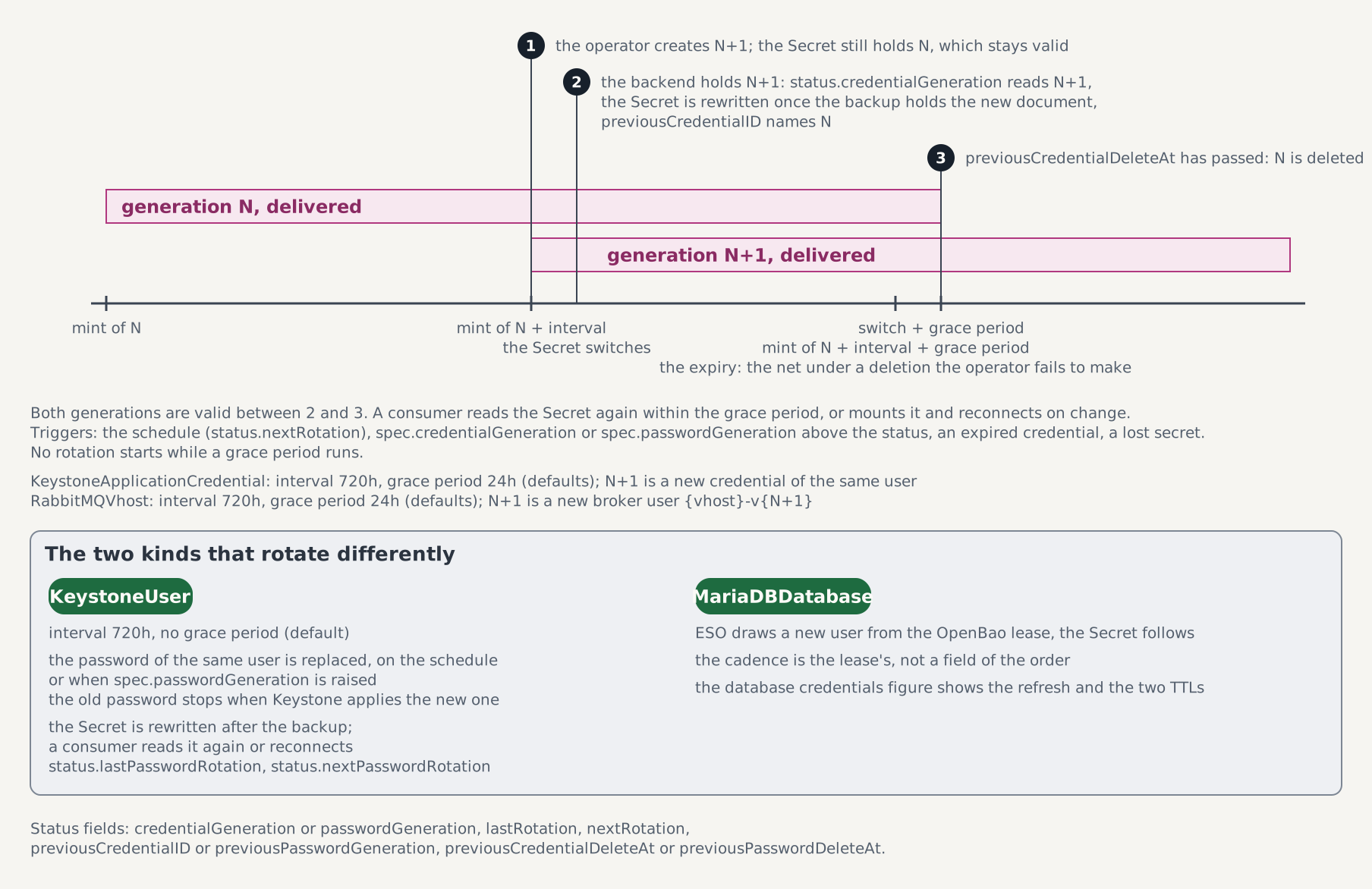
The operator creates generation 2 three minutes after generation 1 was created and switches the Secret once Keystone holds it. Generation 1 stays valid for two minutes more, the grace period, and is then deleted. A consumer that reads the Secret again within those two minutes never holds an invalid credential.
The three badges are the three steps the guide lists; the status fields on the strip are the ones the commands below print.
Turn the schedule off as soon as generation 2 is there, so that no third rotation races the rest of this step. The grace period of generation 1 runs on regardless. The loop, bounded at five minutes, also takes a later generation, since the schedule rotates every three minutes until the patch turns it off:
for _ in $(seq 1 60); do
  gen=$(kubectl get keystoneapplicationcredential workflow-appcred -n workflow \
    -o jsonpath='{.status.credentialGeneration}')
  [ "${gen:-0}" -ge 2 ] && break
  sleep 5
done
[ "${gen:-0}" -ge 2 ] || echo "generation 2 did not appear within five minutes"
kubectl patch keystoneapplicationcredential workflow-appcred -n workflow --type merge \
  -p '{"spec":{"rotation":{"interval":"0s"}}}'
kubectl get keystoneapplicationcredential workflow-appcred -n workflow \
  -o jsonpath='{.status.credentialGeneration}{" "}{.status.credentialID}{" "}{.status.previousCredentialID}{" "}{.status.previousCredentialDeleteAt}{"\n"}'
kubectl get applicationcredentials.openstack.k-orc.cloud -n openstack \
  -l c5c3.io/keystoneapplicationcredential-name=workflow-appcred,c5c3.io/keystoneapplicationcredential-namespace=workflow
The status names generation 2, the new id, the superseded id and the time the superseded one is deleted, two minutes after the switch, and the list shows two K-ORC credentials in openstack.
If the status reads a generation above 2, or generation 2 with an empty previousCredentialID, the grace period of generation 1 has passed. If it still reads generation 1, the schedule did not rotate within five minutes, and generation 1 has passed its Keystone expiry, five minutes after it was created. The operator rotates on that expiry by itself, so something keeps it from creating generation 2; kubectl describe keystoneapplicationcredential workflow-appcred -n workflow shows why. Fix that and run the commands above again. In each of these cases the copy workflow-appcred-gen1 no longer authenticates: copy the current document and rotate by hand, then go on below. The new copy holds the credential this rotation supersedes, with a fresh grace period. The operator switches the status before it rewrites the Secret, so a loop bounded at three minutes first waits for the Secret to hold the credential the status names. A loop that runs out says so, and the copy then holds the superseded credential. The same kubectl describe shows why; fix that and run the commands again. A grace period that still runs delays the rotation until it ends, which the five-minute wait covers:
read -r gen id <<<"$(kubectl get keystoneapplicationcredential workflow-appcred -n workflow \
  -o jsonpath='{.status.credentialGeneration}{" "}{.status.credentialID}')"
for _ in $(seq 1 36); do
  got=$(kubectl get secret workflow-appcred-credentials -n workflow \
    -o jsonpath='{.data.application_credential_id}' | base64 -d)
  [ "$got" = "$id" ] && break
  sleep 5
done
[ "$got" = "$id" ] || echo "the Secret did not take credential $id within three minutes"
kubectl get secret workflow-appcred-credentials -n workflow -o json \
  | jq '{apiVersion: "v1", kind: "Secret", type: "Opaque",
         metadata: {name: "workflow-appcred-gen1", namespace: .metadata.namespace},
         data: {"clouds.yaml": .data["clouds.yaml"]}}' \
  | kubectl apply -f -
kubectl patch keystoneapplicationcredential workflow-appcred -n workflow --type merge \
  -p "{\"spec\":{\"credentialGeneration\":$((gen + 1))}}"
kubectl wait --for=jsonpath="{.status.credentialGeneration}"=$((gen + 1)) \
  keystoneapplicationcredential/workflow-appcred -n workflow --timeout=5m
Inside the grace period the generation-1 copy still authenticates. Run the verify Job with it:
sed -e 's|@TENANT_NS@|workflow|g' \
  -e 's|name: workflow-appcred-verify|name: workflow-appcred-gen1-verify|' \
  -e 's|secretName: workflow-appcred-credentials|secretName: workflow-appcred-gen1|' \
  tests/e2e/c5c3/keystone-user/11-openstack-appcred-verify-job.yaml | kubectl apply -f -
kubectl wait --for=condition=complete job/workflow-appcred-gen1-verify -n workflow --timeout=2m
kubectl logs -n workflow job/workflow-appcred-gen1-verify
The log ends with OK: the delivered application credential authenticates, from the superseded credential. If the Job fails instead, the grace period ended before it ran, which is the refusal the next commands show; go on with them.
kubectl wait cannot wait for a field to disappear, so a loop bounded at five minutes waits for previousCredentialID to clear. The same Job then runs again with the copy:
for _ in $(seq 1 30); do
  [ -z "$(kubectl get keystoneapplicationcredential workflow-appcred -n workflow \
    -o jsonpath='{.status.previousCredentialID}')" ] && break
  sleep 10
done
kubectl get applicationcredentials.openstack.k-orc.cloud -n openstack \
  -l c5c3.io/keystoneapplicationcredential-name=workflow-appcred,c5c3.io/keystoneapplicationcredential-namespace=workflow
kubectl delete job workflow-appcred-gen1-verify -n workflow
sed -e 's|@TENANT_NS@|workflow|g' \
  -e 's|name: workflow-appcred-verify|name: workflow-appcred-gen1-verify|' \
  -e 's|secretName: workflow-appcred-credentials|secretName: workflow-appcred-gen1|' \
  tests/e2e/c5c3/keystone-user/11-openstack-appcred-verify-job.yaml | kubectl apply -f -
kubectl wait --for=condition=failed job/workflow-appcred-gen1-verify -n workflow --timeout=3m
kubectl logs -n workflow job/workflow-appcred-gen1-verify
One K-ORC credential is left, and the Job fails: Keystone refuses a credential it no longer holds. The log ends with Could not find Application Credential: <id>. (HTTP 404) (Request-ID: req-<uuid>), where <id> is the id of the credential in the copy. A loop that runs out means the operator did not delete generation 1; kubectl describe keystoneapplicationcredential workflow-appcred -n workflow shows the order's conditions and events.
A rotation by hand raises spec.credentialGeneration above the generation the status reports. Read the generation from the status and add one: generation 2 keeps the expiry it was created with, and a credential that rotated on that expiry while you waited reads one higher. With the schedule off, the new credential carries no expiry:
gen=$(kubectl get keystoneapplicationcredential workflow-appcred -n workflow \
  -o jsonpath='{.status.credentialGeneration}')
kubectl patch keystoneapplicationcredential workflow-appcred -n workflow --type merge \
  -p "{\"spec\":{\"credentialGeneration\":$((gen + 1))}}"
kubectl wait --for=jsonpath="{.status.credentialGeneration}"=$((gen + 1)) \
  keystoneapplicationcredential/workflow-appcred -n workflow --timeout=5m
id=$(kubectl get keystoneapplicationcredential workflow-appcred -n workflow -o jsonpath='{.status.credentialID}')
for _ in $(seq 1 36); do
  [ "$(kubectl get secret workflow-appcred-credentials -n workflow \
    -o jsonpath='{.data.application_credential_id}' | base64 -d)" = "$id" ] && break
  sleep 5
done
kubectl get keystoneapplicationcredential workflow-appcred -n workflow \
  -o jsonpath='{.status.credentialGeneration}{" "}{.status.nextRotation}{" "}{.status.credentialExpiresAt}{"\n"}'
The generation reads one above the one you read, 3 on the straight path, and both nextRotation and credentialExpiresAt are empty. The loop, bounded at three minutes, waits for the delivered Secret, which the operator rewrites once the backup holds the new document.
The live credential authenticates, and the copy goes:
kubectl delete job workflow-appcred-verify workflow-appcred-gen1-verify -n workflow
kubectl delete secret workflow-appcred-gen1 -n workflow
sed -e 's|@TENANT_NS@|workflow|g' tests/e2e/c5c3/keystone-user/11-openstack-appcred-verify-job.yaml \
  | kubectl apply -f -
kubectl wait --for=condition=complete job/workflow-appcred-verify -n workflow --timeout=5m
kubectl logs -n workflow job/workflow-appcred-verify
A consumer reads the Secret again within the grace period, or mounts it as a volume and reconnects when it changes. A consumer that read the keys into environment variables at start must be restarted within the grace period. spec.rotation.interval and spec.rotation.gracePeriod change the schedule; Order an application credential covers the rest.
Step 8: Order a database
kubectl apply -f - <<'EOF'
apiVersion: c5c3.io/v1alpha1
kind: MariaDBDatabase
metadata:
  name: workflow-db
  namespace: workflow
spec:
  controlPlaneRef:
    name: controlplane
    namespace: openstack
EOF
kubectl wait --for=condition=Ready mariadbdatabase/workflow-db -n workflow --timeout=10m
sed -e 's|@TENANT_NS@|workflow|g' tests/e2e/c5c3/keystone-user/13-mariadb-verify-job.yaml \
  | kubectl apply -f -
kubectl wait --for=condition=complete job/workflow-db-verify -n workflow --timeout=5m
kubectl logs -n workflow job/workflow-db-verify
The schema is workflow_db, and the Secret workflow-db-credentials carries host, port, database, username and password of a user OpenBao issues. The Job writes a row into the schema, reads it back, and fails if the login reaches the ControlPlane's keystone schema.
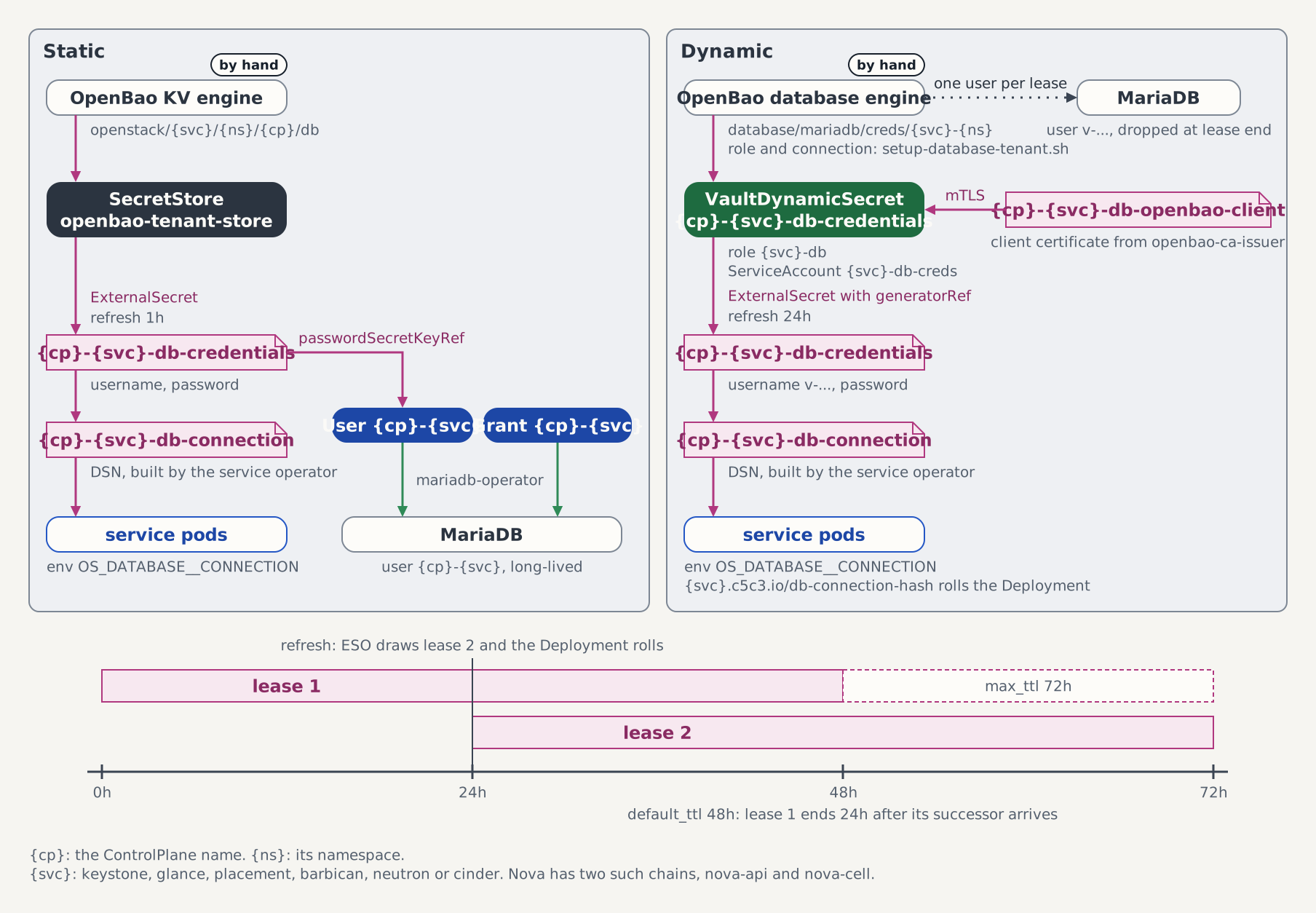
The user OpenBao issues is a lease. The right half of the figure is the chain behind the Secret: ESO draws a new user every 24 hours, OpenBao drops each one 48 hours after it issued it, and the operator rewrites the Secret on every refresh, so a consumer reads it at least once a day.
Step 9: Order a vhost
kubectl apply -f - <<'EOF'
apiVersion: c5c3.io/v1alpha1
kind: RabbitMQVhost
metadata:
  name: workflow-bus
  namespace: workflow
spec:
  controlPlaneRef:
    name: controlplane
    namespace: openstack
EOF
kubectl wait --for=condition=Ready rabbitmqvhost/workflow-bus -n workflow --timeout=10m
user=$(kubectl get secret workflow-bus-credentials -n workflow -o jsonpath='{.data.username}' | base64 -d)
password=$(kubectl get secret workflow-bus-credentials -n workflow -o jsonpath='{.data.password}' | base64 -d)
printf '%s\n' "$password" | kubectl exec -i -n openstack openstack-rabbitmq-server-0 -c rabbitmq -- \
  sh -c 'IFS= read -r pw; rabbitmqctl authenticate_user "$1" "$pw"' _ "$user"
The broker reports Success. The password goes in on standard input, because the arguments of kubectl exec are written to the API server's audit log. The Secret workflow-bus-credentials carries transport_url, host, port, username, password and vhost; a service points oslo.messaging at transport_url. The user rotates on the same schedule as the application credential, every 720 hours with a 24-hour grace period, as a new broker user <vhost>-v2 beside the old one; Step 7 shows the mechanism.
Step 10: Tear the orders down
Deleting an order is what revokes it. Delete them in the order their holds allow: a user, a project or an assignment that a credential order uses holds its deletion, and a user or a project that an assignment names holds as well.
kubectl delete job workflow-verify workflow-scoped-verify workflow-appcred-verify workflow-db-verify -n workflow
kubectl delete keystoneapplicationcredential workflow-appcred -n workflow
kubectl delete keystoneroleassignment workflow-member -n workflow
kubectl delete keystonecatalogentry workflow-dns -n workflow
kubectl delete keystoneproject workflow-project -n workflow
kubectl delete keystoneuser workflow -n workflow
kubectl delete mariadbdatabase workflow-db -n workflow
kubectl delete rabbitmqvhost workflow-bus -n workflow
Under their default deletionPolicy: Retain the schema workflow_db and the vhost stay with their data; the users that reach them are gone. Then withdraw the assignment and delete the namespace:
Withdrawing the entry freezes the orders
Removing the entry while orders exist stops the operator from acting on them and revokes nothing: the Keystone user keeps authenticating and the Secrets stay until the orders are deleted.
i=$(kubectl get controlplane controlplane -n openstack -o json \
  | jq '[.spec.namespaceAssignments[] | .namespace == "workflow" and .targetClusterRef == null] | index(true)')
kubectl patch controlplane controlplane -n openstack --type json -p "[
  {\"op\":\"test\",\"path\":\"/spec/namespaceAssignments/${i}/namespace\",\"value\":\"workflow\"},
  {\"op\":\"remove\",\"path\":\"/spec/namespaceAssignments/${i}\"}]"
kubectl delete namespace workflow
The test operation rejects the patch if another entry sits at that index by the time it applies.
Part 2: A target cluster
Part 2 puts the owner's namespace on a second kind cluster, cobaltcore-target, registered with the operators as a target cluster. The orders are applied there, and the c5c3-operator writes each Secret beside its order on the target, with the addresses the ControlPlane publishes for other clusters. On kind those addresses need three things the devstack does not set up: a route from the target's pods to keystone.127-0-0-1.nip.io:8443, a trust anchor for the Gateway's self-signed certificate, and NodePorts for the database and the bus.
Run Part 2 in one shell: later steps read workdir and NODE_IP from earlier ones. Every command on the target names --context kind-cobaltcore-target; every other command runs on the devstack's cluster, kind-cobaltcore.
The path from the target
Steps 4 and 5 build the path a pod on the target takes to the devstack. Six hops:
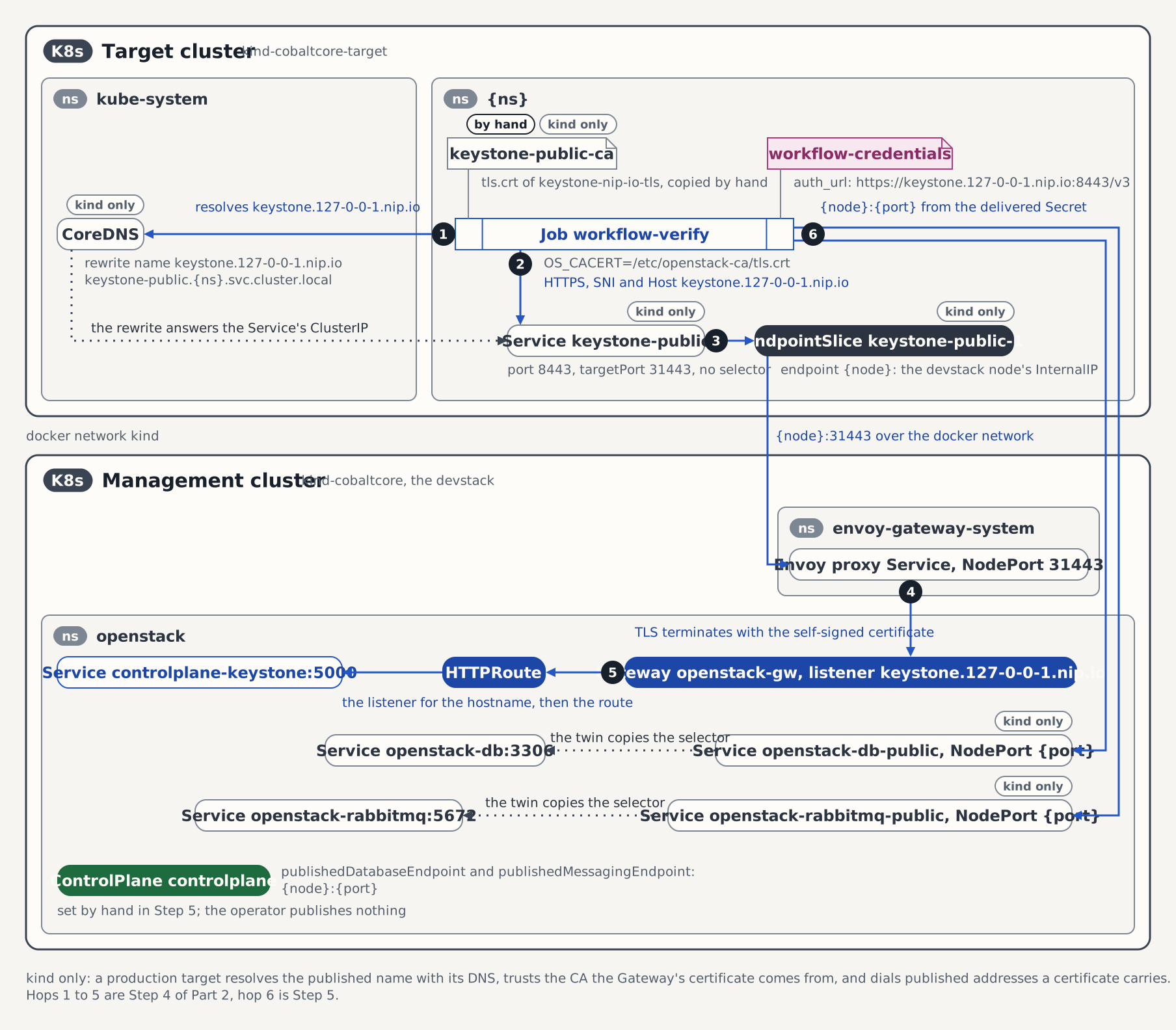
- The Job's pod resolves
keystone.127-0-0-1.nip.io, and the CoreDNS rewrite on the target answers with the ClusterIP of the selector-less Servicekeystone-publicinworkflow. - The pod sends the HTTPS request to that Service with the hostname unchanged, so it carries the SNI and the
Hostheader the Gateway's listener matches. - The Service's EndpointSlice points at the devstack node's
InternalIPon NodePort 31443, reached over the docker networkkind. - The Envoy proxy Service on the devstack terminates TLS with the Gateway's self-signed certificate, which the Job trusts through the ConfigMap
keystone-public-ca. - The Gateway's listener for the hostname and the HTTPRoute hand the request to the Keystone Service
controlplane-keystoneon port 5000. - The database and the bus are dialed at the node's IP and the NodePorts of the twins
openstack-db-publicandopenstack-rabbitmq-public, which Step 5 publishes by hand as the ControlPlane's database and messaging endpoints.
Step 1: Create the target cluster
kind create cluster --name cobaltcore-target
kubectl config use-context kind-cobaltcore
workdir=$(mktemp -d)
The cluster takes no kind config, so it binds no host port and nothing contends with the devstack's 8443 and 8428. kind create cluster switches the current context to the new cluster, and the second command switches it back.
Step 2: Install the access chart
helm install --kube-context kind-cobaltcore-target \
  target-cluster-access deploy/target-cluster/target-cluster-access \
  -n c5c3-access --create-namespace \
  --set 'namespaces={openstack}' \
  --set 'assignedNamespaces={workflow}'
kubectl --context kind-cobaltcore-target create namespace workflow
The chart creates a ServiceAccount the management cluster authenticates as, with a Role in the placed namespace openstack, which it creates on the bare cluster, and a Role in workflow that covers the seven order kinds and Secrets and nothing else. It ships the order CRDs and creates no assigned namespace, hence the second command. Assigned namespaces lists the grants.
Step 3: Register the target
The registration Secret carries a kubeconfig with the chart's token and the target's address on the docker network both clusters share:
kubectl --context kind-cobaltcore-target -n c5c3-access get secret target-cluster-access-token \
  -o jsonpath='{.data.token}' | base64 -d > "$workdir/token"
kubectl --context kind-cobaltcore-target -n c5c3-access get secret target-cluster-access-token \
  -o jsonpath='{.data.ca\.crt}' | base64 -d > "$workdir/ca.crt"
kind get kubeconfig --internal --name cobaltcore-target > "$workdir/internal.kubeconfig"
server=$(kubectl --kubeconfig "$workdir/internal.kubeconfig" config view \
  -o jsonpath='{.clusters[0].cluster.server}')
reg="$workdir/registration.kubeconfig"
kubectl --kubeconfig "$reg" config set-cluster cobaltcore-target \
  --server="$server" --certificate-authority="$workdir/ca.crt" --embed-certs=true
kubectl --kubeconfig "$reg" config set-credentials target-cluster-access --token="$(cat "$workdir/token")"
kubectl --kubeconfig "$reg" config set-context cobaltcore-target \
  --cluster=cobaltcore-target --user=target-cluster-access
kubectl --kubeconfig "$reg" config use-context cobaltcore-target

kubectl create namespace c5c3-clusters --dry-run=client -o yaml | kubectl apply -f -
kubectl -n c5c3-clusters create secret generic cobaltcore-target \
  --from-file=kubeconfig="$reg" \
  --from-literal=namespaces=openstack \
  --from-literal=assignedNamespaces=workflow
kubectl -n c5c3-clusters label secret cobaltcore-target \
  sigs.k8s.io/multicluster-runtime-kubeconfig=true
The namespaces key scopes every operator's cache on the target to openstack. The assignedNamespaces key adds workflow for the c5c3-operator alone, for the seven order kinds and Secrets. An owner's namespace stays out of the namespaces key: every service operator watches the namespaces of that key, the chart grants them nothing in workflow, and their caches would never sync. Within two minutes both operators log the engagement:
kubectl logs -n c5c3-system -l app.kubernetes.io/name=c5c3-operator --tail=-1 | grep 'cluster engaged'
kubectl logs -n keystone-system -l app.kubernetes.io/name=keystone-operator --tail=-1 | grep 'cluster engaged'
Each prints a line naming cobaltcore-target. The keystone-operator's line is the proof that the assigned namespace stays out of a service operator's cache.
Step 4: Reach Keystone from the target
An order on the target is delivered the ControlPlane's spec.services.keystone.publicEndpoint, which the devstack sets to https://keystone.127-0-0-1.nip.io:8443/v3. On the workstation that name resolves to the loopback address, and hack/kind-config.yaml bridges the host port to the Envoy Gateway's NodePort 31443 on the devstack's node. A pod on the target cannot use the URL unchanged: the name points at the pod itself, and port 8443 is bound on the workstation only. The pod does reach the devstack's node at its InternalIP, over the docker network kind. A Service without a selector maps port 8443 to that node's 31443:
NODE_IP=$(kubectl get node -o jsonpath='{.items[0].status.addresses[?(@.type=="InternalIP")].address}')
kubectl --context kind-cobaltcore-target apply -f - <<EOF
apiVersion: v1
kind: Service
metadata:
  name: keystone-public
  namespace: workflow
spec:
  ports:
    - port: 8443
      targetPort: 31443
---
apiVersion: discovery.k8s.io/v1
kind: EndpointSlice
metadata:
  name: keystone-public-1
  namespace: workflow
  labels:
    kubernetes.io/service-name: keystone-public
addressType: IPv4
ports:
  - port: 31443
endpoints:
  - addresses: ["${NODE_IP}"]
EOF
A CoreDNS rewrite then points the name at the Service. It stands in for the DNS a real target cluster resolves the published name with, and it is cluster-wide on the target. The request keeps the hostname, so it carries the SNI and the Host header the Gateway's Keystone listener matches:
kubectl --context kind-cobaltcore-target -n kube-system get configmap coredns \
  -o jsonpath='{.data.Corefile}' \
  | awk '{ print } /^ *ready$/ { print "    rewrite name keystone.127-0-0-1.nip.io keystone-public.workflow.svc.cluster.local" }' \
  > "$workdir/Corefile"
kubectl --context kind-cobaltcore-target -n kube-system create configmap coredns \
  --from-file=Corefile="$workdir/Corefile" --dry-run=client -o yaml \
  | kubectl --context kind-cobaltcore-target replace -f -
kubectl --context kind-cobaltcore-target -n kube-system rollout restart deploy/coredns
kubectl --context kind-cobaltcore-target -n kube-system rollout status deploy/coredns
The devstack's self-signed ClusterIssuer issued the Gateway's certificate, so its tls.crt is its own trust anchor. Copy it into workflow on the target:
kubectl get secret keystone-nip-io-tls -n openstack -o jsonpath='{.data.tls\.crt}' \
  | base64 -d > "$workdir/keystone-public-ca.crt"
kubectl --context kind-cobaltcore-target -n workflow create configmap keystone-public-ca \
  --from-file=tls.crt="$workdir/keystone-public-ca.crt"
kubectl --context kind-cobaltcore-target -n workflow run keystone-probe --rm -i --restart=Never \
  --image=busybox:1.37 -- wget --no-check-certificate -O- https://keystone.127-0-0-1.nip.io:8443/v3
The probe prints Keystone's version document. The delivered credentials carry no CA: a consumer verifies the endpoint against its own trust store, and on a real target that holds the CA the Gateway's certificate comes from.
Step 5: Publish the database and the bus
A database order or a vhost order on the target is delivered the address the ControlPlane records in spec.infrastructure.publishedDatabaseEndpoint or publishedMessagingEndpoint, as host:port. The operator publishes nothing itself. On kind, a NodePort twin of each Service publishes it; kubectl expose service copies the selector of the source Service, so no pod label is guessed:
kubectl expose service openstack-db --type=NodePort --name=openstack-db-public --port=3306 -n openstack
kubectl expose service openstack-rabbitmq --type=NodePort --name=openstack-rabbitmq-public --port=5672 -n openstack
DB_PORT=$(kubectl get svc openstack-db-public -n openstack -o jsonpath='{.spec.ports[0].nodePort}')
BUS_PORT=$(kubectl get svc openstack-rabbitmq-public -n openstack -o jsonpath='{.spec.ports[0].nodePort}')
kubectl patch controlplane controlplane -n openstack --type merge -p "{\"spec\":{\"infrastructure\":{
  \"publishedDatabaseEndpoint\":\"${NODE_IP}:${DB_PORT}\",
  \"publishedMessagingEndpoint\":\"${NODE_IP}:${BUS_PORT}\"}}}"
kubectl get controlplane controlplane -n openstack \
  -o jsonpath='{.spec.infrastructure.publishedDatabaseEndpoint}{" "}{.spec.infrastructure.publishedMessagingEndpoint}{"\n"}'
Both addresses are the node's IP and the port kubectl get svc reports for each twin. Publish before the orders exist: an order on a target cluster has no watch on the ControlPlane, and it reads a later edit only on its ten-minute refresh.
Step 6: Assign the namespace on the target
The entry names the cluster in targetClusterRef. It is a second entry beside any for workflow on the management cluster, because an entry is the pair of namespace and cluster:
kubectl patch controlplane controlplane -n openstack --type json \
  -p '[{"op":"add","path":"/spec/namespaceAssignments/-","value":{"namespace":"workflow","targetClusterRef":{"name":"cobaltcore-target"},"allowedRoles":["member"],"allowCatalogEntries":true}}]'
kubectl wait --for=condition=NamespaceAssignmentsReady controlplane/controlplane -n openstack --timeout=5m
On a ControlPlane that assigns no namespace any more, create the list as in Part 1 Step 2, with this entry.
Step 7: Order the seven pieces
The orders are the ones of Part 1, applied on the target. controlPlaneRef names the ControlPlane on the management cluster. The user, the database and the vhost go first:
kubectl --context kind-cobaltcore-target apply -f - <<'EOF'
apiVersion: c5c3.io/v1alpha1
kind: KeystoneUser
metadata:
  name: workflow
  namespace: workflow
spec:
  controlPlaneRef:
    name: controlplane
    namespace: openstack
---
apiVersion: c5c3.io/v1alpha1
kind: MariaDBDatabase
metadata:
  name: workflow-db
  namespace: workflow
spec:
  controlPlaneRef:
    name: controlplane
    namespace: openstack
---
apiVersion: c5c3.io/v1alpha1
kind: RabbitMQVhost
metadata:
  name: workflow-bus
  namespace: workflow
spec:
  controlPlaneRef:
    name: controlplane
    namespace: openstack
EOF
kubectl --context kind-cobaltcore-target wait --for=condition=Ready -n workflow --timeout=15m \
  keystoneuser/workflow mariadbdatabase/workflow-db rabbitmqvhost/workflow-bus
The project, the role and the catalog entry follow:
kubectl --context kind-cobaltcore-target apply -f - <<'EOF'
apiVersion: c5c3.io/v1alpha1
kind: KeystoneProject
metadata:
  name: workflow-project
  namespace: workflow
spec:
  controlPlaneRef:
    name: controlplane
    namespace: openstack
---
apiVersion: c5c3.io/v1alpha1
kind: KeystoneRoleAssignment
metadata:
  name: workflow-member
  namespace: workflow
spec:
  controlPlaneRef:
    name: controlplane
    namespace: openstack
  userRef:
    name: workflow
  projectRef:
    name: workflow-project
  role: member
---
apiVersion: c5c3.io/v1alpha1
kind: KeystoneCatalogEntry
metadata:
  name: workflow-dns
  namespace: workflow
spec:
  controlPlaneRef:
    name: controlplane
    namespace: openstack
  serviceType: dns
  serviceName: designate
  endpoints:
    - interface: public
      url: https://dns.example.test/v2
EOF
kubectl --context kind-cobaltcore-target wait --for=condition=Ready -n workflow --timeout=10m \
  keystoneproject/workflow-project keystoneroleassignment/workflow-member keystonecatalogentry/workflow-dns
The application credential needs the role, so it goes last:
kubectl --context kind-cobaltcore-target apply -f - <<'EOF'
apiVersion: c5c3.io/v1alpha1
kind: KeystoneApplicationCredential
metadata:
  name: workflow-appcred
  namespace: workflow
spec:
  controlPlaneRef:
    name: controlplane
    namespace: openstack
  userRef:
    name: workflow
  projectRef:
    name: workflow-project
EOF
kubectl --context kind-cobaltcore-target wait --for=condition=Ready -n workflow --timeout=15m \
  keystoneapplicationcredential/workflow-appcred
Step 8: Read the Secrets
kubectl --context kind-cobaltcore-target get secret -n workflow
kubectl --context kind-cobaltcore-target get secret workflow-credentials -n workflow \
  -o jsonpath='{.data.clouds\.yaml}' | base64 -d | grep auth_url
kubectl --context kind-cobaltcore-target get secret workflow-db-credentials -n workflow \
  -o go-template='{{.data.host | base64decode}}:{{.data.port | base64decode}}{{"\n"}}'
kubectl --context kind-cobaltcore-target get secret workflow-bus-credentials -n workflow \
  -o go-template='{{.data.host | base64decode}}:{{.data.port | base64decode}}{{"\n"}}'
kubectl get secret -n workflow
The target lists workflow-credentials, workflow-appcred-credentials, workflow-db-credentials and workflow-bus-credentials. The user's document carries auth_url: "https://keystone.127-0-0-1.nip.io:8443/v3", and the database and the bus carry the node's IP with their NodePorts. The last command finds none of the four on the management cluster.
Step 9: Use them from the target
The token Job mounts the trust anchor of Step 4 and points OS_CACERT at it. Save it once and run it for the user and the application credential:
cat > "$workdir/verify-job.yaml" <<'EOF'
apiVersion: batch/v1
kind: Job
metadata:
  name: workflow-verify
  namespace: workflow
spec:
  backoffLimit: 1
  template:
    spec:
      restartPolicy: Never
      containers:
        - name: osc
          image: ghcr.io/c5c3/tempest:2026.1
          env:
            - name: OS_CLIENT_CONFIG_FILE
              value: /etc/openstack/clouds.yaml
            - name: OS_CACERT
              value: /etc/openstack-ca/tls.crt
          command: ["/bin/sh", "-c"]
          args:
            - openstack --os-cloud admin token issue -c expires
          volumeMounts:
            - name: clouds
              mountPath: /etc/openstack
              readOnly: true
            - name: ca
              mountPath: /etc/openstack-ca
              readOnly: true
      volumes:
        - name: clouds
          secret:
            secretName: workflow-credentials
        - name: ca
          configMap:
            name: keystone-public-ca
EOF
kubectl --context kind-cobaltcore-target apply -f "$workdir/verify-job.yaml"
sed -e 's|name: workflow-verify|name: workflow-appcred-verify|' \
  -e 's|secretName: workflow-credentials|secretName: workflow-appcred-credentials|' \
  "$workdir/verify-job.yaml" | kubectl --context kind-cobaltcore-target apply -f -
kubectl --context kind-cobaltcore-target wait --for=condition=complete -n workflow --timeout=5m \
  job/workflow-verify job/workflow-appcred-verify
kubectl --context kind-cobaltcore-target logs -n workflow job/workflow-verify
kubectl --context kind-cobaltcore-target logs -n workflow job/workflow-appcred-verify
The database and the bus Jobs are the ones of the two-cluster suite, with the namespace substituted. The database Job turns PyMySQL's host-name check off, because the server certificate does not carry the node's IP; a production target publishes a name the certificate carries (see publishedDatabaseEndpoint in the ControlPlane CRD). The bus Job opens an AMQP connection with the delivered transport_url:
for job in 13-mariadb-verify-job 14-bus-verify-job; do
  sed -e 's|orders-tenant|workflow|g' "tests/e2e-orders-multicluster/orders/${job}.yaml" \
    | kubectl --context kind-cobaltcore-target apply -f -
done
kubectl --context kind-cobaltcore-target wait --for=condition=complete -n workflow --timeout=5m \
  job/workflow-db-verify job/workflow-bus-verify
kubectl --context kind-cobaltcore-target logs -n workflow job/workflow-db-verify
kubectl --context kind-cobaltcore-target logs -n workflow job/workflow-bus-verify
The bus Job prints connected: True. The broker on the management cluster confirms the user:
user=$(kubectl --context kind-cobaltcore-target get secret workflow-bus-credentials -n workflow \
  -o jsonpath='{.data.username}' | base64 -d)
password=$(kubectl --context kind-cobaltcore-target get secret workflow-bus-credentials -n workflow \
  -o jsonpath='{.data.password}' | base64 -d)
printf '%s\n' "$password" | kubectl exec -i -n openstack openstack-rabbitmq-server-0 -c rabbitmq -- \
  sh -c 'IFS= read -r pw; rabbitmqctl authenticate_user "$1" "$pw"' _ "$user"
Step 10: Tear Part 2 down
Delete the Jobs and the orders on the target, in the order of Part 1 Step 10:
kubectl --context kind-cobaltcore-target delete job -n workflow \
  workflow-verify workflow-appcred-verify workflow-db-verify workflow-bus-verify
for order in keystoneapplicationcredential/workflow-appcred keystoneroleassignment/workflow-member \
  keystonecatalogentry/workflow-dns keystoneproject/workflow-project keystoneuser/workflow \
  mariadbdatabase/workflow-db rabbitmqvhost/workflow-bus; do
  kubectl --context kind-cobaltcore-target delete -n workflow "$order"
done
kubectl --context kind-cobaltcore-target get secret -n workflow
kubectl get users.openstack.k-orc.cloud,pushsecrets -n openstack -l c5c3.io/keystoneuser-namespace=workflow
Neither command lists anything the orders created. Then withdraw the entry, clear the published addresses, and remove the registration, the chart and the cluster:
i=$(kubectl get controlplane controlplane -n openstack -o json \
  | jq '[.spec.namespaceAssignments[] | .namespace == "workflow" and .targetClusterRef.name == "cobaltcore-target"] | index(true)')
kubectl patch controlplane controlplane -n openstack --type json -p "[
  {\"op\":\"test\",\"path\":\"/spec/namespaceAssignments/${i}/namespace\",\"value\":\"workflow\"},
  {\"op\":\"remove\",\"path\":\"/spec/namespaceAssignments/${i}\"}]"
kubectl patch controlplane controlplane -n openstack --type merge \
  -p '{"spec":{"infrastructure":{"publishedDatabaseEndpoint":null,"publishedMessagingEndpoint":null}}}'
kubectl delete service openstack-db-public openstack-rabbitmq-public -n openstack
kubectl delete secret cobaltcore-target -n c5c3-clusters
helm uninstall --kube-context kind-cobaltcore-target target-cluster-access -n c5c3-access
kind delete cluster --name cobaltcore-target
kind get clusters
The entry goes before the registration Secret: an entry whose cluster does not resolve turns the ControlPlane's Ready False. kind get clusters lists cobaltcore alone.
Teardown
Part 2's teardown leaves the devstack as Part 1 found it. Remove the devstack with:
make teardown-infraTested by
chainsaw test --test-dir tests/e2e/c5c3/keystone-user
chainsaw test --test-dir tests/e2e/c5c3/messaging
chainsaw test --test-dir tests/e2e-orders-multicluster/orders
keystone-user runs the Keystone and database orders of Part 1 on the management cluster, with the rotation, repair, freeze and teardown walks of the how-to guide. It rotates the user's password by hand and on the schedule, and logs in with the superseded credential inside its grace period, as Step 7 shows. messaging does the same for the vhost order. Both need the ControlPlane stack, which ControlPlane E2E Test Suites describes. tests/e2e-orders-multicluster/orders runs Part 2 on two kind clusters; make e2e-orders-multicluster names the stack and the registration it needs, and the e2e-orders-multicluster CI job brings both up.
The suites are isolation-named. The two-cluster suite's plane is cp in chainsaw's own namespace, its owner's namespace on the target is orders-tenant, and its plane publishes Keystone, the database and the bus over plain http and AMQP on pinned NodePorts, so it needs neither the DNS rewrite nor the trust anchor of Part 2. The exhibits are its fixtures as it applies them; the walkthrough above uses the devstack's names.
The suite's ControlPlane
apiVersion: c5c3.io/v1alpha1
kind: ControlPlane
metadata:
  name: cp
spec:
  openStackRelease: "2026.1"
  region: RegionOne
  infrastructure:
    database:
      clusterRef:
        name: openstack-db
      database: keystone
      secretRef:
        name: keystone-db
    cache:
      clusterRef:
        name: openstack-memcached
      backend: dogpile.cache.pymemcache
    messaging:
      clusterRef:
        name: cp-rabbitmq
    publishedDatabaseEndpoint: "@DB_ENDPOINT@"
    publishedMessagingEndpoint: "@BUS_ENDPOINT@"
  services:
    keystone:
      publicEndpoint: "@PUBLIC_ENDPOINT@"
  sizing:
    profile: Minimal
  korc:
    adminCredential:
      cloudCredentialsRef:
        cloudName: admin
        secretName: k-orc-clouds-yaml
      passwordSecretRef:
        name: keystone-admin
        key: password
      applicationCredential:
        restricted: true
        rotation:
          mode: PasswordDriven
  namespaceAssignments:
  - namespace: orders-tenant
    targetClusterRef:
      name: cobaltcore-target
    allowedRoles: [member]
    allowCatalogEntries: true
The user order on the target
apiVersion: c5c3.io/v1alpha1
kind: KeystoneUser
metadata:
  name: workflow
  namespace: orders-tenant
spec:
  controlPlaneRef:
    name: cp
    namespace: "@CP_NS@"
The bus Job
apiVersion: batch/v1
kind: Job
metadata:
  name: workflow-bus-verify
  namespace: orders-tenant
spec:
  backoffLimit: 1
  template:
    spec:
      restartPolicy: Never
      containers:
      - name: amqp
        image: ghcr.io/c5c3/keystone:2026.1
        imagePullPolicy: IfNotPresent
        env:
        - name: TRANSPORT_URL
          valueFrom: {secretKeyRef: {name: workflow-bus-credentials, key: transport_url}}
        command: ["python3", "-c"]
        args:
        - |
          import os
          import kombu

          url = os.environ["TRANSPORT_URL"].replace("rabbit://", "amqp://", 1)
          conn = kombu.Connection(url, connect_timeout=10)
          conn.connect()
          print("connected:", conn.connected)
          conn.release()
          print("OK: the delivered bus credentials connect")
        resources:
          requests:
            cpu: 100m
            memory: 128Mi
          limits:
            memory: 512Mi
Related references
- KeystoneUser, KeystoneProject, KeystoneRoleAssignment, KeystoneCatalogEntry, KeystoneApplicationCredential, MariaDBDatabase and RabbitMQVhost: the seven order kinds, their conditions and what each Secret carries.
- NamespaceAssignmentSpec: the consent an order reads.
- Assigned namespaces: what the access chart grants in an owner's namespace on a target, and the registration's
assignedNamespaceskey. - Order Resources from a ControlPlane: each order kind in depth, with rotation, repair and deletion policies.
- Deploy to a Target Cluster: the access chart and the registration for placed services.
- orders-target-cluster: the nine steps of the two-cluster suite.
- Quick Start (ControlPlane): the devstack this page runs on.