Attach S3 Multi-Store Backends to Glance
This guide walks through running Glance with more than one S3 image store: it attaches a second store alongside the one the ControlPlane devstack already projects, switches which store is the default, and shows why a store attached by hand behaves differently on a ControlPlane than on a standalone Glance. Each store is a GlanceBackend — on a ControlPlane you declare them as services.glance.backends[] entries and the operator projects one child CR per entry; a standalone Glance owns its GlanceBackend CRs directly.
For the full field reference, see the Glance CRD API Reference and the GlanceBackend CRD API Reference.
Prerequisites
Devstack
This guide is written against the Quick Start (ControlPlane) devstack. Stand it up first:
KIND_HOST_PORT=8443 WITH_CONTROLPLANE=true make deploy-infraFollow that tutorial through to its final Verify step, so the ControlPlane's projected controlplane-glance Glance child is Ready in the openstack namespace with its default S3 store attached (bucket glance-images). Every resource name in the examples below is one that devstack produces.
- The devstack's Garage object store and the ESO-synced
garage-s3-credentialsSecret are already running (Step 1 describes them). A second store needs a second bucket the credentials can read and write — the devstack pre-createsglance-images-2for this.
Step 1 — The Garage devstack pieces
The ControlPlane devstack ships an in-cluster, S3-compatible Garage object store in the shared-services namespace, so the multi-store flow is copy-pasteable against a kind cluster. It provides:
- an S3 endpoint at
http://garage.shared-services.svc.cluster.local:3900(path-style addressing, SigV4 regiongarage); - two pre-created buckets,
glance-images(the store the devstack'sdefaultbackend uses) andglance-images-2(the second store this guide attaches); - a
GarageKeynamedglance-s3that imports the pre-seeded OpenBao S3 key pair and is granted read/write on both buckets. External Secrets materializes that key pair into theopenstacknamespace as the Secretgarage-s3-credentials, carrying the fixed data keysaccess-key-idandsecret-access-keyaGlanceBackendreads.
Because the single key already spans both buckets, attaching the second store needs no new credentials.
To declare your own bucket/key pair instead of reusing glance-images-2, apply a GarageBucket and a GarageKey (kind-only devstack machinery — a real deployment provisions its S3 buckets and keys out of band):
apiVersion: garage.rajsingh.info/v1beta1
kind: GarageBucket
metadata:
  name: glance-archive
  namespace: shared-services
spec:
  clusterRef:
    name: garage
  globalAlias: glance-archive
---
apiVersion: garage.rajsingh.info/v1beta1
kind: GarageKey
metadata:
  name: glance-archive-s3
  namespace: shared-services
spec:
  clusterRef:
    name: garage
  bucketPermissions:
    - globalAlias: glance-archive
      read: true
      write: true
The garage-operator reconciles the bucket and materializes the key's S3 credentials into a Secret in shared-services. A backend resolves credentialsSecretRef in the Glance service's own namespace, so the credentials have to reach openstack as well; the devstack does that with a second ExternalSecret reading the same OpenBao path.
Step 2 — Attach the second store
A store is one entry in the ControlPlane's services.glance.backends[] list. The devstack ships a single default entry (bucket glance-images); add a second, non-default entry for glance-images-2. Edit the ControlPlane CR and grow the list to both entries:
kubectl edit controlplane controlplane -n openstackspec:
services:
glance:
backends:
- name: default
type: S3
isDefault: true
s3:
endpoint: http://garage.shared-services.svc.cluster.local:3900
bucket: glance-images
region: garage
credentialsSecretRef:
name: garage-s3-credentials
- name: secondary
type: S3
isDefault: false
s3:
endpoint: http://garage.shared-services.svc.cluster.local:3900
bucket: glance-images-2
region: garage
credentialsSecretRef:
name: garage-s3-credentialsSet stores on the ControlPlane, never on the projected children
The GlanceBackend children (controlplane-glance-default, controlplane-glance-secondary) and the controlplane-glance Glance CR are projected by the c5c3-operator. A GlanceBackend you edit — or delete — by hand is reverted (or recreated) on the next reconcile. Change the services.glance.backends[] list on the ControlPlane CR and let the operator project it down; that list is the single source of truth for the projected stores.
The operator projects one GlanceBackend child per entry. Watch them appear and reach Ready:
kubectl get glancebackends -n openstack
NAME                            READY   TYPE   DEFAULT   GLANCE                AGE
controlplane-glance-default     True    S3     true      controlplane-glance   6m
controlplane-glance-secondary   True    S3     false     controlplane-glance   20s
READY turns True only after the Glance Deployment mounts the section of the backend. The figure shows the steps in between, and The handshake lists them with what differs per kind.
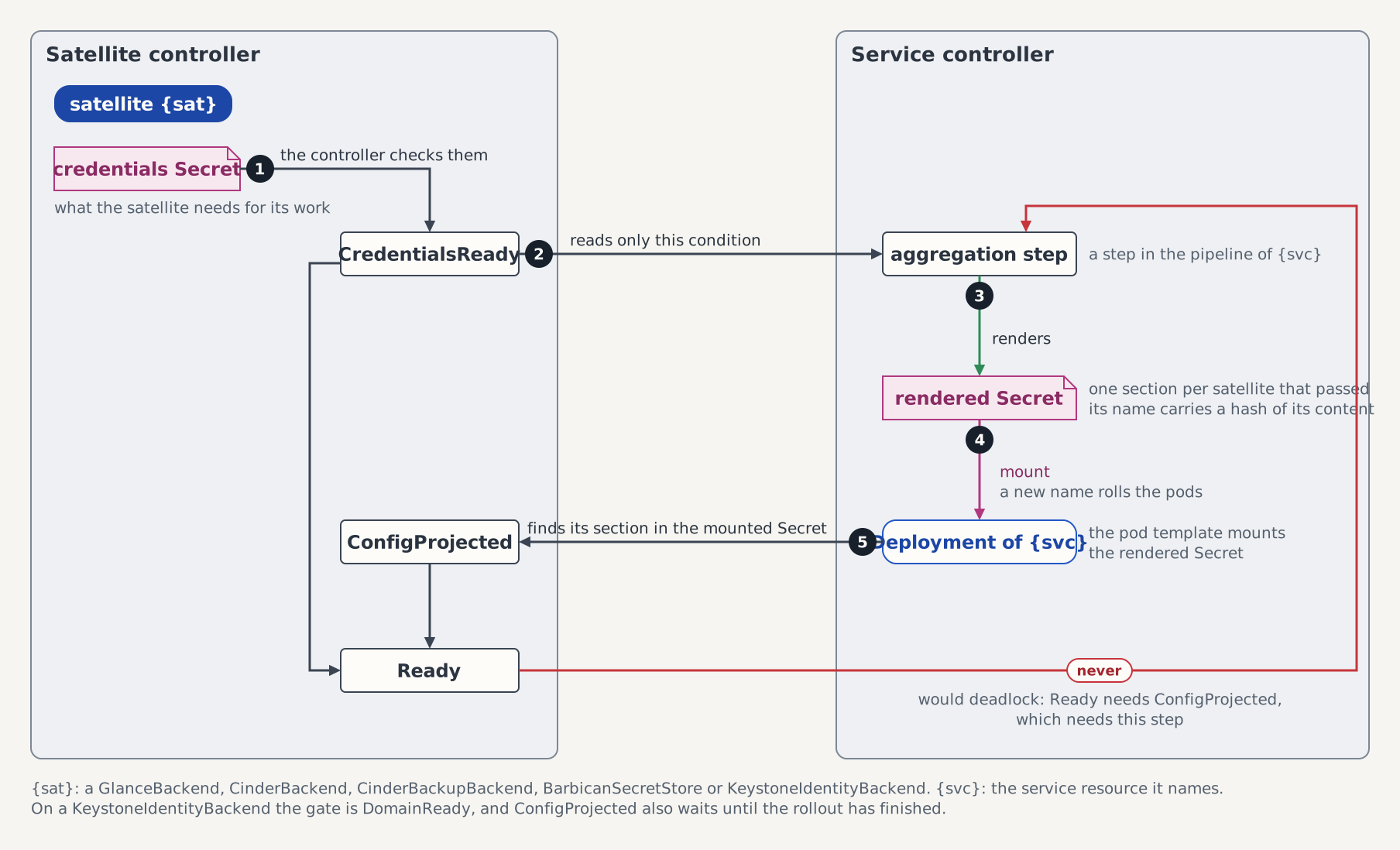
The Glance CR aggregates them through its BackendsReady condition — True with reason AllBackendsProjected once every attached backend is credential-ready and projected:
kubectl get glance controlplane-glance -n openstack \
  -o jsonpath='{.status.conditions[?(@.type=="BackendsReady")]}' | jq
Confirm it from the data path. The projected Glance API is reachable in-cluster only (this guide's ControlPlane leaves services.glance.gateway unset), so issue a token on the host and run a one-shot in-cluster client — the same pattern the extended Quick Start uses to reach an API Service — against GET /v2/info/stores:
openstack --insecure token issue -f value -c id \
  | kubectl run glance-stores-probe -n openstack --rm -i --restart=Never \
      --image=ghcr.io/c5c3/glance:2026.1 \
      --command -- python3 -c '
import json, sys, urllib.request
req = urllib.request.Request(
    "http://controlplane-glance.openstack.svc.cluster.local:9292/v2/info/stores",
    headers={"X-Auth-Token": sys.stdin.read().strip()})
print(json.dumps(json.load(urllib.request.urlopen(req)), indent=2))'
Both store ids appear, with the default flagged:
{
  "stores": [
    { "id": "controlplane-glance-default", "default": true },
    { "id": "controlplane-glance-secondary" }
  ]
}
A client selects the non-default store per upload with the X-Image-Meta-Store: controlplane-glance-secondary header; without it, image data lands in the default store.
The token is piped into the pod's stdin, never passed with --env. An --env=TOKEN=... would write the bearer token as a literal into the Pod spec, where it is readable by every subject holding pod-read in openstack and is captured in the apiserver audit record of the CREATE call. This token is admin-scoped — it inherits the admin exports used to mint it — so a reader replays full admin authority against every service in the catalog until it expires. Piped on stdin it reaches the process directly and is never persisted by the apiserver; it still expires on its own, so nothing here has to revoke it.
Step 3 — Switch the default store
Exactly one entry in backends[] may set isDefault — the ControlPlane validating webhook rejects a list with zero or two defaults (exactly one backends entry must set isDefault). Switch the default by moving the flag between the two entries in a single edit, so the list is never momentarily invalid:
kubectl edit controlplane controlplane -n openstack
# flip isDefault: false on `default` and isDefault: true on `secondary`
The default store id is rendered as [glance_store] default_backend in glance-api.conf, which lives in the content-hashed config ConfigMap. Switching the default re-renders that ConfigMap under a new controlplane-glance-config-<hash> name and rolls the Glance API pods, while the backends Secret keeps its name — the per-store [<name>] sections in backends.conf are invariant to which store is the default, so its content hash does not change:
kubectl get deploy controlplane-glance -n openstack -o jsonpath='config={.spec.template.spec.volumes[?(@.name=="config")].configMap.name}{"\n"}backends={.spec.template.spec.volumes[?(@.name=="backends")].secret.secretName}{"\n"}'Re-running it after the switch shows a new controlplane-glance-config-<hash> name and an unchanged controlplane-glance-backends-<hash> name.
Re-run the /v2/info/stores probe from Step 2: controlplane-glance-secondary now carries "default": true.
No valid default means last-good is retained
If a switch ever leaves zero credential-ready defaults (for example a credentials Secret for the incoming default is not ready yet), BackendsReady goes False/NoDefaultBackend, the config is not re-rendered, and the running pods keep mounting the last-good ConfigMap — the default never silently disappears mid-switch.
Step 4 — User-owned backends
You can also attach a GlanceBackend to the projected Glance by hand — point its spec.glanceRef.name at controlplane-glance. It attaches mechanically and stays user-owned: the c5c3-operator's prune sweep only touches projected children carrying the controlplane-glance- prefix that it created, so a hand-made backend attached to the same Glance is never reverted or deleted by the ControlPlane.
On a ControlPlane devstack such a backend can never be the default, though. Two webhooks combine to forbid it:
- the ControlPlane webhook already requires exactly one default inside
backends[], so a projected default always exists; and - the GlanceBackend webhook enforces sibling-default uniqueness across all backends attached to one Glance, so a second
isDefault: true— the hand-made one — is rejected at admission.
Use hand-attached backends for extra non-default stores. The direct-CR isDefault flip is only meaningful without a ControlPlane; it is demonstrated in the standalone section below.
Troubleshooting
| Symptom | Likely cause |
|---|---|
BackendsReady=False, reason NoDefaultBackend | Zero or more than one attached, credential-ready backend is marked isDefault. The projection is invalid, nothing is re-rendered, and the last-good config is retained. Restore exactly one default. |
CredentialsReady=False, reason WaitingForCredentials | The backend's credentials Secret is absent or is missing the fixed access-key-id / secret-access-key data keys. |
BackendsReady=False/WaitingForBackends with GlanceBackendSkipped Warning events | A per-backend fault (missing/unreadable credentials Secret, or a control character in a credential value) — the faulted backend is skipped and warned while its healthy siblings keep projecting. |
A second backend rejected at admission: GlanceBackend "<name>" attached to the same Glance "<glance>" is already marked isDefault; exactly one default store is allowed | The GlanceBackend sibling-default webhook — another attached backend is already the default (see Step 4). |
A backend rejected: name uses the reserved os_glance_ / os-glance- prefix, or collides with a reserved store section | A GlanceBackend's name becomes its store id and glance-api.conf section, so names Glance and the operator own (default, glance_store, os_glance_staging_store, …) are refused. |
Standalone Glance, without a ControlPlane
Without a ControlPlane there is nothing to project the Glance child, the service account, or the catalog entries, so you own them. This is where isDefault sits directly on each GlanceBackend CR.
Create the service user and grant it the service role, then register the image service in the catalog:
openstack user create --domain Default --project service \
  --password-prompt glance
openstack role add --user glance --project service service

openstack service create --name glance image
openstack endpoint create glance public   http://glance.openstack.svc.cluster.local:9292
openstack endpoint create glance internal http://glance.openstack.svc.cluster.local:9292
Store the service user's password in a Secret the Glance CR reads:
printf 'glance service-user password: '
IFS= read -r -s PW
printf '\n'
printf '%s' "$PW" | kubectl create secret generic glance-service-user -n openstack \
  --from-file=password=/dev/stdin
unset PW
Re-prompt rather than --from-literal: a password on the command line lands in argv, so it is written to the shell's history file and is readable out of /proc/<pid>/cmdline by any local user running ps auxww while the command runs. --from-file=password=/dev/stdin keeps it on a pipe instead — the same reason the external-Keystone adoption guide writes its Secret that way when rotating the admin password.
Apply a Glance CR you own — it names its own Keystone endpoint and service user (keystonePublicEndpoint is optional, for the browser-facing WWW-Authenticate URI):
apiVersion: glance.openstack.c5c3.io/v1alpha1
kind: Glance
metadata:
  name: glance
  namespace: openstack
spec:
  openStackRelease: "2026.1"
  image:
    repository: ghcr.io/c5c3/glance
    tag: "2026.1"
  database:
    clusterRef:
      name: openstack-db
    database: glance
    secretRef:
      name: glance-db
  cache:
    clusterRef:
      name: openstack-memcached
  keystoneEndpoint: http://keystone.openstack.svc.cluster.local:5000/v3
  serviceUser:
    username: glance
    projectName: service
    userDomainName: Default
    projectDomainName: Default
    secretRef:
      name: glance-service-user
      key: password
Then attach the stores as GlanceBackend CRs, where isDefault sits on the CR itself — the GlanceBackend sibling-default webhook still enforces exactly one default across the set:
apiVersion: glance.openstack.c5c3.io/v1alpha1
kind: GlanceBackend
metadata:
  name: primary
  namespace: openstack
spec:
  glanceRef:
    name: glance
  type: S3
  isDefault: true
  s3:
    host: http://garage.shared-services.svc.cluster.local:3900
    bucket: glance-images
    region: garage
    credentialsSecretRef:
      name: garage-s3-credentials
---
apiVersion: glance.openstack.c5c3.io/v1alpha1
kind: GlanceBackend
metadata:
  name: secondary
  namespace: openstack
spec:
  glanceRef:
    name: glance
  type: S3
  isDefault: false
  s3:
    host: http://garage.shared-services.svc.cluster.local:3900
    bucket: glance-images-2
    region: garage
    credentialsSecretRef:
      name: garage-s3-credentials
Flipping the default here is a two-patch sequence, unlike the single ControlPlane edit in Step 3: the two stores are separate objects with separate admission calls, and the sibling-default webhook rejects a second isDefault: true while the old default still holds it. Release the old default first, then promote the new one:
# 1. release the current default — this transiently leaves zero defaults, so
#    BackendsReady goes False/NoDefaultBackend and the last-good config is kept
kubectl patch glancebackend primary -n openstack --type merge \
  -p '{"spec":{"isDefault":false}}'
# 2. promote the new default — the config re-renders and the API pods roll
kubectl patch glancebackend secondary -n openstack --type merge \
  -p '{"spec":{"isDefault":true}}'
Glance keeps serving from the last-good config across the window between the two patches — the default-backend-switch suite below asserts exactly this order and that retention. See the Glance CRD API Reference for the full standalone CR shape.
Tested by
Attaching two S3 stores, uploading to the non-default store, and switching which store is the default are asserted end-to-end on the CI e2e kind cluster by these chainsaw suites:
chainsaw test --test-dir tests/e2e/glance/s3-multistore
chainsaw test --test-dir tests/e2e/glance/default-backend-switch
The two backend CRs the s3-multistore suite applies
The suite isolates its Glance instance from the parallel suite pool, so its CR names use the suite's isolation identifiers — Glance glance-multistore with stores garage-a (default) and garage-b — rather than the controlplane-glance / default / secondary devstack names used in the walkthrough above.
apiVersion: glance.openstack.c5c3.io/v1alpha1
kind: GlanceBackend
metadata:
  name: garage-a
  namespace: openstack
spec:
  glanceRef:
    name: glance-multistore
  type: S3
  isDefault: true
  s3:
    host: http://garage.shared-services.svc.cluster.local:3900
    bucket: glance-images
    region: garage
    credentialsSecretRef:
name: garage-s3-credentialsapiVersion: glance.openstack.c5c3.io/v1alpha1
kind: GlanceBackend
metadata:
name: garage-b
namespace: openstack
spec:
glanceRef:
name: glance-multistore
type: S3
isDefault: false
s3:
host: http://garage.shared-services.svc.cluster.local:3900
bucket: glance-images-2
region: garage
credentialsSecretRef:
name: garage-s3-credentials