Rotate the Keystone Admin Password
This guide walks an operator through rotating a Keystone instance's admin password, verifying that the operator re-bootstraps the instance to apply the new credential, and recovering when the admin Secret is missing or empty.
Unlike Fernet/credential-key rotation, the admin password has no rotation CronJob: the value lives in OpenBao and is projected into the cluster by the External Secrets Operator (ESO). The Keystone operator observes the resulting Secret and re-runs keystone-manage bootstrap to update the admin credential in place.
For the reconciler-side contract (when the bootstrap Job is recreated, the event reasons, the failure path), see reconcileBootstrap in Keystone Reconciler Architecture.
Names. The examples target the ControlPlane devstack's projected Keystone: the CR is
controlplane-keystonein theopenstacknamespace, and its admin password lives in the Secret referenced byspec.bootstrap.adminPasswordSecretRef—controlplane-keystone-admin-credentials, under the keypassword; this guide calls it the admin Secret. If your Keystone CR has a different name, substitute it (and the Secret and Job names derived from it) throughout. For a standalone Keystone with no ControlPlane, read the final section.
Prerequisites
Devstack
This guide is written against the Quick Start (ControlPlane) devstack. Stand it up first:
KIND_HOST_PORT=8443 WITH_CONTROLPLANE=true make deploy-infraFollow that tutorial through to its final Verify step, so the ControlPlane's projected controlplane-keystone Keystone is Ready. Every resource name in the examples below is one that devstack produces.
- A bootstrapped Keystone CR (
BootstrapReady=True) — see Observability & Diagnostics. - The admin password projected via ESO: the
controlplane-keystone-admin-credentialsExternalSecret is present andReady. Plain (non-ESO) admin Secrets never goReady— rotate at the OpenBao source, not by editing the Secret. baoCLI access to the OpenBao KV mount (in kind, OpenBao enforces mTLS, so the CLI needs a client certificate signed by the OpenBao CA — a connection reset without one is expected, not a pod defect).kubectlaccess to the CR's namespace (openstack).
Background: How a Password Rotation Reaches Keystone
The admin password is not stored on the Keystone CR. It flows through three hops:
| Actor | Writes to | Reads from |
|---|---|---|
| Operator/secrets-tooling | OpenBao path kv-v2/bootstrap/openstack/controlplane-keystone/admin (key password) | — |
| External Secrets Operator (ESO) | The admin Secret controlplane-keystone-admin-credentials (key password, creationPolicy: Owner) | OpenBao path bootstrap/openstack/controlplane-keystone/admin, property password |
| Keystone operator | The controlplane-keystone-bootstrap Job's pod template | The admin Secret controlplane-keystone-admin-credentials (key password) |
The figure shows these hops as steps 3 to 6, which the scheduled-rotation guide lists. A manual rotation enters at the "by hand" chip. On this devstack the admin Secret is controlplane-keystone-admin-credentials.
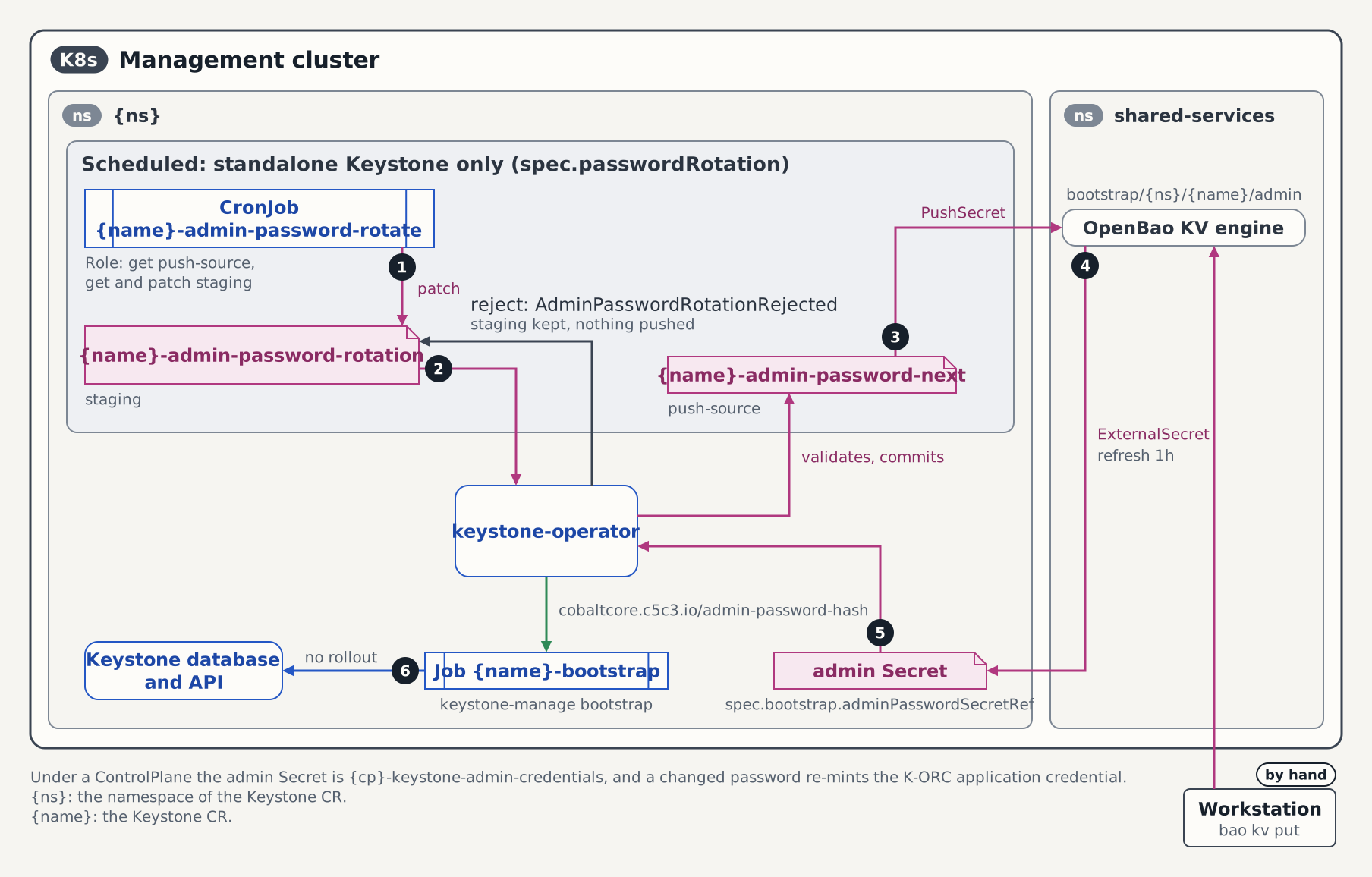
On every reconcile the operator reads the password key of the admin Secret, computes hex(SHA-256(password)), and stamps it onto the bootstrap Job's pod template as the cobaltcore.c5c3.io/admin-password-hash annotation. It passes that same digest to job.RunJobWithRerunKey as the bootstrap Job's re-run key — so the Job re-runs when, and only when, the admin password changes. The re-run gate is keyed on the password digest alone, not on the full pod template: an image-tag change must not re-run bootstrap, because re-running keystone-manage bootstrap after a cross-version DB migration fails on the already-migrated admin user. When the password digest changes, the operator deletes the stale controlplane-keystone-bootstrap Job and recreates it, re-running keystone-manage bootstrap, which updates the admin credential to the new password.
The operator also watches the admin Secret directly (secretToKeystoneMapper), so an ESO write triggers a reconcile with no CR edit. During the re-run BootstrapReady transitions False/BootstrapInProgress → True/BootstrapComplete.
No rollout. Re-bootstrap is a Job re-run, not a Deployment rollout. The running Keystone API pods are not restarted and their UIDs do not change; the bootstrap Job talks to the same database the API pods serve, so the new credential is live the moment the Job completes.
1. Write the new password to OpenBao
The admin password is sourced from OpenBao at kv-v2/bootstrap/openstack/controlplane-keystone/admin (key password). Write the new value there:
bao kv put kv-v2/bootstrap/openstack/controlplane-keystone/admin password=<new-password>Path convention (per-CR). The admin-password path is scoped per Keystone CR as
bootstrap/{namespace}/{name}/admin— for thecontrolplane-keystoneCR inopenstack, that isbootstrap/openstack/controlplane-keystone/admin. Per-CR scoping keeps two Model-B-enabled Keystone CRs from colliding on a shared OpenBao object. This is the path the ESOcontrolplane-keystone-admin-credentialsExternalSecret reads (remoteRef.key: bootstrap/openstack/controlplane-keystone/admin,property: password) and the pathdeploy/openbao/bootstrap/write-bootstrap-secrets.shseeds. If your deployment uses a different KV mount or path, substitute it here and in step 2's ExternalSecret name accordingly.
Nothing happens in the cluster yet — OpenBao now holds the new value, but the admin Secret still carries the old one until ESO syncs.
2. (Optional) Force ESO to sync the new value
ESO refreshes on its spec.refreshInterval (the shipped ExternalSecret uses 1h). To apply the rotation immediately rather than waiting for the next refresh, annotate the ExternalSecret to force a sync:
kubectl -n openstack annotate externalsecret controlplane-keystone-admin-credentials \
  force-sync=$(date +%s) --overwrite
ESO re-reads OpenBao and PATCHes the admin Secret's password key. Confirm the Secret now carries the new value (compare the fingerprint before and after):
kubectl -n openstack get secret controlplane-keystone-admin-credentials \
  -o jsonpath='{.data.password}' | base64 -d | sha256sum
This sha256sum is the same digest the operator stamps onto the bootstrap Job in step 3 — keep it handy to confirm the match.
3. Observe the recreated bootstrap Job
The operator detects that the live controlplane-keystone-bootstrap Job's cobaltcore.c5c3.io/admin-password-hash no longer matches the Secret, deletes the stale Job, and recreates one carrying the new hash:
kubectl -n openstack get jobsInspect the recreated Job's admin-password-hash annotation and confirm it equals the digest from step 2:
kubectl -n openstack get job controlplane-keystone-bootstrap \
  -o jsonpath="{.spec.template.metadata.annotations['cobaltcore\.c5c3\.io/admin-password-hash']}{\"\n\"}"
Expected output (the hex SHA-256 of the new password):
9f86d081884c7d659a2feaa0c55ad015a3bf4f1b2b0b822cd15d6c15b0f00a08You can prove the Job was delete+recreated (not patched) by capturing its .metadata.uid before and after the rotation — the recreated Job has a fresh UID:
kubectl -n openstack get job controlplane-keystone-bootstrap -o jsonpath='{.metadata.uid}{"\n"}'Job retention. The bootstrap Job carries no
TTLSecondsAfterFinished— it is intentionally left unset. The completed Job is the operator's record of the applied password digest (its re-run key), so it is retained, not garbage-collected, and is removed only when the Keystone CR is deleted via owner-reference GC. The steady state is therefore a single completedcontrolplane-keystone-bootstrapJob present at all times; a rotation deletes and recreates it in place rather than leaving a gap.
4. Watch the BootstrapReady transitions
While the recreated Job runs, BootstrapReady drops to False with reason BootstrapInProgress, then returns to True with reason BootstrapComplete:
kubectl -n openstack describe keystone controlplane-keystone | grep -A4 'Conditions:'Or watch just the condition's status and reason:
kubectl -n openstack get keystone controlplane-keystone \
  -o jsonpath="{range .status.conditions[?(@.type=='BootstrapReady')]}{.status}/{.reason}{\"\n\"}{end}" -w
Expected progression:
False/BootstrapInProgress
True/BootstrapComplete
The CR's top-level Ready condition stays True/AllReady throughout — the API never goes down during an admin-password rotation.
5. Observe the event stream
On a successful re-bootstrap the operator emits a Normal event on the Keystone CR:
kubectl -n openstack get events \
  --field-selector reason=BootstrapComplete,involvedObject.name=controlplane-keystone \
  --sort-by='.lastTimestamp'
Expected output:
LAST SEEN   TYPE     REASON             OBJECT            MESSAGE
5s          Normal   BootstrapComplete  keystone/controlplane-keystone     Keystone bootstrap completed successfully
If instead you see a Warning with reason AdminSecretInvalid, the admin Secret is missing, unreadable, or its password key is empty — see Recover from AdminSecretInvalid.
kubectl -n openstack describe keystone controlplane-keystone | grep -A1 -E 'AdminSecretInvalid|BootstrapComplete'6. Recover from AdminSecretInvalid
An admin password is a hard precondition for bootstrap: the operator will not build a Job with empty credentials. If the admin Secret is missing/unreadable or its password key is empty, the operator sets BootstrapReady=False with reason AdminSecretInvalid, emits a Warning event, and requeues with backoff.
Symptoms
kubectl -n openstack get events \
  --field-selector reason=AdminSecretInvalid,involvedObject.name=controlplane-keystone \
  --sort-by='.lastTimestamp'
Example output:
LAST SEEN   TYPE      REASON              OBJECT            MESSAGE
12s         Warning   AdminSecretInvalid  keystone/controlplane-keystone     Admin password Secret openstack/controlplane-keystone-admin-credentials is missing, unreadable, or has an empty "password" value
Inspect
Confirm the admin Secret exists and that its password key decodes to a non-empty value:
kubectl -n openstack get secret controlplane-keystone-admin-credentials \
  -o jsonpath='{.data.password}' | base64 -d | wc -c
A result of 0 (or a NotFound error on the get) is the cause. The usual culprit is ESO: check that the ExternalSecret synced cleanly.
kubectl -n openstack get externalsecret controlplane-keystone-admin-credentials \
  -o jsonpath="{range .status.conditions[*]}{.type}={.status}/{.reason}{\"\n\"}{end}"
Remediate
- Fix the source. Ensure the OpenBao path holds a non-empty
password(bao kv get kv-v2/bootstrap/openstack/controlplane-keystone/admin), then re-sync ESO as in step 2. - Once ESO repopulates the admin Secret, the operator's pending requeue (or a fresh
secretToKeystoneMapperevent from the Secret write) re-runs bootstrap automatically;BootstrapReadyreturns toTrue/BootstrapComplete. No CR edit is required.
Safety note. While
BootstrapReadyisFalse, the previously bootstrapped admin credential remains valid in the database — the operator does not clear or invalidate it. The instance keeps serving with the last good password until a valid Secret lets the bootstrap Job run again.
7. Post-rotation smoke check
Confirm the new password authenticates and the old one no longer does. With the new password exported as OS_PASSWORD (plus the usual OS_AUTH_URL, OS_USERNAME=admin, OS_USER_DOMAIN_NAME=Default, OS_PROJECT_NAME):
openstack token issueA | id | ... | table confirms the new credential is live.
The old password must now be rejected. Re-run with the previous value and expect a 401:
OS_PASSWORD=<old-password> openstack token issue
# The request was not authorized to perform this action. (HTTP 401)
A token minted before the rotation remains valid until its native TTL expires; only new authentications with the old password are rejected.
Standalone Keystone, without a ControlPlane
The Quick Start and Quick Start (Extended) devstacks run a standalone Keystone CR — no ControlPlane projects it. There the names are:
| ControlPlane devstack | Standalone devstack |
|---|---|
CR controlplane-keystone | CR keystone |
admin Secret controlplane-keystone-admin-credentials | admin Secret keystone-admin |
ExternalSecret controlplane-keystone-admin-credentials | ExternalSecret keystone-admin |
bootstrap Job controlplane-keystone-bootstrap | bootstrap Job keystone-bootstrap |
Substitute those names in every command above. The re-bootstrap contract, condition transitions, and smoke check are identical.
The kind shim reads the default-identity path
On the kind Quick Start, the keystone-admin ExternalSecret is a standalone shim (deploy/kind/infrastructure/keystone-admin-externalsecret.yaml). It reads the default ControlPlane identity's per-CR path bootstrap/openstack/controlplane-keystone/admin — notbootstrap/openstack/keystone/admin — regardless of the standalone CR's name. So on the standalone kind devstack, write the new password to that same default-identity path in step 1:
bao kv put kv-v2/bootstrap/openstack/controlplane-keystone/admin password=<new-password>On a non-kind standalone deployment you own the ExternalSecret's remoteRef.key, so write to whatever path it reads.
Related reference
- reconcileBootstrap — the authoritative contract for the bootstrap sub-reconciler and the admin-password-hash re-run gate.
- Labels and Annotations — stable metadata keys, including
cobaltcore.c5c3.io/admin-password-hashandcobaltcore.c5c3.io/pod-spec-hash. - See also Schedule Keystone Admin Password Rotation — the Model B scheduled flow, where a CronJob mints the password instead of an operator writing OpenBao by hand.
- See also Rotate Keystone Fernet and Credential Keys — the key-rotation counterpart to this admin-password rotation.
Tested by
This guide's happy path is asserted end-to-end on the CI e2e kind cluster — re-bootstrap on Secret change, old-password 401 / new-password 201 cutover, and unchanged API pod UIDs — by this chainsaw suite:
chainsaw test --test-dir tests/e2e/keystone/admin-password-rotation