How-to: Restore an OVN Database Snapshot
Every OVNCentral gets a backup CronJob. Raft replication covers the loss of a minority of the members; it does nothing for an operator error applied to all of them, and these snapshots are the way back from that. Restoring one is a manual procedure: the operator writes the snapshots and prunes them, and replays none of them on its own.
This guide takes a snapshot of the controlplane-ovn central on demand as the way back from a wrong replay, picks the snapshot to go back to off the volume, and replays its Northbound half into the running database with ovsdb-client.
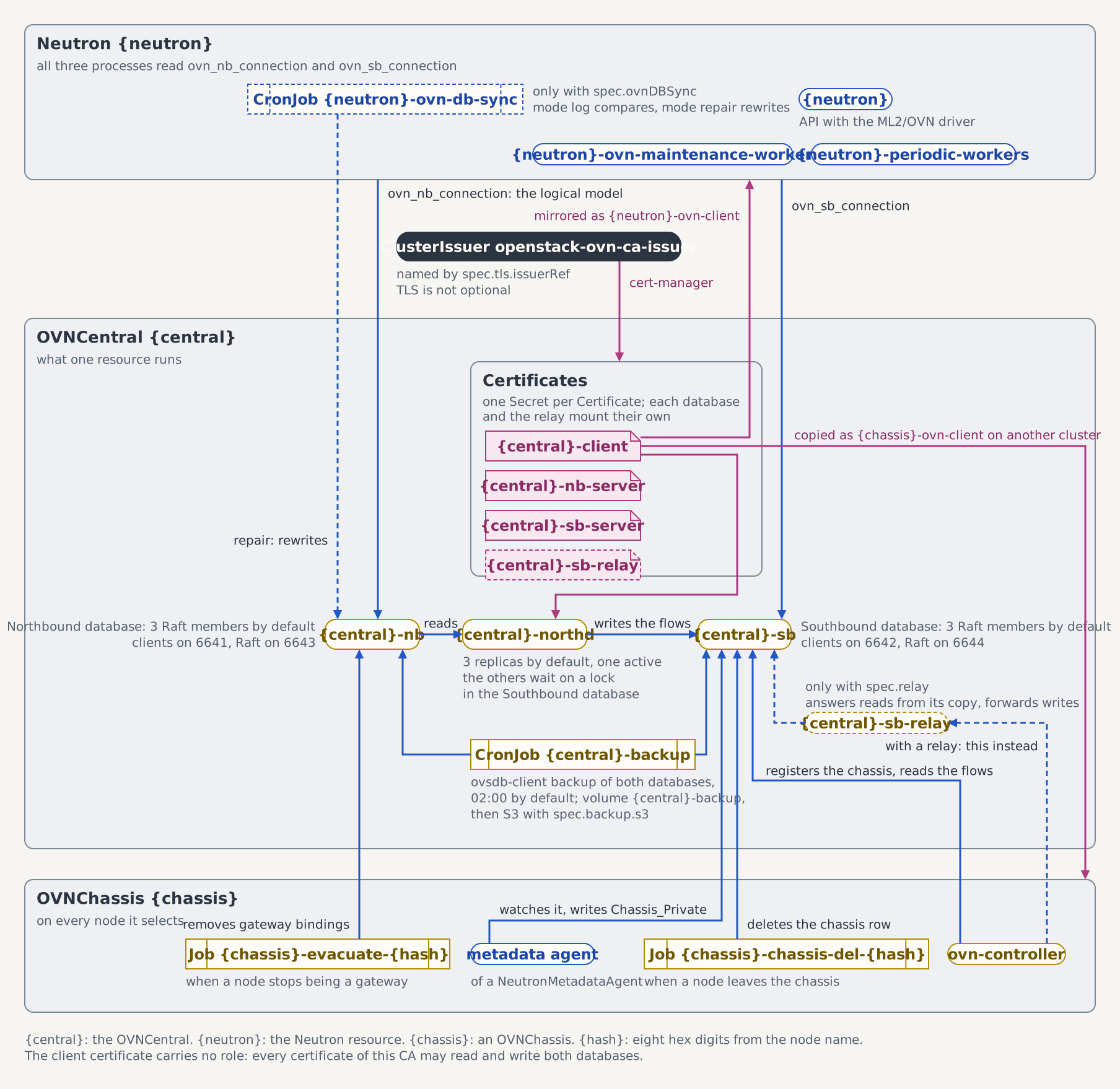
The figure shows the backup CronJob beside the two databases, and northd, which compiles a replayed Northbound model into the Southbound database again.
Prerequisites
Devstack
This guide is written against the Quick Start (ControlPlane) devstack. Stand it up first:
KIND_HOST_PORT=8443 WITH_CONTROLPLANE=true make deploy-infraFollow that tutorial through to the Create a first network check in its Step 7, so the OVNCentral controlplane-ovn is Ready in the openstack namespace and its logical model holds something worth snapshotting.
- A
ControlPlanewhose network service is Ready, if you intend to run the drift check at the end. The replay itself needs the central alone.
Where the snapshots live
The CronJob and the volume share one name, controlplane-ovn-backup:
kubectl get cronjob,pvc controlplane-ovn-backup -n openstackThe volume is mounted at /backup in every run. Each run writes two files, nb-<timestamp>.backup and sb-<timestamp>.backup, where the timestamp is date -u +%Y%m%dT%H%M%SZ, for example nb-20260906T020000Z.backup. Unless spec.backup says otherwise, the schedule is 0 2 * * * and the retention window 14 days; both resolve at reconcile time, and a nil spec.backup behaves like an empty one.
Steps
1. Take a snapshot of the state you are about to replace
The replay in Step 3 replaces the Northbound database rather than merging into it, so snapshot the current state before you replay an older one and note the file name it lands under. It is the only way back from a replay of the wrong file.
Creating a Job from the CronJob runs the same pod template the schedule runs, so the on-demand snapshot is written by the code path the nightly one uses, including the retention sweep that template ends with:
The on-demand run prunes the volume as well
This Job deletes every *.backup file older than spec.backup.retentionDays (14 days unless you changed it) before it exits, exactly as a nightly run does. A snapshot one night short of the window is still on the volume when the incident starts and gone once this run finishes. That is the file Step 2 would have you pick.
So when the state you want back is near the far end of the window, list the volume with the pod from Step 2 before you take the snapshot, and hold your candidate outside the glob the sweep matches by running that pod once more with
"command": ["cp", "/backup/nb-20260823T020000Z.backup", "/backup/hold-nb-20260823T020000Z"]in place of its ls -l /backup. find -name '*.backup' matches no hold-* file, so no retention run touches it; Step 3 replays it under that name. Delete it once the restore is behind you.
kubectl create job controlplane-ovn-backup-manual \
  --from=cronjob/controlplane-ovn-backup -n openstack
kubectl wait --for=condition=complete -n openstack \
  job/controlplane-ovn-backup-manual --timeout=5m
The script prints nothing on success, so the exit status is the whole verdict. It writes each snapshot to a .tmp file and renames it only after ovsdb-client exits zero with a non-empty result, so a run that dies mid-copy leaves nothing that looks like a snapshot. A full volume is why the emptiness check exists: ovsdb-client can exit zero having written nothing, and a zero-byte file restores no database. Retention runs after that gate, pruning *.backup files past the window, sweeping *.backup.tmp leftovers older than a day, and deleting any zero-byte file it still finds.
A failed run reports itself twice, as a BackupJobFailed event and as ovn_operator_backup_total{result="failed"}:
kubectl logs -n openstack job/controlplane-ovn-backup-manual
kubectl get events -n openstack --field-selector reason=BackupJobFailed
2. Pick the file to replay
Nothing mounts the volume between runs, so list it from a short-lived pod that borrows the OVN image from the running Northbound StatefulSet:
IMG="$(kubectl get sts controlplane-ovn-nb -n openstack \
  -o jsonpath='{.spec.template.spec.containers[0].image}')"

OVERRIDES="$(cat <<JSON
{"spec":{
  "containers": [{"name": "ovn-backup-ls", "image": "${IMG}",
    "command": ["ls", "-l", "/backup"],
    "volumeMounts": [{"name": "backup", "mountPath": "/backup"}]}],
  "volumes": [{"name": "backup",
    "persistentVolumeClaim": {"claimName": "controlplane-ovn-backup"}}]
}}
JSON
)"

kubectl run ovn-backup-ls -n openstack --image="$IMG" --restart=Never \
  --overrides="$OVERRIDES"

kubectl wait --for=jsonpath='{.status.phase}'=Succeeded \
  pod/ovn-backup-ls -n openstack --timeout=2m
kubectl logs ovn-backup-ls -n openstack
kubectl delete pod ovn-backup-ls -n openstack
Read the log after the pod reached a terminal phase. kubectl run -i carries only what the container writes after the attach is established, and ls is finished long before that. A zero-byte file in the listing is the fingerprint of a run that failed before its rename, and the next retention sweep deletes it.
Choose the nb-*.backup file to replay out of that listing and keep its full path for Step 3. The newest file is rarely the one you want: the Step 1 snapshot sorts last by construction, and a nightly run that fired after the damage captured the damage. Read the timestamps against the last moment the logical model was the one you want back.
3. Replay the Northbound snapshot
The restore runs as a Job of your own, from the same image, mounting the snapshot volume and the client keypair the central publishes. SNAPSHOT names the file you picked in Step 2; the value below is an example, and replaying a different file means editing that one line:
IMG="$(kubectl get sts controlplane-ovn-nb -n openstack \
  -o jsonpath='{.spec.template.spec.containers[0].image}')"
NB="$(kubectl get ovncentral controlplane-ovn -n openstack \
  -o jsonpath='{.status.northbound.internalDbAddress}')"

cat <<JOB | kubectl apply -f -
apiVersion: batch/v1
kind: Job
metadata:
  name: controlplane-ovn-restore
  namespace: openstack
spec:
  backoffLimit: 0
  activeDeadlineSeconds: 300
  template:
    spec:
      restartPolicy: Never
      securityContext:
        fsGroup: 42424
        seccompProfile:
          type: RuntimeDefault
      containers:
      - name: restore
        image: ${IMG}
        securityContext:
          allowPrivilegeEscalation: false
          runAsNonRoot: true
          runAsUser: 42424
          runAsGroup: 42424
          readOnlyRootFilesystem: true
          capabilities:
            drop: [ALL]
          seccompProfile:
            type: RuntimeDefault
        env:
        - name: NB_ADDR
          value: "${NB}"
        - name: SNAPSHOT
          value: "/backup/nb-20260906T020000Z.backup"
        command:
        - sh
        - -ec
        - |
          test -s "\$SNAPSHOT"
          echo "restoring \$SNAPSHOT"
          ovsdb-client --force -p /certs/tls.key -c /certs/tls.crt -C /certs/ca.crt restore "\$NB_ADDR" OVN_Northbound < "\$SNAPSHOT"
        volumeMounts:
        - name: backup
          mountPath: /backup
        - name: certs
          mountPath: /certs
          readOnly: true
        - name: tmp
          mountPath: /tmp
      volumes:
      - name: backup
        persistentVolumeClaim:
          claimName: controlplane-ovn-backup
      - name: certs
        secret:
          secretName: controlplane-ovn-client
      - name: tmp
        emptyDir: {}
JOB

kubectl wait --for=condition=complete -n openstack \
  job/controlplane-ovn-restore --timeout=5m
kubectl logs -n openstack job/controlplane-ovn-restore
Four details of that Job carry weight. The pod-level fsGroup: 42424 is what hands a freshly provisioned volume to the group the container runs as, and the container context is the Restricted one the backup run itself carries; without both, the replay cannot read the files the backup wrote. The snapshot is redirected as a regular file rather than piped, because ovsdb-client restore needs a seekable stdin. --force covers a snapshot taken from a clustered database. And $NB_ADDR is one server: status.northbound.internalDbAddress lists one ssl:<ip>:6641 entry per Raft member, and the ControlPlane devstack pins the Northbound to a single member, so the field holds one address. On a three-member cluster, pass one entry from the list.
The replay replaces the database; it does not merge into it. The snapshot's rows come back under fresh UUIDs, so anything holding a reference to an old row's UUID is now pointing at a row that no longer exists, and every Northbound row created since the snapshot is deleted. A network a tenant created after the backup ran is gone from the logical model by the time the Job reports complete, and the Step 1 snapshot is what brings it back. northd recompiles the Southbound database from the restored Northbound model on its own, and each chassis re-registers itself there, which is why the sb-*.backup file earns its place as forensic material; a routine repair goes through the Northbound.
4. Check Neutron against the restored model
Neutron's own database was not part of the snapshot, so after a replay the two disagree wherever the model moved on since the backup. Run the drift check in its reporting mode before changing anything: Repair OVN Drift with db-sync covers the log mode and what to do with what it finds.
Its repair mode rebuilds from Neutron what OVN lacks, so it recovers nothing that only ever existed in the Northbound database. Those rows come back from a snapshot or not at all, which is what the Step 1 file is for.
See also
- OVNCentral CRD: the
spec.backupblock, the S3 shifter, and the sub-resource names. - OVN Controller Events:
BackupJobFailedand the other events the central controller emits. - Enable the OVN Operator Metrics Endpoint: the backup counter and duration histogram to alert on.
Tested by
The round trip a snapshot has to survive (seed a logical switch, snapshot it with the CronJob's own pod template, wipe the switch, replay the snapshot, find the switch again) is asserted on the CI e2e kind cluster by the suite below. It also creates a switch the snapshot predates and asserts the replay deleted it, which is the replacement half of the paragraph above. It runs the same ovsdb-client invocation this guide prints, against the one-member clustered Northbound the operator projects, which is the shape every deployment runs:
chainsaw test --test-dir tests/e2e/ovn/central-backup-restoreThe OVNCentral the suite applies
The suite shares the openstack namespace with every other OVN suite, so its CR is isolation-named (ovn-restore) where the walkthrough above uses the controlplane-ovn name the devstack produces. Its backup is suspended, so the only snapshot on the volume is the one the suite writes by hand.
apiVersion: ovn.openstack.c5c3.io/v1alpha1
kind: OVNCentral
metadata:
  name: ovn-restore
  namespace: openstack
spec:
  tls:
    issuerRef:
      name: openstack-ovn-ca-issuer
  northbound:
    replicas: 1
  southbound:
    replicas: 1
  northd:
    deployment:
      replicas: 1
  backup:
    suspend: true