How-to: Deploy to a Target Cluster
A Keystone CR that carries spec.targetClusterRef stays where it was created, with its status, its finalizers and the webhook that admitted it, and writes every child it projects onto another cluster. This guide builds both halves as kind clusters: cobaltcore-target runs the infrastructure and receives the children, cobaltcore-mgmt runs the operators and holds the CRs. The management cluster reaches the target through one ServiceAccount the target's own administrator created, so the grant set is readable on the target and revocable there.
The field's contract (immutability, the ownership labels, the teardown order, what a ControlPlane places per service) is Target Clusters.
The figure shows what this guide builds. {cluster} is cobaltcore-target, {name} is keystone, {ns} is openstack and {access-ns} is c5c3-access here.
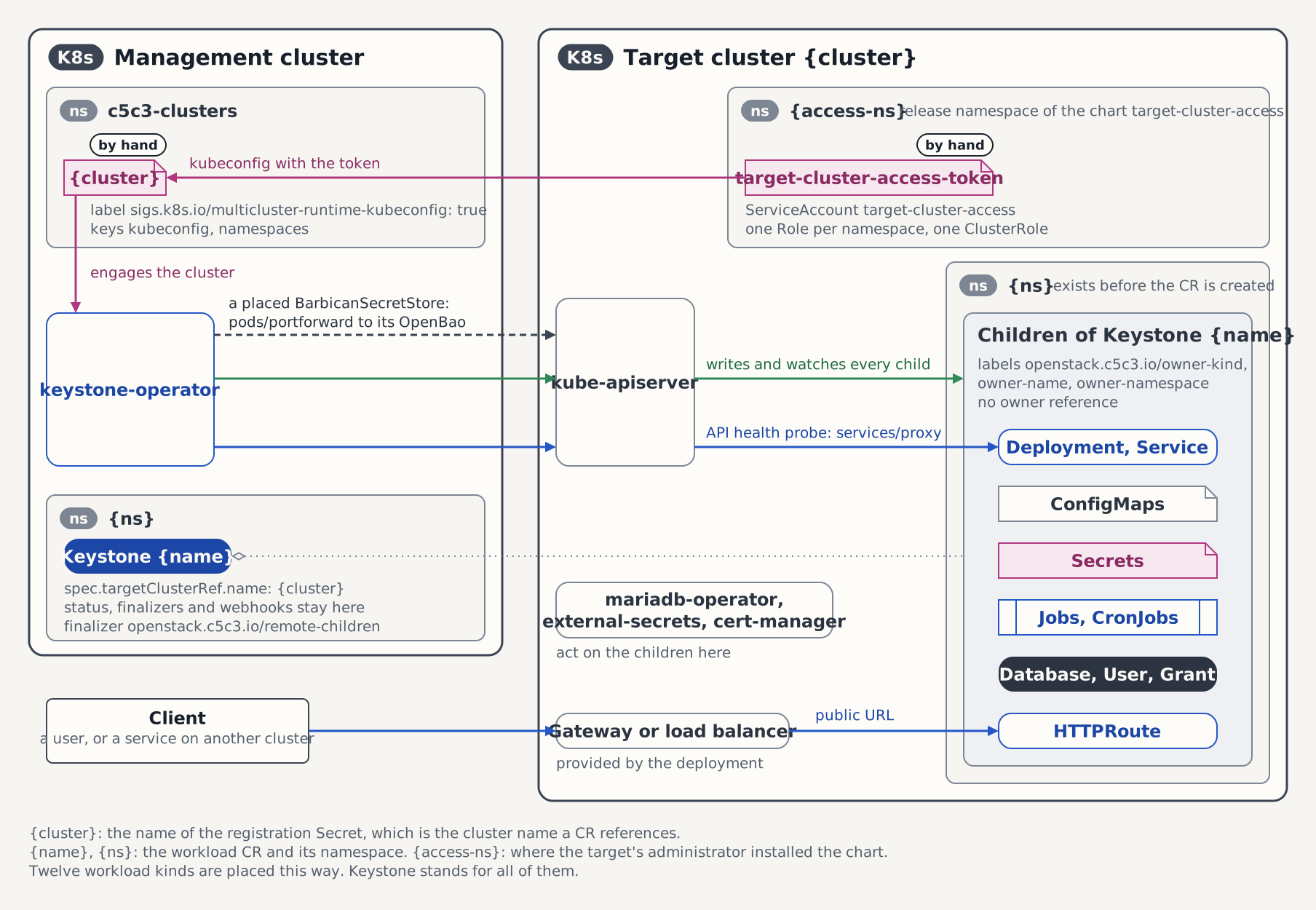
Prerequisites
Devstack
This guide is written against the Quick Start devstack. Stand it up first:
INFRA_ONLY=true CLUSTER_NAME=cobaltcore-target KIND_HOST_PORT=9443 make deploy-infraFollow that tutorial through its Step 2 — Cluster + infrastructure stack and stop there. INFRA_ONLY=true keeps every CobaltCore operator off this cluster, which is what the two-cluster split is for, so the tutorial's operator and CR steps do not apply here. Host port 9443 leaves 8443 free for a cobaltcore devstack you may already be running, and overriding KIND_HOST_PORT needs yq v4.40.1 or newer on PATH. This bring-up creates the openstack namespace and every infrastructure name the examples below resolve on the target: openstack-db, openstack-memcached, openbao-tenant-store, keystone-db, keystone-admin.
The Keystone image on the target cluster. The placed workload runs there, so that is where its image has to be:
bashRELEASE=2026.1 docker pull ghcr.io/c5c3/keystone:${RELEASE} kind load docker-image ghcr.io/c5c3/keystone:${RELEASE} --name cobaltcore-targetThe management cluster.
hack/deploy-mgmt-cluster.shcreates thecobaltcore-mgmtkind cluster, bootstraps Flux, and installs cert-manager in full plus the CRD sets the operators' local watches need: mariadb-operator, external-secrets, openbao-operator, and the Prometheus operator CRDs. Every controller-runtime watch registers against this cluster at builder time, so those kinds have to be installed here even though no child is written here. The rabbitmq-cluster-operator goes in with its controller, not just its CRD: a ControlPlane's shared message bus is provisioned in the ControlPlane's own namespace on this cluster, so the controller that turns aRabbitmqClusterinto running RabbitMQ pods has to run here too. The script installs no CobaltCore operator, and it leaves the kubectl context on the cluster it created:bashhack/deploy-mgmt-cluster.shThe two operators on the management cluster.
hack/ci-deploy-operator.shapplies an operator's CRDs and installs its in-repo chart withimage.pullPolicy=Never, so the image has to be inside the cluster before the chart goes in. The CI job that runs this suite calls the same script at itsdevdefault tag, against images an earlier job built;latestis the published equivalent:bashfor op in keystone barbican; do docker pull ghcr.io/c5c3/${op}-operator:latest kind load docker-image ghcr.io/c5c3/${op}-operator:latest --name cobaltcore-mgmt done OPERATOR=keystone IMAGE_REPO=ghcr.io/c5c3/keystone-operator IMAGE_TAG=latest \ NAMESPACE=keystone-system hack/ci-deploy-operator.sh OPERATOR=barbican IMAGE_REPO=ghcr.io/c5c3/barbican-operator IMAGE_TAG=latest \ NAMESPACE=barbican-system hack/ci-deploy-operator.shThe walkthrough below places a Keystone only. The barbican-operator is what the suite under Tested by needs, and installing it now saves a second pass.
Steps
1. Install the access chart on the target
deploy/target-cluster/target-cluster-access is the grant set a cluster applies before it is registered. It renders one Role per declared namespace, a ClusterRole for the few kinds that have no namespace to be scoped to, the ServiceAccount the management cluster authenticates as, and a long-lived token Secret for it:
helm install --kube-context kind-cobaltcore-target \
  target-cluster-access deploy/target-cluster/target-cluster-access \
  -n c5c3-access --create-namespace \
  --set 'namespaces={openstack}' \
  --set createNamespaces=false
namespaces is required; an install without it fails at render time rather than granting an account that reaches nothing. createNamespaces=false because the devstack bring-up already created openstack, and Helm refuses to adopt a namespace another install owns. Leave it at its true default when the namespaces are new.
Whatever you pass here has to equal the namespaces key of the registration Secret in step 3. The operators scope their caches on this cluster to that key, so a namespace granted here but missing there is never watched, and one listed there but missing here answers every read with forbidden. A namespace assigned to a service owner, the chart's assignedNamespaces, goes into the Secret's assignedNamespaces key instead, which this guide does not use; see Assigned namespaces.
2. Assemble the registration kubeconfig
The kubeconfig the management cluster stores carries the chart's ServiceAccount token and nothing else. The admin kubeconfig kind holds for cobaltcore-target is not what gets registered: authenticating as the chart's account is what keeps the operators inside the scope the target granted, and a verb the chart does not hold then surfaces as a CR that never reaches Ready instead of being papered over.
Read the token and the CA bundle the token controller fills in after the install. An empty read means it has not run yet:
workdir=$(mktemp -d)

kubectl --context kind-cobaltcore-target -n c5c3-access get secret target-cluster-access-token \
  -o jsonpath='{.data.token}' | base64 -d > "$workdir/token"
kubectl --context kind-cobaltcore-target -n c5c3-access get secret target-cluster-access-token \
  -o jsonpath='{.data.ca\.crt}' | base64 -d > "$workdir/ca.crt"
The server URL has to be the one an operator pod on cobaltcore-mgmt can dial. kind get kubeconfig --internal prints the target API server's address on the docker network both clusters share, where the 127.0.0.1:9443 of the ordinary kubeconfig would resolve to the management node itself:
kind get kubeconfig --internal --name cobaltcore-target > "$workdir/internal.kubeconfig"
server=$(kubectl --kubeconfig "$workdir/internal.kubeconfig" config view \
  -o jsonpath='{.clusters[0].cluster.server}')
Put the three pieces together:
export KUBECONFIG="$workdir/registration.kubeconfig"
kubectl config set-cluster cobaltcore-target \
  --server="$server" --certificate-authority="$workdir/ca.crt" --embed-certs=true
kubectl config set-credentials target-cluster-access --token="$(cat "$workdir/token")"
kubectl config set-context cobaltcore-target \
  --cluster=cobaltcore-target --user=target-cluster-access
kubectl config use-context cobaltcore-target
unset KUBECONFIG
3. Register the target on the management cluster
The registration Secret's name is the cluster name a CR references. It lives in the operators' clusters namespace (the --clusters-namespace flag, default c5c3-clusters) and carries the label the provider selects on:
kubectl --context kind-cobaltcore-mgmt create namespace c5c3-clusters

kubectl --context kind-cobaltcore-mgmt -n c5c3-clusters create secret generic cobaltcore-target \
  --from-file=kubeconfig="$workdir/registration.kubeconfig" \
  --from-literal=namespaces=openstack

kubectl --context kind-cobaltcore-mgmt -n c5c3-clusters label secret cobaltcore-target \
  sigs.k8s.io/multicluster-runtime-kubeconfig=true
The namespaces key repeats what step 1 granted. It scopes each operator's cache on this cluster to that one namespace, which is what makes the chart's namespaced Roles enough: a cluster-wide LIST would be refused, and an informer whose LIST is refused never syncs. Leaving the key out engages the cluster with a cluster-wide cache, which then needs cluster-wide read on every watched kind, secrets included. A namespace assigned to a service owner goes into a second key, assignedNamespaces, never into this one: a service operator's informers span every namespace of the namespaces key, and the assigned Role grants them nothing there.
Engagement is asynchronous, and the operator logs the cluster it built:
kubectl --context kind-cobaltcore-mgmt -n keystone-system logs \
  -l app.kubernetes.io/name=keystone-operator --tail=-1 \
  | grep 'building the cluster from its registration Secret'
4. Place a Keystone on the target
The CR is applied to the management cluster and names the registered cluster. Every infrastructure name in it resolves on the target, where the devstack bring-up created it:
# keystone-target.yaml
apiVersion: keystone.openstack.c5c3.io/v1alpha1
kind: Keystone
metadata:
  name: keystone
  namespace: openstack
spec:
  targetClusterRef:
    name: cobaltcore-target
  secretStoreRef:
    kind: SecretStore
    name: openbao-tenant-store
  deployment:
    replicas: 1
  image:
    repository: ghcr.io/c5c3/keystone
    tag: "2026.1"
  database:
    clusterRef:
      name: openstack-db
    database: keystone
    secretRef:
      name: keystone-db
  cache:
    clusterRef:
      name: openstack-memcached
    backend: dogpile.cache.pymemcache
  fernet:
    rotationSchedule: "0 0 * * 0"
    maxActiveKeys: 3
  bootstrap:
    adminUser: admin
    adminPasswordSecretRef:
      name: keystone-admin
    region: RegionOne
There is no gateway block: the target is reached over its API server here, not over a published hostname, and a route would only add a Gateway API dependency to it.
kubectl --context kind-cobaltcore-mgmt apply -f keystone-target.yaml
kubectl --context kind-cobaltcore-mgmt wait keystone/keystone -n openstack \
  --for=condition=Ready --timeout=10m
5. Delete the CR and watch the sweep
Deleting the CR tears its children down explicitly, under the openstack.c5c3.io/remote-children finalizer that holds it in etcd until the sweep has run. The delete returning is therefore the sweep having completed:
kubectl --context kind-cobaltcore-mgmt delete keystone/keystone -n openstack

kubectl --context kind-cobaltcore-target -n openstack get deploy,svc,secret,database \
  -l openstack.c5c3.io/owner-name=keystone
The sweep selects by ownership label, so openstack-db and openstack-memcached outlive it:
kubectl --context kind-cobaltcore-target -n openstack get mariadb,memcachedDeregistering the cluster is one delete, and it belongs after the CRs that name it are gone. A cluster deregistered under a live CR flips that CR's gate condition to TargetClusterUnavailable, and the children already written stay where they are:
kubectl --context kind-cobaltcore-mgmt -n c5c3-clusters delete secret cobaltcore-targetRevoking the grants themselves is a helm uninstall target-cluster-access -n c5c3-access on the target, which takes the ServiceAccount and its token with it. Deleting the account is the part that revokes: the token it minted never expires, so deleting the token Secret alone leaves a leaked copy valid until an account of the same name is gone. The namespaces stay — they carry helm.sh/resource-policy: keep, so the uninstall takes the access away and not the workloads placed there. See Rotating and revoking the target token for the rotation that keeps the placement running.
Verification
The CR is Ready on the management cluster, and its children are on the target and nowhere else:
kubectl --context kind-cobaltcore-mgmt get keystone/keystone -n openstack
kubectl --context kind-cobaltcore-target -n openstack get deploy,svc,database \
  -l openstack.c5c3.io/owner-name=keystone
kubectl --context kind-cobaltcore-mgmt -n openstack get deploy,database
The last command prints No resources found. A Deployment there would mean the ref was ignored and the service was deployed twice.
A remote child carries no owner reference, because nothing on the target can resolve one into the management cluster. Ownership is recorded in three labels instead:
kubectl --context kind-cobaltcore-target -n openstack get deploy keystone \
  -o jsonpath='{.metadata.labels}{"\n"}{.metadata.ownerReferences}{"\n"}'
Recover from a target node restart
Stopping and starting the target's kind node container is routine maintenance, and nearly everything on the target comes back without help: MariaDB, memcached, and the placed Deployment. The operator-managed OpenBaoCluster instances come back unsealed too, since a static seal reads its key from a mounted Secret on every start. The shared OpenBao in namespace shared-services is the exception. It is Shamir-sealed with five key shares at a threshold of three, so it restarts sealed and stays sealed until someone applies three shares by hand. Everything downstream waits while it does: the ExternalSecrets on the target stop refreshing, and the placed CRs on the management cluster sit on their secrets gate.
This was verified by hand once on this guide's devstack, and no end-to-end suite covers a node restart. On a single-cluster devstack the same procedure applies under that cluster's own kubectl context.
The failure signature
The placed CR is not Ready, and its failing condition names the store:
kubectl --context kind-cobaltcore-mgmt -n openstack get keystone/keystone \
  -o jsonpath='{.status.conditions[?(@.type=="SecretsReady")].message}{"\n"}'
SecretsReady carries reason SecretStoreNotReady and the message SecretStore "openbao-tenant-store" is not ready; upstream secret backend unreachable. On the target, the ExternalSecrets that feed the placed workload have stopped refreshing, but their printed status lags behind that: the STATUS and READY columns still carry SecretSynced and True from the last successful sync. The store is the readable target-side signal:
kubectl --context kind-cobaltcore-target -n openstack get secretstoreWhile the backend is sealed, openbao-tenant-store prints STATUS InvalidProviderConfig and READY False.
The seal state itself comes from inside the pod. OpenBao's API listener in shared-services requires and verifies a client certificate, so every bao call carries the four env values the bring-up uses:
kubectl --context kind-cobaltcore-target -n shared-services exec openbao-0 -- \
  env BAO_ADDR=https://127.0.0.1:8200 \
      VAULT_CACERT=/openbao/tls/ca.crt \
      VAULT_CLIENT_CERT=/openbao/client-tls/tls.crt \
      VAULT_CLIENT_KEY=/openbao/client-tls/tls.key \
      bao status
A sealed store answers Initialized true and Sealed true, and exits non-zero while doing so. bao status carries the seal state in its exit code: 0 for unsealed, 2 for sealed, 1 for a connection error.
Unseal the shared OpenBao
The shares live in the Secret openbao-init-keys in shared-services, under data key init-output: the JSON that bao operator init printed at bring-up. Three of the five shares reach the threshold.
Two details of the loop below are deliberate. That JSON also holds the store's root token, which grants strictly more than the shares do, so only unseal_keys_b64 is read out of it and the shell drops it again at the end. And no share is ever passed as an argument, because a command line is readable in two places: kubectl exec encodes every element of the remote command as a repeated command= query parameter and the API server records the request URI in its audit log, and inside the container the expanded argument sits in /proc/<pid>/cmdline for as long as the call runs. Three shares are the whole threshold, so neither copy is acceptable. bao operator unseal takes the key only from an argument or an interactive terminal prompt, so the loop writes the share to sys/unseal instead: key=- tells bao write to read the value from stdin. A successful write prints nothing, a rejected share prints an error and exits non-zero.
unseal_keys=$(kubectl --context kind-cobaltcore-target -n shared-services \
  get secret openbao-init-keys -o jsonpath='{.data.init-output}' \
  | base64 -d | jq -c '.unseal_keys_b64')

for i in 0 1 2; do
  key=$(printf '%s' "$unseal_keys" | jq -r ".[$i]")
  if [[ -z "$key" || "$key" == "null" ]]; then
    echo "unseal key index $i missing from openbao-init-keys" >&2
    break
  fi
  printf '%s' "$key" | kubectl --context kind-cobaltcore-target -n shared-services \
    exec -i openbao-0 -- \
    env BAO_ADDR=https://127.0.0.1:8200 \
        VAULT_CACERT=/openbao/tls/ca.crt \
        VAULT_CLIENT_CERT=/openbao/client-tls/tls.crt \
        VAULT_CLIENT_KEY=/openbao/client-tls/tls.key \
        bao write sys/unseal key=-
done

unset unseal_keys key
The guard is what keeps a failed read visible. A missing Secret, a wrong --context, or an absent jq leaves unseal_keys empty at exit status 0; without the guard the loop applies three empty keys, bao rejects each one, and the seal never lifts while nothing says which step actually failed.
Re-run bao status: it exits 0 and reports Sealed false. The kind overlay runs a single replica, so openbao-0 is the whole store. The production base runs three, and every pod that comes up sealed takes the same three shares.
If the keys are gone
openbao-init-keys is the only custody of the shares. Without it there is no unseal path: recovery means re-initializing the store, which loses the raft data the old seal protected, and re-running the bring-up's OpenBao bootstrap to refill it.
If the pod is not up
Exit code 1 from bao status is a connection error, so the server is not answering at all. Shares do nothing for a pod that never started. Check the pod and its volume first:
kubectl --context kind-cobaltcore-target -n shared-services get pod openbao-0
kubectl --context kind-cobaltcore-target -n shared-services get pvc
Apply the shares only once openbao-0 is Running and bao status reports the seal.
If consumers stay stale after the unseal
Consumers usually recover on their own once the store is open, and on this devstack run both placed CRs were back to Ready=True within seconds of the third share, so the force-sync below is for the ones that stay in backoff.
An ExternalSecret that failed against the sealed store is in retry backoff, and its next attempt can be minutes away. ESO re-syncs on a change to the ExternalSecret's own metadata, so an annotation with a fresh value forces one:
for es in keystone-admin keystone-db; do
  kubectl --context kind-cobaltcore-target -n openstack annotate externalsecret "$es" \
    force-sync=$(date +%s) --overwrite
done
Both belong in the loop. The operator's secrets gate holds on keystone-db and keystone-admin alike, and a target restarted before ESO's first successful sync has no materialized keystone-db Secret to fall back on, so nudging only one of the two leaves the CR parked on WaitingForDBCredentials until the wait below times out. Leave openbao-instance-unseal-key out of it: that Secret carries the proving instance's seal key, which is never re-synced against a live instance. Unseal-key custody walks the full chain, from the seeded path in the management OpenBao to the mount inside the instance pod.
Then wait for the placed CRs to come back:
kubectl --context kind-cobaltcore-mgmt -n openstack wait keystone/keystone \
  --for=condition=Ready --timeout=10m
The admission lock on the managed instances
The openbao-operator chart ships a ValidatingAdmissionPolicy that denies every mutation of the OpenBaoCluster instances the operator manages, among them the proving instance openbao-instance in openstack. The shared OpenBao in shared-services is Helm-deployed and carries none of the labels that policy matches, which is why the unseal exec above and a plain pod delete there both go through. OpenBao proving instance covers the policy and the sanctioned way to restart a managed instance.
See also
- Target Clusters: the registration Secret's contract, what the chart grants and what it deliberately does not, the ownership labels, and ControlPlane placement.
- Keystone CRD:
spec.targetClusterRefand the rest of the Keystone spec.
Tested by
The flow above mirrors the following end-to-end suite:
chainsaw test --test-dir tests/e2e-multicluster/placed-servicesThe suite applies its CRs on the management cluster and asserts on both, so it needs a kubeconfig for the target of its own. That one is chainsaw's credential rather than the operators', and the admin kubeconfig is the right choice for it:
kind get kubeconfig --name cobaltcore-target > _output/cobaltcore-target.kubeconfigmake e2e-multicluster runs the same suite with the repo's chainsaw config, after checking that the registration Secret and that kubeconfig exist.
The Keystone CR the suite applies
The suite runs in the parallel suite pool, so its CR is isolation-named: keystone-mc, on its own logical database keystone_mc, where the walkthrough above uses the keystone name the devstack produces.
apiVersion: keystone.openstack.c5c3.io/v1alpha1
kind: Keystone
metadata:
  name: keystone-mc
  namespace: openstack
spec:
  targetClusterRef:
    name: cobaltcore-target
  secretStoreRef:
    kind: SecretStore
    name: openbao-tenant-store
  deployment:
    replicas: 1
  image:
    repository: ghcr.io/c5c3/keystone
    tag: "2026.1"
  database:
    clusterRef:
      name: openstack-db
    database: keystone_mc
    secretRef:
      name: keystone-db
  cache:
    clusterRef:
      name: openstack-memcached
    backend: dogpile.cache.pymemcache
  fernet:
    rotationSchedule: "0 0 * * 0"
    maxActiveKeys: 3
  bootstrap:
    adminUser: admin
    adminPasswordSecretRef:
      name: keystone-admin
    region: RegionOne
The Barbican pair the suite applies
Isolation-named for the same reason (barbican-mc and barbican-mc-store, against the walkthrough's keystone). The pair is what takes the API probe through the target's service proxy and the OpenBao handshake through a pods/portforward tunnel, both on the access chart's credentials.
apiVersion: barbican.openstack.c5c3.io/v1alpha1
kind: Barbican
metadata:
  name: barbican-mc
  namespace: openstack
spec:
  targetClusterRef:
    name: cobaltcore-target
  openStackRelease: "2026.1"
  deployment:
    replicas: 1
  image:
    repository: ghcr.io/c5c3/barbican
    tag: "2026.1"
  database:
    clusterRef:
      name: openstack-db
    database: barbican_mc
    secretRef:
      name: barbican-db
  cache:
    clusterRef:
      name: openstack-memcached
  keystoneEndpoint: http://keystone-mc.openstack.svc.cluster.local:5000/v3
  serviceUser:
    username: admin
    projectName: admin
    userDomainName: Default
    projectDomainName: Default
    secretRef:
      name: keystone-admin
key: passwordapiVersion: barbican.openstack.c5c3.io/v1alpha1
kind: BarbicanSecretStore
metadata:
name: barbican-mc-store
namespace: openstack
spec:
barbicanRef:
name: barbican-mc
type: OpenBao
isDefault: true
openBao:
instanceRef:
name: openbao-instance