Multi-Tenant Deployment
This guide is for deploying operators in namespace-scoped mode, using Keystone as the example. In this mode an operator uses a Role / RoleBinding instead of ClusterRole / ClusterRoleBinding and restricts its cache, watches, and reconciliation to a single namespace. The service operator charts and the ControlPlane operator chart expose the same rbac.namespaceScoped setting.
This guide covers running the Keystone operator itself namespace-scoped: one operator instance confined to one namespace. That is distinct from the higher-level tenancy unit, the ControlPlane CR. A ControlPlane CR is namespaced by default, but its operator runs cluster-wide (by default). When enabled, its validating webhook enforces at most one ControlPlane per namespace. Give each tenant its own namespace with a ControlPlane and per-CR-scoped credentials (admin password, K-ORC application credential, Keystone keys). To create tenants as ControlPlanes, start from the ControlPlane Quick Start; the namespace-scoped operator RBAC described here is the complementary, lower-level concern.
For a control plane confined to one namespace, namespace-scoped operators can confine Secret access without cluster permissions. Set rbac.namespaceScoped: true. This replaces an operator's cluster-wide ClusterRole with a Role bound to a single namespace. The operator pod can then only access that namespace's Secrets. The Security trade-off below explains the privilege-escalation path this closes, and why it stays open for the c5c3-operator.
The chart still ships cluster-wide (rbac.namespaceScoped: false) by default because some capabilities still need cluster scope; see When cluster-wide RBAC is still required. Adopt namespace-scoped mode when your use-case fits the deployment and pair it with one standalone webhook release per operator type, so the CRs of the namespace-scoped installs are still defaulted and validated at admission (see Admission webhooks). :::
Prerequisites
Devstack
This guide builds on the Quick Start (ControlPlane) devstack for the cluster, CRDs, and shared infrastructure (MariaDB, Memcached, External Secrets Operator). Stand it up first:
KIND_HOST_PORT=8443 WITH_CONTROLPLANE=true make deploy-infraFollow that tutorial through to its final Verify step. This guide then re-deploys the keystone-operator namespace-scoped (the steps below). Treat the tutorial as the cluster-and-infrastructure baseline for this installation.
Before deploying the operator in namespace-scoped mode, ensure:
- CRDs are installed cluster-wide. Keystone CRDs (
keystones.keystone.openstack.c5c3.io) are always cluster-scoped resources; they cannot be installed per-namespace. A cluster-admin must install the CRDs before any operator instance can start. Install them once withkubectl apply -ffrom a privileged context as shown in CRD installation. - Target namespace exists. The namespace into which you deploy the operator must already exist, or pass
--create-namespacetohelm upgrade -i. - Infrastructure dependencies are reachable. MariaDB, Memcached, and External Secrets Operator services must be accessible from the tenant namespace (see Multiple instances).
When to use namespace-scoped mode
- Multi-tenant clusters: multiple teams share a cluster and each team operates its own OpenStack control plane in an isolated namespace.
- Least-privilege requirements: security policy mandates that workloads must not hold cluster-wide permissions.
- Multiple control planes: you need several independent ControlPlanes, each in a different namespace, with operators confined to those namespaces.
When cluster-wide RBAC is still required
Keep the default (rbac.namespaceScoped: false) when any of these apply. Each needs cluster scope, which namespace-scoped mode cannot provide:
- Cross-namespace CR management: a single operator instance reconciles
Keystone(orControlPlane) CRs in more than one namespace. A namespace-scoped operator only watches and reconciles its own namespace. - Admission webhooks — a namespace-scoped release renders no webhook configuration, so its CRs are admitted by a separate, cluster-wide standalone webhook release of the same chart (see Admission webhooks: the standalone webhook release).
ClusterSecretStorereads — a CR reads its secrets through aClusterSecretStore, such as the sharedopenbao-cluster-store. A namespace-scoped operator refuses such a CR (see Secret stores in namespace-scoped mode).- The c5c3-operator, ovn-operator and neutron-operator charts — these charts refuse
rbac.namespaceScoped=trueat render time. The c5c3 and ovn operators watch cluster-scoped kinds, and the neutron operator reads across namespaces.
Security trade-off: the cluster-wide RBAC default
The default (rbac.namespaceScoped: false) binds the operator's ServiceAccount to a ClusterRole. Among its rules, that ClusterRole grants:
get/list/watch/create/update/patch/deleteonsecretsin every namespace, andcreateonserviceaccountsplus full CRUD onrolesandrolebindings, which the operator needs to mint the per-CronJob rotation RBAC described below.
Privilege-escalation path
A compromised operator pod or a leaked ServiceAccount token can therefore:
- Read every Secret in the cluster.
- Make the compromise durable. An attacker can bind permissions to a subject they control, turning a transient pod compromise into a standing issue that outlives the pod.
The ControlPlane operator widens the blast radius further: it projects the OpenStack admin password in cleartext into a clouds.yaml Secret in each tenant's child namespace (see ControlPlane Reconciler → RBAC Permissions). Cluster-wide Secret read access exposes all of those projected passwords.
The c5c3-operator chart refuses rbac.namespaceScoped: true (see When cluster-wide RBAC is still required), so the ControlPlane operator's cluster-wide Secret and RoleBinding grants cannot be scoped down. Protect it by other means: limit who can exec into its pod or read its ServiceAccount token, run it on dedicated nodes, and audit the API requests its ServiceAccount makes from anywhere other than that pod.
Contrast: the per-CronJob rotation RBAC
Each rotation CronJob has a namespaced Role. Its resourceNames rules grant get on the push-source Secret and get and patch on the staging Secret. It cannot write to a Secret consumed by a privileged workload. Namespace-scoping the operator also limits its RBAC to the namespace it manages.
Why the cluster-wide Secret rule cannot simply be narrowed
A natural question is whether the cluster-wide secrets rule could be pinned to specific names or labels. For the cluster-wide deployment model it can not.
resourceNamesdoes not apply tolist/watch.- The names are dynamic. Managed Secrets (the Fernet keys, the credential keys, the database-connection Secret, the projected
clouds.yaml) are named after each CR and spread across namespaces. - RBAC has no label or field selectors.
The supported way to restrict the blast radius is therefore to reduce the scope. rbac.namespaceScoped: true confines both the RBAC grant and the informer cache to a single namespace.
Helm values
Two values control namespace-scoped mode. A third one turns a release into the standalone webhook that admits the CRs of the namespace-scoped installs:
| Value | Default | Description |
|---|---|---|
rbac.namespaceScoped | false | Deploy namespace-scoped Role / RoleBinding instead of ClusterRole / ClusterRoleBinding. Passes --namespace to the operator binary to restrict its cache and watches. |
webhook.enabled | true | false on a namespace-scoped install, which the schema requires: the release then renders no webhook configuration (see Admission webhooks). |
webhook.standalone | false | true on the one standalone webhook release per operator type only. Requires webhook.enabled=true and rbac.namespaceScoped=false. |
Minimal values override:
# values-namespace-scoped.yaml
rbac:
  namespaceScoped: true

webhook:
  enabled: false
Admission webhooks: the standalone webhook release
When rbac.namespaceScoped is true, the values schema requires webhook.enabled: false, and the release renders no webhook configuration.
Helm renders the MutatingWebhookConfiguration and ValidatingWebhookConfiguration of a release under the installer's credentials. Both are cluster-scoped: each intercepts the CR kind in every namespace and routes the request to the Service of its own release. Two namespace-scoped releases of one chart would therefore register two pairs that both intercept every tenant's CRs, and each operator pod would admit CRs it cannot otherwise see. The webhooks also read cluster-scoped kinds, such as the PriorityClass a CR names, and a namespaced Role grants nothing for them.
Instead, a cluster admin installs one standalone webhook release per operator type, cluster-wide, for example into keystone-system:
helm install keystone-operator-webhook \
  operators/keystone/helm/keystone-operator/ \
  --namespace keystone-system --create-namespace \
  --set webhook.standalone=true
The release runs the operator image with --enable-controllers=false. Its manager registers no controller, elects no leader, engages no target cluster, and serves only the admission webhooks; the pod reports Ready once the webhook server's TLS listener is up. Its ClusterRole carries only what the webhooks read. For keystone that is two rules, get on priorityclasses and list on keystoneidentitybackends, and no rule on secrets, rolebindings or leases. Its webhook configurations admit the CRs of every namespace, so the one release serves every namespace-scoped install of the chart.
The webhook configurations fail closed (failurePolicy: Fail). Until cert-manager has injected the CA bundle into both of them, and whenever no pod of the release is Ready, the API server rejects every create and update of the chart's CRs in every namespace. Before the first CR write, check that kubectl get mutatingwebhookconfiguration keystone-operator-webhook-mutating -o jsonpath='{.webhooks[0].clientConfig.caBundle}' and the same query on validatingwebhookconfiguration keystone-operator-webhook-validating print a non-empty value. Keep replicas at its default of 2, which also renders a PodDisruptionBudget, so a node drain does not take the admission path down.
A cluster-wide release of the same chart with webhook.enabled=true already admits the CRs of every namespace through its in-process webhook. On a cluster that runs one, either leave out the standalone release or set webhook.enabled=false on the cluster-wide release. With both in place, both pairs of configurations admit every request, which works but makes each admission call twice.
Adding the release to existing namespace-scoped installs
A namespace-scoped install that ran without admission webhooks stores CRs the webhooks never defaulted or validated. Once the standalone release is up, its webhooks intercept every update of those CRs: a label change, a GitOps re-apply, and the operator's own finalizer updates alike.
- The defaulting webhook fills its defaults on the next write to each CR. For a
Keystonewithoutspec.trustFlush, that is the hourly schedule0 * * * *, and the operator then starts akeystone-manage trust_flushCronJob for that tenant. - The validating webhook checks the whole spec on every update. A CR stored with a spec the webhook rejects, such as an invalid cron expression, refuses every update until you fix that spec.
Before you install the release, list the Keystone CRs without spec.trustFlush:
kubectl get keystones -A -o json \
  | jq -r '.items[] | select(.spec.trustFlush == null) | "\(.metadata.namespace)/\(.metadata.name)"'
Set spec.trustFlush on each of them: keep the default schedule, or set suspend: true, which creates the CronJob suspended so trust_flush does not run:
kubectl patch keystone <name> -n <namespace> --type merge \
  -p '{"spec":{"trustFlush":{"suspend":true}}}'
Once the release is up, send each Keystone and each KeystoneIdentityBackend a server-side dry-run update. It passes both webhooks without persisting anything, and each CR whose stored spec the validating webhook rejects prints the field to fix:
for kind in keystones keystoneidentitybackends; do
  kubectl get "$kind" -A --no-headers \
    -o custom-columns=NAMESPACE:.metadata.namespace,NAME:.metadata.name \
    | while read -r ns name; do
        kubectl annotate "$kind" "$name" -n "$ns" \
          c5c3.io/admission-check=1 --dry-run=server >/dev/null
      done
done
The validating webhook also checks a KeystoneIdentityBackend that is being deleted. A backend it rejects refuses the operator's finalizer removal and stays Terminating, so fix the backends the sweep reports before you delete any of them. Backends of one Keystone that clash on a field the CRD makes immutable, such as domain names that differ only in case, leave no spec to fix: delete every backend of the clash. The webhook skips a Terminating sibling in its cross-backend checks, so their finalizer removals pass.
One backend of a domain-name clash usually owns the Keystone domain: the Manage backend whose status.domainID is set. With deletionPolicy: Delete, its finalizer disables and deletes that domain and everything in it. Delete the other backends of the clash first, without waiting: they stay Terminating until the owner is deleted too. Once they are Terminating, the webhook admits updates of the owner again, so set the owner to Retain before you delete it:
kubectl get keystoneidentitybackends -n <namespace> \
  -o custom-columns=NAME:.metadata.name,DOMAIN:.spec.domain.name,MODE:.spec.domain.mode,DOMAIN_ID:.status.domainID,POLICY:.spec.domain.deletionPolicy
kubectl delete keystoneidentitybackend <other> -n <namespace> --wait=false
kubectl patch keystoneidentitybackend <owner> -n <namespace> --type merge \
  -p '{"spec":{"domain":{"deletionPolicy":"Retain"}}}'
kubectl delete keystoneidentitybackend <owner> -n <namespace>
Recreate the backend you keep with domain.mode: Adopt. A new Manage backend finds the retained domain, which it did not create, and reports DomainAlreadyExists.
Keeping the standalone release in step
The standalone release defaults and validates the CRs of every namespace-scoped install, so its operator version sets the admission rules for all of them. Run it at the newest operator version any namespace-scoped install of the chart runs, and upgrade in this order: the CRDs, then the standalone release, then the namespace-scoped installs. An older standalone release rejects values only a newer webhook accepts and leaves the defaults a newer controller expects unset. A rule a newer release tightens applies from the next write of every existing CR on, the controllers' own finalizer updates included, so fix the CRs it rejects before you upgrade the release, or find them right after with the dry-run update above.
Running without admission webhooks
Without a standalone webhook release, and without a cluster-wide release that keeps its webhook, the CRs of a namespace-scoped install reach the reconciler unadmitted. The following admission-time behaviors are lost:
| Behavior | Impact |
|---|---|
| Defaulting webhook | Zero-valued fields (replicas: 0, empty cache.backend, etc.) are no longer auto-filled. You must set all required fields explicitly in your Keystone CRs. |
| Validating webhook | Server-side validation of cron expressions, duplicate plugin sections, and resource request/limit ordering is skipped. Invalid CRs will be accepted by the API server and fail at reconciliation time instead of at admission time. |
CRD-level CEL validation rules remain active. These rules cover structural constraints such as database mutual exclusivity, autoscaling metric requirements, and minimum-value checks, as well as the immutability transition rules.
Secret stores in namespace-scoped mode
A namespace-scoped operator cannot read a ClusterSecretStore. The kind is cluster-scoped, so the Role the chart renders grants nothing for it, and an operator started with --namespace registers no watch on it. Every CR such an operator reconciles sets spec.secretStoreRef to a namespaced SecretStore in the CR's own namespace:
apiVersion: keystone.openstack.c5c3.io/v1alpha1
kind: Keystone
metadata:
  name: keystone
  namespace: team-alpha
spec:
  # …
  secretStoreRef:
    kind: SecretStore
    name: openbao-tenant-store
A CR that omits the field resolves to the shared ClusterSecretStoreopenbao-cluster-store. The operator refuses it, and any CR that names a ClusterSecretStore, without reading the store. The CR reports SecretsReady=False with reason ClusterSecretStoreUnsupported and a message that names the store and the namespace, and the operator checks it again every 15 seconds. Setting spec.secretStoreRef to a SecretStore clears the condition.
setup-eso-tenant.sh creates openbao-tenant-store in a namespace; the command is under Migrating an existing deployment.
Example: namespace-scoped install
Chart scope
These commands use the Keystone chart. The other service operator charts and the c5c3 ControlPlane operator chart also expose rbac.namespaceScoped; each operator needs its own chart, image, CRDs, and namespace. A namespaced ControlPlane CR does not itself change the scope of its operator.
Known ClusterSecretStore watch failure
The current Keystone controller watches ClusterSecretStore even in namespace-scoped mode. Its namespaced Role cannot list that cluster-scoped resource, so the watch repeatedly fails with clustersecretstores.external-secrets.io is forbidden. Pod readiness alone does not establish that reconciliation works. Do not use this mode for Keystone until the watch and RBAC contract are fixed and a Keystone CR reaches Ready=True in a namespace-scoped test.
Deploy the operator into the team-alpha namespace with namespace-scoped RBAC. Build the operator image and load it into the kind cluster first. This mirrors the install form of the guide's namespace-scoped-rbac chainsaw suite (a local dev image with pullPolicy=Never, no registry needed). make image builds the image with Nix, so it needs Nix with flakes on a Linux host (Build and load locally):
make image OPERATOR=keystone IMG=ghcr.io/c5c3/keystone-operator:dev
kind load docker-image ghcr.io/c5c3/keystone-operator:dev --name cobaltcore
Install the standalone webhook release first. It admits the Keystone CRs of team-alpha and of every later namespace-scoped install:
helm install keystone-operator-webhook \
  operators/keystone/helm/keystone-operator/ \
  --namespace keystone-system --create-namespace \
  --set webhook.standalone=true \
  --set image.repository=ghcr.io/c5c3/keystone-operator \
  --set image.tag=dev \
  --set image.pullPolicy=Never \
  --wait --timeout 120s
The devstack's cluster-wide keystone-operator keeps its own webhook, so on the devstack both releases admit each request. On a cluster without a cluster-wide release, the standalone release is the only admission path for team-alpha.
Then install the namespace-scoped operator:
helm dep up operators/keystone/helm/keystone-operator
helm upgrade -i keystone-operator \
  operators/keystone/helm/keystone-operator/ \
  --namespace team-alpha --create-namespace \
  --set rbac.namespaceScoped=true \
  --set webhook.enabled=false \
  --set image.repository=ghcr.io/c5c3/keystone-operator \
  --set image.tag=dev \
  --set image.pullPolicy=Never \
  --wait --timeout 120s
This creates the following RBAC resources in team-alpha (not at cluster scope):
Role/keystone-operator          (namespace: team-alpha)
RoleBinding/keystone-operator   (namespace: team-alpha)
The operator Deployment receives the --namespace=team-alpha argument, restricting its controller-runtime cache and watches to that namespace.
Multiple instances in different namespaces
You can install the operator multiple times, once per namespace, with each instance independently managing its own Keystone CRs:
helm dep up operators/keystone/helm/keystone-operator

# Team Alpha
helm upgrade -i keystone-operator \
  operators/keystone/helm/keystone-operator/ \
  --namespace team-alpha --create-namespace \
  --set rbac.namespaceScoped=true \
  --set webhook.enabled=false \
  --set image.repository=ghcr.io/c5c3/keystone-operator \
  --set image.tag=dev \
  --set image.pullPolicy=Never

# Team Beta
helm upgrade -i keystone-operator \
  operators/keystone/helm/keystone-operator/ \
  --namespace team-beta --create-namespace \
  --set rbac.namespaceScoped=true \
  --set webhook.enabled=false \
  --set image.repository=ghcr.io/c5c3/keystone-operator \
  --set image.tag=dev \
  --set image.pullPolicy=Never
Both instances share the standalone webhook release installed in the example above: its webhook configurations admit the Keystone CRs of team-alpha and team-beta alike.
Each instance only watches and reconciles resources in its own namespace. There is no cross-namespace interference because:
- The
Role/RoleBindinggrants permissions only within the release namespace. - The
--namespaceflag restricts the controller-runtime informer cache to that namespace. - Leader election leases are namespace-scoped, so each instance elects its own leader independently.
Infrastructure dependencies (MariaDB, Memcached, External Secrets Operator) must be accessible from each tenant namespace. Depending on your cluster setup, this may require cross-namespace Service references or per-namespace infrastructure stacks.
CRD installation
Custom Resource Definitions (CRDs) are always cluster-scoped. Even when the operator itself runs in namespace-scoped mode, the CRDs must be installed at the cluster level by a user with cluster-admin privileges.
# Install CRDs directly from the chart's crds/ directory
kubectl apply --server-side -f \
  operators/keystone/helm/keystone-operator/crds/
If you manage CRDs separately (e.g., via a GitOps pipeline or a dedicated CRD-management chart), ensure they are applied before deploying any operator instances. A missing CRD causes the operator to crash on startup.
Local chart path vs. published OCI chart
The helm upgrade -i examples above use the in-repo chart path operators/keystone/helm/keystone-operator/, which assumes a checked-out repository. For deployments off a checkout, use the published OCI chart instead: oci://ghcr.io/c5c3/charts/keystone-operator.
Per-ControlPlane secret stores and OpenBao identities
Every ControlPlane and the service children it owns reach OpenBao through namespaced openbao-tenant-store stores. The c5c3 operator provisions a store in each namespace used by the ControlPlane and its children and projects the store reference onto the children. Each store authenticates to OpenBao as the eso-tenant Kubernetes auth role, and the eso-tenant templated policy scopes every readable and writable path to the caller's own namespace. A tenant token in namespace team-alpha can therefore only reach team-alpha's key and bootstrap material and is denied on any other tenant's paths. OpenBao isolates one control plane's secret material from another.
The figure shows the tenant store of one ControlPlane namespace beside the shared cluster store.
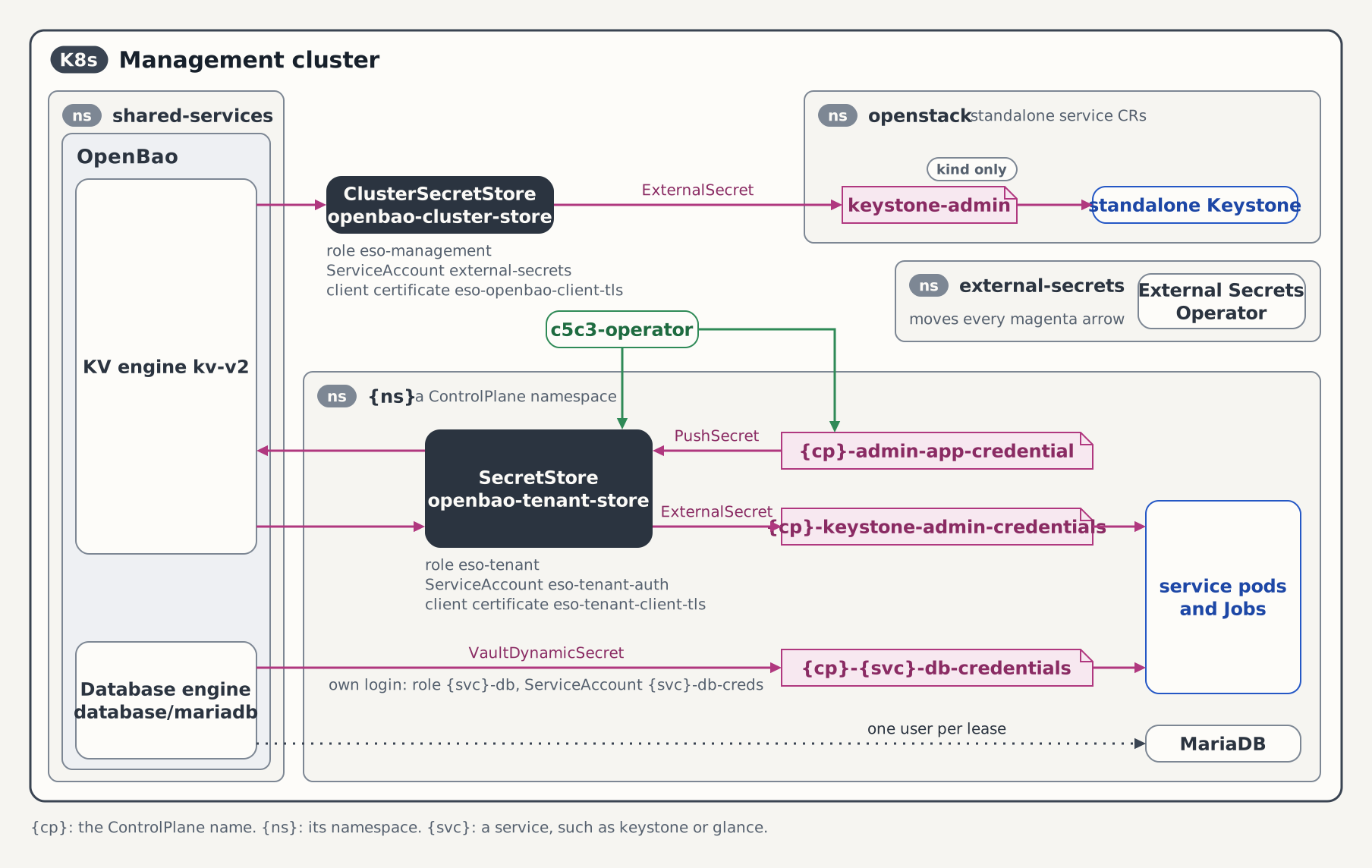
This is the enforced default: you configure nothing, and existing operator-managed ControlPlanes migrate onto it on operator upgrade. The shared cluster-scoped store openbao-cluster-store no longer carries any per-ControlPlane write grant or Keystone read. It is restricted to the namespaces hosting the static infrastructure ExternalSecrets and grants only the genuinely shared bootstrap and infrastructure reads.
spec.secretStoreRef is an override in case you manage the store yourself:
apiVersion: c5c3.io/v1alpha1
kind: ControlPlane
metadata:
  name: controlplane
  namespace: team-alpha
spec:
  # …
  # Optional. OMIT this to get the operator-provisioned per-tenant store (the
  # default).
  secretStoreRef:
    kind: SecretStore
name: my-own-store- Omitted (the default). The operator provisions the per-tenant identity: the
ServiceAccount(eso-tenant-auth), the cert-manager mTLSCertificate, and the namespacedSecretStore(openbao-tenant-store) as owned children and routes the ControlPlane and its children through it. - Set. The operator provisions nothing and uses the store you name (a namespaced
SecretStoreyou manage, or the sharedopenbao-cluster-store). The reference is projected onto the service children, so this is the single place you configure it.
Migrating an existing deployment
Upgrade from the shared store
Older deployments used the shared openbao-cluster-store for per-ControlPlane secret traffic. Its wildcard write grants allowed a tenant's ESO identity to access another tenant's keys. The new default uses a namespaced openbao-tenant-store with a per-tenant identity. Follow the migration steps below when upgrading an existing deployment.
Operator-managed ControlPlanes migrate from the shared cluster store to the per-tenant namespaced store automatically. Upgrade the operators; each ControlPlane provisions its per-tenant store and re-points its ExternalSecrets and PushSecrets in place. On a cluster whose OpenBao was bootstrapped before this feature, re-run deploy/openbao/bootstrap/setup-auth.sh and setup-policies.sh so the eso-tenant role and policy exist. Until they do, the per-tenant stores stay NotReady and reconciliation of new secret objects is gated, but existing Secrets keep serving and no key material is lost (a 403 never deletes anything).
Do not delete a ControlPlane mid-migration
Deleting a ControlPlane while its PushSecrets cannot reach OpenBao leaves the DeletionPolicy=Delete finalizer looping on 403 and the CR stuck in Terminating. Complete the OpenBao bootstrap re-run first.
Standalone service CRs have no ControlPlane operator above them to provision a store. Operators for Keystone, Horizon, Barbican, Cinder, Glance, Neutron, Nova, and Placement expose spec.secretStoreRef; set it explicitly when moving from the shared store. The OpenBao side (the eso-tenant auth role and policy) is created once at bootstrap by setup-auth.sh / setup-policies.sh; the in-cluster side is created per namespace by setup-eso-tenant.sh:
# Run once per tenant namespace, then wait for the SecretStore to be Ready.
deploy/openbao/bootstrap/setup-eso-tenant.sh team-alpha
kubectl wait --for=condition=Ready secretstore/openbao-tenant-store \
  -n team-alpha --timeout=120s
Then set spec.secretStoreRef: {kind: SecretStore, name: openbao-tenant-store} on each standalone service CR that uses OpenBao. The tenant store is provisioned per namespace, not per service.
A ControlPlane's fernet and credential keys are irreplaceable: the credential keys decrypt every application credential, EC2 credential, and TOTP secret, and their OpenBao backup is bound to a PushSecret that deletes the remote copy when the binding goes away. Switching stores moves this material; it never re-creates it: the operator updates the backup PushSecrets in place (unchanged name and OpenBao path) so a store switch only re-points the identity.
The per-ControlPlane database and cache need no additional work: the infrastructure a ControlPlane owns is already created in the ControlPlane's own namespace, so two ControlPlanes already get two instances.
Further reading
- ControlPlane Quick Start: standing up a tenant as a
ControlPlaneCR (the one-per-namespace tenancy aggregate). - Enable the Keystone Operator NetworkPolicy: confine the namespace-scoped operator's egress.
- Helm Values Schema: the full
rbac.*/webhook.*value reference.
Tested by
The namespace-scoped install of the seven operators whose charts accept the mode, and the two-ControlPlanes-in-two-namespaces tenancy this guide describes, are asserted on the CI e2e kind cluster by these chainsaw suites. The keystone suite also installs the standalone webhook release. Each namespace-scoped-rbac suite reads the namespace-scoped operator's own log and metrics after its CR is Ready, because the cluster-wide operator of the same chart reconciles that CR too.
chainsaw test --test-dir tests/e2e/keystone/namespace-scoped-rbac
chainsaw test --test-dir tests/e2e/barbican/namespace-scoped-rbac
chainsaw test --test-dir tests/e2e/cinder/namespace-scoped-rbac
chainsaw test --test-dir tests/e2e/glance/namespace-scoped-rbac
chainsaw test --test-dir tests/e2e/horizon/namespace-scoped-rbac
chainsaw test --test-dir tests/e2e/nova/namespace-scoped-rbac
chainsaw test --test-dir tests/e2e/placement/namespace-scoped-rbac
chainsaw test --test-dir tests/e2e/c5c3/multi-controlplane