How-to: Configure NFS Volume Backups
Backups are opt-in. A Cinder without a backup backend renders no backup Deployment at all and still serves volumes. This guide reads the backup target the ControlPlane devstack projects, runs a volume through a backup and a restore, and sizes the service for larger volumes. The target is a CinderBackupBackend: at most one may be attached to a Cinder, because the backup driver is a single property of the one cinder-backup Deployment rather than one of several stores.
For the full field reference, see the CinderBackupBackend CRD API Reference and the Cinder CRD.
Prerequisites
Devstack
This guide is written against the Quick Start (ControlPlane) devstack. Stand it up first:
KIND_HOST_PORT=8443 WITH_CONTROLPLANE=true WITH_NFS=true make deploy-infraFollow that tutorial through the block-storage block of Step 4 and the Create a first volume check in Step 7, so the projected controlplane-cinder child is Ready in openstack with nfs1 and nfsbk attached. Every resource name in the examples below is one that devstack produces.
Set storage on the ControlPlane, never on the projected children
The controlplane-cinder Cinder CR, the CinderBackend nfs1 and the CinderBackupBackend nfsbk are projected by the c5c3-operator. A child you edit, or delete, by hand is reverted (or recreated) on the next reconcile. Change services.cinder on the ControlPlane CR and let the operator project it down; that block is the single source of truth for the projected storage.
- The
OS_*environment variables from the tutorial's token-issue step, so theopenstackclient reaches the ControlPlane's Keystone. - The volume
demo-volthat the tutorial's Create a first volume check leaves behind in Step 7.
Step 1 — Read the projected backup service
The devstack's backupBackend entry is nfsbk on /backups, projected into one satellite and one Deployment:
kubectl get cinderbackupbackends -n openstack
kubectl get deploy controlplane-cinder-backup -n openstack
NAME READY TYPE CINDER AGE
nfsbk True NFS controlplane-cinder 9mREADY turns True only after the backup Deployment mounts the Secret rendered for this backend. The figure shows the steps in between, and The handshake lists them with what differs per kind.
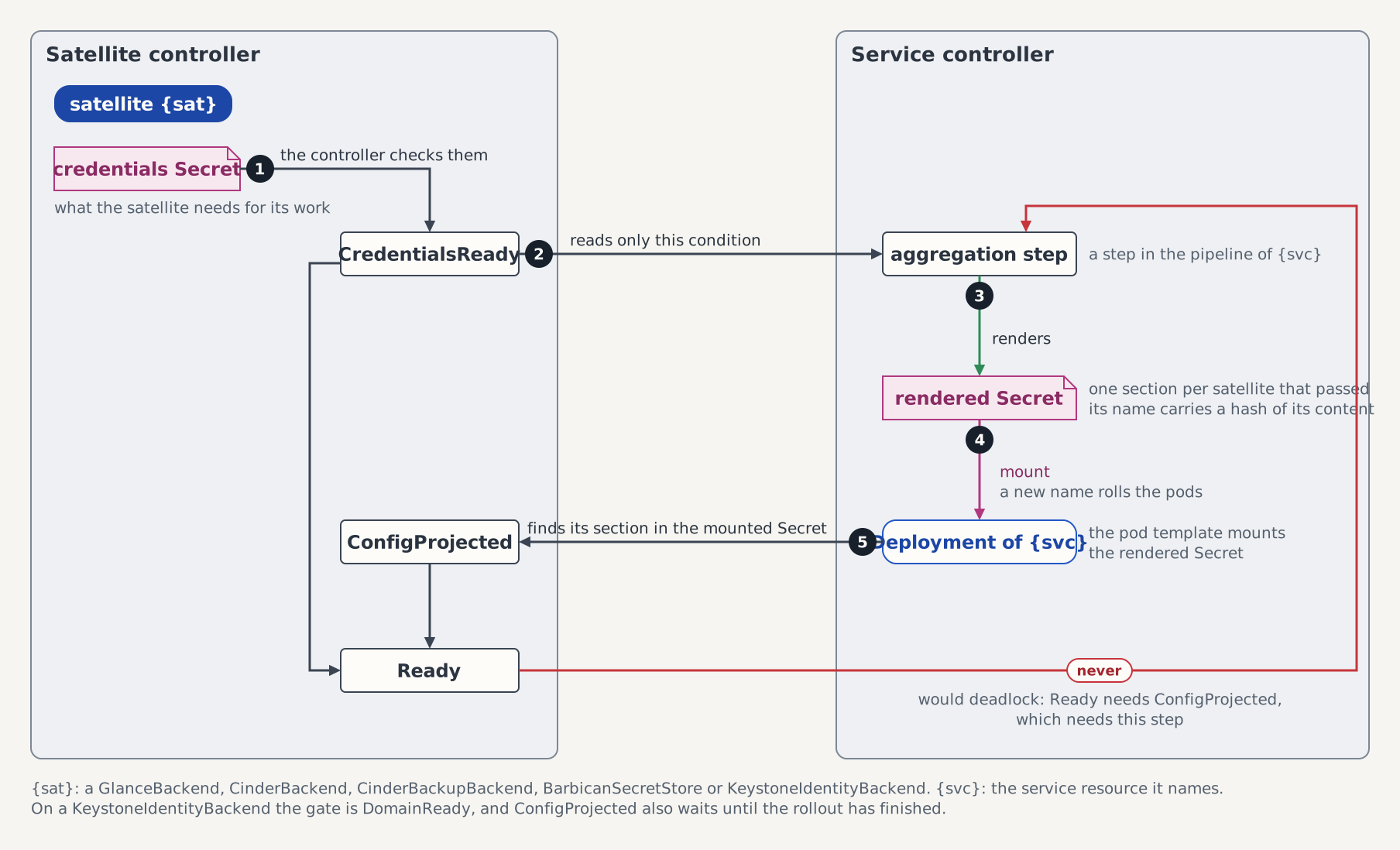
Two conditions on the Cinder child cover the two halves. BackupBackendReady is True under the reason BackupBackendProjected once the attached target is rendered, and BackupServiceReady is True under BackupServiceReady once the Deployment is up:
kubectl get cinder controlplane-cinder -n openstack -o jsonpath='{range .status.conditions[?(@.type=="BackupBackendReady")]}{.type}={.status}/{.reason}{"\n"}{end}{range .status.conditions[?(@.type=="BackupServiceReady")]}{.type}={.status}/{.reason}{"\n"}{end}'BackupBackendReady=True/BackupBackendProjected
BackupServiceReady=True/BackupServiceReadyThe rendered driver section lives in the content-hashed Secret controlplane-cinder-backup-nfsbk-<hash>, and the backup pod is the only thing that mounts it. Read it there:
kubectl exec -n openstack deploy/controlplane-cinder-backup -- \
cat /etc/cinder/backup.conf.d/backup.conf[DEFAULT]
backup_compression_algorithm = zlib
backup_driver = cinder.backup.drivers.nfs.NFSBackupDriver
backup_file_size = 52428800
backup_mount_options = nfsvers=4.1,soft,timeo=30,retrans=2
backup_mount_point_base = /var/lib/cinder/backup_mount
backup_share = nfs-server.openstack.svc.cluster.local:/backups
backup_use_same_host = false
host = controlplane-cinder-backuphost is derived from the Cinder's own name, so replacing the backup backend with one pointing at the same export keeps the backups already written restorable. backup_use_same_host = false follows from that: the service owns its target through that identity and a backup is never handed to another host.
host governs which backup service may serve a restore, not where the chunks are. spec.nfs.server and spec.nfs.path are mutable — only cinderRef and type carry transition rules — so repointing either at a different export is admitted without a warning, the backup Deployment rolls, and BackupBackendReady and BackupServiceReady both stay True while every pre-existing backup fails to restore: its chunks are on the export that was left behind. No condition and no event reports that. Treat a change of server or path as a migration, and move the chunks with it.
The figure shows the backup pod beside the volume services, with the exports each of them mounts.
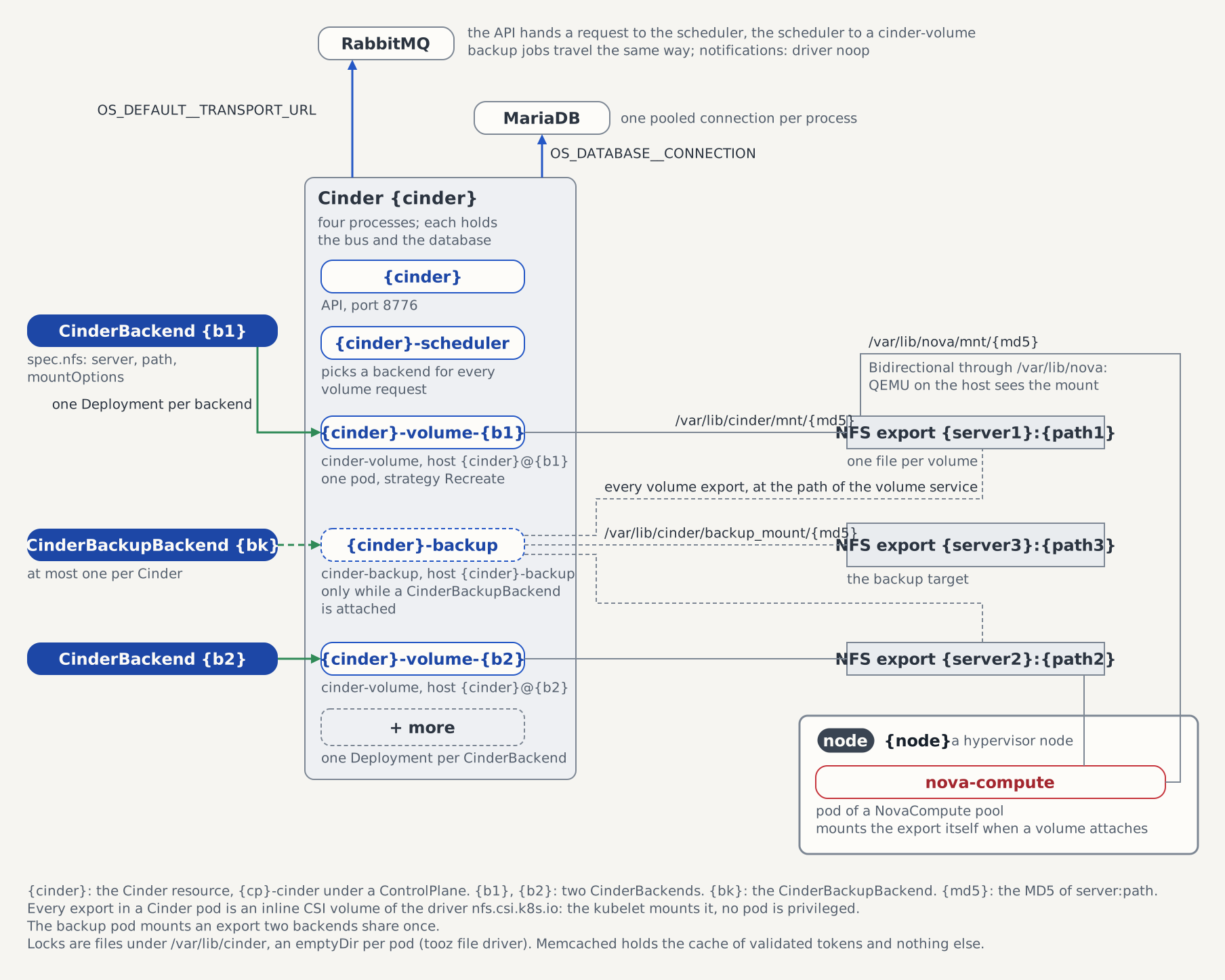
The pod mounts more than its own target. It carries every volume backend's export under /var/lib/cinder/mnt/<md5> beside /var/lib/cinder/backup_mount/<md5>, because a backup reads the source volume itself through os-brick rather than a copy the volume service hands over, and it needs that file at the path cinder resolved the volume's provider location to:
kubectl exec -n openstack deploy/controlplane-cinder-backup -- \
  grep /var/lib/cinder /proc/mounts
Step 2 — Back up and restore a volume
Back up the volume the tutorial created. openstack volume backup create returns before the chunks are written, so wait for available before going on:
openstack --insecure volume backup create --name demo-bk demo-vol
openstack --insecure volume backup show demo-bk -c status -f value
Restore it into the same volume:
openstack --insecure volume backup restore --force demo-bk demo-vol
openstack --insecure volume show demo-vol -c status -f value
--force is what openstackclient requires to restore into a volume that already exists. Without it the command refuses before any API call, with Volume 'demo-vol' already exists; if you want to restore the backup to it you need to specify the '--force' option.
Restore into an existing volume
A restore writes into a volume that is already there. It is not a way to recreate one that is gone, so plan a recovery by creating the target volume first.
The file the driver writes into is what makes the difference. Restoring into a volume the request creates opens that file with truncation, and the chunked driver writes only the non-zero blocks it stored, so the file ends up as large as the data written and no larger. qemu-img info then reports a virtual size below the volume's, and the driver refuses to attach it. Restoring into a volume that already exists seeks to each block's offset and writes every byte, and the volume comes back byte-identical to the source.
Deleting the backup is what proves the service owns the chunks it wrote:
openstack --insecure volume backup delete demo-bk
openstack --insecure volume backup list
Step 3 — Size the backup service
Two fields on the backupBackend entry shape what a backup costs. fileSize is the size in bytes of one chunk: cinder splits a volume into objects of that size and writes them one at a time. compression selects the algorithm each chunk is compressed with, one of none, zlib, bz2 and zstd:
kubectl patch controlplane controlplane -n openstack --type merge \
  -p '{"spec":{"services":{"cinder":{"backupBackend":{"name":"nfsbk","type":"NFS","nfs":{"server":"nfs-server.openstack.svc.cluster.local","path":"/backups"},"fileSize":104857600,"compression":"zstd"}}}}}'
fileSize has a minimum of 1048576 and must be a multiple of 32768: cinder hashes each chunk in blocks of 32 KiB and refuses a chunk size that block size does not divide. Leaving either field unset lets the satellite CRD's defaults apply, 52428800 and zlib.
The chunk size is also the memory rule. The backup process holds one object and its compressed form in memory at a time, so the footprint follows fileSize, and the reconciler renders 2Gi as the backup container's memory request and limit to match. That limit has been reached on the CI tempest leg by a backup of a 1 GiB volume, which is more than the chunk arithmetic alone accounts for. Treat 2Gi as the budget for volumes of roughly that size, and raise it before a backup target takes larger ones.
On a ControlPlane the raise goes on spec.sizing.cinder.backup.resources, and the operator pins the replica count. On a Cinder CR you own it goes on spec.backup.deployment.resources, where replicas: 1 has to be spelled out beside it: the shared schema default of three lands on any present deployment block before the webhook runs, and a CEL rule pins this Deployment at one replica.
spec:
  backup:
    deployment:
      replicas: 1
      strategy:
        type: Recreate
      resources:
        requests:
          memory: 512Mi
        limits:
          memory: 4Gi
Standalone Cinder, without a ControlPlane
Without a ControlPlane the backup target is a CinderBackupBackend you own, pointed at your Cinder by spec.cinderRef:
apiVersion: cinder.openstack.c5c3.io/v1alpha1
kind: CinderBackupBackend
metadata:
  name: nfs-backups
  namespace: openstack
spec:
  cinderRef:
    name: cinder
  type: NFS
  nfs:
    server: nfs-server.openstack.svc.cluster.local
    path: /backups
  fileSize: 52428800
  compression: zlib
At most one may be attached to a Cinder. The validating webhook lists the namespace siblings on every create and update, and rejects a second one on spec.cinderRef with Cinder "cinder" already has CinderBackupBackend "nfs-backups" attached. Should a second CR ever slip past admission, the cinder-side step refuses to guess: it renders nothing, sets BackupBackendReady=False under the reason MultipleBackupBackends naming both candidates, and deletes the backup Deployment in the same pass. Backups resume when one of the two is removed.
cinderRef and type are immutable, because a restore reads a backup with the driver that wrote it. Deleting the CR is a plain delete with no finalizer: the backup service re-registers under <cinder>-backup whenever it starts, so there is no per-target registry row to unregister. The parent drops the backup Deployment on its next pass and BackupServiceReady returns to True under BackupNotConfigured.
See also
- CinderBackupBackend CRD API Reference — the rendered keys, the
extraOptionsdenylist, and the two gates behind the one-attachment rule. - Attach an NFS Backend to Cinder — the volume backends whose exports this service mounts beside its own target.
- Cinder CRD — the backup Deployment's pod-level block and the two CEL rules that pin it.
- ControlPlane CRD API Reference — the curated
backupBackendentry and how its fields reach the satellite.
Tested by
The projected backup service, the rendered driver section read back off the pod, and a backup-restore-delete round trip against a live volume are asserted end-to-end on the CI e2e kind cluster by these chainsaw suites:
chainsaw test --test-dir tests/e2e/cinder/backup-nfs
chainsaw test --test-dir tests/e2e/c5c3/full-controlplane-keystone
The backup backend CR the backup-nfs suite applies
The suite runs its own Cinder in the shared openstack namespace, and spec.cinderRef is immutable, so the fixture carries the suite's own isolation identifiers: Cinder cinder-backup with the target backup-nfsbk. The walkthrough above keeps the controlplane-cinder / nfsbk names the devstack produces. fileSize, compression and mountOptions are omitted there, so the suite reads the schema defaults back off the rendered section.
apiVersion: cinder.openstack.c5c3.io/v1alpha1
kind: CinderBackupBackend
metadata:
  name: backup-nfsbk
  namespace: openstack
spec:
  cinderRef:
    name: cinder-backup
  type: NFS
  nfs:
    server: nfs-server.openstack.svc.cluster.local
    path: /backups