End-to-End SSO
This guide takes you from a working ControlPlane to a Horizon login page with a working SSO button, and then to a domain dropdown for users who live in an LDAP-backed domain.
It assumes you already know how to attach identity backends. If you do not, read Attach an OIDC Federation Backend and Attach an LDAP Domain Backend first — this guide picks up where they leave off and shows what the ControlPlane does with them.
Prerequisites
Devstack
This guide is written against the Quick Start (ControlPlane) devstack. Stand it up first:
KIND_HOST_PORT=8443 WITH_CONTROLPLANE=true make deploy-infraFollow that tutorial through to its final Verify step, so the ControlPlane's projected controlplane-keystone and controlplane-horizon children are running. Every resource name in the examples below is one that devstack produces.
On the kind devstack, stand up the fixture IdP and LDAP directory this guide federates against. These are the fixtures of the mirroring e2e suite. Its Keycloak registers the gateway host of Keystone as a redirect URI, which is where the identity provider sends the browser back in hop 4 of the login:
kubectl apply -f tests/e2e-controlplane-sso/00-keycloak.yaml \
              -f tests/e2e-controlplane-sso/01-openldap.yaml
kubectl -n openstack rollout status deploy/keycloak
kubectl -n openstack rollout status deploy/openldap
Already applied the oidc-federation fixture?
Keycloak imports its realms at pod start, so if you previously applied the oidc-federation guide's copy of the Keycloak fixture, re-apply the manifest above and restart the pod so the gateway redirect URIs are picked up:
kubectl -n openstack rollout restart deploy/keycloak- Attach an OIDC Federation Backend — how to stand up the federation backend this guide projects onto the login page.
- Attach an LDAP Domain Backend — how to stand up the LDAP domain backend used in the multi-domain step.
What the ControlPlane does for you
Attaching a KeystoneIdentityBackend to a ControlPlane's Keystone child is the only action you take. The ControlPlane operator watches those backends and, for every one that reaches Ready, projects:
- a WebSSO choice onto the Horizon child (
spec.websso), so the login page gains an entry in its "Authenticate using" dropdown for each OIDC backend; - a domain field onto the Horizon child (
spec.multiDomain), once any LDAP-backed domain is in play; - the trusted dashboard origin onto the Keystone child (
spec.federation.trustedDashboards), so Keystone accepts the token hand-off back to your dashboard. This one waits for no backend: the operator derives it fromservices.horizonon every pass.
Only Ready backends contribute. A backend whose Keystone-side federation objects are not provisioned yet never produces an SSO button that dead-ends. Detaching the last backend clears the block again, and the login page reverts to local credentials.
The SSO choices also need both services published (Step 1). Until then the operator projects no spec.websso at all, even for a Ready backend, and logs why — a button whose hand-off Keystone would reject only after the user has typed their corporate password is worse than no button.
Step 1 — Publish both services
The WebSSO hand-off is a browser flow, so both Keystone and the dashboard must be reachable under the names the browser uses.
apiVersion: c5c3.io/v1alpha1
kind: ControlPlane
metadata:
  name: controlplane
  namespace: openstack
spec:
  services:
    keystone:
      gateway:
        hostname: keystone.example.com
        parentRef:
          name: openstack-gw
      # The browser follows the SSO redirect to this URL, so it must be the
      # externally routable Keystone — never the cluster-local Service URL.
      publicEndpoint: https://keystone.example.com/v3
    horizon:
      gateway:
        hostname: horizon.example.com
        parentRef:
          name: openstack-gw
      # The browser-observed dashboard base URL. The operator derives the
      # trusted WebSSO origin from it: publicEndpoint + "/auth/websso/".
      publicEndpoint: https://horizon.example.com
Keystone matches the origin verbatim
Keystone compares the origin the dashboard sends against its [federation] trusted_dashboard list character for character. Three rules follow:
publicEndpointmust include a non-default port. If you publish the dashboard onhttps://horizon.example.com:8443, say so. WhenpublicEndpointis empty the operator deriveshttps://{gateway.hostname}— the default-443 form — and the hand-off is rejected on any other port.publicEndpointandgateway.hostnamemust name the same host. Django derives the origin it sends from the request'sHostheader, i.e. from the gateway hostname, not frompublicEndpoint. If the two disagree, Keystone would reject an origin you never see in your configuration — so the validating webhook rejects the ControlPlane instead. The port may still differ, since Gateway API hostnames carry none.publicEndpointmust usehttpsbehind a gateway. The Gateway listener terminates TLS, and after every federated login the browser posts the unscoped WebSSO token to this origin, in a form Keystone hands it. Overhttpthat bearer token — good for the user's full API privileges — travels in cleartext, so the validating webhook rejects it. Without a gateway the value is only warned about.
Step 2 — Attach a federation backend
Apply an OIDC KeystoneIdentityBackend pointing at your ControlPlane's Keystone child. The child is named {controlplane-name}-keystone:
apiVersion: keystone.openstack.c5c3.io/v1alpha1
kind: KeystoneIdentityBackend
metadata:
  name: keycloak
  namespace: openstack
spec:
  keystoneRef:
    name: controlplane-keystone
  domain:
    name: federated
  type: OIDC
  oidc:
    # Fixture-true values from the two-fixture apply in Prerequisites. Explicit
    # endpoints are required because the operator's metadata-fetch SSRF guard
    # blocks .well-known discovery against the in-cluster Keycloak — see
    # [Attach an OIDC Federation Backend](./keystone/oidc-federation.md) Step 4 for the
    # full worked example (mappings, groups, and why introspection is https).
    issuer: http://keycloak.openstack:8080/realms/cobaltcore
    clientID: keystone
    clientSecretRef:
      name: keycloak-cobaltcore-client
    endpoints:
      # The browser opens this endpoint, so it uses the issuer's host: Keycloak
      # posts the login form to that host, and a session cookie set on the FQDN
      # would not be sent along (400, cookie_not_found).
      authorizationEndpoint: http://keycloak.openstack:8080/realms/cobaltcore/protocol/openid-connect/auth
      tokenEndpoint: http://keycloak.openstack.svc.cluster.local:8080/realms/cobaltcore/protocol/openid-connect/token
      jwksURI: http://keycloak.openstack.svc.cluster.local:8080/realms/cobaltcore/protocol/openid-connect/certs
      userinfoEndpoint: http://keycloak.openstack.svc.cluster.local:8080/realms/cobaltcore/protocol/openid-connect/userinfo
      introspectionEndpoint: https://keycloak.openstack.svc.cluster.local:8443/realms/cobaltcore/protocol/openid-connect/token/introspect
    oauth2Introspection:
      enabled: true
      tlsVerify: false
The Default domain is off limits
A federation backend may not back the Default domain: it hosts the SQL-backed service users and the bootstrap admin. Give each federated backend its own domain.
Once the backend reports Ready, watch the projection appear on the Horizon child without touching it:
kubectl get horizon controlplane-horizon -n openstack -o jsonpath='{.spec.websso}' | jq{
"enabled": true,
"initialChoice": "credentials",
"keystoneURL": "https://keystone.example.com/v3",
"choices": [
{ "id": "credentials", "label": "Keystone Credentials" },
{ "id": "keycloak_openid", "label": "keycloak" }
],
"idpMapping": {
"keycloak_openid": { "identityProvider": "keycloak", "protocol": "openid" }
}
}The credentials entry leads the list and is preselected. Enabling SSO must never lock out local accounts — including the bootstrap admin and every LDAP-domain user — so the operator always offers the local login form alongside the federated choices.
Step 3 — Complete a login
Open https://horizon.example.com/auth/login/. The "Authenticate using" dropdown now offers your identity provider. Pick it, authenticate at the provider, and you land back on the dashboard with a session.
The hops of a login
The figure follows one login with an OIDC backend. Its numbers are the hops below. An arrow with an open head is a request the browser sends, one with a filled head a call between servers.
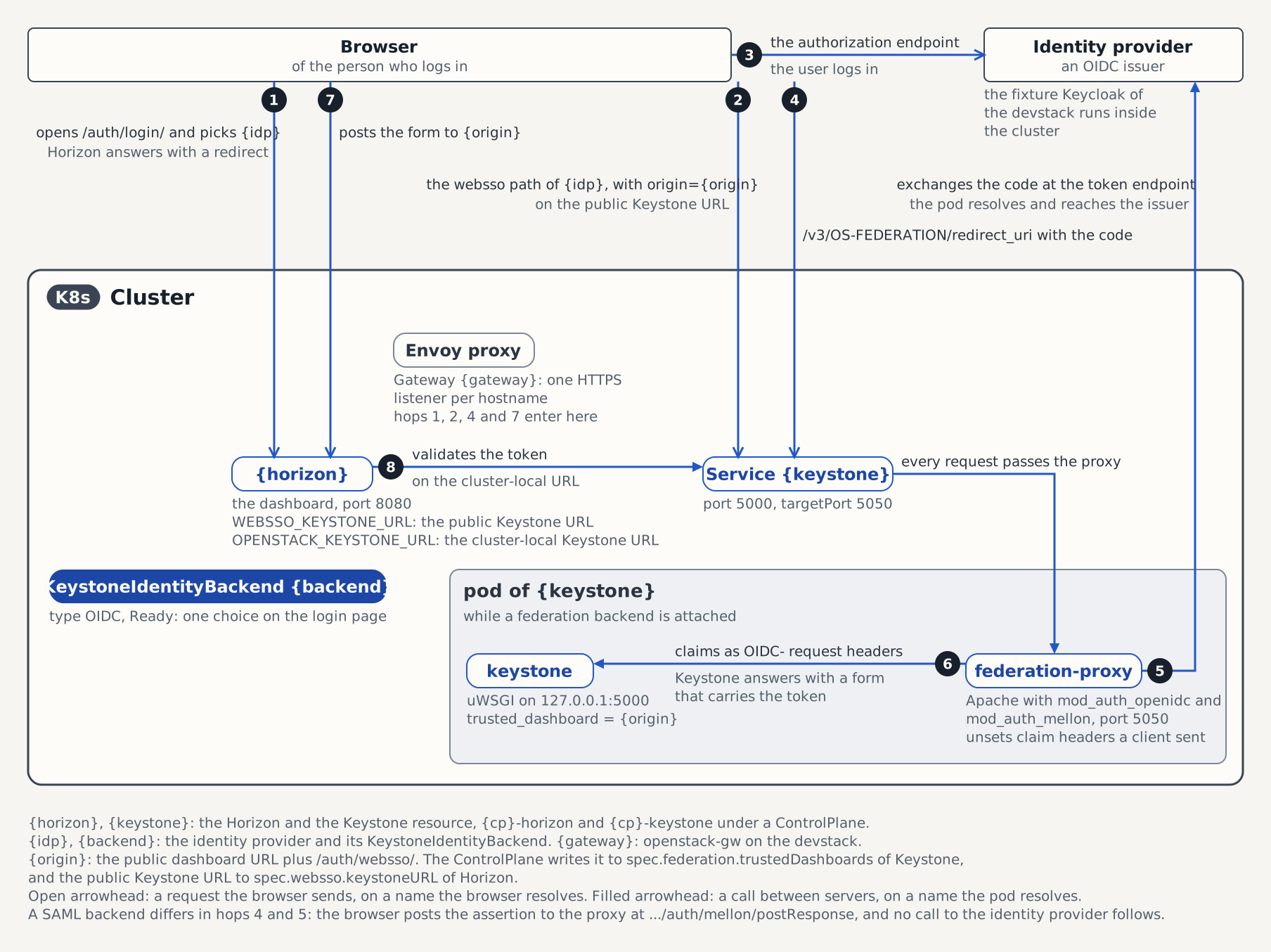
- The browser opens
https://horizon.example.com/auth/login/and submits the chosen entry of "Authenticate using". Horizon answers with a redirect. - The browser follows it to
{keystoneURL}/auth/OS-FEDERATION/identity_providers/{idp}/protocols/{protocol}/webssoand passes the dashboard origin,https://horizon.example.com/auth/websso/, asorigin.{keystoneURL}isspec.websso.keystoneURLof the Horizon child, the public Keystone URL. The Service of Keystone sends every request to thefederation-proxycontainer on port 5050, which protects this path and redirects a browser without a session to the identity provider. - The browser opens the authorization endpoint of the issuer, and the user logs in there.
- The identity provider sends the browser back to
/v3/OS-FEDERATION/redirect_urion the public Keystone host, with an authorization code. - The proxy exchanges the code at the token endpoint of the provider. This call leaves the Keystone pod, so the pod has to resolve and reach the issuer.
- The proxy passes the request to Keystone on
127.0.0.1:5000, with the claims asOIDC-request headers. Keystone maps them to a user, comparesoriginwith its[federation] trusted_dashboardlist, and answers with a form that carries an unscoped token. - The browser submits that form to the origin,
https://horizon.example.com/auth/websso/. - Horizon validates the token against
OPENSTACK_KEYSTONE_URL, the cluster-local Service URL of Keystone, and starts the session.
Hops 1 to 4 and 7 use names the browser resolves, which is why Step 1 publishes both services. Hops 5 and 8 use names a pod resolves. A SAML backend differs in hops 4 and 5: the identity provider has the browser post the assertion to the proxy's endpoint /v3/OS-FEDERATION/identity_providers/{idp}/protocols/{protocol}/auth/mellon/postResponse, and no call from the proxy to the provider follows.
The fixture IdP is not reachable from a host browser
On the kind devstack the fixture Keycloak issuer is a cluster-internal Service name, so a browser on your workstation cannot complete the login form: it is redirected to http://keycloak.openstack:8080/..., which the host cannot resolve. Clicking the SSO button through to a session needs an externally reachable IdP (your production Keycloak, or a fixture published through the gateway with matching redirect URIs and a host-resolvable issuer). The full WebSSO hand-off against the in-cluster fixture — including the Envoy-routed gateway redirect URIs this guide's fixtures register — is exercised headlessly by the mirroring e2e suite (see Tested by).
For a copy-pasteable devstack login that does not need a browser, use the CLI bearer flow in Attach an OIDC Federation Backend.
Step 4 — Multi-domain login for LDAP users
Attach an LDAP KeystoneIdentityBackend the same way. Once it is Ready, the Horizon child gains:
kubectl get horizon controlplane-horizon -n openstack -o jsonpath='{.spec.multiDomain}' | jq{
"enabled": true,
"defaultDomain": "Default"
}The login page now shows a domain field, and users who leave it blank land in Default — so the bootstrap admin stays reachable.
The field is free text rather than a dropdown. Horizon bounds a domain dropdown by OPENSTACK_KEYSTONE_DOMAIN_CHOICES and rejects every domain outside it, but the operator only sees the domains your LDAP backends declare. A dropdown built from those would lock out everyone in a domain it cannot enumerate — a SQL-backed domain you populated out-of-band, or the domain an OIDC backend targets. A standalone Horizon CR (one no ControlPlane projects onto) can still set spec.multiDomain.domainDropdown and domainChoices itself, once you have enumerated every domain your users live in.
LDAP authentication alone is not enough to get a scoped token: a fresh domain carries no role assignments, and Keystone answers 401 for a scope the user holds no role on. Grant the role before asking users to log in:
openstack role add --domain corp --user alice memberA 403 on /project/ right after login is expected on this devstack — there are no compute or network services in the catalog for the project dashboard to render.
Standalone Keystone, without a ControlPlane
Without the ControlPlane there is nothing to project the trusted origin, so set it directly on the Keystone CR. It is an oslo MultiStrOpt, so the field is a list and renders as one trusted_dashboard line per entry:
apiVersion: keystone.openstack.c5c3.io/v1alpha1
kind: Keystone
metadata:
  name: keystone
spec:
  federation:
    trustedDashboards:
      - https://horizon.example.com/auth/websso/
      - https://horizon.example.com:8443/auth/websso/
The section renders as soon as an origin is declared, so you can prepare the trust relationship before the first backend attaches. You then configure the dashboard's spec.websso block on the Horizon CR yourself — the same shape the ControlPlane would have projected.
Do not also set it in extraConfig
The typed list is written after the spec.extraConfig merge, so declaring [federation] trusted_dashboard in both places would silently drop the extraConfig value. The validating webhook rejects the combination.
Publishing the dashboard on a non-default port
Local development clusters, and any deployment that cannot bind :443, publish the dashboard somewhere else. Two things must agree with what the browser sees:
    horizon:
      gateway:
        hostname: horizon.127-0-0-1.nip.io
        parentRef:
          name: openstack-gw
      publicEndpoint: https://horizon.127-0-0-1.nip.io:8443
The operator then projects https://horizon.127-0-0-1.nip.io:8443/auth/websso/ as the trusted origin. The port cannot be derived from the hostname, which is why the override exists.
Pinning the federation proxy image
Attaching an OIDC backend makes the Keystone operator inject an Apache / mod_auth_openidc sidecar. The ControlPlane projects ghcr.io/c5c3/keystone-federation-proxy:latest by default — a mutable tag, so every node re-pulls it on each pod start. Pin it:
    keystone:
      federationProxyImage:
        repository: ghcr.io/c5c3/keystone-federation-proxy
        digest: sha256:<digest>
The same override takes a locally built tag, which is how the federated-controlplane e2e suite exercises the sidecar under review rather than the one already published.
Troubleshooting
The login page shows no SSO choice. The backend has not reached Ready. Only Ready backends contribute a choice:
kubectl get keystoneidentitybackend -n openstackKeystone answers "Origin ... is not a trusted dashboard host". The origin the dashboard sent does not match trusted_dashboard character for character. This is hop 6 of the login. Compare them:
kubectl get keystone controlplane-keystone -n openstack \
  -o jsonpath='{.spec.federation.trustedDashboards}'
Then check two of the rules from Step 1: the port must be present when it is not 443, and publicEndpoint must name the same host as gateway.hostname.
The SSO button redirects to an unreachable URL. This is hop 2 of the login. spec.websso.keystoneURL is projected from services.keystone.publicEndpoint. If that is unset, the operator derives https://{gateway.hostname}/v3, the default-443 form, which a gateway published on another port does not answer. Set publicEndpoint with the port. Only a Horizon CR you write yourself falls back to spec.keystoneEndpoint, the cluster-local Service URL, when its spec.websso.keystoneURL is empty.
Tested by
The full ControlPlane-driven SSO chain — both services published through the shared gateway, the OIDC and LDAP backends attached, and a headless WebSSO hand-off — is asserted end-to-end on its own CI e2e kind cluster by this chainsaw suite:
chainsaw test --test-dir tests/e2e-controlplane-ssoThe ControlPlane CR the suite applies
The suite runs a second full ControlPlane in its own CI job (the webhook permits only one ControlPlane per namespace), so its CR name (controlplane-sso) differs from the controlplane devstack name used in the walkthrough above.
apiVersion: c5c3.io/v1alpha1
kind: ControlPlane
metadata:
  name: controlplane-sso
  namespace: openstack
spec:
  openStackRelease: "2026.1"
  region: RegionOne
  infrastructure:
    database:
      clusterRef:
        name: openstack-db
      database: keystone
      secretRef:
        name: keystone-db
    cache:
      clusterRef:
        name: openstack-memcached
      backend: dogpile.cache.pymemcache
  services:
    keystone:
      gateway:
        hostname: keystone.127-0-0-1.nip.io
        parentRef:
          name: openstack-gw
      publicEndpoint: https://keystone.127-0-0-1.nip.io/v3
      federationProxyImage:
        repository: ghcr.io/c5c3/keystone-federation-proxy
        tag: dev
    horizon:
      gateway:
        hostname: horizon.127-0-0-1.nip.io
        parentRef:
          name: openstack-gw
      publicEndpoint: https://horizon.127-0-0-1.nip.io
      # The kind shim Secret is pinned to the DEFAULT ControlPlane identity, so
      # a named ControlPlane must point at its own key material (the documented
      # multi-ControlPlane path). 03-horizon-secret-key-externalsecret.yaml
      # provisions it.
      secretKeyRef:
        name: controlplane-sso-horizon-secret-key
        key: secret-key
  sizing:
    profile: Minimal
  korc:
    adminCredential:
      cloudCredentialsRef:
        cloudName: admin
        secretName: k-orc-clouds-yaml
      passwordSecretRef:
        name: keystone-admin
        key: password
      applicationCredential:
        restricted: true
        rotation:
          mode: PasswordDriven
The identity backends the suite applies
Both backends reference the suite's projected Keystone child (controlplane-sso-keystone) rather than the walkthrough's controlplane-keystone.
---
apiVersion: keystone.openstack.c5c3.io/v1alpha1
kind: KeystoneIdentityBackend
metadata:
  name: keycloak-cobaltcore
  namespace: openstack
spec:
  keystoneRef:
    name: controlplane-sso-keystone
  domain:
    name: cobaltcore
    mode: Manage
    deletionPolicy: Delete
    description: Keycloak cobaltcore realm
  type: OIDC
  oidc:
    issuer: http://keycloak.openstack:8080/realms/cobaltcore
    clientID: keystone
    clientSecretRef:
      name: keycloak-cobaltcore-client
    # Explicit endpoints: the operator's metadata-fetch SSRF guard blocks
    # discovery against the in-cluster Keycloak's private ClusterIP. This suite
    # exercises the browser websso flow only, so — unlike the keystone
    # oidc-federation suite — no oauth2Introspection block is needed.
    endpoints:
      # The browser opens this endpoint, so it uses the issuer's host: Keycloak
      # posts the login form to that host, and a session cookie set on the FQDN
      # would not be sent along (400, cookie_not_found).
      authorizationEndpoint: http://keycloak.openstack:8080/realms/cobaltcore/protocol/openid-connect/auth
      tokenEndpoint: http://keycloak.openstack.svc.cluster.local:8080/realms/cobaltcore/protocol/openid-connect/token
      jwksURI: http://keycloak.openstack.svc.cluster.local:8080/realms/cobaltcore/protocol/openid-connect/certs
      userinfoEndpoint: http://keycloak.openstack.svc.cluster.local:8080/realms/cobaltcore/protocol/openid-connect/userinfo
  mappings:
  - remote:
    - type: HTTP_OIDC_ISS
      anyOneOf:
      - http://keycloak.openstack:8080/realms/cobaltcore
    - type: HTTP_OIDC_PREFERRED_USERNAME
    local:
    # {0} is the first value-producing remote: the HTTP_OIDC_ISS rule carries
    # anyOneOf, so Keystone treats it as a pure condition and never adds it to
    # the positional direct-map tuple — HTTP_OIDC_PREFERRED_USERNAME is the only
    # value, at index 0.
    - user:
        name: "{0}"
      group:
        name: federated-users
        domain:
          name: cobaltcore
  groups:
  - name: federated-users
    description: Federated Keycloak cobaltcore users
    roleAssignments:
    - role: member
      domain: true
---
apiVersion: keystone.openstack.c5c3.io/v1alpha1
kind: KeystoneIdentityBackend
metadata:
  name: planetexpress-ldap
  namespace: openstack
spec:
  keystoneRef:
    name: controlplane-sso-keystone
  domain:
    name: planetexpress
    mode: Manage
    deletionPolicy: Delete
    description: Planet Express corporate directory
  type: LDAP
  ldap:
    url: ldap://openldap.openstack.svc.cluster.local:10389
    bindCredentialsSecretRef:
      name: openldap-bind
    suffix: dc=planetexpress,dc=com
    readOnly: true
    users:
      treeDN: ou=people,dc=planetexpress,dc=com
      objectClass: inetOrgPerson
      idAttribute: uid
      nameAttribute: uid
      mailAttribute: mail