How-to: Attach an NFS Backend to Cinder
A Cinder serves volumes off the backends attached to it, one NFS export per backend. This guide reads the backend the ControlPlane devstack already projects, attaches a second export beside it, places a volume there through a volume type, and detaches it again. Each backend is a CinderBackend: on a ControlPlane you declare them as services.cinder.backends[] entries and the operator projects one child CR per entry, while a standalone Cinder owns its CinderBackend CRs directly.
For the full field reference, see the Cinder CRD and the CinderBackend CRD API Reference.
Prerequisites
Devstack
This guide is written against the Quick Start (ControlPlane) devstack. Stand it up first:
KIND_HOST_PORT=8443 WITH_CONTROLPLANE=true WITH_NFS=true make deploy-infraFollow that tutorial through the block-storage block of Step 4 and the Create a first volume check in Step 7, so the projected controlplane-cinder child is Ready in openstack with nfs1 and nfsbk attached. Every resource name in the examples below is one that devstack produces.
Set storage on the ControlPlane, never on the projected children
The controlplane-cinder Cinder CR, the CinderBackend nfs1 and the CinderBackupBackend nfsbk are projected by the c5c3-operator. A child you edit, or delete, by hand is reverted (or recreated) on the next reconcile. Change services.cinder on the ControlPlane CR and let the operator project it down; that block is the single source of truth for the projected storage.
- The
OS_*environment variables from the tutorial's token-issue step, so theopenstackclient reaches the ControlPlane's Keystone.
Step 1 — The kind NFS stack
WITH_NFS=true adds an overlay the default make deploy-infra leaves out. It brings up two pieces:
- an NFSv4 server, the Deployment and Service
nfs-serverinopenstack, reachable atnfs-server.openstack.svc.cluster.localon2049/TCP; - csi-driver-nfs in
kube-system, the mounter that turns an export into a volume in the pod spec. The cinder-operator mounts every share as an inline CSI volume, so nothing cluster-scoped is bound for it and a detaching backend leaves nothing to reclaim.
An init container pre-creates two export directories, /exports/volumes and /exports/backups, owned 42424:42424 with mode 0770. That is the uid the cinder pods run as, which is what lets the NFS driver do its file operations as the service user instead of through a root helper the image has no sudoers entry for.
The server exports /exports with Pseudo = /, which makes it the NFSv4 pseudo-root. A client addresses the two directories as:
nfs-server.openstack.svc.cluster.local:/volumes
nfs-server.openstack.svc.cluster.local:/backups
A path of /exports/volumes resolves to /exports/exports/volumes on the server and the mount fails.
The stack is kind-only and opt-in. For the chart pin, the server image, and the reasons it stays out of the default flow, see NFS storage stack.
Step 2 — Read the attached backend
The devstack declares one volume backend, nfs1, on /volumes. The operator projected a CinderBackend carrying that bare name:
kubectl get cinderbackends -n openstackNAME READY TYPE CINDER AGE
nfs1 True NFS controlplane-cinder 8mThe entry name reaches the satellite unprefixed. Cinder keys every volume by the backend it was created on, so a rename would strand the volumes already there.
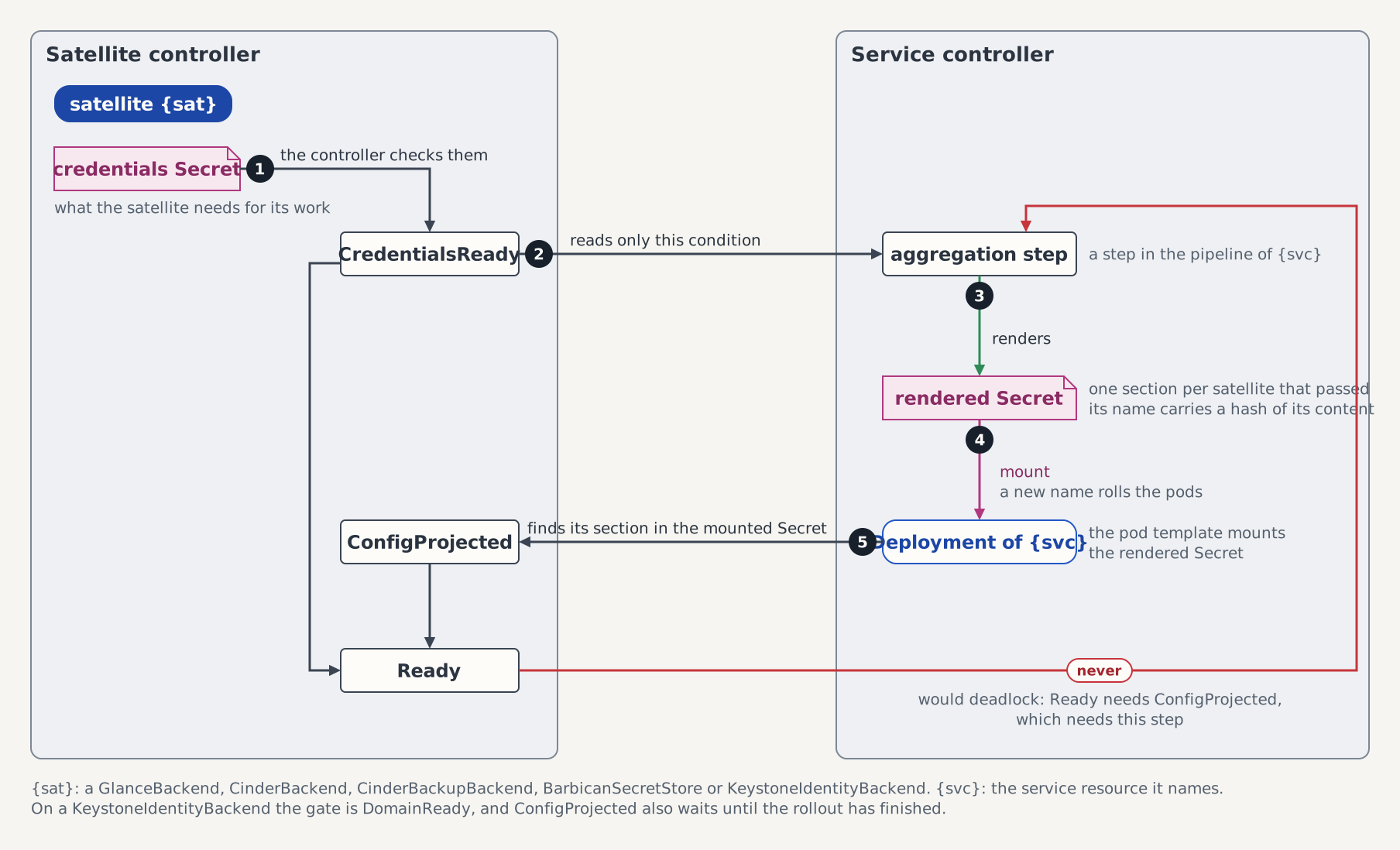
READY turns True only after the volume Deployment of the backend mounts its section. The figure shows the steps in between, and The handshake lists them with what differs per kind.
The Cinder child aggregates its backends through BackendsReady, True under the reason AllBackendsProjected once every attached backend is credential-ready and projected:
kubectl get cinder controlplane-cinder -n openstack \
  -o jsonpath='{.status.conditions[?(@.type=="BackendsReady")]}' | jq
The figure shows where a backend ends up: one Deployment per CinderBackend, with the export of that backend mounted into its pod and into the backup pod.
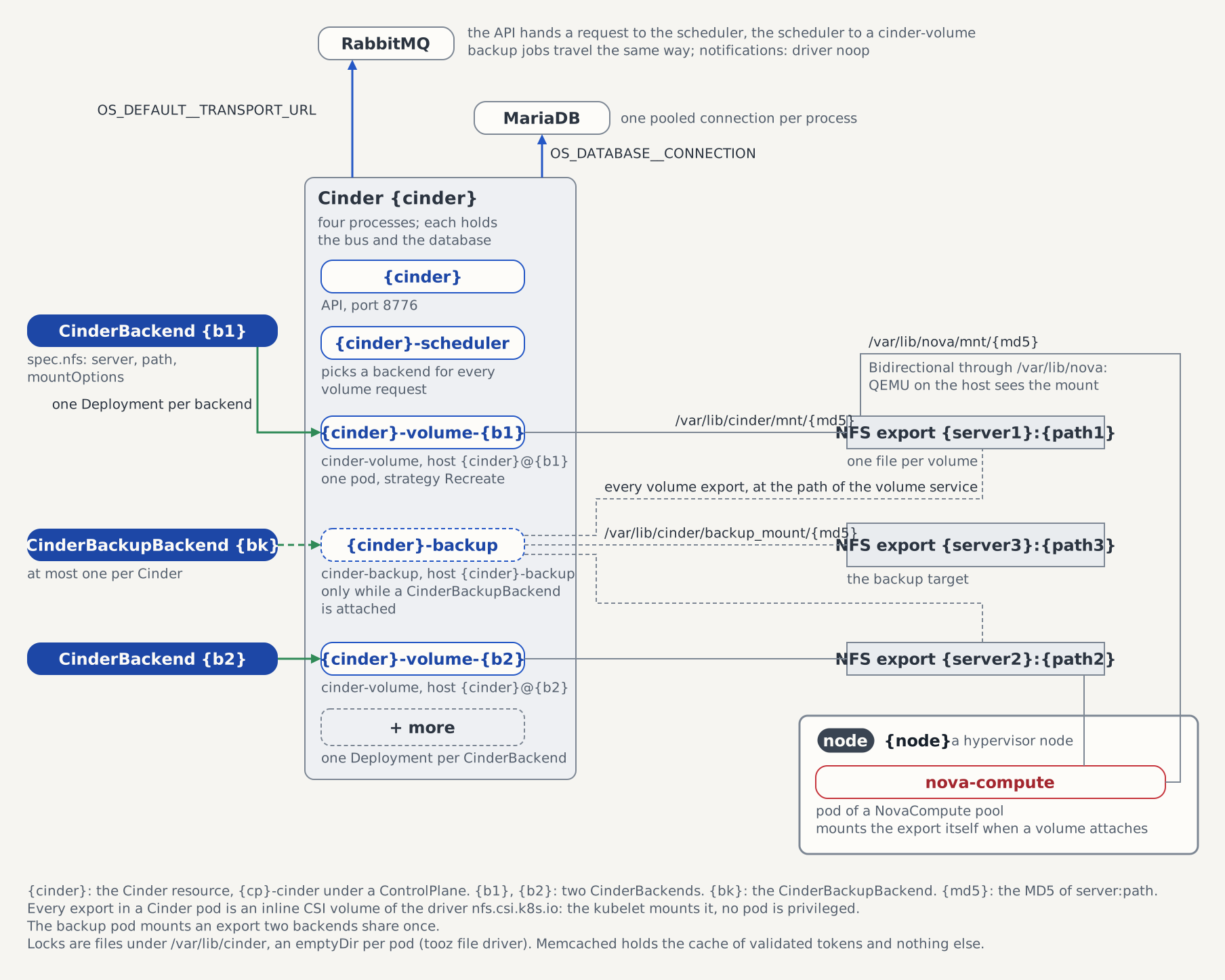
Each projected backend gets a cinder-volume Deployment of its own, {cinder}-volume-{backend}, and registers in cinder's service registry under the host identity {cinder}@{backend}. The operator reports that identity:
kubectl get cinder controlplane-cinder -n openstack \
-o jsonpath='{.status.volumeServices}' | jq[
{ "backend": "nfs1", "host": "controlplane-cinder@nfs1" }
]The export is mounted at /var/lib/cinder/mnt/<md5 of "server:path">, the path os-brick's remotefs driver derives. Cinder resolves the provider location of every volume to it, so a mount anywhere else puts those volumes out of reach. Read the live mount off the pod:
kubectl exec -n openstack deploy/controlplane-cinder-volume-nfs1 -- \
  grep /var/lib/cinder/mnt /proc/mounts
It prints one line, whose second field is the directory:
nfs-server.openstack.svc.cluster.local:/volumes /var/lib/cinder/mnt/6f3cb55ed3b423dbb7791aaf3783754f nfs4 rw,...6f3cb55ed3b423dbb7791aaf3783754f is the hex MD5 of nfs-server.openstack.svc.cluster.local:/volumes. The nfs-backend suite asserts the same path on the Deployment's volumeMounts.
Step 3 — Attach a second backend
A second backend needs a second export. Create the directory on the server with the ownership and mode the driver needs:
kubectl exec -n openstack deploy/nfs-server -- sh -c 'mkdir -p /exports/volumes-b && chown 42424:42424 /exports/volumes-b && chmod 0770 /exports/volumes-b'mkdir -p and the two mode calls converge, so a repeated run is a no-op. Off kind, the storage administrator provisions the export instead.
Add a second entry to services.cinder.backends on the ControlPlane:
kubectl edit controlplane controlplane -n openstackspec:
services:
cinder:
backends:
- name: nfs1
type: NFS
nfs:
server: nfs-server.openstack.svc.cluster.local
path: /volumes
- name: nfs2
type: NFS
nfs:
server: nfs-server.openstack.svc.cluster.local
path: /volumes-bbackends is a map list keyed by name, so the API server refuses a duplicate. The validating webhook adds two rules of its own: the name default is refused, because it would name cinder.conf's [DEFAULT] section, and len(controlplane.Name) + 7 + len(name) must stay at or below 47, the budget the projected satellite shares with its cinderRef in the service-remove Job name a detach spawns.
The operator projects one CinderBackend and one cinder-volume Deployment per entry:
kubectl get cinderbackends -n openstack
kubectl rollout status deploy/controlplane-cinder-volume-nfs2 -n openstack
status.volumeServices then carries both host identities:
[
  { "backend": "nfs1", "host": "controlplane-cinder@nfs1" },
  { "backend": "nfs2", "host": "controlplane-cinder@nfs2" }
]
Projected is not yet reachable by a request. A volume lands on a backend because a volume type selected it by name, so create a type carrying volume_backend_name=nfs2 and a volume of that type:
openstack --insecure volume type create --property volume_backend_name=nfs2 to-nfs2
openstack --insecure volume create --size 1 --type to-nfs2 demo-b
openstack --insecure volume show demo-b -c status -f value
The last command prints available once the scheduler has answered over the bus and cinder-volume has created the file. The file is on the new export:
kubectl exec -n openstack deploy/nfs-server -- ls -l /exports/volumes-bNo backend is the default one. The operator renders no default_volume_type, so cinder keeps its own __DEFAULT__ type for a volume created without --type, and the scheduler places such a volume on whichever backend has room. A type like to-nfs2 is what pins a volume to one of them.
Step 4 — Detach it again
Detaching starts at the volumes. A volume on a backend that leaves is keyed to a host identity nothing serves afterwards, and attach, extend, snapshot and delete all fail against it. Remove them first:
openstack --insecure volume delete demo-b
openstack --insecure volume type delete to-nfs2
Then drop the nfs2 entry from services.cinder.backends:
kubectl edit controlplane controlplane -n openstack
# delete the nfs2 entry, leaving nfs1
Dropping one entry is not gated the way dropping the whole cinder block is. The update webhook only warns:
Warning: spec.services.cinder.backends entry "nfs2" is removed: its CinderBackend
is pruned and its cinder-volume service unregistered, leaving every volume on
that backend unmanageable until the entry is restored under the same name with
type NFS. Re-adding the name with another type hands those volumes to a driver
that did not create them.
The detach then runs in a fixed order, because a running cinder-volume reports itself back into the service registry every few seconds and an entry removed underneath it comes back. The CinderBackend is held by the cinder.openstack.c5c3.io/service-remove finalizer while that plays out, and reports Ready=False under the reason Detaching.
Read the contract back in the order the operator satisfies it. The volume Deployment goes first:
kubectl get deploy controlplane-cinder-volume-nfs2 -n openstack
# Error from server (NotFound): deployments.apps "controlplane-cinder-volume-nfs2" not found
A later pass finds it gone and runs the service-remove Job. Its name is {cinder}-{backend}-service-remove, so this one is the only place the Cinder's name and the backend's appear joined: the satellite itself stayed nfs2.
kubectl get job controlplane-cinder-nfs2-service-remove -n openstackNAME STATUS COMPLETIONS DURATION AGE
controlplane-cinder-nfs2-service-remove Complete 1/1 11s 40sThe Job runs cinder-manage service remove cinder-volume controlplane-cinder@nfs2. Exit code 2 is "host not found", the state of a backend whose cinder-volume never registered, so the script reads it as success. Releasing the finalizer emits a ServiceRemoved event on the Cinder child:
kubectl get events -n openstack --field-selector reason=ServiceRemovedRemoved the volume service controlplane-cinder@nfs2 from the service registryFrom the API side the registry row stops being listed as soon as that Job succeeds:
openstack --insecure volume service listcontrolplane-cinder@nfs2 is gone from the output, which reads GET /v3/os-services. The row itself is only soft-deleted and survives in the table until the next db purge sweeps it; a backend attached again registers under a new row id.
The volume files on /exports/volumes-b are untouched by any of this, and nothing serves them anymore. Re-adding the entry under the same name and type restores the host identity they are keyed by.
Troubleshooting
| Symptom | Likely cause |
|---|---|
BackendsReady=True/NoBackends beside VolumeServicesReady=False/NoBackends | No CinderBackend is attached. BackendsReady is True because a Cinder without volume backends still serves its API and its scheduler, so the absence is a posture and not a fault; the volume side is where it reads as not ready. On a ControlPlane it means the entries have not been projected yet. |
CredentialsReady=False/WaitingForParent on the backend | No Cinder of the name in spec.cinderRef exists, so which cluster this backend's volume service runs on is unknown. The backend requeues every 15 seconds. On a ControlPlane the Cinder child is not projected until its KeystoneService registration reports the service account provisioned. |
VolumeServicesReady=False/ServiceRemoveJobFailed | The <cinder>-<backend>-service-remove Job failed permanently, and the message names it. The finalizer stays, because the registry entry is still there. Delete the Job to retry the removal once the cause is understood. |
Warning event SharedExportMountOptionsIgnored | Two volume backends serve the same export with different mountOptions. The backup pod mounts each export once, with the options of the backend projected first, so the second backend's are not applied there. Its own cinder-volume still mounts with its own. |
A backend rejected at admission with metadata.name plus spec.cinderRef.name must not exceed 47 characters: detaching this backend runs the "<cinder>-<name>-service-remove" Job, whose name is copied into a label value Kubernetes caps at 63 characters | The two names share one budget, because either of them may be the long one. Shorten the backend name, or the Cinder's. On a ControlPlane the Cinder child is {controlplane}-cinder, so the ControlPlane's own name spends the same budget. |
Every create ends in error while the CR reports Ready=True/AllReady | The export is gone or unreachable. Nothing in the API reports this: the operator never reads the mount, the volume service takes its readiness from the broker socket, and no mount probe and no BackendsHealthy condition exist, so a total storage outage leaves every readiness signal green while the write path fails closed. The CR is the wrong place to look for it — go to the mount, as Step 2 does, and read the cinder-volume log for the EIO the soft mount returns. Alert on the share itself, not on the conditions. |
Standalone Cinder, without a ControlPlane
Without a ControlPlane nothing projects the Cinder child, its service account or its catalog entries, so you own them. The Cinder CR names its own broker, Keystone endpoint and service user:
apiVersion: cinder.openstack.c5c3.io/v1alpha1
kind: Cinder
metadata:
  name: cinder
  namespace: openstack
spec:
  openStackRelease: "2026.1"
  image:
    repository: ghcr.io/c5c3/cinder
    tag: "2026.1"
  database:
    clusterRef:
      name: openstack-db
    database: cinder
    secretRef:
      name: cinder-db
  cache:
    clusterRef:
      name: openstack-memcached
  messaging:
    secretRef:
      name: cinder-messaging
  keystoneEndpoint: http://keystone.openstack.svc.cluster.local:5000/v3
  serviceUser:
    username: cinder
    projectName: service
    userDomainName: Default
    projectDomainName: Default
    secretRef:
      name: cinder-service-user
      key: password
messaging is required rather than optional. A volume create travels from the API through the scheduler to the volume service and back, all of it over the bus, so a Cinder without a broker accepts requests nothing acts on.
keystoneEndpoint and serviceUser are set together or not at all. Leaving both out renders auth_strategy = noauth, which is how the e2e suites exercise the storage path on a cluster running no identity service. That posture belongs to those suites: it serves every volume operation unauthenticated, and the CRD refuses a gateway beside it for that reason.
Attach each export as a CinderBackend you own:
apiVersion: cinder.openstack.c5c3.io/v1alpha1
kind: CinderBackend
metadata:
  name: nfs-a
  namespace: openstack
spec:
  cinderRef:
    name: cinder
  type: NFS
  nfs:
    server: nfs-server.openstack.svc.cluster.local
    path: /volumes
spec.nfs.mountOptions is omitted here, so the CRD default applies: nfsvers=4.1,soft,timeo=30,retrans=2. Keep the mount soft. A hard mount blocks the cinder-volume process on an unreachable server instead of failing the request.
cinderRef and type are immutable, enforced by CEL transition rules that hold even when the webhook is down. Re-pointing a backend would leave the volumes the old deployment created under a host identity nothing serves, and swapping the type would hand them to a driver that did not write them. Delete the backend and create a new one instead, which is the same detach sequence Step 4 walks through.
See also
- CinderBackend CRD API Reference — the rendered
[<name>]section, theextraOptionsdenylist, the name rules, and the five caveats this driver ships with (no snapshots among them). - Cinder Reconciler Architecture — the four steps of the detach and what a failed Job leaves behind.
- Configure NFS Volume Backups — the backup service that mounts every one of these exports beside its own target.
- ControlPlane CRD API Reference —
services.cinderand the rest of the projected block-storage surface.
Tested by
Reading a projected backend, attaching a second export and placing a volume on it through a volume type, and the detach sequence above are asserted end-to-end on the CI e2e kind cluster by these chainsaw suites:
chainsaw test --test-dir tests/e2e/cinder/nfs-backend
chainsaw test --test-dir tests/e2e/cinder/multi-backend
chainsaw test --test-dir tests/e2e/cinder/backend-detach
chainsaw test --test-dir tests/e2e/c5c3/full-controlplane-keystone
The backend CRs the nfs-backend and multi-backend suites apply
Each suite runs its own Cinder in the shared openstack namespace, and spec.cinderRef is immutable, so the fixtures carry the suites' own isolation identifiers: Cinder cinder-nfs with the backend nfsbe-nfs1, and Cinder cinder-multi with the second backend multi-nfs-b. The walkthrough above keeps the controlplane-cinder / nfs1 names the devstack produces.
apiVersion: cinder.openstack.c5c3.io/v1alpha1
kind: CinderBackend
metadata:
  name: nfsbe-nfs1
  namespace: openstack
spec:
  cinderRef:
    name: cinder-nfs
  type: NFS
  nfs:
    server: nfs-server.openstack.svc.cluster.local
path: /volumesapiVersion: cinder.openstack.c5c3.io/v1alpha1
kind: CinderBackend
metadata:
name: multi-nfs-b
namespace: openstack
spec:
cinderRef:
name: cinder-multi
type: NFS
nfs:
server: nfs-server.openstack.svc.cluster.local
path: /volumes-b