How-to: Drain a Compute Node
Leaving the pool is the drain. When a node stops matching a NovaCompute's selector, the pool disables the node's compute service once and keeps its pod while Nova counts servers on the host. When none is left, the pool releases the pod and deletes the service, which removes the host mapping, the resource provider and the aggregate membership. The pool never migrates an instance.
The figure shows the phases a node of a pool passes through. This guide walks the path from Active through Draining and Releasing until the entry is dropped.
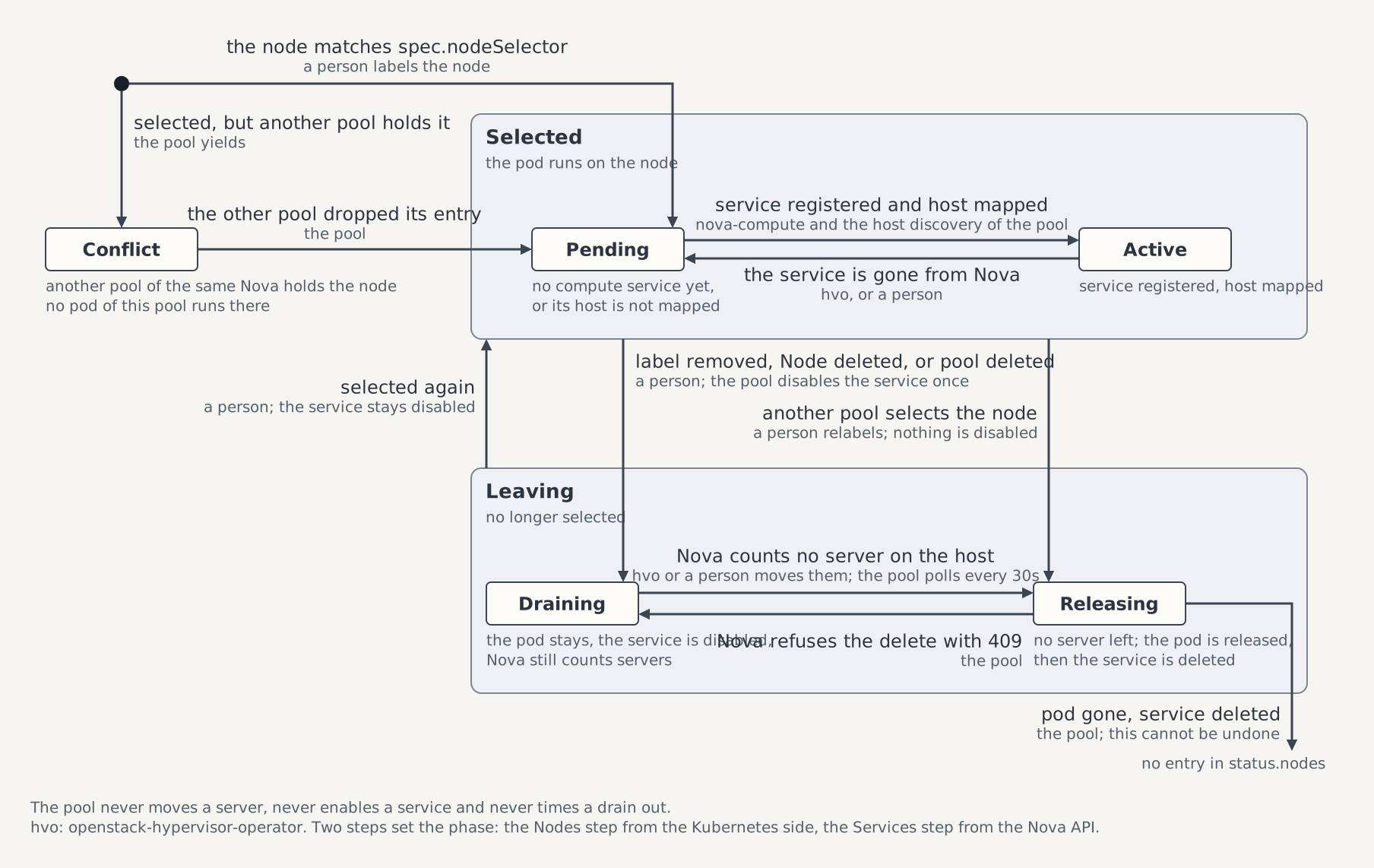
This guide drains the node of the ControlPlane devstack through a pool on nova's fake driver. It then gives the order on a compute cluster that runs openstack-hypervisor-operator (hvo), and what the pool reports when hvo terminates a node. Every statement about hvo below is as read at a2baf3f, the commit the rev key of images/openstack-hypervisor-operator/source.json pins; moving that pin includes checking them again (see openstack-hypervisor-operator).
Prerequisites
Devstack
This guide is written against the Quick Start (ControlPlane) devstack. Stand it up first:
KIND_HOST_PORT=8443 WITH_CONTROLPLANE=true WITH_OVN_KERNEL_MODULES=true make deploy-infraFollow that tutorial through the Boot a first server checks in Step 7, without its optional fake compute, and keep the OS_* variables of Step 7 exported. A fake compute that already runs registers under the kind node's name as well, so remove it first, as Run a Fake Compute for Testing describes.
- A Linux host with root or passwordless sudo, the requirement Label a Node as a Compute or Network Node names.
- The
OVNChassiscontrolplane-chassisReadyon the node, as that guide leaves it. The pool'swait-for-chassisinit container waits until the chassis has written itssystem-idinto the node's Open vSwitch database, so a pool on a node without one never starts.
Set up a pool to drain
The devstack runs no compute node, so the walkthrough first gives its one node a pool and a server. On a compute cluster both exist already; skip to On a compute cluster.
Read the node's name, and label it for the pool and an availability zone:
NODE="$(kubectl get nodes -l openstack.c5c3.io/chassis=true -o jsonpath='{.items[0].metadata.name}')"
kubectl label node "$NODE" openstack.c5c3.io/nova-compute-pool=a topology.kubernetes.io/zone=az1
Apply a pool that selects the label:
# controlplane-pool-a.yaml
apiVersion: nova.openstack.c5c3.io/v1alpha1
kind: NovaCompute
metadata:
  name: controlplane-pool-a
  namespace: openstack
spec:
  novaRef:
    name: controlplane-nova
  nodeSelector:
    openstack.c5c3.io/nova-compute-pool: a
  resources:
    requests:
      cpu: 50m
      memory: 128Mi
    limits:
      memory: 768Mi
  extraConfig:
    DEFAULT:
      compute_driver: fake.FakeDriverWithoutFakeNodes
      vif_plugging_is_fatal: "false"
vif_plugging_timeout: "0"kubectl apply -f controlplane-pool-a.yaml
kubectl wait novacompute/controlplane-pool-a -n openstack \
--for=condition=Ready --timeout=10mextraConfig switches the pool to nova's fake driver, because kind has no KVM. The pool reports Ready only once Nova has mapped its host into the cell, which the pool's own host discovery does (see Host discovery), so the scheduler can place a server on the node right away. No hypervisor operator runs on this devstack, so AggregatesReady reads True under NodesOutsideZoneAggregate, and the node's servers boot in Nova's default zone.
Create the flavor and the image of the quick start's fake-compute check, and boot a server without a network:
openstack --insecure flavor create --vcpus 1 --ram 128 --disk 1 m1.nano
truncate -s 1M /tmp/boot-image.raw
openstack --insecure image create --disk-format raw --container-format bare \
  --file /tmp/boot-image.raw boot-image
for _ in $(seq 30); do
  [ "$(openstack --insecure image show boot-image -f value -c status)" = active ] && break
  sleep 2
done
openstack --insecure server create --image boot-image --flavor m1.nano \
  --nic none --wait drain-server
openstack --insecure server show drain-server -c OS-EXT-SRV-ATTR:host -f value
The last command prints the node's name, the value of $NODE.
Steps
1. Take the node out of the pool
kubectl label node "$NODE" openstack.c5c3.io/nova-compute-pool-
kubectl wait novacompute/controlplane-pool-a -n openstack --timeout=2m \
  --for=jsonpath='{.status.nodes[0].phase}'=Draining
kubectl get novacompute controlplane-pool-a -n openstack \
  -o jsonpath='{.status.nodes[0].phase} {.status.nodes[0].instances} {.status.nodes[0].serviceStatus}{"\n"}'
A pool on the management cluster watches no Node. It sees the label change on its next poll of Nova, which comes every 60 seconds while every node is settled, so the node turns Draining within a minute. The last command prints Draining 1 disabled: the pool disabled the service once and counts one server on the host.
kubectl get novacompute controlplane-pool-a -n openstack \
  -o jsonpath='{.status.conditions[?(@.type=="ServicesReady")].status} {.status.conditions[?(@.type=="ServicesReady")].reason}{"\n"}'
openstack --insecure compute service list --service nova-compute --long
kubectl get pods -n openstack \
  -l app.kubernetes.io/instance=controlplane-pool-a,app.kubernetes.io/component=nova-compute
ServicesReady reads True Draining, because a drain is not an outage. The service row is disabled with the reason c5c3.io: leaving NovaCompute openstack/controlplane-pool-a, and the pod still runs on the node. The DaemonSet's node affinity holds one term per Draining node, which keeps its pod there while the instances leave (see The pod). The new term changes the pod template, so a RollingUpdate pool restarts that pod once; the servers keep running through the restart, because libvirt runs them, not nova-compute.
2. Empty the host
The devstack has one node, so there is no host to migrate the server to, and deleting it stands in for the eviction. On a compute cluster the host is emptied by migration instead, as On a compute cluster describes.
openstack --insecure server delete --wait drain-server
for _ in $(seq 36); do
  [ -z "$(kubectl get novacompute controlplane-pool-a -n openstack -o jsonpath='{.status.nodes}')" ] && break
  sleep 5
done
kubectl get novacompute controlplane-pool-a -n openstack -o jsonpath='{.status.nodes}{"\n"}'
A Draining node is polled every 30 seconds. Once Nova counts no server, the node goes Releasing and the pool releases its pod; once the pod is gone, the pool deletes the compute service and drops the node from status.nodes, so the last command prints an empty line. The pool's next pass, about 10 seconds later, deletes the zone aggregate no pool needs any more:
kubectl get events -n openstack \
  --field-selector involvedObject.kind=NovaCompute,involvedObject.name=controlplane-pool-a
openstack --insecure compute service list --service nova-compute
openstack --insecure aggregate list
The events carry ComputeServiceDisabled from step 1, ComputeServiceDeleted, and AggregateDeleted for az1. The service list has no row for $NODE: deleting the service also removed the host mapping and the resource provider. tenant_filter_tests is still in the aggregate list, because the pool keeps it for as long as the pool exists.
3. Clean up
kubectl delete novacompute controlplane-pool-a -n openstack
kubectl label node "$NODE" topology.kubernetes.io/zone-
openstack --insecure image delete boot-image
openstack --insecure flavor delete m1.nano
The last pool of the Nova removes tenant_filter_tests on its way out.
What the pool never does
- It never migrates an instance. A server stays on a Draining node until someone moves or deletes it.
- It never enables a service. A node selected again mid-drain goes back to
Activewith its service still disabled, andopenstack compute service set --enable <host> nova-computeenables it by hand. - It does not finish the drain of a Node deleted while it still holds instances. The entry stays
Draininguntil the owner acts.
When the drain does not finish
A node that stays Draining with instances above zero still has servers on its host. List them:
openstack --insecure server list --all-projects --host "$NODE"ServicesReady=False under ComputeAPIError means a Keystone or Nova call failed. The message names the call and the HTTP status, and the pool retries after 30 seconds.
A pool being deleted carries the finalizer nova.openstack.c5c3.io/compute-drain until every node is released, so an unreachable Nova API holds the deletion. The escape is removing that finalizer, and only that one, by hand, which leaves the compute services and the aggregates the pool marked in Nova:
i="$(kubectl get novacompute controlplane-pool-a -n openstack -o json \
  | jq '.metadata.finalizers | index("nova.openstack.c5c3.io/compute-drain")')"
kubectl patch novacompute controlplane-pool-a -n openstack --type=json -p "[
  {\"op\":\"test\",\"path\":\"/metadata/finalizers/$i\",\"value\":\"nova.openstack.c5c3.io/compute-drain\"},
  {\"op\":\"remove\",\"path\":\"/metadata/finalizers/$i\"}]"
A pool on a compute cluster also carries openstack.c5c3.io/remote-children. Leave it: the operator still deletes the pool's DaemonSet and ConfigMaps there and reaps the mirrored Secrets before it releases that finalizer.
On a compute cluster
On a compute cluster hvo empties the host before the pool label comes off. The order below is for a node of a pool there, such as controlplane-compute-a from Connect a Compute Cluster, with NODE set to the node's name and COMPUTE_CONTEXT to the compute cluster's kubeconfig context. The Node and Hypervisor commands run against the compute cluster; the novacompute reads stay on the management cluster. hvo keeps one cluster-scoped Hypervisor (short name hv) per hypervisor Node, named after it.
The figure shows the order below with what hvo and the pool do after each command. The drain lists the seven steps. Step 1 of this section is steps 1 to 3 of the figure, step 2 waits for step 3 to finish, and step 3 is steps 4 to 7.
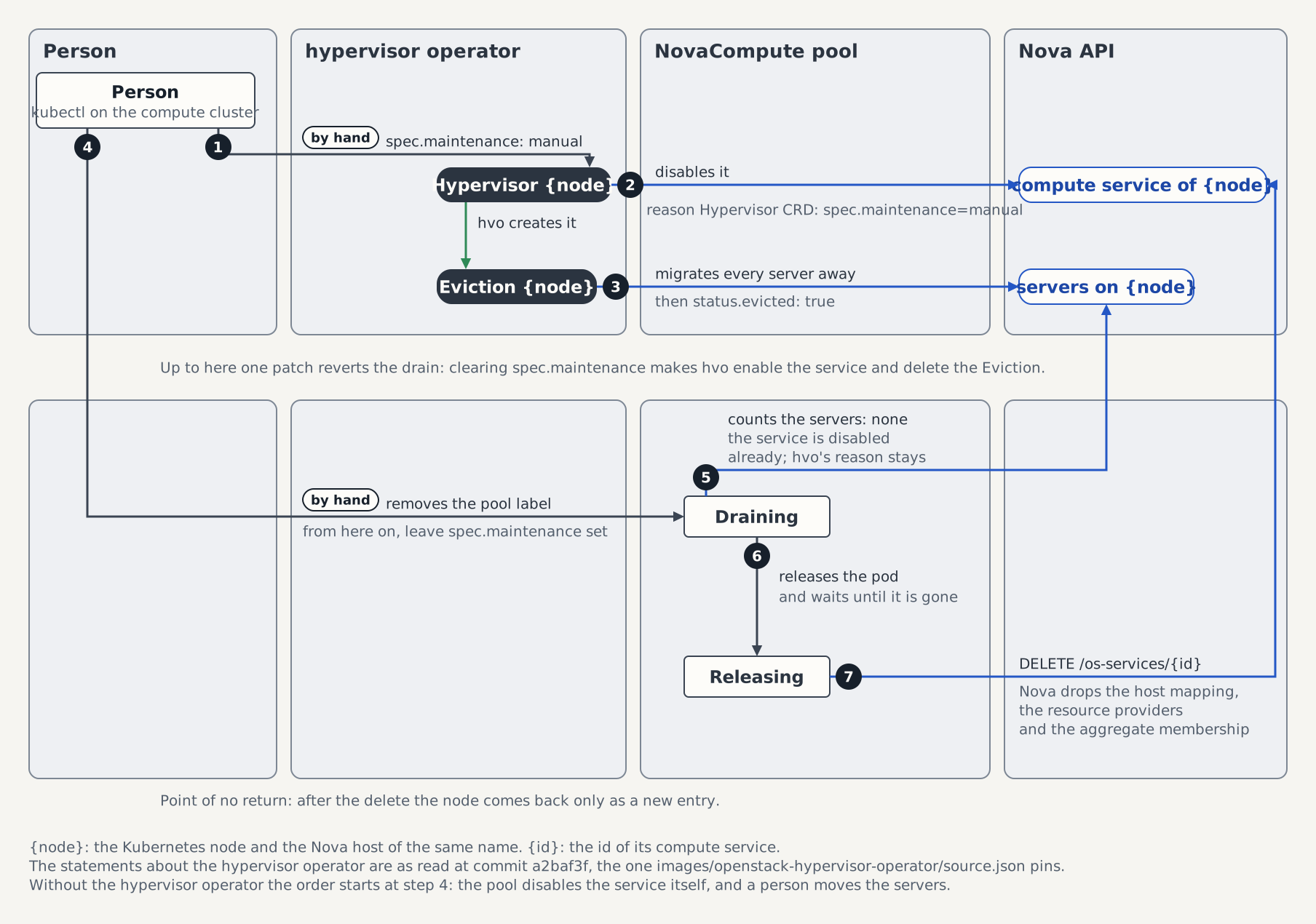
Put the node into manual maintenance:
bashkubectl --context "$COMPUTE_CONTEXT" patch hypervisor "$NODE" --type merge \ -p '{"spec":{"maintenance":"manual","maintenanceReason":"leaving pool a"}}'hvo disables the compute service with the reason
Hypervisor CRD: spec.maintenance=manualand creates anEvictionnamed after the node. The Eviction live-migrates every server that isACTIVEor powered on and cold-migrates the rest. A server inERRORis retried after the others, withMigratingInstance=FalseunderFailedon the Eviction. The CRD refusesmanualwithout amaintenanceReason.Wait until the host is empty:
bashkubectl --context "$COMPUTE_CONTEXT" wait "hypervisor/$NODE" --timeout=20m \ --for=jsonpath='{.status.evicted}'=true kubectl --context "$COMPUTE_CONTEXT" get eviction "$NODE"A finished Eviction reports
Evicting=FalseunderSucceeded, and hvo sets the Hypervisor'sstatus.evictedtotrue. Run the second command while the wait runs to see the Eviction's progress.Take the node out of the pool:
bashkubectl --context "$COMPUTE_CONTEXT" label node "$NODE" openstack.c5c3.io/nova-compute-pool- kubectl get novacompute controlplane-compute-a -n openstack -o jsonpath='{.status.nodes}{"\n"}'A pool on a compute cluster watches the labels of its Nodes, so it sees the change at once, finds the host empty and releases the node as in step 2. The service is disabled already, so the pool keeps hvo's reason and disables nothing. Repeat the second command until the node's entry is gone.
The order keeps the drain reversible until the label comes off: clearing spec.maintenance before step 3 makes hvo enable the service again and delete the Eviction, and the node is back in service.
Leave spec.maintenance set once the label is off
From step 3 on, the pool drains the node, and the pool never enables a service. Clearing spec.maintenance then makes hvo enable the service under a Draining node, and the scheduler places servers on a host that is leaving. Cleared after the pool deleted the service, it makes hvo retry the enable against a service that no longer exists, on every pass.
To decommission the node, delete its Node after step 3. The Hypervisor is owner-referenced to the Node and goes with it.
The Eviction's live migrations need the TLS PKI of Live migration on every node of the migration domain. Two kinds of server do not leave the host on their own:
Servers the Eviction cannot move
The Eviction cold-migrates every server that is not running. Nova's libvirt driver reaches the destination host of a cold migration over [libvirt] remote_filesystem_transport, which defaults to ssh, and the compute image carries no ssh client, so the migration fails and the server stays on the host. Start such a server before the drain, so the Eviction live-migrates it, or move it some other way.
Upstream's Eviction live-migrates with block_migration=false, which Nova refuses for a server on local disks, so on a host with such servers the Eviction of step 2 does not finish. The hvo image this repository builds leaves that choice to Nova; see Lab hypervisors.
When the node is terminated
hvo has a second path that ends in an offboarded node, the maintenance value termination. Gardener's machine controller sets it on a node it is about to delete, or an operator sets it by hand; hvo sets it itself only on a Hypervisor it creates for a Node that is already terminating. The value is one-way, and the CRD admits only ha after it. Offboarding runs only while the node carries the label cobaltcore.cloud.sap/node-hypervisor-lifecycle, which turns on the Hypervisor's spec.lifecycleEnabled.
On that path hvo disables the service and evicts the host as under manual. Once the Eviction reports Evicting=False, hvo taints the node kvm.cloud.sap/offboarding:NoExecute. The taint evicts the pool's pod (the NovaCompute webhook refuses an indefinite toleration of it) and every other pod in hvo's --agent-namespaces that does not tolerate it, the chassis and metadata agent pods included when they share the pool's namespace. hvo waits for AgentPodsEvicted=True, then deletes the compute service and the resource provider and sets Offboarded=True.
The pool still selects the node meanwhile. Once Nova marks the service down, the pool reports ServicesReady=False under ServicesDown. Once hvo has deleted the service, the reason turns to WaitingForServices, naming the node, and the pool's Ready stays False.
Remove the pool label, or delete the Node:
kubectl --context "$COMPUTE_CONTEXT" label node "$NODE" openstack.c5c3.io/nova-compute-pool-The entry goes Draining, finds no service and no server, goes Releasing, and is dropped without a service delete. Take the node out of the chassis as well, as Drain a Chassis Node describes, or its Southbound Chassis row stays.
Deleting the pool drains every node
Deleting a NovaCompute drains all its nodes the same way. Each goes Draining, and the finalizer nova.openstack.c5c3.io/compute-drain holds the deletion until every node is released and the aggregates are cleaned up. The last pool of the Nova on a cluster also deletes the Secrets the ControlPlane mirrored there, the compute contract and hvo's auth Secret.
See also
- The drain, Node phases and Conditions in the NovaCompute reference.
- Nova Controller Events: the events a pool records, with their messages.
- Connect a Compute Cluster: attaching the compute cluster whose nodes the order above drains.
- Drain a Chassis Node: taking the same node out of the OVN chassis.
Tested by
The walkthrough mirrors steps 7 and 8 of the following suite. It boots a server on the one kind node through the fake driver, removes the pool label, and then deletes the server where hvo's Eviction would migrate it. No suite runs hvo; Part 2, Step 9 of the Quick Start (metal-stack) evicts a node through it by hand.
chainsaw test --test-dir tests/e2e/nova/compute-node-poolThe NovaCompute the suite applies
The suite runs a Nova of its own, so its CRs are isolation-named (pool-a of the Nova nova-pool) where the walkthrough above uses controlplane-pool-a of the devstack's controlplane-nova. The selector is the one the walkthrough removes.
apiVersion: nova.openstack.c5c3.io/v1alpha1
kind: NovaCompute
metadata:
  name: pool-a
  namespace: openstack
spec:
  novaRef:
    name: nova-pool
  nodeSelector:
    openstack.c5c3.io/nova-compute-pool: a
  resources:
    requests:
      cpu: 50m
      memory: 128Mi
    limits:
      memory: 768Mi
  extraConfig:
    DEFAULT:
      compute_driver: fake.FakeDriverWithoutFakeNodes
      vif_plugging_is_fatal: "false"
      vif_plugging_timeout: "0"