Schedule Keystone Admin Password Rotation
This guide walks an operator through enabling scheduled rotation of a Keystone instance's admin password, understanding the resource chain it creates, and confirming that a rotation reached the running Keystone.
This is a companion to Rotate the Keystone Admin Password, which covers the manual flow. The difference in one line:
- Manual. You write the new password into OpenBao by hand; ESO projects it into the admin Secret and the operator re-bootstraps.
- Scheduled. A CronJob generates a fresh password on a schedule, the operator validates it and pushes it to OpenBao, and the same re-bootstrap path applies it. Configure the schedule once; the operator generates each password.
Both flows converge on the same final stage: reconcileBootstrap re-runs keystone-manage bootstrap against the new credential. This guide links to the manual guide's verification steps.
On a ControlPlane deployment
Scheduled admin-password rotation (spec.passwordRotation) is a standalone-CR-only option: the ControlPlane CRD does not expose it. Setting spec.passwordRotation on a ControlPlane-owned child is unsupported. On a ControlPlane, the c5c3-operator already owns the admin credential's lifecycle (it generates and rotates the K-ORC admin application credential and projects the admin password from OpenBao into controlplane-keystone-admin-credentials). Enabling scheduled rotation on the child would put two owners on the same bootstrap/openstack/controlplane-keystone/admin path.
To rotate the admin password on a ControlPlane deployment, use the manual flow at the OpenBao source. It does not change the ControlPlane-owned child: Rotate the Keystone Admin Password.
The rest of this guide targets a standalone Keystone CR.
Names. The examples target the standalone Quick Start's Keystone: the CR is
keystonein theopenstacknamespace, and its admin password lives in the Secret referenced byspec.bootstrap.adminPasswordSecretRef:keystone-admin, under the keypassword; this guide calls it the admin Secret. The scheduled-rotation resources are named after the CR (e.g. the CronJob iskeystone-admin-password-rotate) and the per-CR OpenBao path isbootstrap/openstack/keystone/admin. If your Keystone CR has a different name, substitute it (and the resource and path names derived from it) throughout.
Prerequisites
Devstack
This guide is written against the Quick Start devstack. Stand it up first:
KIND_HOST_PORT=8443 make deploy-infraFollow that tutorial through to its final Verify step, so a standalone Keystone CR named keystone is Ready in the openstack namespace. Every resource name in the examples below is one that devstack produces.
- A bootstrapped Keystone CR (
BootstrapReady=True) with the manual admin-password flow already working. Scheduled rotation reuses the same ESO/OpenBao path and final re-bootstrap stage. See Rotate the Keystone Admin Password. kubectlaccess to the cluster andjq,openssl, and thebaoCLI on your workstation. Step 1 configures the CLI for the kind OpenBao instance; other deployments need their configured address, trusted CA, client certificate, and token.kubectlaccess to the CR's namespace (openstack).
1. Connect OpenBao and the admin ExternalSecret to the per-CR path
Scheduled rotation writes each password to the per-CR OpenBao path bootstrap/{namespace}/{name}/admin. For keystone in openstack, that is bootstrap/openstack/keystone/admin. The OpenBao path and the ExternalSecret must match before the first rotation.
Seed and mark the per-CR path. Write the current admin password to this OpenBao path so ESO's first sync has a value, then set its managed-by=external-secrets custom-metadata so the backup PushSecret can overwrite it. ESO's OpenBao provider refuses to overwrite a path it does not own and fails the PushSecret with secret not managed by external-secrets; a plain bao kv put writes no custom-metadata, so set the marker separately with bao kv metadata put.
On kind, the OpenBao API is available through the openbao Service in the shared-services namespace. Start this port-forward in a separate terminal and leave it running while using the CLI:
kubectl port-forward svc/openbao -n shared-services 8200:8200In the terminal where you will run bao, extract the client certificate, key, and CA from the cluster. The listener requires mutual TLS, so the CLI needs these files as well as the root token and local API address:
BAO_CERT_DIR=$(mktemp -d)
chmod 700 "$BAO_CERT_DIR"
kubectl get secret openbao-client-tls -n shared-services \
  -o jsonpath='{.data.tls\.crt}' | openssl base64 -d -A > "$BAO_CERT_DIR/client.crt"
kubectl get secret openbao-client-tls -n shared-services \
  -o jsonpath='{.data.tls\.key}' | openssl base64 -d -A > "$BAO_CERT_DIR/client.key"
kubectl get secret openbao-client-tls -n shared-services \
  -o jsonpath='{.data.ca\.crt}' | openssl base64 -d -A > "$BAO_CERT_DIR/ca.crt"
chmod 600 "$BAO_CERT_DIR/client.key"

export BAO_ADDR=https://127.0.0.1:8200
export VAULT_CACERT="$BAO_CERT_DIR/ca.crt"
export VAULT_CLIENT_CERT="$BAO_CERT_DIR/client.crt"
export VAULT_CLIENT_KEY="$BAO_CERT_DIR/client.key"
export BAO_TOKEN="$(kubectl get secret openbao-init-keys -n shared-services \
  -o jsonpath='{.data.init-output}' | openssl base64 -d -A | jq -r '.root_token')"
Now seed the path. The prompt below works in macOS shells and reads the value silently. Piping it to bao keeps the password out of the command arguments and shell history:
# Prompt without echo. `password=-` reads the value from stdin, keeping the
# cleartext credential out of the command arguments and shell history.
printf 'current admin password: '
IFS= read -r -s PW
printf '\n'
printf '%s' "$PW" | bao kv put kv-v2/bootstrap/openstack/keystone/admin password=-
unset PW

# The metadata marker carries no secret, so a plain argument is fine here.
bao kv metadata put \
  -custom-metadata=managed-by=external-secrets \
  kv-v2/bootstrap/openstack/keystone/admin

rm -rf "$BAO_CERT_DIR"
unset BAO_CERT_DIR BAO_ADDR BAO_TOKEN VAULT_CACERT VAULT_CLIENT_CERT VAULT_CLIENT_KEY
Point the admin ExternalSecret at the per-CR path. The ExternalSecret feeding the admin Secret must read the same per-CR path this rotation writes, or the rotated password never reaches Keystone. On the kind Quick Start the admin Secret keystone-admin is fed by the shim ExternalSecret deploy/kind/infrastructure/keystone-admin-externalsecret.yaml, which reads the default-identity path bootstrap/openstack/controlplane-keystone/admin, not the standalone CR's per-CR path. Repoint it:
kubectl -n openstack patch externalsecret keystone-admin --type merge -p '
spec:
  data:
    - secretKey: password
      remoteRef:
        key: bootstrap/openstack/keystone/admin
        property: password
'
Use a dedicated ExternalSecret for a durable setup. If your devstack continuously reconciles
deploy/kind/infrastructure/(Flux/GitOps), a manual patch to the shim is reverted. Create a dedicated ExternalSecret for your CR that reads the per-CR path instead, as theadmin-password-scheduled-rotationchainsaw suite ships its own CR + ExternalSecret (tests/e2e/keystone/admin-password-scheduled-rotation/00-keystone-cr.yaml). On a non-kind deployment, set the ExternalSecret'sremoteRef.keytobootstrap/openstack/keystone/admin.
2. Enable scheduled rotation
Scheduled rotation is opt-in. Add a spec.passwordRotation block to the Keystone CR:
apiVersion: keystone.openstack.c5c3.io/v1alpha1
kind: Keystone
metadata:
  name: keystone
  namespace: openstack
spec:
  bootstrap:
    adminUser: admin
    adminPasswordSecretRef:
      name: keystone-admin
  passwordRotation:
    enabled: true
    schedule: "0 0 1 * *"   # monthly, midnight on the 1st (default)
    suspend: false          # default
    passwordLength: 32       # default; minimum 24
The four fields of passwordRotation:
| Field | Type | Default | Meaning |
|---|---|---|---|
enabled | bool | false | Turns the feature on. false (or a nil block) tears down every scheduled-rotation resource. |
schedule | cron string | "0 0 1 * *" | When the CronJob generates a new password. |
suspend | bool | false | Pauses the CronJob without deleting any resource. |
passwordLength | int | 32 (minimum 24) | Length of the generated password. |
Note. The defaulting webhook only fills
scheduleandpasswordLengthonceenabled: true. A nilpasswordRotationblock is never created. Upgrading a CR that never set it must not silently enable rotation. The leaf fields above are shown explicitly for clarity. You can omitschedule,suspend, andpasswordLengthand let the webhook default them.
3. Topology: what the operator stands up
When enabled: true, the reconcilePasswordRotation sub-reconciler ensures a chain of resources. The figure numbers the steps of one rotation:
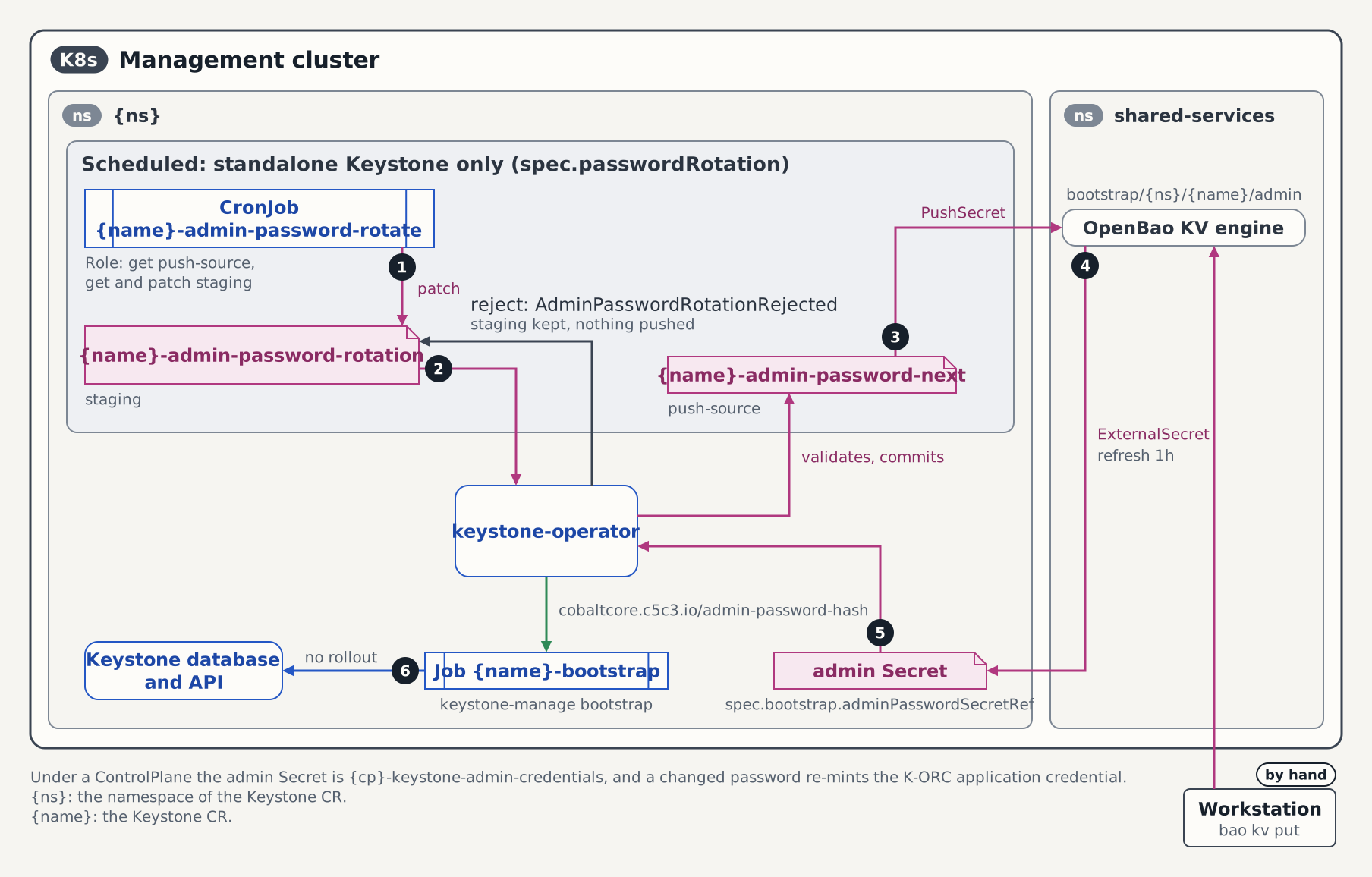
- The CronJob
keystone-admin-password-rotategenerates a password and PATCHespasswordand the annotationcobaltcore.c5c3.io/rotation-completed-atontokeystone-admin-password-rotation. It mounts only/scripts/admin_password_rotate.shand never runskeystone-manage. - The operator checks that the password is not empty and has the minimum length, commits it to
keystone-admin-password-next, deletes the staging Secret and emitsAdminPasswordRotated. A rejected password raises the Warning eventAdminPasswordRotationRejected, stays on the staging Secret for inspection and is not pushed. - The PushSecret
keystone-admin-password-backupwrites OpenBaobootstrap/openstack/keystone/admin. A manual rotation enters here: Rotate the admin password writes the same path withbao kv put. - The ExternalSecret
keystone-adminsyncs the admin Secretkeystone-admin. secretToKeystoneMappertriggers a reconcile,reconcileBootstrapsees a new password hash and deletes and recreates the Jobkeystone-bootstrap.- The Job runs
keystone-manage bootstrap, and the new password is live when it completes.
The resources, by name:
| Resource | Name | Role |
|---|---|---|
| CronJob | keystone-admin-password-rotate | Generates a fresh password on schedule and PATCHes it onto the staging Secret. Mounts only the rotation script; never runs keystone-manage. |
| Staging Secret | keystone-admin-password-rotation | Receives the CronJob-generated password; the only Secret the CronJob SA may patch. |
| Push-source Secret | keystone-admin-password-next | Operator-owned. The operator commits the validated password here; the PushSecret selects it. |
| PushSecret | keystone-admin-password-backup | Mirrors the push-source Secret to OpenBao bootstrap/openstack/keystone/admin (per-CR path). |
| RBAC trio | keystone-admin-password-rotate (ServiceAccount, Role, RoleBinding) | The CronJob's split-RBAC identity. |
| Script ConfigMap | keystone-admin-password-rotate-script (content-hash suffixed) | Immutable mount of admin_password_rotate.sh. |
Two safety properties are worth calling out:
Split RBAC. The CronJob's Role grants
get+patchon only the staging Secretkeystone-admin-password-rotation, andget(read-only) on the push-source Secret. The CronJob can never write the push-source Secret. The operator validates the staged value and writes the push-source. Write access to the Secret a PushSecret backs is a token-forgery primitive, and it is kept off the CronJob's attack surface.
Clobber-safe push. The PushSecret is only created once the push-source Secret actually holds a valid password (non-empty, at least the minimum length). Before the first rotation completes the push-source Secret is empty, so the operator does not push. Otherwise, it would overwrite the seeded
bootstrap/openstack/keystone/adminvalue with nothing.
ESO-managed source path. The PushSecret can only write
bootstrap/openstack/keystone/adminif that OpenBao path carries the custom-metadata markermanaged-by=external-secrets(Step 1). The ESO Vault/OpenBao provider refuses to overwrite a path it does not own and fails the PushSecret withsecret not managed by external-secrets.
For the full sub-reconciler contract (validation rules, event reasons, the clobber-safe gate, RBAC shape) see reconcilePasswordRotation.
4. Prove a scheduled rotation end-to-end
The monthly default schedule rarely fires when you want to observe it, so trigger a run on demand and follow the evidence chain. Each step below is something you can run and confirm.
4.1 Confirm the CronJob exists with your schedule
kubectl -n openstack get cronjob keystone-admin-password-rotateThe SCHEDULE column should show your spec.passwordRotation.schedule (e.g. 0 0 1 * *).
4.2 Trigger a run on demand
Instantiate a one-shot Job from the CronJob template and wait for it to finish:
JOB=keystone-admin-password-rotate-manual-$(date +%s)
kubectl -n openstack create job --from=cronjob/keystone-admin-password-rotate "$JOB"

kubectl -n openstack wait --for=condition=complete job/"$JOB" --timeout=120s
The timestamp suffix keeps the Job name unique, so re-running this step never collides with a prior manual Job (AlreadyExists) before it is cleaned up.
The Job's pod generates a fresh password and PATCHes it onto the staging Secret keystone-admin-password-rotation.
4.3 Observe the operator commit
On the next reconcile the operator validates the staged password, copies it onto the push-source Secret, deletes staging, and emits a Normal event. Confirm all three:
# Push-source Secret now carries a non-empty password and the completion stamp.
kubectl -n openstack get secret keystone-admin-password-next \
  -o jsonpath="{.metadata.annotations['cobaltcore\.c5c3\.io/rotation-completed-at']}{\"\n\"}"

# Staging Secret has been deleted (NotFound is the success signal here).
kubectl -n openstack get secret keystone-admin-password-rotation

# The success event.
kubectl -n openstack get events \
  --field-selector reason=AdminPasswordRotated,involvedObject.name=keystone \
  --sort-by='.lastTimestamp'
Expected event:
LAST SEEN   TYPE     REASON               OBJECT          MESSAGE
5s          Normal   AdminPasswordRotated keystone/keystone   admin password rotation applied from staging secret keystone-admin-password-rotation
Note. The password value itself is never logged or echoed in an event. If the staged value is rejected you will instead see a Warning with reason
AdminPasswordRotationRejected(empty or too short) orAdminPasswordRotationAnnotationInvalid(malformed completion timestamp), and the staging Secret is retained for inspection.
4.4 Confirm the OpenBao value changed and ESO synced it
The PushSecret mirrors the push-source Secret into OpenBao at bootstrap/openstack/keystone/admin, and the keystone-admin ExternalSecret projects it back into the admin Secret keystone-admin. Use the manual guide's force-sync + fingerprint technique to confirm the admin Secret carries the new value: see step 2 of the manual guide.
The short version:
kubectl -n openstack get secret keystone-admin \
  -o jsonpath='{.data.password}' | base64 -d | sha256sum
This digest is the same one the operator stamps onto the recreated bootstrap Job in the next step.
4.5 Watch the re-bootstrap (cross-link to the manual guide)
From here the flow matches a manual rotation. The operator's secretToKeystoneMapper observes the admin Secret change and re-runs the idempotent bootstrap Job. Follow the manual guide's steps, which are the authoritative walkthrough.
Substitute the names. The manual guide is written against the ControlPlane devstack's
controlplane-keystone. Reading it for a standalonekeystoneCR, substitutecontrolplane-keystone→keystone,controlplane-keystone-bootstrap→keystone-bootstrap, andcontrolplane-keystone-admin-credentials→keystone-adminthroughout.
- Step 3: Observe the recreated bootstrap Job (the
keystone-bootstrapJob is delete+recreated with a fresh UID and the newcobaltcore.c5c3.io/admin-password-hash). - Step 4: Watch the
BootstrapReadytransitions (False/BootstrapInProgress→True/BootstrapComplete). - Step 5: Observe the event stream.
- Step 6: Recover from
AdminSecretInvalidif the synced value is empty. - Step 7: Post-rotation smoke check (the new password authenticates
201; the old one is rejected401).
4.6 Note the separation from the live credential
The push-source Secret keystone-admin-password-next is a distinct object from the live admin Secret keystone-admin. The operator commits the new password onto the push-source Secret; the running Keystone keeps using the value in keystone-admin until ESO has synced the new value back. A scheduled rotation never clobbers the credential the running Keystone is using mid-flight.
5. Per-CR path isolation
Scheduled rotation scopes the OpenBao RemoteKey per Keystone CR to bootstrap/{namespace}/{name}/admin. For keystone in openstack, that is bootstrap/openstack/keystone/admin. Each Keystone CR with scheduled rotation therefore writes its admin password to its own OpenBao object, and the matching admin-credentials ExternalSecret reads that same per-CR path. Two Keystone CRs with scheduled rotation in the same cluster no longer share one OpenBao object. They cannot clobber each other's rotations, so scheduled rotation can be enabled on multiple Keystone CRs concurrently.
Path in lockstep. The admin-credentials ExternalSecret's
remoteRef.keymust match the per-CR path of the Keystone CR whose rotation feeds it. Step 1 connects these paths. For a CR named{name}in{namespace}, that isbootstrap/{namespace}/{name}/admin. On a ControlPlane deployment the operator-projectedcontrolplane-keystone-admin-credentialsExternalSecret readsbootstrap/openstack/controlplane-keystone/admin, and the bootstrap seed (deploy/openbao/bootstrap/write-bootstrap-secrets.sh) seeds that path for each ControlPlane identity inKORC_CONTROLPLANES. Scheduled rotation is not configured on the projected child (see On a ControlPlane deployment).
6. Suspend or disable rotation
There are two ways to stop rotating, with different blast radius.
Suspend: keep every resource but stop new runs.
kubectl -n openstack patch keystone keystone --type merge \
  -p '{"spec":{"passwordRotation":{"suspend":true}}}'
This sets the CronJob's spec.suspend: true; the CronJob and all sibling resources remain. No new password is generated until you set suspend: false again.
Disable: tear everything down.
kubectl -n openstack patch keystone keystone --type merge \
  -p '{"spec":{"passwordRotation":{"enabled":false}}}'
Setting enabled: false (or removing the passwordRotation block entirely) deletes all scheduled-rotation resources: the CronJob, the staging and push-source Secrets, the RBAC trio, the PushSecret, and the script ConfigMap. It reports PasswordRotationReady=True with reason RotationDisabled.
Safety note. Disabling does not remove the last-pushed password from OpenBao. The PushSecret uses
DeletionPolicy: None, so the value already inbootstrap/openstack/keystone/adminstays put when the PushSecret is deleted. Disabling rotation can never lock the admin out of Keystone.
Related reference
reconcilePasswordRotation: the authoritative contract for the scheduled-rotation sub-reconciler, including validation rules, event reasons, the clobber-safe PushSecret gate, and split RBAC.reconcileBootstrap: the bootstrap sub-reconciler and theadmin-password-hashre-run gate that applies the rotated credential.- Rotate the Keystone Admin Password: the manual rotation guide whose verification steps (3–7) this guide cross-links, and the supported admin-password rotation path on a ControlPlane deployment.
- Rotate Keystone Fernet and Credential Keys: the key-rotation counterpart, which uses an analogous staging-to-production split.
Tested by
This guide's evidence chain is asserted end-to-end on the CI e2e kind cluster. The suite checks CronJob run → push-source commit → OpenBao change → ESO sync → re-bootstrap BootstrapReady=True → new-password 201 / old-password 401, and the disable-to-teardown RotationDisabled posture:
chainsaw test --test-dir tests/e2e/keystone/admin-password-scheduled-rotationThe Keystone CR the suite applies
The suite isolates its Keystone instance from the parallel suite pool, so its CR name (keystone-adminpw-sched) and logical database (keystone_adminpw_sched) differ from the devstack names used in the walkthrough above.
apiVersion: keystone.openstack.c5c3.io/v1alpha1
kind: Keystone
metadata:
  name: keystone-adminpw-sched
  namespace: openstack
spec:
  secretStoreRef:
    kind: SecretStore
    name: openbao-tenant-store
  deployment:
    replicas: 1
  image:
    repository: ghcr.io/c5c3/keystone
    tag: "2026.1"
  database:
    clusterRef:
      name: openstack-db
    database: keystone_adminpw_sched
    secretRef:
      name: keystone-db
  cache:
    clusterRef:
      name: openstack-memcached
    backend: dogpile.cache.pymemcache
  fernet:
    rotationSchedule: "0 0 * * 0"
    maxActiveKeys: 3
  bootstrap:
    adminUser: admin
    adminPasswordSecretRef:
      name: keystone-adminpw-sched-admin
    region: RegionOne
  # Model B scheduled admin-password rotation. Day-2 rotation lives at the spec
  # root beside the fernet/credential key rotation config. The defaulting webhook
  # fills passwordLength=32 and suspend=false when rotation is enabled; they are
  # set explicitly here for reviewer clarity. The monthly schedule is never
  # actually due during the test — chainsaw-test.yaml step 4 triggers a rotation
  # manually with `kubectl create job --from=cronjob`.
  passwordRotation:
    enabled: true
    schedule: "0 0 1 * *"
    passwordLength: 32
    suspend: false
  # Disable dogpile.cache for this fixture. The e2e-operator Chainsaw suite runs
  # many Keystone CRs against a single shared `openstack-memcached`, and every
  # instance caches `admin@default` identity-backend lookups under the same
  # memcached keys. A cache entry could answer this suite's auth request with a
  # pre-rotation result, producing a false 201 where this test asserts 401 after
  # rotation. Same rationale as the fernet-rotation and admin-password-rotation
  # fixtures (follow-up: namespace cache keys per CR so shared memcached is safe).
  extraConfig:
    cache:
      enabled: "false"