How-to: Enable Glance Image Caching
Every image download Glance serves is a read out of the object store. Booting fifty instances from the same image means fifty of those reads, all for bytes that have not changed since the first one. spec.imageCache lets the API pods keep what they have served on their own disk, so the repeat reads are answered from the node. This guide covers what that buys, how to size the bound it needs, and how to tell a warm cache from a cold one.
Prerequisites
Devstack
This guide is written against the Quick Start (ControlPlane) devstack. Stand it up first:
KIND_HOST_PORT=8443 WITH_CONTROLPLANE=true make deploy-infraFollow that tutorial through to its final Verify step, so the projected controlplane-glance Glance child is Ready in the openstack namespace, its default S3 store is attached, and the image API answers on https://glance.127-0-0-1.nip.io:8443. Every resource name below is one that devstack produces.
- The
OS_*environment variables from the tutorial's token-issue step, so theopenstackclient reaches the ControlPlane's Keystone.
What the cache changes
GlanceBackend supports one store type, S3, so every image download travels the object-store path: the API pod opens a connection to the store, streams the object back, and pays that latency and that egress once per download. A boot storm of N instances from one image is N such reads.
With the cache on, the first download of an image also writes it to the pod's cache directory. Later downloads of the same image are served from there, and the store sees nothing.
The figure shows a download as path C. The dashed parts exist only while the cache is enabled.
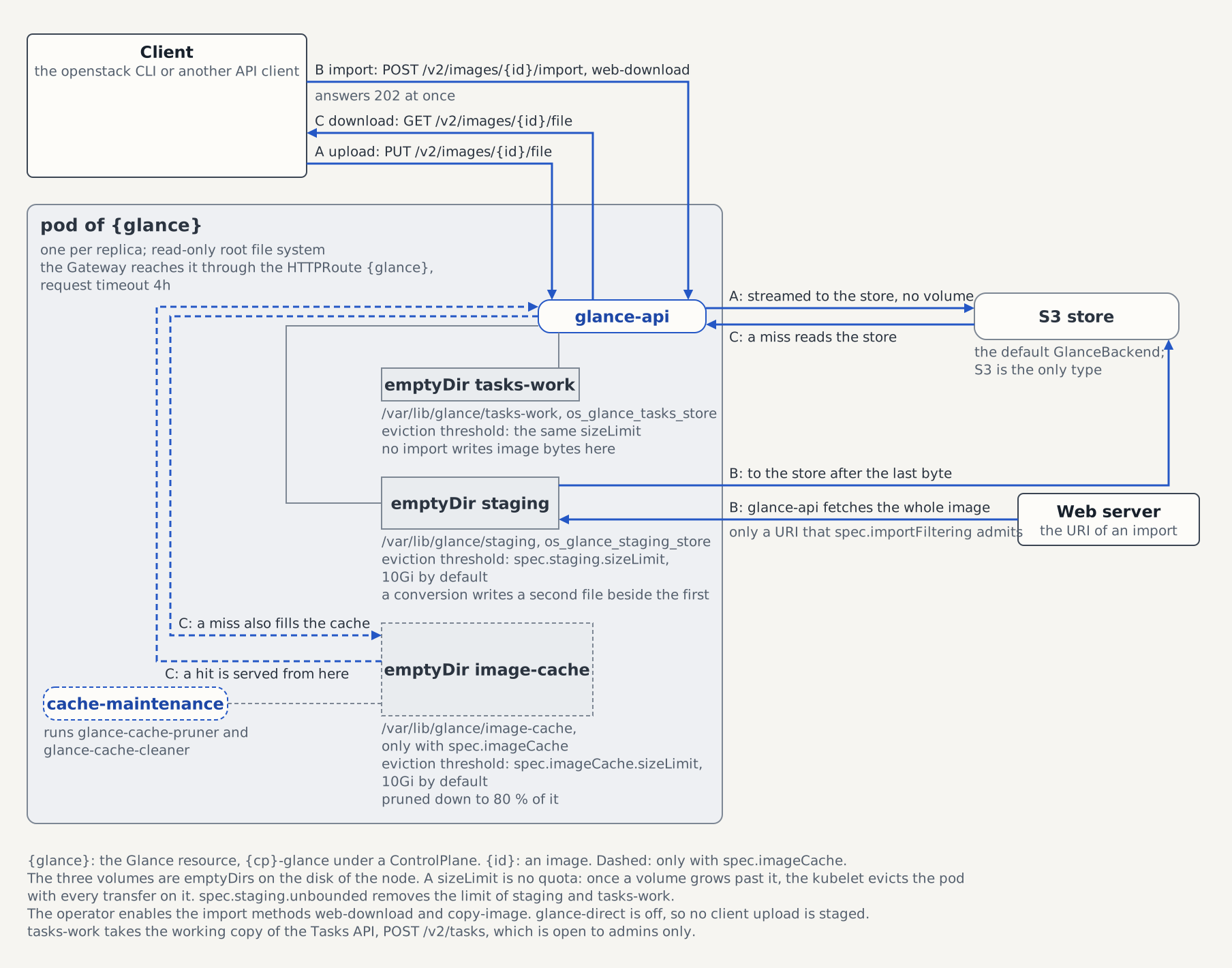
Two properties shape what that is worth:
The cache is per replica. Each pod fills its own, so an image is fetched from the store once per replica that serves it, and a download is a hit only when it lands on a replica that already holds the image. A three-replica deployment pulls a popular image three times before every pod has it, and claims three times the configured bound in node disk. Running more replicas for availability therefore costs cache efficiency.
Every rollout starts it cold. The cache is an emptyDir, so a config change, a release upgrade, a node drain, or an eviction discards it. Nothing warms it in advance, and no CR field changes that. Enabling the cache is therefore not a way to survive an object-store outage; it shortens the repeat path while the pods live.
Enable it
The cache is a ControlPlane knob, projected onto the Glance child. The block's presence is the switch, so an empty block is enough to turn it on at the operator defaults (10Gi, pruned every 5m):
kubectl patch controlplane controlplane -n openstack --type merge \
  -p '{"spec":{"services":{"glance":{"imageCache":{"sizeLimit":"20Gi","maintenanceInterval":"5m"}}}}}'
kubectl rollout status deploy/controlplane-glance -n openstack
Set the cache on the ControlPlane, never on the projected child
The controlplane-glance Glance CR is projected by the c5c3-operator, so a spec.imageCache you patch onto the child is reverted on the next reconcile. The projection is unconditional in the other direction too: clearing services.glance.imageCache on the ControlPlane removes the child's field, which switches the cache off on the next rollout and is how you revert this guide.
Enabling, resizing, and retuning each cost one rollout. The pod template gains the volume and the sidecar in the same reconcile that rewrites the config ConfigMap, so the two changes do not restart the pods twice.
Read back what the pods actually got:
kubectl get deploy controlplane-glance -n openstack -o jsonpath='bound={.spec.template.spec.volumes[?(@.name=="image-cache")].emptyDir.sizeLimit}{"\n"}containers={range .spec.template.spec.containers[*]}{.name}{" "}{end}{"\n"}'bound=20Gi
containers=glance-api cache-maintenanceConfirm the service is healthy again on the ControlPlane's per-service condition. Its aggregate Ready also covers every other service, so it answers a different question:
kubectl get controlplane controlplane -n openstack \
  -o jsonpath='{.status.conditions[?(@.type=="GlanceReady")].status}{" "}{.status.conditions[?(@.type=="GlanceReady")].reason}{"\n"}'
Sizing the bound
sizeLimit bounds the cache volume; the threshold of the pruner is 80% of it, and the API does not check it when it writes. The operator renders image_cache_max_size as sizeLimit / 10 * 8, so a 20Gi bound gives the pruner 17179869184 bytes to prune down to and leaves the remaining 20% as headroom. Glance's pruner only prunes down to that threshold, and only when the maintenance loop runs it, so the cache sits above the mark between two passes; the headroom is what keeps those writes from crossing the emptyDir bound and getting the pod evicted.
Three numbers decide the value:
- The working set, not the catalog. The cache is worth its disk for the images a fleet boots repeatedly. Size it around those, and accept that a rarely used image gets pruned out and re-fetched.
- Replicas multiply it. Every replica holds its own copy, so
spec.sizing.glance.api.replicasscales the node-disk cost linearly, and the scheduler is not told about it: the operator derives noresources.requests.ephemeral-storagefrom this field, exactly as it derives none fromspec.staging. Size nodes againstreplicas × (2 × staging.sizeLimit + imageCache.sizeLimit). - A large single image still fits. An image bigger than
image_cache_max_sizeis cached in full, because the size check runs after the download, and the next pruner pass removes it. It only becomes dangerous as it approachessizeLimititself, since that is the bound the kubelet enforces and glance knows nothing about.
maintenanceInterval is the cadence for the passes that run while the cache is below the threshold — it is what bounds how long a stalled entry survives, not how far a download burst may overshoot. The headroom itself is defended by the sidecar's 30-second size poll, which prunes as soon as the cache crosses image_cache_max_size regardless of the interval. The interval's floor is 1m, because every scheduled tick walks the cache directory and its sqlite index.
Verification
With the OS_* variables exported, upload an image and download it twice. The cache is written on the download path, so the upload alone leaves the directory empty:
dd if=/dev/urandom of=/tmp/cache-demo.img bs=1M count=64
openstack --insecure image create --disk-format raw --container-format bare \
  --file /tmp/cache-demo.img cache-demo
openstack --insecure image save --file /tmp/cache-demo.out cache-demo
openstack --insecure image show cache-demo -f value -c id
The download landed on one replica, and only that pod cached it, so look at all of them:
for pod in $(kubectl get pods -n openstack \
    -l app.kubernetes.io/instance=controlplane-glance -o name); do
  echo "--- $pod"
  kubectl exec -n openstack "${pod#pod/}" -c glance-api -- \
    ls -1 /var/lib/glance/image-cache
done
One pod lists a file named after the image ID the command above printed, next to cache.db, the metadata the sqlite driver keeps inside the cache directory:
2b1c9f3a-4e77-4a1c-9f0d-7c2e5b8a9d41
cache.db
Download the image once more. It hits the cache when it lands on that same replica, and returns the same bytes either way:
openstack --insecure image save --file /tmp/cache-demo.again cache-demo
sha256sum /tmp/cache-demo.img /tmp/cache-demo.out /tmp/cache-demo.again
Clean up:
openstack --insecure image delete cache-demo
rm -f /tmp/cache-demo.img /tmp/cache-demo.out /tmp/cache-demo.again
Reading the maintenance loop
The cache-maintenance sidecar runs glance-cache-pruner and glance-cache-cleaner on two triggers: every maintenanceInterval, and — as soon as a 30-second size poll finds the cache above image_cache_max_size — without waiting for it. The second trigger is the one that keeps a burst of concurrent downloads from crossing the emptyDir bound between two scheduled passes, since glance itself never checks the size on the write path. Its logs are the only place either command's output appears:
kubectl logs -n openstack deploy/controlplane-glance -c cache-maintenance --tail=30No failure of a maintenance pass takes the pod down. The loop prints glance-cache-maintenance failed: 1 consecutive, cache at <n> KiB of <m> on stderr and tries again on the next pass, and it keeps doing that however long the failure lasts. The sidecar shares the pod with glance-api, so a loop that exited would crash-loop the container, make the pod NotReady, and drop that API replica from the Service — and because a broken pruner is a property of the image and the shared config, it fails on every replica at once. A degraded cache must not become an immediate Glance outage.
Watch the consecutive count, because absorbing the failure only delays the outage. 1 consecutive on an otherwise quiet log is a transient, and the matching glance-cache-maintenance recovered: after <n> consecutive failures line says it cleared. A count that keeps climbing is a pruner that can never run: nothing else enforces image_cache_max_size, so every replica's cache grows to the emptyDir bound and the kubelet evicts the pod on ephemeral-storage pressure. That eviction does not pass through the eviction API, so the PodDisruptionBudget does not stagger it — replicas under even traffic cross their identical bound at about the same time and go together, then refill and go again. Meanwhile the Glance CR shows only DeploymentReady=False with reason WaitingForDeployment; nothing in its status names the cache. Alert on glance-cache-maintenance failed. It is the only place this failure is visible before the evictions start.
A glance-cache-maintenance unmeasured line means the size poll itself failed; the loop runs a pass anyway rather than read an unreadable directory as an empty cache. du's own error is on the line above it.
That is the whole observability story. The operator exports no Prometheus metrics for cache hits, cache size, or pruner runs, emits no event, and no status condition tracks the cache: these logs are what you have. To answer "is the cache doing anything", compare download latency, or count the files under the cache directory with the kubectl exec loop above.
Standalone Glance, without a ControlPlane
Without a ControlPlane nothing projects the Glance child, so the same block sits on the Glance CR you own:
apiVersion: glance.openstack.c5c3.io/v1alpha1
kind: Glance
metadata:
  name: glance
  namespace: openstack
spec:
  imageCache:
    sizeLimit: 20Gi
    maintenanceInterval: 5m
Everything else in this guide is unchanged: the operator resolves unset fields to 10Gi and 5m, derives the pruner threshold at 80% of the bound, mounts the volume into glance-api, and runs the same sidecar next to it. Removing the block again disables the cache on the next rollout.
See also
- Glance CRD API Reference — the full
ImageCacheSpeccontract, the rendered config keys, and the reservedcachemiddleware name. - Glance Operator — why the driver is
sqliteand the cache directory anemptyDirrather than a PVC. - ControlPlane CRD API Reference —
services.glance.imageCacheand the rest of the projected Glance surface. - Large Image Uploads through the Gateway — the staging bound the node-sizing formula above shares its node with.
Tested by
The cache shape, a download served off the cached copy (proved by glance's own cached_images.hits counter, not by the returned bytes, which match either way), a pruner pass that brings an over-threshold cache back under its bound without the kubelet evicting the pod, and the revert above — unsetting the block and watching the sidecar and volume leave the live Deployment — are asserted end-to-end on the CI e2e kind cluster by this chainsaw suite, which runs a 256Mi bound with a 1m interval so the arithmetic plays out inside a test:
chainsaw test --test-dir tests/e2e/glance/image-cache