How-to: Connect a Compute Cluster
A compute cluster runs nova-compute on its hypervisor nodes, beside openstack-hypervisor-operator (hvo) and kvm-node-agent. The ControlPlane delivers three things there: the mirror of the compute contract, hvo's auth Secret, and a copy of the metadata shared secret. The owner of the compute cluster provides the hosts, libvirt with its TLS PKI, the external listener of the message broker, and the installs of hvo and kvm-node-agent. This guide attaches one compute cluster. Repeat steps 4 to 7 for every further cluster, with names of its own for the chassis, the agent and the pool.
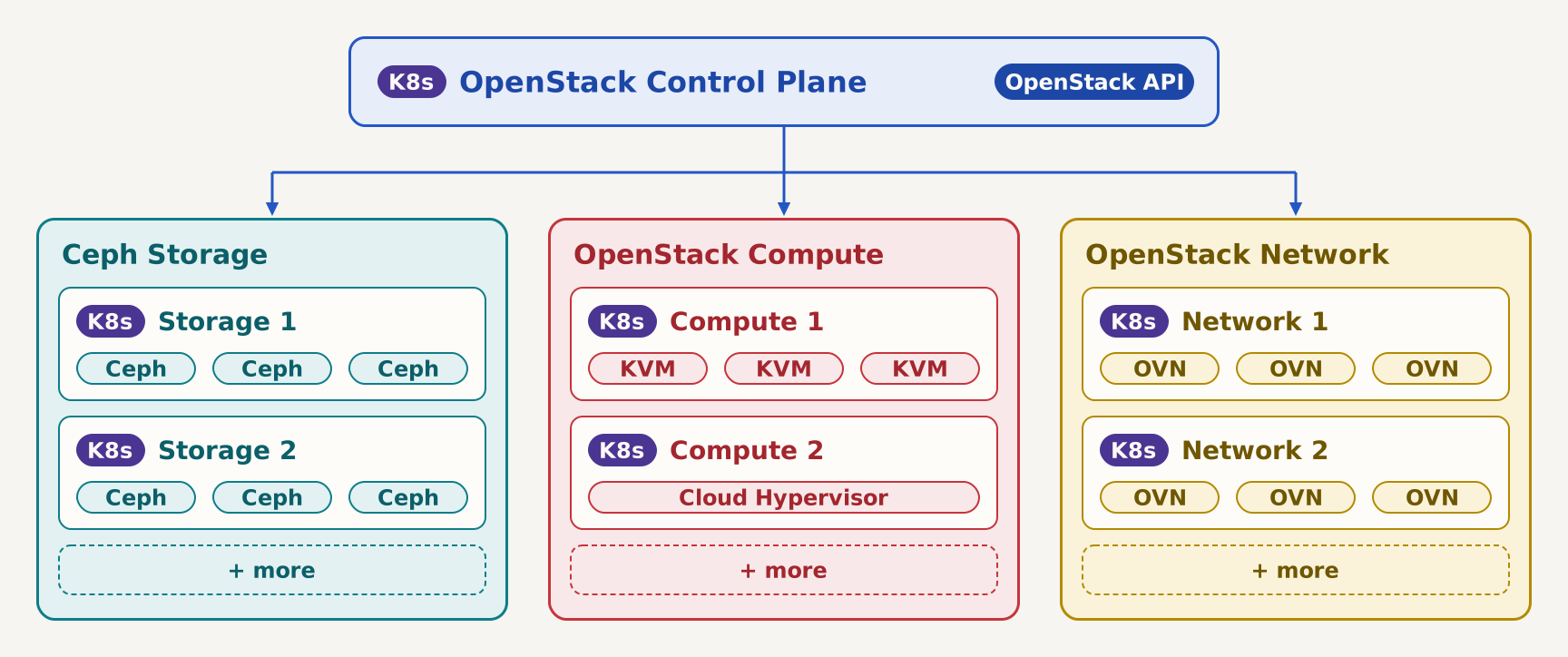
The multi-cluster target picture shows where such a cluster sits: one of several compute clusters attached to one control plane.
Prerequisites
Devstack
This guide is written against the Quick Start (ControlPlane) devstack. Stand it up first:
KIND_HOST_PORT=8443 WITH_CONTROLPLANE=true make deploy-infraFollow that tutorial through the Boot a first server checks in Step 7, so NovaReady is True on the ControlPlane and the projected controlplane-nova has published controlplane-nova-compute-config. The devstack is the management side, and its names are the ones this guide uses: the ControlPlane controlplane, the Nova controlplane-nova and the OVNCentralcontrolplane-ovn, all in the namespace openstack. Its managed RabbitMQ has no TLS listener, so admission refuses the remoteCompute block of step 1 there with requires a brownfield bus with tls (...) (see ServiceNovaRemoteComputeSpec).
- A compute cluster registered as in Deploy to a Target Cluster, with the access chart installed with
--set 'namespaces={openstack}' --set 'privilegedNamespaces={openstack}' --set createNamespaces=true. Namespaces on a compute cluster lists what each namespace there receives and needs. - Two substitution rules:
COMPUTE_CLUSTERis the name of the registration Secret, the value of everytargetClusterRef.namebelow, andCOMPUTE_CONTEXTis the kubeconfig context of the compute cluster. Export both before you copy a command. The pool's namespace on the compute cluster is the Nova's,openstack. - A brownfield broker in
spec.infrastructure.messaging, withtlsset, which the platform exposes to the compute nodes with a certificate that names the external address. - Keystone published over
https, and Placement, Neutron and Glance, and Cinder and Barbican when declared, published with apublicEndpointor agateway. The webhook requires both once step 1 setsremoteCompute. - On every hypervisor node: the
topology.kubernetes.io/zonelabel, theopenvswitchandgenevekernel modules, and libvirtd with the TLS listener and the PKI of Live migration. - openstack-hypervisor-operator and kvm-node-agent, installed by the cluster's own tooling. Everything this guide says about hvo is as read at
a2baf3f, the commit therevkey ofimages/openstack-hypervisor-operator/source.jsonpins; moving that pin includes checking it again (see openstack-hypervisor-operator). jqonPATH.
What the ControlPlane delivers
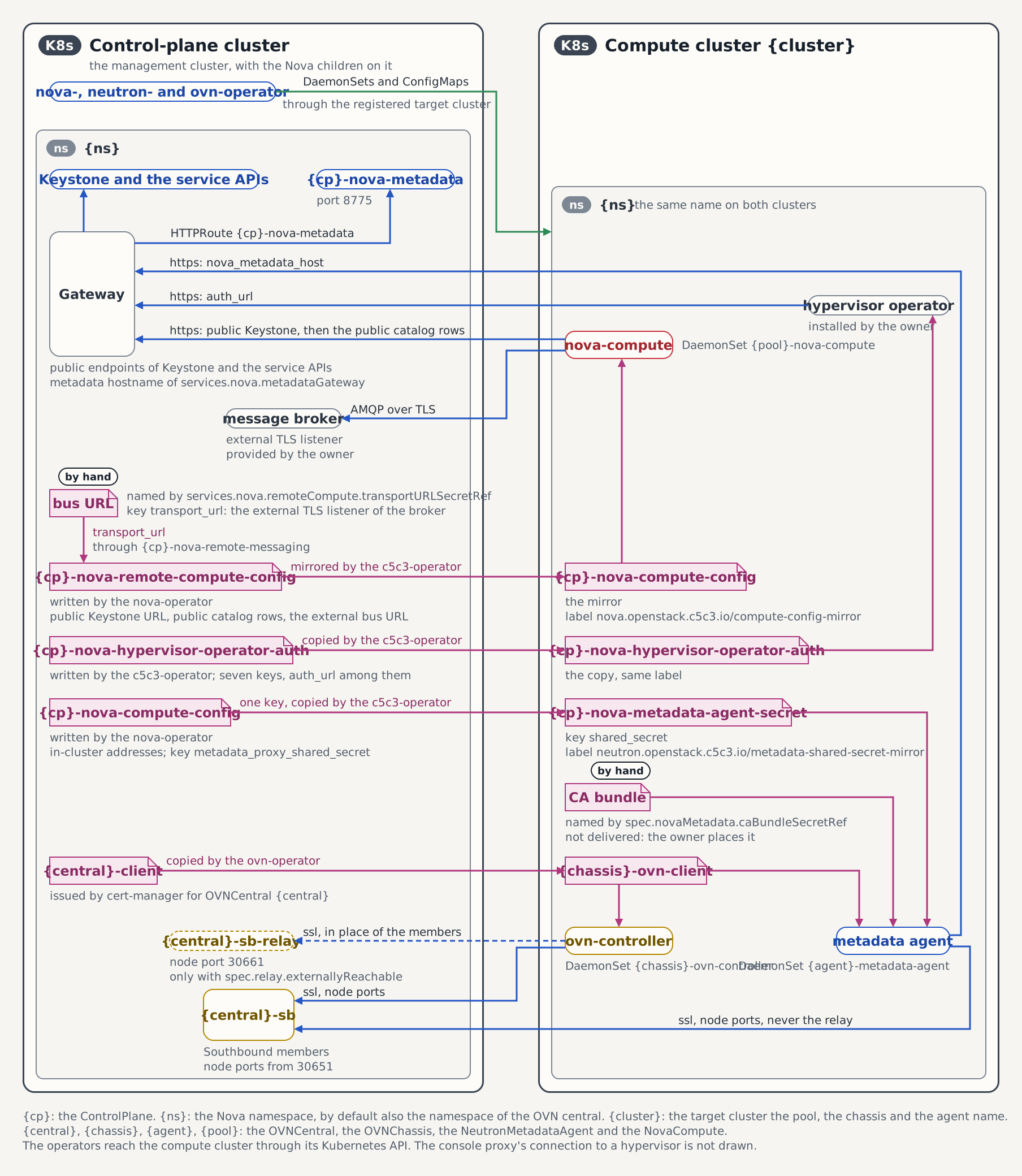
Three Secrets arrive on the compute cluster. The mirror of the compute contract arrives in the Nova namespace under the in-cluster name, controlplane-nova-compute-config, labelled nova.openstack.c5c3.io/compute-config-mirror: "true". hvo's auth Secret, controlplane-nova-hypervisor-operator-auth, arrives beside it. controlplane-nova-metadata-agent-secret arrives in the OVN central namespace, which on the devstack is openstack as well.
The figure shows the three Secrets with their writers, the two Secrets the owners provide, and the address every component on the compute cluster dials. {cp} is controlplane, {ns} is openstack, {central} is controlplane-ovn, {chassis} is controlplane-compute-chassis, {agent} is controlplane-compute-metadata and {pool} is controlplane-compute-a here.
On the management cluster the contract is controlplane-nova-compute-config in openstack, and the child names it in status.computeConfigSecretRef. It keeps that name for the lifetime of the Nova and is updated in place. The remote contract of step 1 carries the same keys:
| Key | Content |
|---|---|
nova-compute.conf | The nova.conf fragment a nova-compute reads |
transport_url | The rabbit:// URL of the message bus, with the broker user and password |
password | The password of the nova service user every client section authenticates as |
metadata_proxy_shared_secret | The value the Neutron metadata agent signs proxied instance requests with |
cell_name | cell1, the cell the compute is mapped into |
ca.crt | The broker's CA bundle, only while the bus uses TLS |
The fragment carries [DEFAULT], [keystone_authtoken], [service_user], [placement], [neutron], [glance], [oslo_messaging_rabbit], [oslo_messaging_notifications], [upgrade_levels] and [vnc], plus [cinder], [key_manager] and [barbican] while the ControlPlane declares block storage and the key manager. It carries no database, cache, scheduler, conductor or libvirt section, no [DEFAULT] host, no state_path and none of the ControlPlane's extraConfig: those belong to the compute deployment. The Compute contract reference lists every omission with its reason.
The mount path is part of the contract. [oslo_messaging_rabbit] ssl_ca_file points at /etc/nova/compute-config/ca.crt, so a compute that mounts the Secret anywhere else finds no CA bundle where its own configuration says one is.
Three of the keys are credentials
transport_url, password and metadata_proxy_shared_secret are credentials: the broker login, the nova service user's password, and the secret that authenticates every metadata request. Treat the Secret and every copy of it like the admin credential. Only nova-compute.conf, cell_name and ca.crt, a public CA bundle, carry nothing secret. Do not print the Secret's data to a terminal you share, and do not attach it to a ticket.
Steps
1. Hand the ControlPlane the external bus URL
The URL is rabbit://<user>:<password>@<external address>:<TLS port>/<vhost>, with the user, the password and the vhost of the Secret spec.infrastructure.messaging.secretRef names. Read it without echoing it, store it, and name the Secret in the ControlPlane:
printf 'external bus URL: '
IFS= read -r -s REMOTE_TRANSPORT_URL
printf '\n'
printf '%s' "$REMOTE_TRANSPORT_URL" | kubectl create secret generic \
  controlplane-nova-remote-transport -n openstack --from-file=transport_url=/dev/stdin
unset REMOTE_TRANSPORT_URL
kubectl patch controlplane controlplane -n openstack --type merge \
  -p '{"spec":{"services":{"nova":{"remoteCompute":{"transportURLSecretRef":{"name":"controlplane-nova-remote-transport"}}}}}}'
kubectl wait nova/controlplane-nova -n openstack --timeout=5m \
  --for=jsonpath='{.status.remoteComputeConfigSecretRef.name}'=controlplane-nova-remote-compute-config
The Nova child then publishes the remote contract, controlplane-nova-remote-compute-config: every auth_url names the public Keystone URL, every client section resolves the public catalog rows, and transport_url is the URL you handed over (see The remote contract). A missing Secret, or a missing key in it, holds NovaReady=False under WaitingForRemoteMessaging.
The URL carries the broker password
Deliver controlplane-nova-remote-transport from the deployment's secret store, for example through an ExternalSecret, and keep the URL off shared terminals. By hand, pipe it in as above: on kubectl's command line, any local user reads it from /proc/<pid>/cmdline while the command runs. Clearing remoteCompute later switches the mirror on every compute cluster back to the in-cluster contract, whose addresses those clusters cannot reach.
2. Provision the hypervisor operator's account
kubectl patch controlplane controlplane -n openstack --type merge \
  -p '{"spec":{"services":{"nova":{"hypervisorOperator":{}}}}}'
kubectl wait --for=create secret/controlplane-nova-hypervisor-operator-auth \
  -n openstack --timeout=10m
kubectl get secret controlplane-nova-hypervisor-operator-auth -n openstack -o json \
  | jq '.data | keys'
The ControlPlane projects the account (user hypervisor-operator, role admin) only once the Nova child is Ready, and writes the Secret once the account exists. jq lists its seven keys: auth_url, password, project_domain_name, project_name, region_name, user_domain_name and username. Step 7 maps each onto hvo's chart.
The Secret carries a cloud-admin password. Nova and Placement read the admin role cloud-wide, so anyone who can read the Secret, on this cluster or on a compute cluster it is copied to, can act as a cloud administrator (see ServiceNovaHypervisorOperatorSpec).
3. Publish the metadata API
An instance asks 169.254.169.254 for its metadata. The Neutron metadata agent on the compute cluster answers, signs the request with the shared secret, and forwards it to the Nova metadata API on the control plane. Publish that API on a hostname of its own with services.nova.metadataGateway. On the devstack the Gateway already carries the listener https-nova-metadata for it:
kubectl patch controlplane controlplane -n openstack --type merge \
  -p '{"spec":{"services":{"nova":{"metadataGateway":{"parentRef":{"name":"openstack-gw"},"hostname":"nova-metadata.127-0-0-1.nip.io"}}}}}'
kubectl wait nova/controlplane-nova -n openstack --timeout=5m \
  --for=jsonpath='{.status.conditions[?(@.type=="MetadataHTTPRouteReady")].reason}'=HTTPRouteAccepted
MetadataHTTPRouteReady reads True under HTTPRouteNotRequired while no metadata gateway is set, so the wait keys on the reason an accepted route sets.
4. Run the OVN chassis on the compute cluster
A chassis on another cluster reaches the OVN databases through node ports, which the central publishes once both databases are externally reachable. Patch the central the quick start applies:
kubectl patch ovncentral controlplane-ovn -n openstack --type merge \
  -p '{"spec":{"northbound":{"externallyReachable":true},"southbound":{"externallyReachable":true}}}'
externallyReachable is mutable; of a database's fields only replicas, storage and electionTimerMs are frozen. A central that runs a relay (spec.relay) also sets spec.relay.externallyReachable: true, or a chassis on another cluster dials the Southbound node ports directly, which puts its connection on the Raft members. The quick start's central runs no relay.
Label each hypervisor node on the compute cluster, then apply the chassis on the management cluster:
kubectl --context "$COMPUTE_CONTEXT" label node <node> openstack.c5c3.io/chassis=true
kubectl apply -f - <<EOF
apiVersion: ovn.openstack.c5c3.io/v1alpha1
kind: OVNChassis
metadata:
  name: controlplane-compute-chassis
  namespace: openstack
spec:
  centralRef:
    name: controlplane-ovn
  nodeSelector:
    openstack.c5c3.io/chassis: "true"
  targetClusterRef:
    name: ${COMPUTE_CLUSTER}
EOF
kubectl wait ovnchassis/controlplane-compute-chassis -n openstack \
  --for=condition=Ready --timeout=10m
While the central publishes no external address, the chassis reports CentralReady=False under CentralNotExternallyReachable, with a message that names both fields. The ovn-operator copies the central's client identity to controlplane-compute-chassis-ovn-client in openstack on the compute cluster, keeps the copy equal to the source across cert-manager renewals, and deletes it with the DaemonSets when the chassis is deleted. The chassis publishes that name in status.clientSecretName, and the metadata agent of step 5 mounts the same Secret:
kubectl --context "$COMPUTE_CONTEXT" get secret controlplane-compute-chassis-ovn-client \
  -n openstack -L app.kubernetes.io/component
kubectl get ovnchassis controlplane-compute-chassis -n openstack \
  -o jsonpath='{.status.clientSecretName}{"\n"}'
The first command shows ovn-client in the COMPONENT column, and the second prints the Secret's name.
5. Attach the metadata agent
The agent verifies the metadata listener's certificate, and the ControlPlane does not deliver the CA bundle for it. Create the bundle as the Secret nova-metadata-ca, key ca.crt, in openstack on the compute cluster. Elsewhere the bundle is the issuer of the metadata listener's certificate; on the devstack that certificate is self-signed, and its own Secret carries it:
kubectl get secret nova-metadata-nip-io-tls -n openstack \
  -o jsonpath='{.data.ca\.crt}' | base64 -d > nova-metadata-ca.crt
kubectl --context "$COMPUTE_CONTEXT" create secret generic nova-metadata-ca \
  -n openstack --from-file=ca.crt=nova-metadata-ca.crt
Then apply the agent on the management cluster. It names the chassis of step 4 and the copy of the shared secret the ControlPlane delivers:
kubectl apply -f - <<EOF
apiVersion: neutron.openstack.c5c3.io/v1alpha1
kind: NeutronMetadataAgent
metadata:
  name: controlplane-compute-metadata
  namespace: openstack
spec:
  openStackRelease: "2026.1"
  image:
    repository: ghcr.io/c5c3/neutron
    tag: "2026.1"
  chassisRef:
    name: controlplane-compute-chassis
  targetClusterRef:
    name: ${COMPUTE_CLUSTER}
  novaMetadata:
    host: nova-metadata.127-0-0-1.nip.io   # nova-metadata.<your domain> elsewhere
    port: 443
    protocol: https
    caBundleSecretRef:
      name: nova-metadata-ca
    sharedSecretRef:
      name: controlplane-nova-metadata-agent-secret
EOF
port: 443 assumes a Gateway on the standard port; on the devstack's KIND_HOST_PORT=8443 mapping it is 8443. Once the agent exists, the ControlPlane writes the copy onto the compute cluster:
kubectl --context "$COMPUTE_CONTEXT" get secret controlplane-nova-metadata-agent-secret \
  -n openstack -L neutron.openstack.c5c3.io/metadata-shared-secret-mirror
The label column shows true. The copy holds only shared_secret, so neither the bus URL nor the service password enters the agent's namespace.
6. Create the node pool
A compute cluster set up with an earlier version of this guide carries a controlplane-nova-compute-config copied by hand, without the mirror label, in the namespace that guide's COMPUTE_NAMESPACE named. In openstack the ControlPlane refuses to overwrite the copy and reports NovaReady=False under NovaComputeConfigError, naming the Secret. In any other namespace nothing reports it, and it keeps the credentials there. List every copy, then delete each one with an empty label column, naming its namespace. The label selector leaves the ControlPlane's mirror alone, and the mirror recreates the copy in openstack under the same name with the same keys:
kubectl --context "$COMPUTE_CONTEXT" get secret -A \
  --field-selector metadata.name=controlplane-nova-compute-config \
  -L nova.openstack.c5c3.io/compute-config-mirror
kubectl --context "$COMPUTE_CONTEXT" delete secret -n <namespace> \
  --field-selector metadata.name=controlplane-nova-compute-config \
  -l 'nova.openstack.c5c3.io/compute-config-mirror!=true'
Label the pool's nodes on the compute cluster, then apply the pool on the management cluster:
kubectl --context "$COMPUTE_CONTEXT" label node <node> openstack.c5c3.io/nova-compute-pool=a
kubectl apply -f - <<EOF
apiVersion: nova.openstack.c5c3.io/v1alpha1
kind: NovaCompute
metadata:
  name: controlplane-compute-a
  namespace: openstack
spec:
  novaRef:
    name: controlplane-nova
  nodeSelector:
    openstack.c5c3.io/nova-compute-pool: a
  targetClusterRef:
    name: ${COMPUTE_CLUSTER}
  libvirt:
    virtType: kvm
EOF
The pool carries no extraConfig: on a hypervisor the libvirt driver is Nova's default. Once the pool exists, the ControlPlane mirrors the contract onto the compute cluster and copies hvo's auth Secret beside it:
kubectl --context "$COMPUTE_CONTEXT" get secret controlplane-nova-compute-config \
  controlplane-nova-hypervisor-operator-auth -n openstack \
  -L nova.openstack.c5c3.io/compute-config-mirror
kubectl get controlplane controlplane -n openstack \
  -o jsonpath='{.status.conditions[?(@.type=="NovaReady")].reason}{"\n"}'
kubectl wait novacompute/controlplane-compute-a -n openstack \
  --for=condition=Ready --timeout=10m
openstack --insecure compute service list --service nova-compute
Both Secrets show true. The mirror carries the remote contract's data under the in-cluster name, so the pool reads it the way a pool beside the Nova reads the original. NovaReady reads NovaReady once every mirror target is served. The service list shows one up row per node, named after the Node. Until the hvo of step 7 onboards the nodes, AggregatesReady reads True under NodesOutsideZoneAggregate. A pool that stays at ConfigReady=False under WaitingForComputeConfig, or at AggregatesReady=False under NodesWithoutZone, is explained under Conditions.
7. Configure the hypervisor operator
hvo stays the compute cluster's own install. This step gives what the install needs from this side. A Flux HelmRelease of the chart openstack-hypervisor-operator from oci://ghcr.io/cobaltcore-dev/charts reads every key of the copied auth Secret into the chart value it feeds:
# A fragment of hvo's HelmRelease on the compute cluster, in openstack.
spec:
  valuesFrom:
    - kind: Secret
      name: controlplane-nova-hypervisor-operator-auth
      valuesKey: auth_url
      targetPath: controllerManager.manager.env.osAuthUrl
    - kind: Secret
      name: controlplane-nova-hypervisor-operator-auth
      valuesKey: username
      targetPath: controllerManager.manager.env.osUsername
    - kind: Secret
      name: controlplane-nova-hypervisor-operator-auth
      valuesKey: user_domain_name
      targetPath: controllerManager.manager.env.osUserDomainName
    - kind: Secret
      name: controlplane-nova-hypervisor-operator-auth
      valuesKey: project_name
      targetPath: controllerManager.manager.env.osProjectName
    - kind: Secret
      name: controlplane-nova-hypervisor-operator-auth
      valuesKey: project_domain_name
      targetPath: controllerManager.manager.env.osProjectDomainName
    - kind: Secret
      name: controlplane-nova-hypervisor-operator-auth
      valuesKey: region_name
      targetPath: controllerManager.manager.env.osRegionName
    - kind: Secret
      name: controlplane-nova-hypervisor-operator-auth
      valuesKey: password
      targetPath: secret.servicePassword
  values:
    controllerManager:
      manager:
        env:
          agentNamespaces: openstack
          # The namespace of the libvirt CA Issuer, as on the metal-stack lab.
          certificateNamespace: hypervisor-system
          certificateIssuerName: nova-hypervisor-agents-ca-issuer
valuesFrom reads only Secrets of the release's own namespace, so the release sits in openstack on the compute cluster, beside the copy. agentNamespaces is the comma-separated list of namespaces whose pods hvo waits for before it offboards a node, and it defaults to monsoon3. List the OVN central namespace too when it differs from openstack, so hvo also waits for the metadata agent. certificateNamespace and certificateIssuerName name the Issuer of the libvirt certificates of Live migration. That namespace is never one in the access chart's namespaces, because the CobaltCore operators read every Secret there, and these Secrets hold the node keys.
hvo reads two node labels. It creates a Hypervisor for every Node labelled nova.openstack.cloud.sap/virt-driver. cobaltcore.cloud.sap/node-hypervisor-lifecycle turns on its lifecycle for the node: without the label hvo neither onboards nor offboards the node, and the value skip-tests skips the smoke test. The annotation nova.openstack.cloud.sap/aggregates names the aggregates the host stays in once onboarding ends. hvo keeps the host in the aggregates the annotation lists plus the one of the zone label, and in no other. Without the annotation the host leaves both aggregates when onboarding ends, and the zone has no host in Nova. The value lists only aggregates beyond the zone's, and each of them must exist.
kubectl --context "$COMPUTE_CONTEXT" label node <node> \
  nova.openstack.cloud.sap/virt-driver=kvm \
  cobaltcore.cloud.sap/node-hypervisor-lifecycle=skip-tests
kubectl --context "$COMPUTE_CONTEXT" annotate node <node> nova.openstack.cloud.sap/aggregates=
Custom Placement traits, the ones a flavor asks for with trait:CUSTOM_GPU=required, go on the pool. The pool creates them in Placement and writes each node's list into the node's Hypervisor, and hvo applies it from Handover on (see The traits). Writing a Hypervisor on the compute cluster needs the access chart's opt-in hypervisorTraits, which also lets the registration kubeconfig evict and offboard every hypervisor there (see Target Clusters). Turn it on, then declare the traits, for the pool and for one GPU node:
helm upgrade --kube-context "$COMPUTE_CONTEXT" --reuse-values \
  target-cluster-access deploy/target-cluster/target-cluster-access -n c5c3-access \
  --set hypervisorTraits=true
kubectl patch novacompute controlplane-compute-a -n openstack --type=merge -p '{"spec":{
  "traits":["CUSTOM_POOL_A"],
  "hostTraits":[{"nodeName":"<node>","traits":["CUSTOM_GPU"]}]}}'
kubectl get novacompute controlplane-compute-a -n openstack \
  -o jsonpath='{.status.conditions[?(@.type=="TraitsReady")].reason}{"\n"}'
The reason reads WaitingForHypervisorOperator until hvo has applied every node's list, then TraitsApplied. A hostTraits entry with mode: Replace gives its node the entry's traits instead of the pool's. The pool's nodes carry no nova.openstack.cloud.sap/custom-traits annotation: hvo overwrites the list from it on every Node reconcile, and the pool leaves an annotated node alone and reports it under NodesWithCustomTraitsAnnotation. Remove the annotation from a node that carries one by hand:
kubectl --context "$COMPUTE_CONTEXT" annotate node <node> nova.openstack.cloud.sap/custom-traits-hvo authenticates a second time at start, scoped to a project test in the domain cc3test, and exits when that fails, skip-tests or not. The smoke test that skip-tests skips also boots flavor ID 1 from the image cirros-kvm onto a volume of type premium, on a network. deploy/kind/hypervisor-operator-fixtures/ declares all of them as K-ORC resources, and names the flavor, the network and its subnet hvo-smoke-test. K-ORC adopts an existing object of a managed name, and the overlay's teardown deletes what it adopted, so apply the overlay only to a cloud that has none of them yet. On such a cloud every one of these commands fails:
openstack --insecure domain show cc3test
openstack --insecure volume type show premium
openstack --insecure image show cirros-kvm
openstack --insecure flavor show 1
openstack --insecure flavor show hvo-smoke-test
openstack --insecure network show hvo-smoke-test
Then apply it on the management cluster once CinderReady is True:
kubectl apply -k deploy/kind/hypervisor-operator-fixturesOn a cloud that has one of them, declare only what hvo needs under skip-tests: the domain, the project and the role assignment of the overlay's fixtures.yaml, with the imports the assignment names. Declare as managed only what the cloud lacks. An existing cc3test domain, or a test project the first command below shows, goes in as managementPolicy: unmanaged with an import.filter, the way hvo-user-domain imports Default: name, and for the project also domainRef. When the second command lists a row, the user already holds admin on test; leave out the assignment and the imports it names. Deleting an import leaves its object in place.
openstack --insecure project show test --domain cc3test
openstack --insecure role assignment list --user hypervisor-operator \
  --user-domain Default --project test --project-domain cc3test --role admin
A K-ORC resource that needs an endpoint registered after K-ORC's first login fails once with No suitable endpoint could be found in the service catalog. K-ORC then logs in again and the retry succeeds, so no restart is needed (see ServiceNovaHypervisorOperatorSpec).
hvo reads its password once, at start. A CredentialRotation of the account rewrites the copied Secret, and the valuesFrom interval then upgrades the release, which restarts hvo with the new password.
An install outside SAP's environment meets three upstream defaults. With upstream's images, onboarding waits for HaEnabled, which only SAP's kvm-ha-service sets, and for TraitsUpdated, which hvo sets only when a custom trait differs. hvo dials only the public catalog endpoints. kvm-node-agent runs as uid 42438 and exits at start on a host without that account. Lab hypervisors records each item and the patched images this repository publishes for hvo and kvm-node-agent. deploy/lab/metal-stack/hypervisor/hvo-release.yaml is a worked release; it sets osAuthUrl by value, because hvo there runs beside Keystone and reaches it in-cluster.
Onboarding latency
A new compute registers itself when it starts, but the scheduler places nothing on it until it has a host mapping. A NovaCompute pool runs the discovery itself as soon as it sees the registered, unmapped host, so a pool's node is mapped within about a minute of the registration, and the pool reports Ready only after that. For a compute without a pool, the scheduler's discovery periodic writes the mapping within 300 seconds. A consumer that polls for it adds its own interval: openstack-hypervisor-operator polls every 60 seconds, so it sees such a node as mapped up to 360 seconds after the compute registered. Nova Cells describes the pool's discovery Job, the periodic and the command that maps a host at once. hvo onboards only the nodes that carry the lifecycle label. It puts each node into its zone's aggregate and tenant_filter_tests while it onboards it, both of which the pool creates, and afterwards keeps it in the aggregates the annotation names plus its zone's (see The aggregates).
A hypervisor that receives no builds
nova-compute counts the builds that end FAILED or RESCHEDULED on a node in failed_builds, a key of the stats column of that node's compute_nodes row, and resets it to 0 on the next build that succeeds there. A server deleted while it is still scheduling counts: the build finds no instance and ends FAILED with the debug line Instance disappeared before build., leaving no fault and no action event. A claim that fails on the host counts too, and a build that reaches another host after a reschedule still counts on the host that failed. The counter is in the database and nowhere in the API. The hypervisor views carry no stats field, so openstack hypervisor show cannot show it.
With the operator's [filter_scheduler] defaults the counter changes no placement. Reading it matters for a deployment that restored Nova's weigher through extraConfig, where one failed build takes the host out of every placement until a build succeeds on it. It is also a diagnostic: a counter that keeps growing names a host whose builds fail for a reason of its own.
Read the counter
On the devstack's managed MariaDB, read the cell database as root. The password comes from the Secret the openstack-db MariaDB names and reaches mariadb over stdin, never as an argument:
root_secret="$(kubectl get mariadb openstack-db -n openstack -o 'jsonpath={.spec.rootPasswordSecretKeyRef.name}')"
root_key="$(kubectl get mariadb openstack-db -n openstack -o 'jsonpath={.spec.rootPasswordSecretKeyRef.key}')"
kubectl get secret "${root_secret}" -n openstack -o "jsonpath={.data.${root_key:-password}}" | base64 -d \
  | kubectl exec -i -n openstack openstack-db-0 -c mariadb -- \
      sh -c 'export MYSQL_PWD; MYSQL_PWD="$(cat)"; exec mariadb -uroot -N nova -e "SELECT host, stats FROM compute_nodes WHERE deleted = 0"'
The query prints one row per hypervisor. host is the node name, which is [DEFAULT] host of the pool's nova-compute on that node. stats is JSON with string values, and "failed_builds": "N" is among them. nova-compute keeps the counter in memory and writes it to the row on its next update_available_resource periodic, which runs every 60 seconds, so a fresh failure shows within a minute. An empty result means no compute has registered yet.
A MariaDB CR that names no rootPasswordSecretKeyRef prints an empty root_secret, and a brownfield database has no MariaDB CR at all. Both run the same SELECT with the cell credentials: the password is the password key of the Secret the Nova's spec.database.secretRef names, and the user is the Nova's name in static managed mode and that Secret's username key otherwise. The schema is the Nova's spec.database.database, nova on the devstack.
Take a failing host out of scheduling
With the operator's defaults nothing steers builds away from a host whose builds keep failing. As the emptiest host it keeps winning the ram, cpu and disk weighers, so unpinned builds keep landing on it until its compute service is disabled. Disable the service while the cause is open, with <node> the host the query printed. The openstack commands below run with the admin OS_* variables of the metal-stack quick start's Part 1, Step 7, OS_CACERT among them, so the CLI verifies the Gateway:
openstack compute service set --disable --disable-reason "builds fail" <node> nova-computeThe pool never enables a service, and hvo writes the service's status only while it onboards the node and when the Hypervisor's spec.maintenance changes. Once the cause is fixed, enable the service again:
openstack compute service set --enable <node> nova-computeA pinned build cannot reach a disabled service. The disable sets the COMPUTE_STATUS_DISABLED trait on the node's resource provider, and Nova's scheduler forbids that trait in every Placement query, the zone:host form included. Such a server ends ERROR with No valid host was found, and the counter does not move. The pinned build below is the reset for a host whose cause is fixed: enable the service as above, then pin the build, which also proves the fix. While the cause is open, keep the service disabled and restart the node's nova-compute pod instead, which resets the counter with the service disabled. Enabling the service only for a pinned build opens the host to every unpinned build until it is disabled again, and as the emptiest host it wins them.
Reset the counter
The commands below take two values. host is the node name, which is the Nova host. zone is the node's topology.kubernetes.io/zone label, the availability zone of the aggregate the pool created for it (see The aggregates):
host=<node>
zone="$(kubectl --context "$COMPUTE_CONTEXT" get node "${host}" \
  -o jsonpath='{.metadata.labels.topology\.kubernetes\.io/zone}')"
The first way is one build that succeeds on the host. An admin pins a server to the host through the zone:host form of the availability zone, as Part 2, Step 5 of the metal-stack quick start does, with the flavor 1, the image cirros-kvm and the network lab-net that quick start creates:
openstack server create unblock --image cirros-kvm --flavor 1 \
  --network lab-net --availability-zone "${zone}:${host}" --wait
A pinned server that reaches ACTIVE resets the counter, and after the next periodic the row reads "failed_builds": "0". A pinned server that ends ERROR raises the counter by one more. A forced host gets no reschedule, so the error stays on that host, and the server's fault names what the host cannot do:
openstack server show unblock -c fault -f valueDelete the server either way:
openstack server delete unblock --waitThe second way is a restart of the node's nova-compute pod. The pool's DaemonSet, controlplane-compute-a-nova-compute, recreates it, and the new process starts with a counter of 0 and writes it on its first periodic. The running servers stay untouched, because libvirt and QEMU run outside the pod, and the node keeps its identity through /var/lib/nova:
kubectl --context "$COMPUTE_CONTEXT" delete pod -n openstack \
  -l app.kubernetes.io/name=novacompute,app.kubernetes.io/instance=controlplane-compute-a,app.kubernetes.io/component=nova-compute \
  --field-selector "spec.nodeName=${host}"
Rotation
The ControlPlane rewrites the mirror and the auth copy in place whenever a value changes: a rotated service-user password, a rotated broker credential, a new metadata shared secret, or a ControlPlane change that alters the fragment, such as publishing the console proxy. The pool hashes the contract's data into its pod template, so every such change rolls it. A RollingUpdate pool restarts its pods on its own, and an OnDelete pool waits for its pods to be deleted.
Removing a node or a compute cluster
Drain a Compute Node takes a node out of its pool, in the order hvo's maintenance needs.
To detach a whole compute cluster, first empty every hypervisor as in steps 1 and 2 of that order. A pool being deleted drains every node it holds and keeps its deletion until Nova counts no server on each host, and it never migrates one. Then delete the pools; kubectl delete returns once a pool is gone:
kubectl delete novacompute controlplane-compute-a -n openstack --timeout=30mOnly then delete the metadata agent, and drain the chassis as Drain a Chassis Node describes before deleting it. Deleting the last pool of the Nova on a cluster deletes the mirror and the auth copy there, each with a ComputeConfigMirrorReaped event, and the teardown of the last agent that names the metadata copy deletes that one.
What this repository tests
No suite crosses a cluster boundary with Nova, exposes a broker, or runs hvo, so steps 1 and 2 and steps 5 to 7 are the contract as written. hvo and kvm-node-agent run only on the metal-stack lab, by hand, in Part 2 of the Quick Start (metal-stack). Tested by lists the suites that cover the pieces this guide puts together.
Standalone Nova, without a ControlPlane
A standalone Nova sets spec.remoteCompute itself: keystoneEndpoint, which has to use https, and transportURLSecretRef (see NovaRemoteComputeSpec). It then publishes {nova}-remote-compute-config. Nothing mirrors that Secret, so copy its data to the compute cluster under the name {nova}-compute-config, in the pool's namespace, which is the name a pool reads. With NOVA set to the standalone Nova's name:
kubectl get secret "${NOVA}-remote-compute-config" -n openstack -o json \
  | jq --arg name "${NOVA}-compute-config" '{apiVersion, kind, type, data, metadata: {name: $name}}' \
  | kubectl --context "$COMPUTE_CONTEXT" apply --server-side -n openstack -f -
kubectl --context "$COMPUTE_CONTEXT" annotate secret "${NOVA}-compute-config" \
  -n openstack kubectl.kubernetes.io/last-applied-configuration-
Both commands keep the credentials out of the copy's metadata. A client-side kubectl apply stores the whole object, data included, in the kubectl.kubernetes.io/last-applied-configuration annotation, where tools that redact data but show annotations would print it. --server-side does not create that annotation, but once a client-side apply or a GitOps tool has left it on the copy, the API server rewrites it with every kubectl apply --server-side, the new credentials included. The annotate command removes it; on a copy that never carried it, the command changes nothing.
A copy made by hand carries no mirror label, so no pool teardown deletes it. It is a snapshot: repeat the copy after every change of the source, and the pool then rolls its pods onto it.
A standalone Nova has no hypervisorOperator block and no copy of the metadata shared secret. Provision an admin account for hvo yourself, and copy the shared secret into the agent's namespace on the compute cluster.
Tested by
The counter read of A hypervisor that receives no builds ran on the devstack against its fake compute, cobaltcore-control-plane, and printed "failed_builds": "0". No run has taken a hypervisor out of scheduling and reset it by hand yet, and no suite does. The suites below cover the pieces this guide puts together:
- hvo's account, its auth Secret and the fixture overlay (
full-controlplane-keystone); - the content of the remote contract (
remote-compute-contract); - a pool that consumes the contract on the management cluster (
compute-node-pool), whose step 5 declares a pool trait and a node trait against a stand-in Hypervisor CRD and checks them in Placement; - the agent's https configuration and its CA mount (
metadata-agent, steps 6 to 8); - a chassis and an agent on one cluster attached to a central on another (
placed-services); - a pool that boots a server through libvirt on the management cluster (
server-boot).
chainsaw test --test-dir tests/e2e/c5c3/full-controlplane-keystone
chainsaw test --test-dir tests/e2e/nova/remote-compute-contract
chainsaw test --test-dir tests/e2e/nova/compute-node-pool
chainsaw test --test-dir tests/e2e/neutron/metadata-agent
chainsaw test --test-dir tests/e2e-multicluster/placed-services
chainsaw test --test-dir tests/e2e-nova-libvirt/server-boot